Як оплатити підписку Ahrefs криптовалютою
Ahrefs залишається одним із найзатребуваніших SEO-інструментів і коштує від 29 до 1499 доларів на місяць залежно від тарифу. За таких сум питання оплати стає не формальністю, а робочим завданням. Криптовалютою сервіс не розраховується, міжнародну картку може отримати не кожен, а підписка списується регулярно і не прощає збоїв. Розберемо, як закрити це завдання і не втратити доступ до акаунту в середині робочого місяця.
Для чого потрібна підписка Ahrefs
Ahrefs вирішує шість завдань SEO-фахівця, і кожне з них окремо коштувало б окремого інструмента.
Аналіз сайтів. Site Explorer розкладає будь-який домен по поличках — трафік, топові сторінки, динаміка видимості. За хвилину ви отримуєте картину, яку вручну збирали б тиждень.
Дослідження ключових слів. Keywords Explorer показує частотність, складність просування і потенційний трафік за запитом. Це база для планування контенту, без якої ви пишете наосліп.
Перевірка посилального профілю. У цьому напрямку в Ahrefs історично найкраща база на ринку. Ви бачите, хто посилається на вас і на конкурентів, які посилання з'явилися і які відпали.
Моніторинг позицій. Rank Tracker стежить за динамікою запитів і надсилає звіти за розкладом. Корисно, коли потрібно показати клієнту результат у цифрах, а не на словах.
Технічний аудит. Site Audit обходить сайт і знаходить биті посилання, дублі, проблеми зі швидкістю і структурою. Простіше полагодити те, що вже заважає зростанню, ніж гадати про причини просідання.
Аналіз конкурентів. Тут сходяться всі попередні пункти — ви дивитеся, за рахунок чого зростають інші сайти в ніші, і запозичуєте робочі рішення.
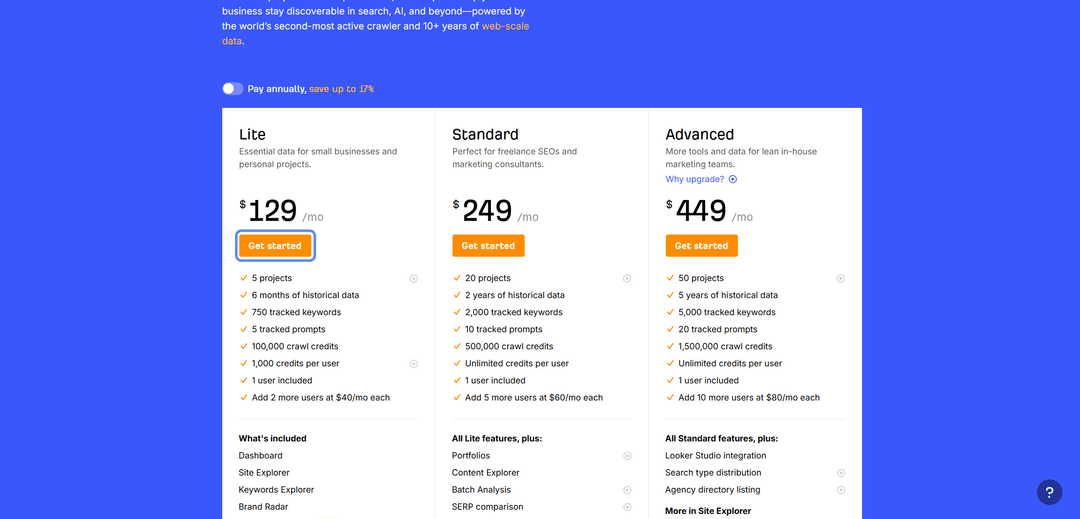
Тарифів шість, і стартувати можна з нуля. Ahrefs Free відкриває дані по власному сайту після підтвердження прав на домен — цього вистачить, щоб полагодити технічну частину і подивитися свої посилання, але конкурентів через нього не вивчити. Starter коштує 29 доларів на місяць і дає базовий аналіз запитів і чужих сайтів. Далі йдуть три основні плани: Lite за 129 доларів підійде невеликому бізнесу і особистим проектам, Standard за 249 доларів розрахований на фрилансерів і консультантів, Advanced за 449 доларів — на внутрішні маркетингові команди. Річна оплата на цих трьох тарифах економить до 17 відсотків.
Рахуйте не лише ціну плану, а й кількість користувачів. У кожен тариф включена одна людина, а кожна наступна коштує окремо — 40 доларів на місяць на Lite, 60 на Standard і 80 на Advanced. Для команди з трьох фахівців рахунок зростає майже в півтора раза відносно цінника на сайті.
Корпоративний тариф самостійно не оформити. Enterprise коштує 1499 доларів на місяць і вимагає річного зобов'язання, а замість кнопки оплати там кнопка зв'язку з відділом продажів. Ви описуєте завдання і обсяг роботи, після чого умови обговорюються індивідуально, тому закладайте на це час. Натомість даєте безлімітний доступ до API, єдиний вхід для співробітників, керування правами і журнал дій.
Безкоштовного пробного періоду в платних тарифів немає. Перевірити сервіс до покупки можна тільки через Ahrefs Free на своєму сайті або взявши Starter на місяць.
Чому виникають проблеми з оплатою
Криптовалютою Ahrefs оплатити не можна — це перше, об що спотикається власник цифрових активів. Сервіс приймає банківські картки, прив'язати гаманець з USDT чи біткоіном до акаунту неможливо. Залишається або продавати монети на біржі й виводити гроші у фіат, втрачаючи на курсі та комісіях, або шукати інструмент, який заправляється криптою, а Ahrefs бачить його як звичайну картку.
Друга складність лежить у міжнародних платежах. Оплата проходить через закордонний еквайринг, який перевіряє країну банку і звіряє її з країною в платіжній формі. Розбіжність або непідтримуваний регіон призводять до відмови ще до підтвердження, причому причину система не пояснює — ви просто бачите повідомлення про помилку.
Третій момент стосується суми списання. До ціни тарифу додається ПДВ, а його ставка залежить від країни в платіжній адресі, тому з картки йде більше, ніж написано на сторінці тарифів. Наприклад, при ірландській адресі ставка становить 23 відсотки, і підписка за 27 євро перетворюється на списання в 33,21 євро. Ціна до того ж відображається у валюті вашого регіону, а не завжди в доларах, тож підсумковий рядок потрібно дивитися прямо у формі оплати. Якщо на картці лежить рівно вартість тарифу, платіж відхилиться.
Четверта складність випливає з регулярності. Підписка продовжується автоматично, і картка має підтримувати повторювані списання з перевіркою 3-D Secure. Одноразові й передплачені картки часто проходять перший платіж і зриваються на автопродовженні, а разом із підпискою ви втрачаєте доступ до проектів і накопиченої статистики.
Які способи оплати можна використовувати
Робочих варіантів три, і вибір залежить від того, звідки ви платите і якими грошима володієте.
Міжнародна банківська картка. Прямий шлях і для оформлення нової підписки, і для продовження чинної. Visa чи Mastercard іноземного банку проходить еквайринг без питань і списує оплату щоперіоду сама. Складність в отриманні — банк зазвичай вимагає особистого візиту, пакета документів і підтвердження адреси проживання. Власнику криптовалюти така картка до того ж не відповідає на головне питання, бо монети все одно доведеться спочатку продавати.
Корпоративна картка компанії. Підходить, коли підписку оформлюють на організацію. Оплата проходить з розрахункового рахунку, витрати одразу потрапляють у бухгалтерію, а в чекауті є позначка про покупку від імені компанії — вона дозволяє вказати податковий номер і скоригувати нарахування податку. Обмеження просте: інструмент доступний лише юридичним особам з корпоративним рахунком у відповідному банку, а фрилансеру чи приватному фахівцю він не підійде.
Віртуальна картка. Дозволяє оплачувати закордонні SaaS-сервіси без випуску фізичного пластику. У такої картки є номер, строк дії і код CVC, і для Ahrefs вона нічим не відрізняється від звичайної. Ключовий момент у тому, що частина сервісів віртуальних карток поповнюється криптовалютою, і тоді обидві головні перешкоди зникають одразу. Оформлення займає хвилини і не вимагає візиту у відділення.
Як оплатити Ahrefs за допомогою Mirocard
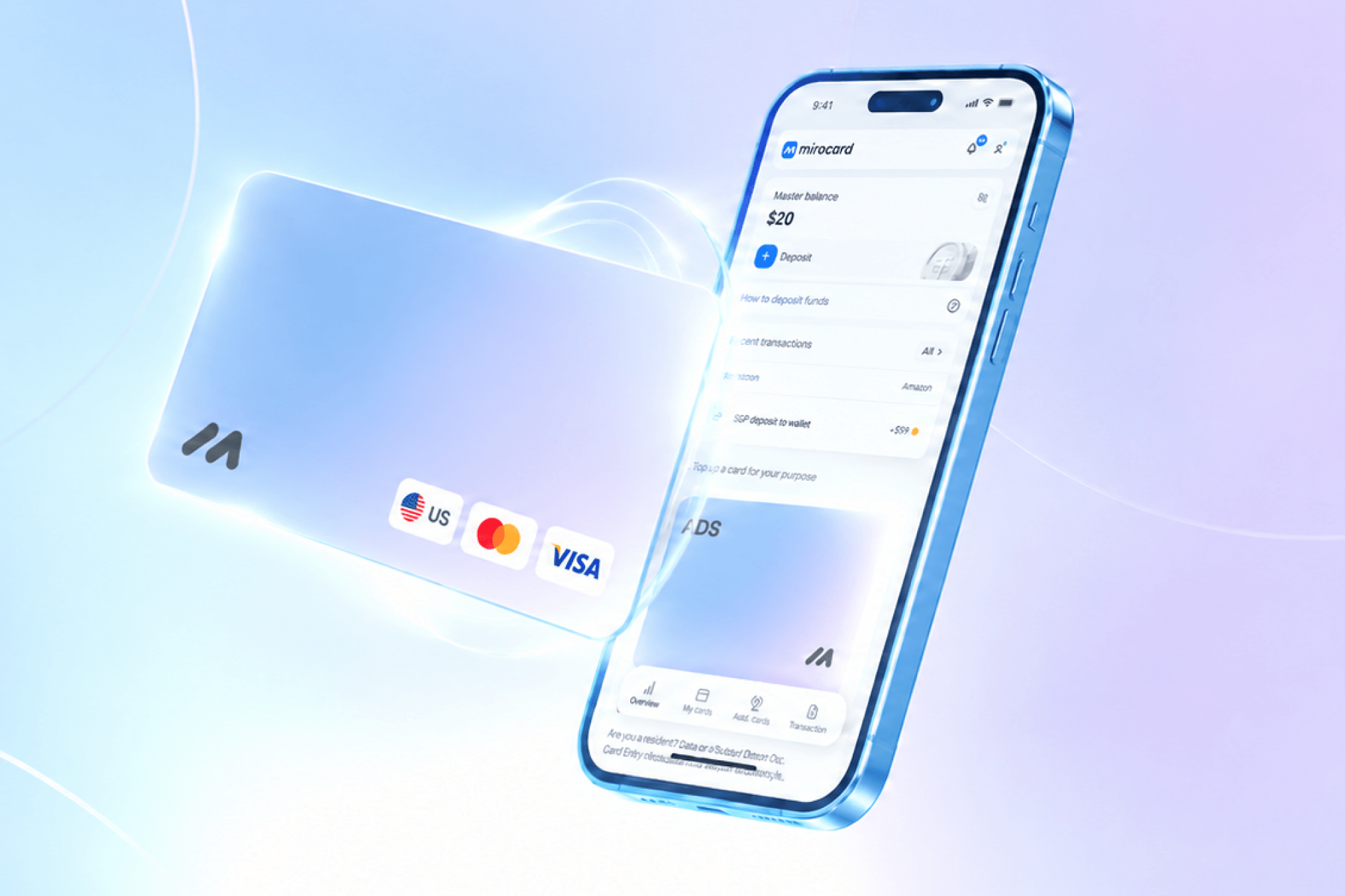
Mirocard випускає віртуальні картки Visa і Mastercard, які поповнюються криптовалютою. Для Ahrefs це означає пряму оплату з гаманця без біржі й виведення в готівку, а для тих, кому недоступні іноземні банки, — робочий спосіб розрахуватися за кордоном.
Під SEO-сервіси підходить картка для оплати цифрових сервісів і підписок. Її розрахували на повторювані списання, тому продовження тарифу не зірветься в середині місяця. Випуск коштує 10 доларів, комісія за поповнення становить 4 відсотки. Поповнюється картка основними монетами, серед них BTC, ETH, USDT і USDC.
Як випустити картку
Оформлення йде через браузер і вкладається в кілька хвилин.
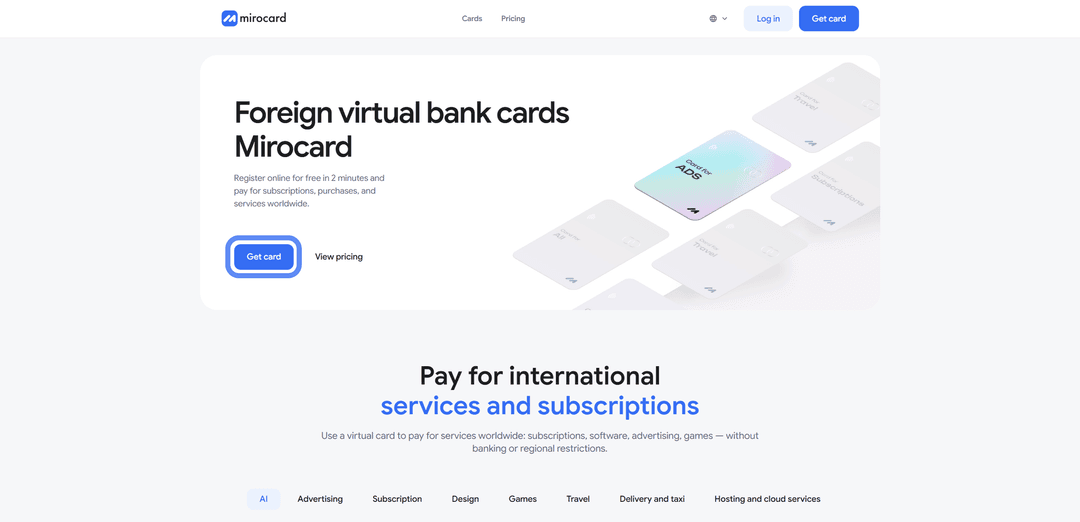
Крок 1. Заведіть акаунт. Відкрийте mirocard.com і натисніть «Get Card». Новому користувачу знадобиться вказати електронну пошту і пароль, а потім перейти за посиланням з листа, щоб підтвердити адресу. Тим, у кого є обліковий запис Heleket, реєструватися заново не потрібно — вхід через нього підтягне в Mirocard і випущені картки, і залишок на рахунку.

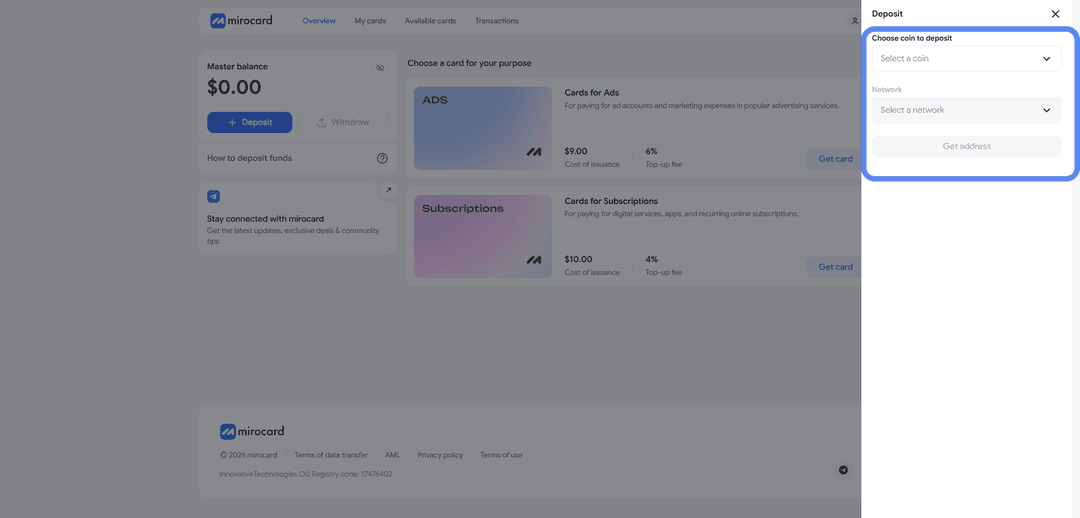
Крок 2. Поповніть майстер-баланс. Майстер-баланс працює як спільний рахунок кабінету, з якого оплачується і випуск картки, і її подальше поповнення. Натисніть «Top Up», вкажіть монету і мережу, після чого сервіс видасть адресу для переказу. Відправте на неї крипту з гаманця або біржі. За комісією мережі вигідніше за все USDT у TRC-20. Гроші стануть на баланс, щойно транзакція підтвердиться.

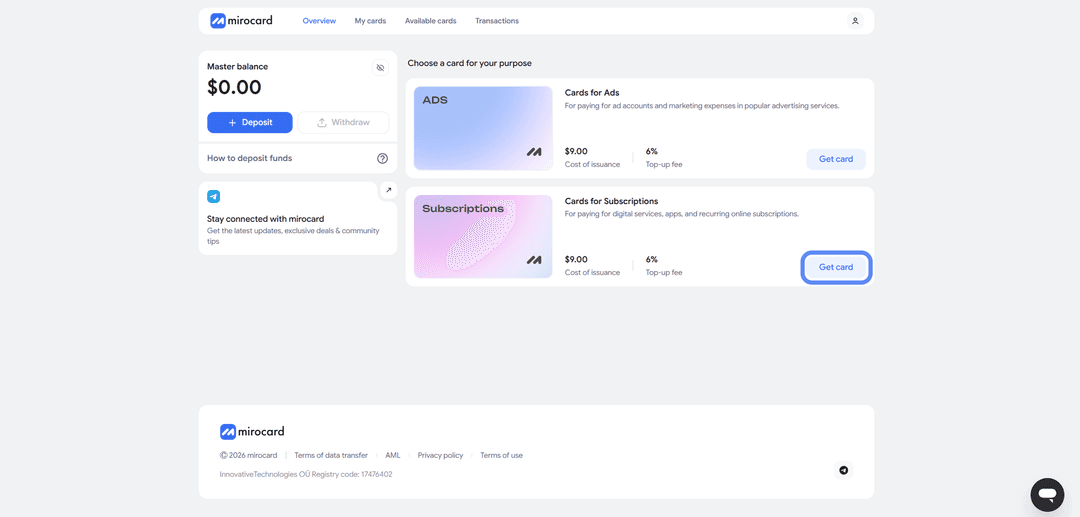
Крок 3. Оберіть картку. У каталозі відкрийте картку для підписок і цифрових сервісів і запустіть випуск. На сторінці оформлення видно розрахунок — вартість випуску і стартовий баланс, який ви кладете на картку одразу. Тут же варто зазирнути в розділ з умовами і списком обмежень по сервісах, щоб заздалегідь знати правила.
Крок 4. Підтвердьте особу. Для цієї картки потрібна верифікація — коротка перевірка із завантаженням документів. Вона захищає ваш рахунок і відкриває повні ліміти на поповнення і витрати, а займає зазвичай пару хвилин.

Крок 5. Оплатіть випуск. Підтвердьте оформлення кнопкою оплати. Десять доларів за випуск спишуться з майстер-балансу, а решта суми перейде на картку і стане доступна для розрахунків.
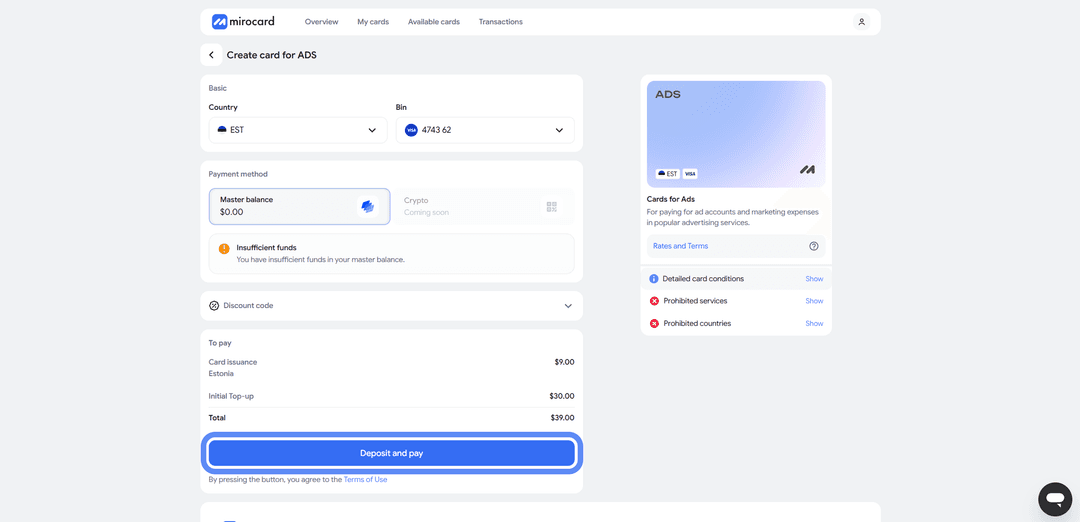
Крок 6. Заберіть реквізити. Готова картка з'явиться в кабінеті з номером, строком дії і кодом CVC. Окремо активувати її не потрібно, платежі вона приймає одразу. Звідси ж копіюйте дані під час оплати Ahrefs.
Як пройти оплату
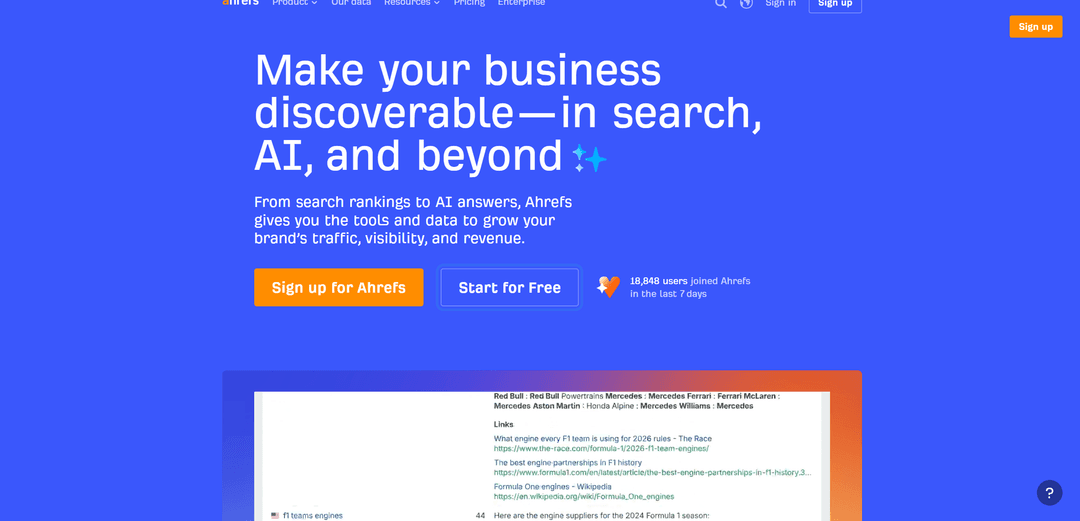
Крок 1. Відкрийте сайт і почніть оформлення. Перейдіть на Ahrefs і натисніть кнопку «Start for free» і увійдіть в акаунт.
Крок 2. Перейдіть до підписки. На наступному екрані ви побачите плани підписки. Тут показані склад тарифу, ціна за місяць і що входить у вартість — звірте, той ви план обрали, щоб не змінювати його після оплати.
Крок 3. Оберіть оплату карткою. На екрані оплати серед способів позначте варіант з карткою. Крім неї там зазвичай доступні платіжні гаманці, але нам потрібен саме пункт із введенням реквізитів.
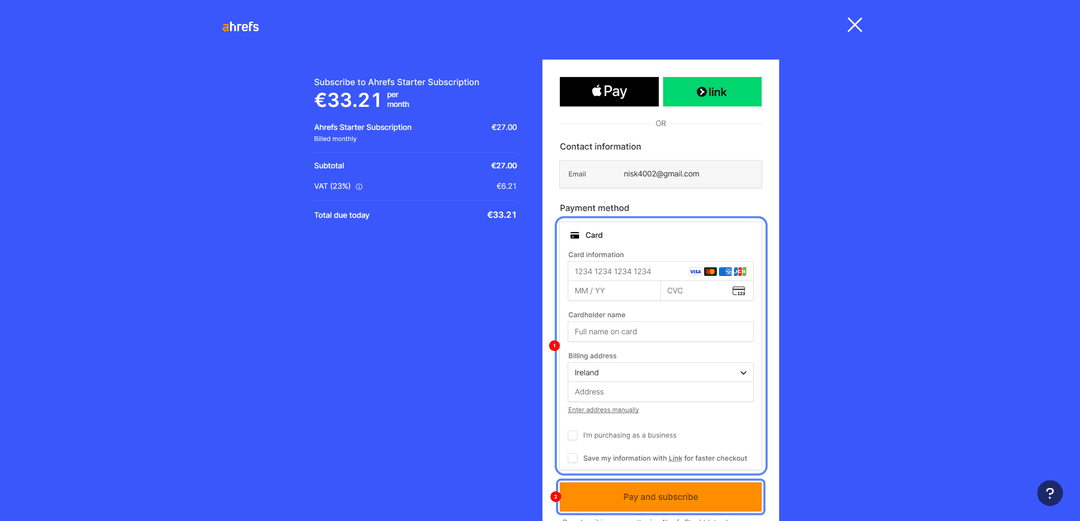
Крок 4. Заповніть дані. Введіть номер картки Mirocard, строк дії у форматі ММ/РР і код CVC з особистого кабінету. Окремо вкажіть ім'я власника і адресу електронної пошти для чеків. У полі країни оберіть ту, до якої прив'язана картка, — ці дані видно в кабінеті Mirocard. Збіг країни і картки помітно підвищує шанси пройти перевірку.
Крок 5. Перевірте підсумкову суму. Перед підтвердженням перевірте, чи вистачає у вас грошей на балансі картки для оплати підписки.
Крок 6. Підтвердьте оплату. Натисніть кнопку «Pay and subscribe» внизу форми. Доступ відкриється одразу, а картка залишиться прив'язаною для наступних списань. Якщо платіж не пройшов, скопіюйте реквізити заново, перевірте баланс з урахуванням податку і комісії та переконайтеся, що країна у формі збігається з карткою.
Чому віртуальна картка зручна для SEO-сервісів
Віртуальна картка закриває чотири завдання, які виникають у будь-кого, хто постійно працює з платними інструментами.
Оплата щомісячних підписок. Картка підтримує регулярні списання, тому тариф продовжується сам, без ручного підтвердження щомісяця. Для інструмента, де втрата доступу означає зупинку роботи над клієнтськими проектами, це принципово.
Розділення робочих і особистих витрат. Заведіть окрему картку під професійні сервіси, і всі витрати на інструменти опиняться в одному місці. Зібрати звіт по витратах чи порахувати собівартість проекту стане простіше, а особисті покупки не заважатимуться у виписці.
Один інструмент для кількох сервісів. SEO-фахівець рідко обмежується одним підписковим сервісом — поруч зазвичай ідуть інструменти аналітики, парсери і ШІ-сервіси. Одна картка обслуговує їх усі, замість того щоб шукати спосіб оплати під кожен окремо.
Швидке керування регулярними списаннями. У кабінеті видно баланс, історію операцій і статус картки, а за потреби картку можна заморозити. Ви вирішуєте, скільки грошей лежить на картці, і несподіване списання понад цю суму просто не пройде.
Висновок
Оплатити Ahrefs можна трьома способами, і в кожного своя ціна питання. Міжнародна картка працює напряму, але отримати її для деяких занадто складно, а криптовалюту вона не приймає. Корпоративна картка зручна компаніям, зате недоступна приватним фахівцям. Віртуальна картка з криптопоповненням вирішує одразу обидва головні болі — знімає заборону на оплату монетами і відкриває дорогу тим, кому не видають рахунок в іноземному банку.
Mirocard у цій схемі поводиться як звична Visa чи Mastercard, а різниця лише в способі поповнення. Налаштували один раз, і підписка на Ahrefs оплачується прямо з криптогаманця, без обмінників і зайвих конвертацій. Тією ж карткою закриваються інші робочі сервіси, тому замість кількох схем оплати у вас залишається одна.