How to Pay for Booking.com with Cryptocurrency
Booking.com is a service that brings together hotels, apartments, and other places to stay all over the world. In the screenshot example, a search for Amsterdam alone turns up 200 properties, and each one can be compared by price, rating, distance to the center, and guest reviews.
The main convenience is that the whole selection sits in one place, and the price on the listing includes taxes and fees. You can filter options by budget, star rating, breakfast, and a private bathroom, then go straight to booking.
But picking a hotel isn't enough — the reservation still has to be paid for, or at least guaranteed with a card. Below, we'll look at which conditions to check in advance, why your payment methods don't go through, and how to make a booking through Mirocard step by step.
What to check in a specific hotel's conditions
The rules are set not by the service itself but by the chosen property and rate, so you need to read them before paying. Open the hotel's page and look at the tabs at the top. "Info & prices" shows the rates, "House rules" describes the stay rules, and "Important and legal info" contains important booking details.
In the rate's conditions, look for three things. First, when the money is charged — right at booking, before arrival, or on site. Second, whether you can cancel the booking for free and up to what date. Third, whether there's a deposit or additional fees.
How you prepare the card depends on that. If payment is immediate, the money leaves at the moment of booking. If you pay on site, the card serves as a guarantee, and the balance needs to stay in place until check-in.
Treat the price in the list as a guide. In the screenshot, a Standard Room for 8 nights for two adults costs $1,470, and the "Includes taxes and fees" label says taxes are already counted. Anything else, like a deposit, is in the rate's conditions.
Separately, compare rates with and without free cancellation. A non-refundable option is usually cheaper, but you can't cancel that kind of booking for a refund, so take it only when the dates definitely won't change. Free cancellation costs a bit more but leaves room in case your plans change.
Can you pay for Booking.com directly with cryptocurrency
Not directly. The booking form has no button for paying in coins and no wallet address — the service accepts cards. There's a link to the crypto world only in the form of discounts for holders of one crypto service's card, but that isn't accepting coins or paying from a wallet.
So the setup always has two parts. First, you turn coins into money on a card, and then you pay with that card on Booking.com. What's left is choosing how to handle the first part so it doesn't eat into your trip budget.
The longest route goes through an exchange. You sell coins, withdraw the money to a bank card, wait for it to arrive, and pay. Every step costs fees and time, and the exchange rate has time to change while the money is on its way.
The short route goes through a virtual card that's topped up straight from a wallet. Coins turn into card balance inside the service, so neither an exchange nor a bank is needed in the chain.
Mirocard for paying for Booking.com with cryptocurrency
Mirocard issues virtual Visa and Mastercard cards that are topped up with cryptocurrency. BTC, ETH, USDT, USDC, TON, TRX, and SOL all work. Conversion into dollars happens inside the service, and an amount for the booking shows up on the card's balance right away.
A practical plus for a traveler is that the card is kept separate from the rest of your money. It holds only the amount needed for a specific booking, and if the details ever end up in the wrong hands, it's that card that suffers. Your wallet with savings stays untouched.
If you pay with a stablecoin like USDT or USDC, the amount on the card doesn't depend on exchange-rate swings. That's handy when you book several months before the trip and the price in dollars is already known.
Paying for Booking.com with Mirocard
First, issue a card. For a booking, a card built for travel fits, which costs $15 and supports Apple Pay and Google Pay. We cover sign-up, issuance, and the first top-up in detail in a separate guide, so here we'll go straight to booking.
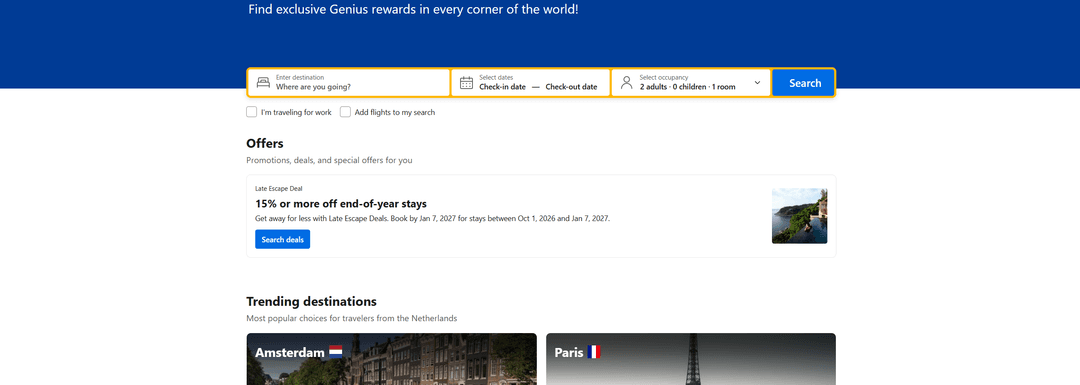
Open Booking.com and sign in. On the main page, pick the "Stays" tab and fill in the search form. In the "Where are you going?" field, enter a city or a hotel name. Then enter the check-in and check-out dates in the "Check-in date" and "Check-out date" fields and the guest count, which defaults to "2 adults · 0 children · 1 room." If you're traveling for work, check "I'm traveling for work." Leave the "Add flights to my search" box unchecked when you're buying tickets separately, otherwise the results will show extra options. Click "Search."
At the top of the results, the number of properties found is shown, and to the right of it, a "List" / "Grid" toggle. The filters are on the left, and it's worth starting with the per-night budget. After that, "4 stars," "Breakfast included," "Private bathroom," and the property type come in handy. Properties marked "Ad" are paid for with advertising, so don't look only at them.
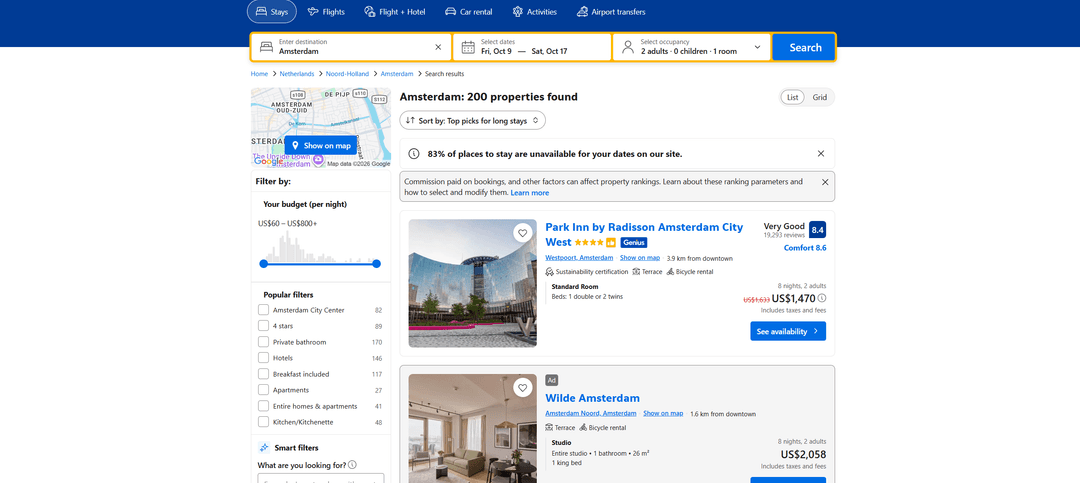
The listing shows the rating, the number of reviews, the distance to the center, the room type, and the price for all nights. Click "See availability" to open the hotel's page. Look through the photos, amenities, and the tabs with conditions, then click "Reserve." Before that, check the dates, number of nights, and the total with taxes, because once you move on to payment, you'll have to change them all over again.
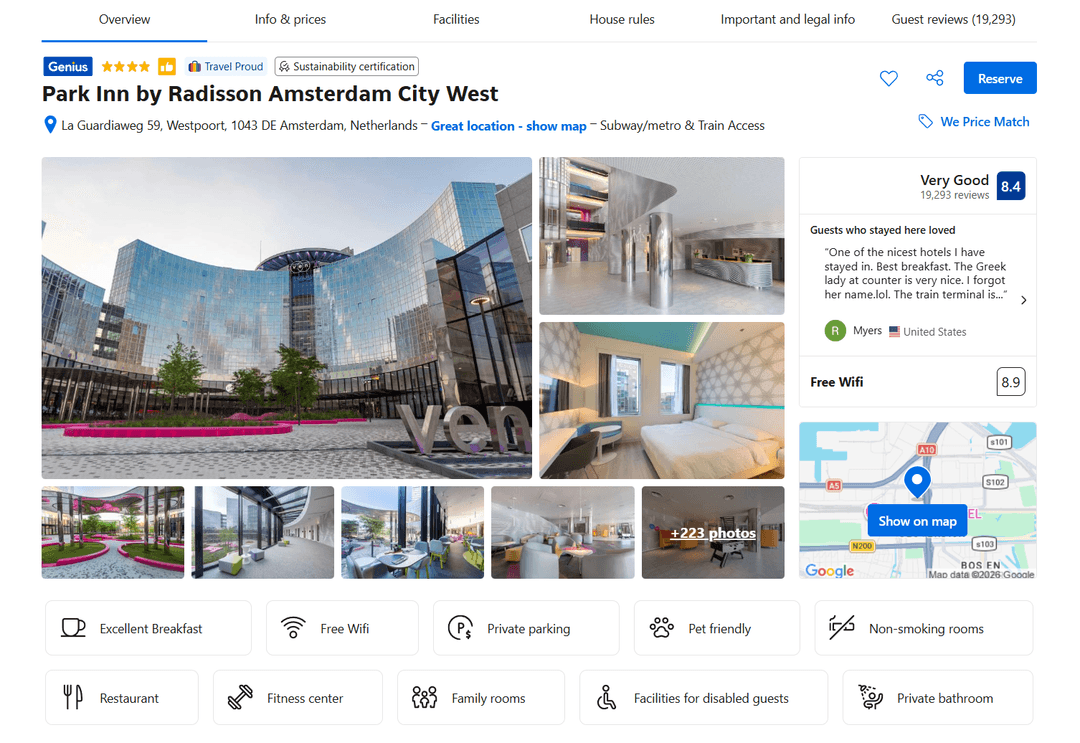
Next, choose a room and enter the guest's details. At the payment step, enter the Mirocard virtual card's details — the number, expiration date, and the code on the back. If the site asks for the payer's country or address, choose the country that matches the card's own details. Confirm the booking and wait for the confirmation email.
What to pay attention to at check-in
Before the trip, check the booking and payment terms. Open the confirmation email and check the dates, number of guests, room type, and rate. If you paid at booking, make sure the amount was charged, and if you're paying on site, check that the card guarantee hasn't expired.
The hotel may ask for the same card the booking was paid with at check-in. So the card details and the guest's information should be at hand, and the name on the booking should match the name on the passport.
Save the booking confirmation on your phone, and ideally as a screenshot too. The address, booking number, and hotel contacts will be needed at the front desk or for questions on arrival, and mobile service on site may not work right away.
Check-in time and the property rules are listed on the "House rules" tab. Take a look the evening before, so you don't arrive ahead of time and know whether a deposit is required at check-in.
Conclusion
A booking doesn't end with the "Reserve" button. After payment, a refund for a cancellation or a charge for extra services can come through, and all of it goes through the same card.
So don't close the card right after booking. Keep it until the end of the trip, keep a small buffer on the balance, and any charges and refunds will go through calmly. With Mirocard, that's easy — the card stays in your account, and the balance can be topped up whichever way suits you at any time.