Mirocard Virtual Card Review
#reviews
Foreign services have long become part of everyday work — some people pay for ChatGPT subscriptions, others buy advertising on Facebook and TikTok, others pay for hosting or Netflix. The problem is the same for everyone: many banks block such payments. The card is declined at checkout, and familiar tools become inaccessible.
A virtual card solves this problem. It is a fully functional bank card, just without the plastic — it has a number, expiry date, and CVV, just like a regular one. It can be used anywhere Visa or Mastercard is accepted. In this review we will look at how the Mirocard card works, what it can do, and how to get one.
What Is Mirocard
Mirocard is a virtual card service for paying for foreign services, subscriptions, advertising, and online purchases. The card is issued online in a couple of minutes, without visiting a bank. It is topped up with cryptocurrency, which removes dependency on sanctions and regional bank restrictions.
In simple terms — you get a working payment instrument accepted worldwide wherever Visa and Mastercard are supported.
What Mirocard Offers
The service has several card types for different tasks — here are the main ones.
Paying for International Services
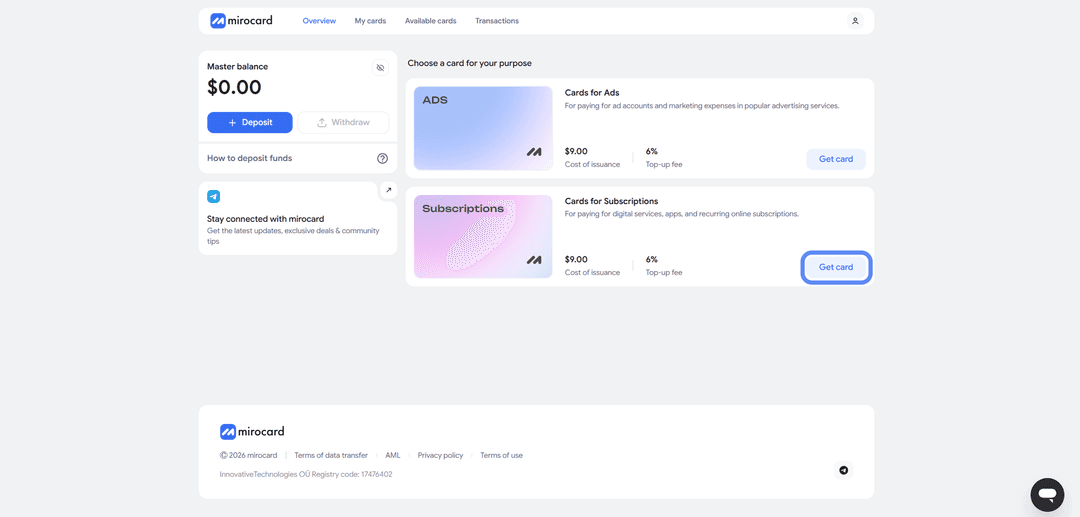
For subscriptions there is a dedicated card category designed for recurring charges. Issuance costs $10, top-up fee is 4%.
Working with Advertising
For arbitrage and traffic buying, there is a separate card type. These work with Facebook Ads, TikTok Ads, Google Ads, AdsPower, and other advertising platforms. The cards support 3D Secure, which is very important — without it, many advertising platforms will simply not accept the card.
The advertising card issuance fee is $9, and the top-up commission is 6%. The transaction fee is zero, which is convenient when running a high volume of operations in an ad account.
Apple Pay and Google Pay Support
Contactless payment is available for cards with a Hong Kong BIN — these are travel cards. Such a card can be added to Apple Pay and Google Pay and used to pay online, in apps, and at physical terminals without entering card details.
Subscription and advertising cards do not support Apple Pay and Google Pay — they work through the standard method of entering the card number, expiry date, and CVV. If contactless payment is important to you, you need to look specifically for the Hong Kong BIN when choosing a card.
Instant Virtual Card Issuance
Card details arrive immediately after completing the application — no waiting days, lengthy checks, or delivery. Submit the request, pay the issuance fee, receive the card number, expiry date, and CVV. You can start paying right away.
Multiple cards can be opened from a single account — handy for separating budgets. For example, one card for personal subscriptions, another for work services, a third for ad accounts.
Topping Up with Cryptocurrency
The balance is topped up with cryptocurrency from an exchange or external wallet. Supported coins include ETH, USDC, USDT, AVAX, BCH, DAI, BNB, BTC, DASH, DOGE, POL, LTC, SOL, TON, TRX, XMR. Crediting happens after blockchain confirmation, usually within a few minutes.
The network is selected at the top-up stage. The cheapest option in terms of transfer fees is USDT via TRC-20, which is also the most commonly used.
How the Mirocard Card Works
Here is the process step by step — from registration to the first payment.
Step 1. Registration
Go to the Mirocard website and click "Get a Card."
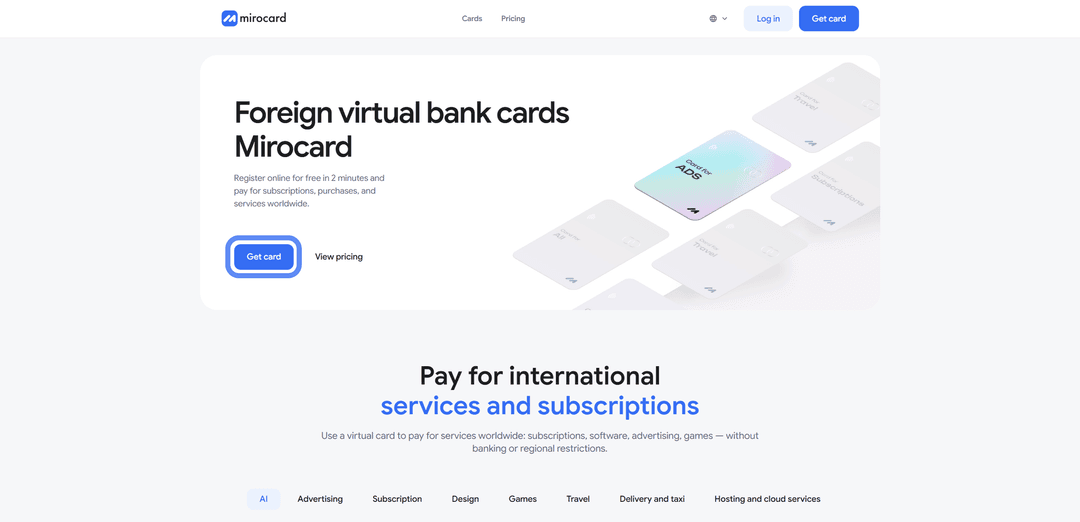
You will be taken to the login page — enter your account credentials (email and password). If you are on the platform for the first time, select "Register." You will need a working email address — a confirmation link will be sent to it — and a password.

Step 2. Top Up the Master Balance
In your personal account, find the Master Balance block and click "Top Up."

A list of coins and networks will appear — choose a suitable one (for example, USDT via TRC-20 for minimum fees). Click "Get Address" — the service will generate a unique top-up wallet. Transfer crypto to it from an exchange or external wallet.
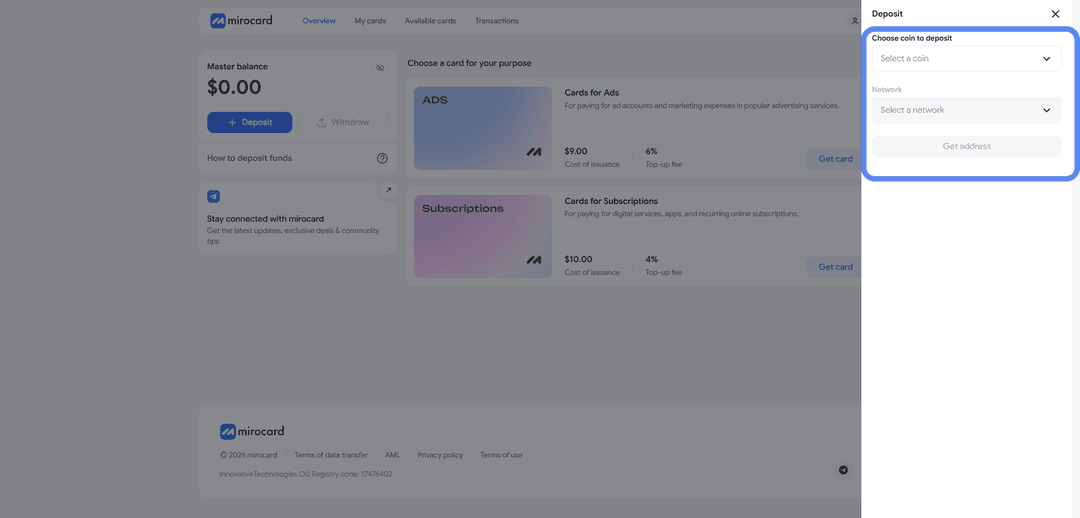
Funds will arrive immediately after blockchain confirmation.
Step 3. Choose a Card
After topping up the Master Balance, select the card you want to issue — for example, the subscriptions card. Click "Get Card" on the right side of the block — the issuance page will open.
Step 4. Verification
For some card types, verification is required before issuance. This ensures that only you can manage your funds and link new cards. After the review, maximum purchase and top-up limits will become available.

Advertising cards do not require verification — you can issue the card straight away.
Step 5. Pay for Issuance
On the same page, click "Deposit and Pay."
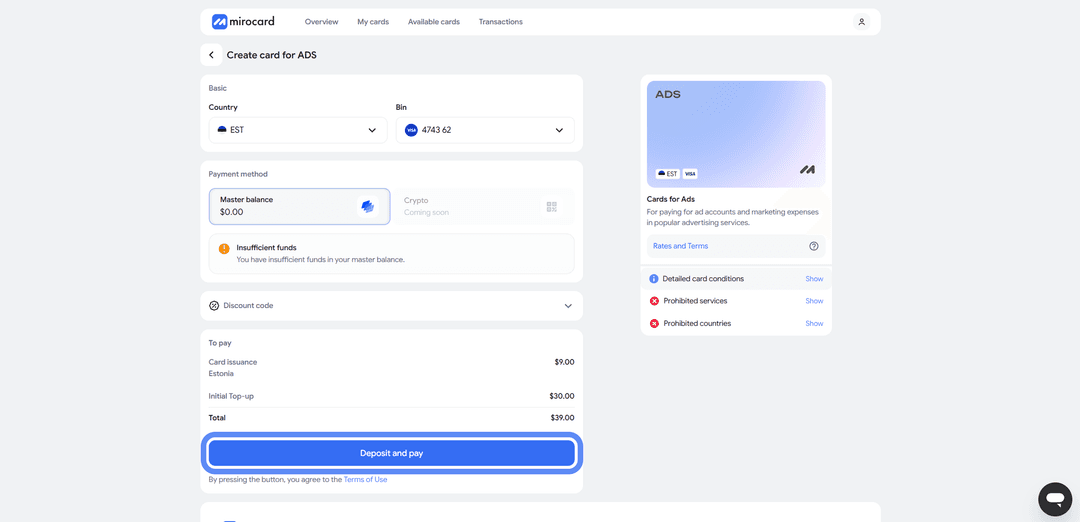
The issuance fee will be deducted from the Master Balance — for example, $10 for a subscriptions card or $9 for an advertising card. The card will appear in your personal account immediately.
Step 6. Start Using
The card works right after issuance — no activation required. In your account you can see the card details, current balance, and transaction history. The card can be topped up from the Master Balance as needed, and the Master Balance itself can be topped up with cryptocurrency whenever convenient.
The entire process from registration to first payment usually takes less than half an hour — most of the time is spent waiting for the crypto transfer to confirm.
Security and Payment Protection
When it comes to money, convenience alone is not enough — protection matters too.
3D Secure
Advertising cards support 3D Secure — a technology where a payment is confirmed with an additional step (usually a code from an SMS or an app). Without 3D Secure, many foreign services, especially advertising platforms, simply will not accept the card. With it, the transaction is protected from unauthorized use even if the card details are accidentally exposed.
Card Management
All operations are visible in your personal account in real time. You can see where every dollar went, track subscriptions, and quickly spot unwanted charges.
Each card is isolated — if one encounters an issue or suspicious activity, the others keep working. This is especially important when you use multiple cards for different purposes.
Who Is Mirocard For
The service covers the needs of several user categories.
Digital professionals. Marketers, designers, developers subscribed to dozens of SaaS tools — Figma, Notion, Adobe, GitHub, Copilot, and similar. One card covers all work subscriptions, and expenses are transparent and centralized.
Traffic arbitrageurs. Buying traffic requires reliable cards with 3D Secure and zero transaction fees. The Mirocard advertising card is built exactly for this — it works with Facebook, TikTok, and Google Ads without rejection at the linking stage.
Freelancers. When foreign services need to be paid for but a card does not work, a virtual card becomes the only viable option. It is also easy to top up — client payments often arrive in crypto, which can be transferred directly to the Master Balance.
Users of foreign SaaS and AI services. ChatGPT Plus, Claude Pro, Midjourney, Cursor — all of these require an international card. Mirocard is accepted on all popular AI platforms.
Online businesses. Hosting, cloud services, advertising platforms, analytics tools — the standard expense set for any company. Multiple cards for different areas simplify accounting and help separate budgets by department or project.
Conclusion
Mirocard is a solid option for anyone who needs to pay for foreign services without bank restrictions. The card is issued in minutes, topped up with crypto, and works with thousands of platforms worldwide.
The main strength is flexibility. Each task has its own card type with its own cost and feature set — cards for subscriptions, for advertising, and for travel.
If foreign payments are a regular part of your work or life, a virtual card removes most of the routine friction. And getting started without intermediaries takes just a few minutes and a couple of dollars for issuance.