How to Pay for Envato with Cryptocurrency
Envato Elements is a subscription for people who make websites, videos, presentations, and ads and don't want to buy a separate template or image every time. One payment opens a library of more than 29 million assets. It includes stock video and photos, video templates, music and sound effects, design templates, graphics and 3D, fonts, and add-ons.
The main convenience is that downloads are unlimited, and a commercial license covers the assets. A designer or video editor takes the template they need, builds a project for a client, and doesn't have to think about what rights they have. The latest plans have also added AI tools for images, video, voiceover, and music on top of the library.
To use all of this, you have to pay for the subscription. Below, we'll look at the ways people pay for Envato and how to set up a subscription through a Mirocard virtual card step by step.
How people usually pay for Envato
The subscription checkout page shows two payment methods. The first is a Visa or Mastercard bank card, with fields for the number, the expiration month and year, and the security code. The second is PayPal, selected with a separate checkbox below the card form.
The service's help center lists other options too. Envato accepts American Express, but only for payments in dollars, and Apple Pay is available on suitable devices. For most buyers, a card is enough, because it goes through the same familiar payment flow.
The price is shown in the currency the site picked for your region. In the checkout page example, that's euros, and tax is added on top of the plan price. That's why the total in the form is higher than the figure on the plan card.
Can you pay for Envato with cryptocurrency
Not directly. The subscription checkout page has two payment methods, a Visa or Mastercard card and PayPal. There's no crypto option, no QR code, and no wallet address. The help center also lists American Express for payments in dollars and Apple Pay on suitable devices, but coins aren't mentioned anywhere.
That means a card is needed either way. Coins first have to turn into money the payment form accepts. The question is which route to choose, because an Envato subscription renews automatically, and any complicated scheme would have to be repeated every period.
What's left is preparing a card so that, once it's set up, the payment needs no extra actions. A virtual card topped up from a wallet fits that.
How to turn cryptocurrency into a way to pay for Envato
The scheme has three steps, and it looks like cryptocurrency — virtual card — Envato. You send coins to the card's balance, get the details, and enter them in the payment form on the site. The service sees an ordinary card and doesn't know where the money on it came from.
There's also a workaround through an exchange. You sell the coins, withdraw the money to a bank card, and pay with it. It works, but every step involves a fee and waiting, and the exchange rate has time to change. On top of that, the subscription will require repeating that chain at every renewal.
A virtual card has one more advantage in this scheme. Money is charged only from it, so your main wallet stays closed off from the service. If you decide to drop the subscription, cancel it in your account and stop topping up the card.
Mirocard: paying for Envato with cryptocurrency
Mirocard issues virtual Visa and Mastercard cards that are topped up with cryptocurrency. BTC, ETH, USDT, USDC, TON, TRX, and SOL all work. Coins are converted into dollars inside the service, and the amount shows up on the card's balance right away, so neither an exchange nor a bank is needed in the chain.
The card is set up entirely online, with no bank visit. For Envato, a card for paying for subscriptions fits. It costs $5, and the top-up fee is 4%. Its details work in the payment form like those of an ordinary card, and the service doesn't tell it apart from the rest.
For a subscription with automatic renewal, it's also convenient that you decide when to top up the card. If you want to pay a year ahead, transfer the needed amount once. If you want to test the service for a month, send the card only the price of the monthly plan.
How to pay for Envato with Mirocard
First, issue a card. We covered sign-up, issuance, and the first top-up in detail in the guide to issuing a card. Once the details appear in your account, top up the balance. The amount should cover the whole payment, including tax and a small buffer for currency conversion.
Then open the Envato Elements plans page. At the top, you'll see the heading "Choose your all-in-one creative asset subscription" and four cards. Under each name is the monthly price, and a small note shows what the same plan costs when billed monthly.
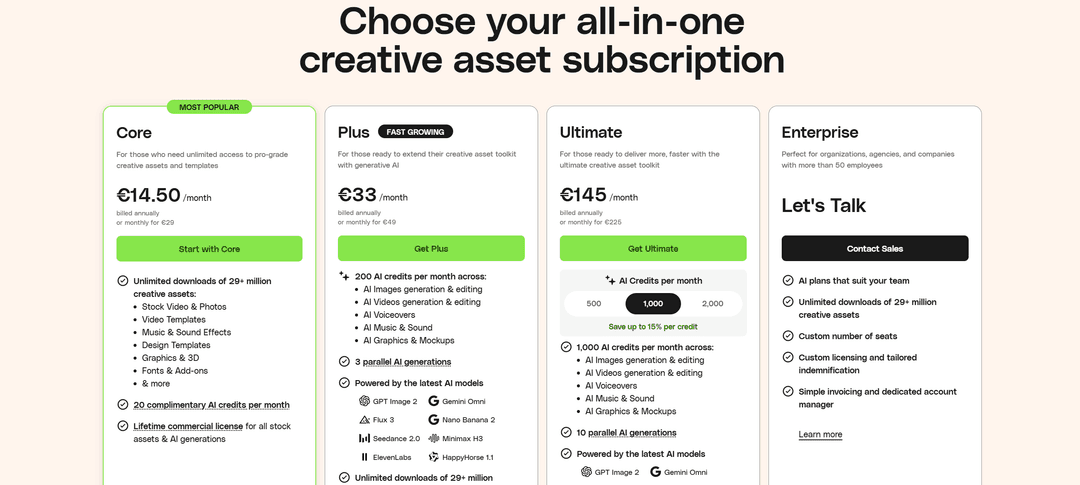
Pick a plan. The "Core" card is marked as the most popular. It includes unlimited downloads from the whole library, 20 free AI credits a month, and a lifetime commercial license for the assets you download. "Plus" adds 200 AI credits a month and three parallel generations. "Ultimate" gives a toggle for 500, 1,000, or 2,000 credits and ten parallel generations. "Enterprise" is for companies with 50 or more employees, and instead of a price, it has a "Contact Sales" button.
Click the button under the plan you chose. For the first plan, it's called "Start with Core," for the second "Get Plus," and for the third "Get Ultimate." The checkout page opens, with the buyer's details and payment method on the left and an "Order Summary" block on the right.
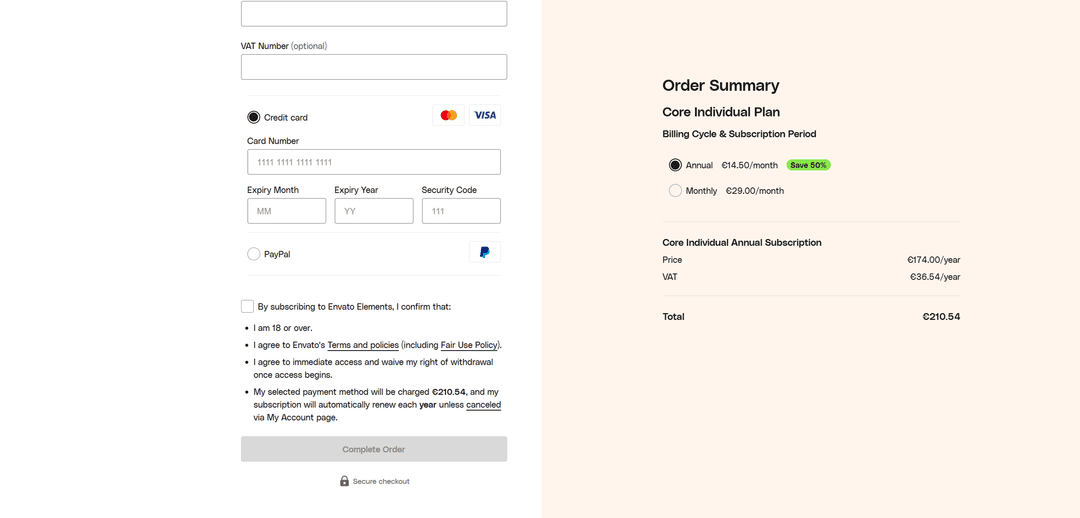
In the right-hand block, check the plan and choose the period in the "Billing Cycle & Subscription Period" section. The "Annual" option is cheaper and marked "Save 50%," while "Monthly" costs twice as much per month but doesn't require paying for a full year upfront. Below, the "Price" and "VAT" rows and the "Total" are shown.
On the left, fill in the buyer's details. The "VAT Number" field is optional and is filled in only when signing up as a company.
Choose "Credit card" and enter the Mirocard virtual card's details. The number goes in the "Card Number" field, the expiration month and year in "Expiry Month" and "Expiry Year," and the code on the back in "Security Code."
Read the "By subscribing to Envato Elements, I confirm that" block and check the box. There are four conditions. You confirm that you're at least 18, agree to the service's terms, get access immediately, and waive the right to a refund once it begins. The last item states the charge amount and says the subscription renews every year until you cancel it.
After that, the "Complete Order" button becomes active. Click it, and if the issuing bank asks for confirmation, enter the code from the message. Once the payment goes through, the subscription turns on for the account.
What to check before paying
Start with the price. The figure on the plan card shows the cost of one month when paying for a year, and the whole annual amount plus tax is what gets charged. In the checkout page example, the Core plan costs €174 for a year, tax is €36.54, and the total comes to €210.54. That's the amount you need to have on the card.
Then check the subscription period. The annual plan is half the price of monthly, but the service doesn't refund it. The help center says a partial refund for an already-used year isn't possible if you've downloaded assets. If you're not sure you'll need Envato for the whole year, start with a month.
The third thing to check is the balance. The site calculates the price in euros, while the card is usually kept in dollars, and a conversion happens at the time of the charge. Add a buffer of a few percent to the total, otherwise the payment might stall at the last step.
The fourth concerns the payment details. Check the card number, expiration date, and code, plus the country in the address if it was requested. A single wrong digit in the number or code leads to a decline, and the payment has to be started over.
The fifth is about renewal. The subscription renews on the day of the first payment, and the money is charged automatically. If you decide not to continue, cancel the subscription in the "My Account" section ahead of time, because access stays until the end of the paid period and the next payment simply won't go through. You can change the card in the same place, and the new details take effect from the end of the current period.
Conclusion
The key number on Envato isn't on the plan card but in the "Total" row on the checkout page. The big monthly figure shows the price when paying for a year, while the whole annual amount plus tax will leave your card. So choose a plan by looking at the total, not at the monthly price.
With Mirocard, an amount like that stops being a problem. You issue a card, top it up with the amount you need, enter the details in the form, and click "Complete Order." If your plans change, cancel the subscription in "My Account" and stop topping up the card by the renewal date.