How to Pay for Discord with Cryptocurrency
Discord is a communication service where people gather on topic-based servers. They have text chats, voice rooms, video calls, and screen sharing. Gamers, study groups, and interest communities choose it because messaging and voice are in one app.
The basic features are free, but some functions unlock only with a paid subscription, and that needs a working payment method. Below, we'll look at what the subscription gives you, how it works, and how to set up Discord Nitro through Mirocard step by step.
What you can pay for in Discord
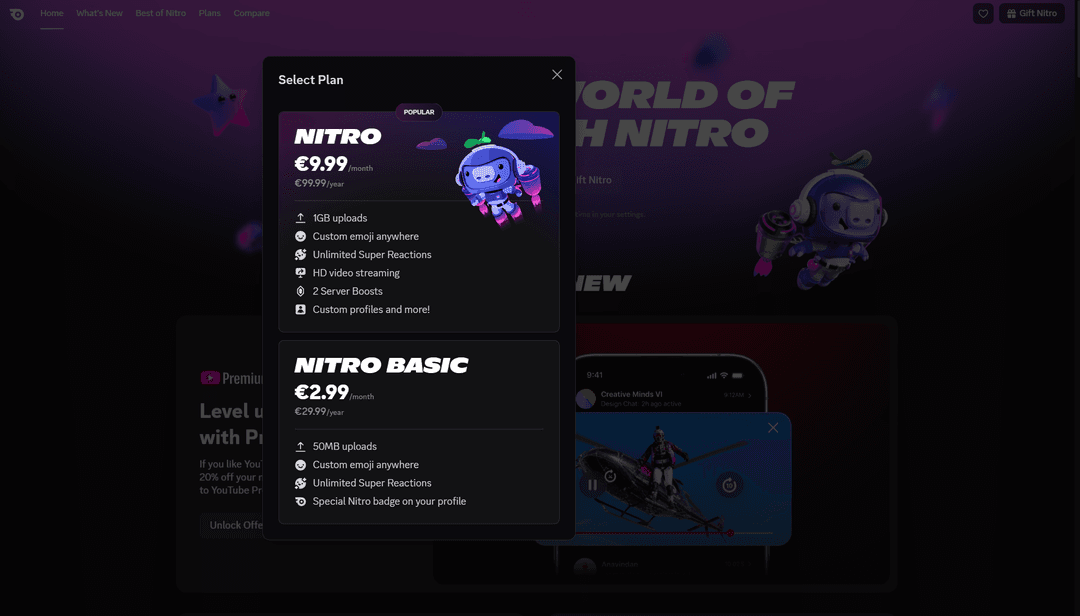
Discord's paid features are bundled into the Nitro subscription. It comes in two kinds. Nitro Basic costs €2.99 a month or €29.99 a year, while full Nitro costs €9.99 a month or €99.99 a year. The prices are taken from the plan selection page and may differ by region.
Basic suits people who want a bit more self-expression. It includes custom emoji on any server, unlimited Super Reactions, file uploads up to 50 MB, and a Nitro badge on your profile. Full Nitro gives all of that and adds file uploads up to 1 GB, high-quality streaming, two server boosts, and expanded profile customization. It's for people who stream often, send large files, or support a community server. A server boost is a separate purchase, and Nitro gives additional boosts at a 30% discount.
How the Discord Nitro subscription works
The subscription is set up for one account and lasts as long as payments go through. You choose a plan and a period, enter your card details, and access to the features opens right after payment. The monthly option is handy for a trial, while the annual one is about sixteen percent cheaper, because twelve months at €9.99 comes to more than €99.99 for the year.
Payment renews automatically. Below the card fields, Discord states directly that you authorize charging money for future payments under its terms. So on the renewal day, the card needs to hold the right amount.
There's also a second route, a gift code. It's bought separately, entered on the redemption page, and doesn't renew on its own. If you activate a code while you have an active subscription, it turns into a credit on the account that works only for the same plan and term. So activate a code after the subscription ends.
What you can pay for Discord with
Discord's main payment method is a bank card. In the add-payment window, the service shows Mastercard, Visa, American Express, and Discover icons, then asks for the number, expiration date, and security code.
Next to the card, there are other options. In the example, they're PayPal, iDEAL with Wero, and Bancontact, but the list depends on the country, and some methods are tied to local banks. A card remains the universal option.
Below the card fields are two additional options. The "Save my information for faster checkout" checkbox saves your details for quick payments, and the "Redeem gift card" link lets you enter a gift card. If you're paying by card, you can skip both options.
Can you pay for Discord directly with cryptocurrency
Not directly. The add-payment-method window has no wallet and no address to transfer to — only a card and local payment services. So coins need to be turned into card balance.
How to use cryptocurrency to pay for Discord
The shortest route goes through a virtual card. You send coins to the balance, get the details, and enter them in Discord's payment window. The service sees an ordinary card, and conversion happens inside the payment service, with no exchange and no bank account.
Mirocard for paying for Discord with cryptocurrency
A Mirocard card is topped up with cryptocurrency straight from a wallet. BTC, ETH, USDT, USDC, TON, TRX, and SOL all work, and coins are converted into dollars inside the service. If you top up the card with a stablecoin, the balance doesn't depend on exchange-rate swings, and the subscription's price in dollars stays clear.
Mirocard for paying for Discord
You get a Mirocard card in a single visit to the site. You create an account, issue a virtual Visa or Mastercard for paying subscriptions, and copy the details from your account. No bank branch is involved, and you can enter the details into the payment form right after issuance.
For Discord, a card for paying subscriptions fits. It costs $5, and the top-up fee is 4%. A separate card limits risk, because the service charges money only from it, and your other funds stay out of its reach.
How to pay for Discord with Mirocard
First, issue a card. We covered sign-up, issuance, and the first top-up in the guide to issuing a card. Once the details appear in your account, top up the balance. The card should hold the plan's price plus a small buffer, because when you add a payment method, Discord may make a trial charge.
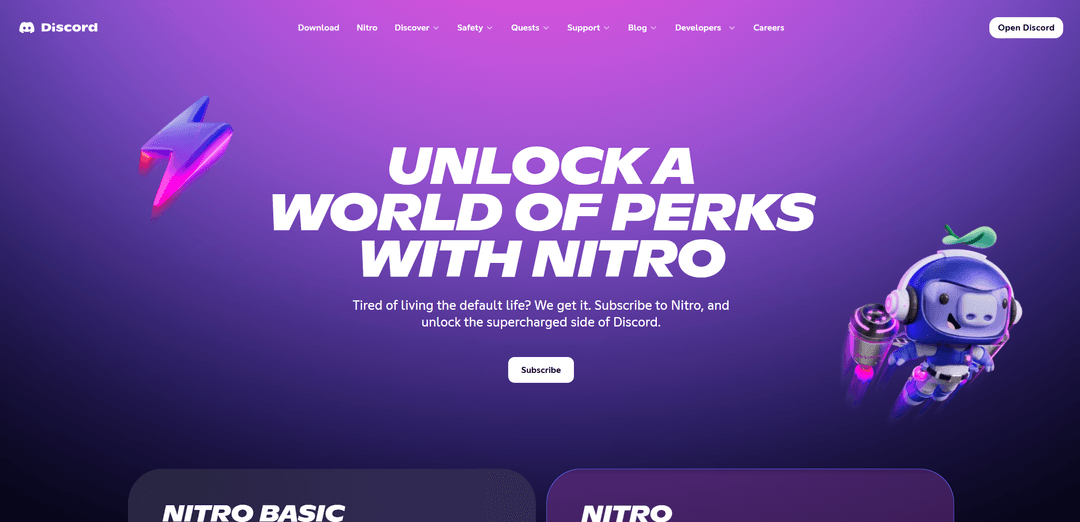
Open the Nitro page on Discord's site. In the center of the screen is a "Subscribe" button, and below it two cards, "Nitro Basic" and "Nitro." Click "Subscribe," and the "Select Plan" window opens.
Pick a plan. The "Nitro" card is marked "Popular" and fits if you stream often, send large files, or support a server with boosts. The "Nitro Basic" card is cheaper and is for when emoji, reactions, and a badge are enough. Under each plan's name, the monthly and annual prices are shown, so decide on the period right away.
In the "Add Payment Method" window, check the country under the heading. It should match your card's details. Then leave the "Card" tab and enter the Mirocard's details. The number goes in the "Card number" field, the expiration month and year in "Expiration date" in MM / YY format, and the code on the back in "Security code."
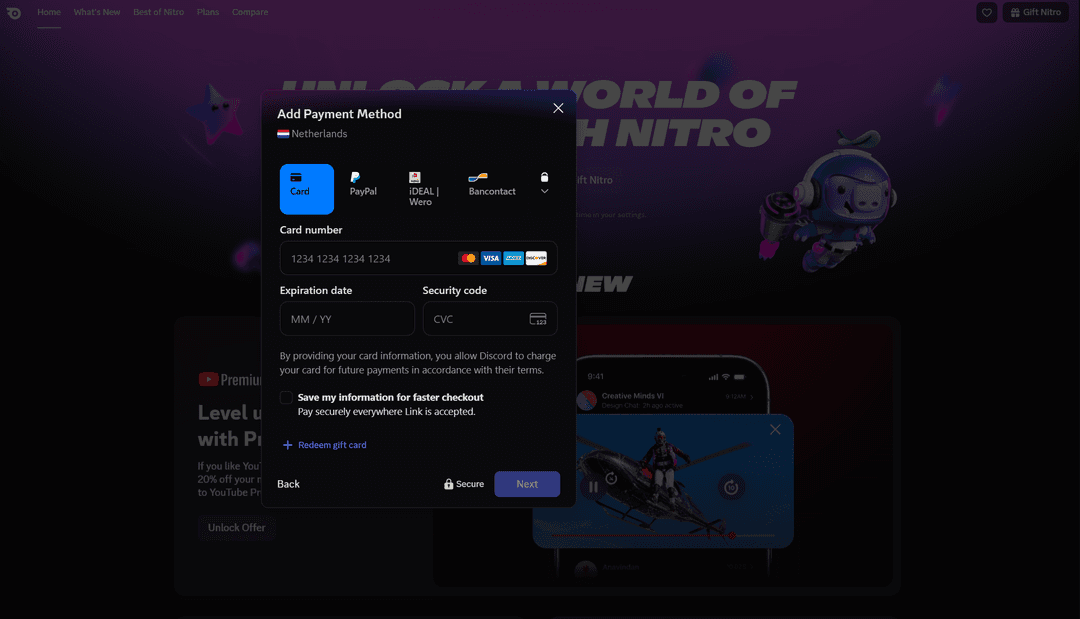
The "Save my information for faster checkout" checkbox is optional, because it isn't needed for renewing the subscription. After filling in the fields, click "Next." If the bank asks, enter the confirmation code.
What to do if Discord doesn't accept the card
Start with the balance. If the card has less than the plan's price, the payment will be declined. Add a buffer to the price for the trial charge and currency conversion, because Discord shows the price in euros, while the card is usually kept in dollars.
Then check the payment details. Most often the error comes from a wrong digit in the number, the expiration date, or the code. Make sure the country in the payment window matches the card's details, and don't copy the details with extra spaces.
Separately, deal with the renewal problem. If the card doesn't have enough on renewal day, the payment won't go through and the subscription will end. So top up the card in advance and note the date of the next charge. If the payment method has changed, update it in your account settings.
If the payment still doesn't go through, don't retry it repeatedly — check the amount and details first.
Conclusion
Nitro is inexpensive, so extra payment costs are more noticeable than with larger subscriptions. Choose a cheap network for the transfer, top up your Mirocard card with a stablecoin, and keep on the balance only the plan's amount plus a small buffer.