How to Pay for DeepSeek
DeepSeek is a Chinese company known for its line of open-weight language models and the chat service of the same name. The web chat and mobile app are free with no geographic restrictions — anyone can talk to the model, translate text, or go through code without entering any payment details. DeepSeek doesn't sell separate paid subscriptions for individual chat users; there's no Pro or Plus tier.
Money only comes into play for those who connect to the model through the API — that is, building DeepSeek into an app, bot, CRM, or internal tool. That requires a separate developer account on the DeepSeek platform, distinct from the chat account, where you work with a balance and tokens instead. The distinction matters, so before looking for a payment method it's worth confirming you actually need to pay at all.
How DeepSeek API billing works
The API balance works on a pay-as-you-go basis, with no fixed monthly fee. You top up the balance in advance, and the system charges per token processed — separately for what's sent to the model and for what it generates in response. The longer the request and the more detailed the reply, the higher the cost, so the final bill depends on the volume of text, not the number of requests.
The minimum top-up amount on the official site is $2. You can enter a custom amount or pick one of the preset options on the "Top up" page, and the system shows the total including any applicable fees upfront — sometimes a small tax is added on top of the base amount depending on the payment's jurisdiction, making the final charge slightly higher than the number you picked.
Payment methods DeepSeek offers
The top-up page supports a few different tools. A Visa or Mastercard debit or credit card is the most direct way to attach a payment method to the account. Next to the card form there's a separate PayPal button, plus Google Pay for a quick confirmation through a card already saved with that service. Alipay sits apart from the rest — the Chinese payment service DeepSeek officially accepts for payments in yuan.
On paper there are several options, but in practice they all require the same thing: a payment instrument the system accepts as international.
What payment options are actually open to users
This is where the real difficulty starts for a large part of DeepSeek's audience. Many API users hold cryptocurrency and want to spend their digital assets, or simply don't have a Visa or Mastercard linked to a fiat account, and don't want to open a bank account just to pay for tokens once. DeepSeek doesn't accept crypto payments directly, so a crypto balance on an exchange doesn't by itself help top up an API account.
Technically any card works as long as the payment system accepts it as issued in a supported jurisdiction, and the anti-fraud system separately checks several parameters. First is the BIN — the leading digits of the card number, which identify the issuing bank and country. Second is the billing address, which needs to match the issuer's country. Third is the IP address at the moment of payment confirmation. A mismatch on any of the three reads as a risk signal and can get the transaction declined before any money is charged.
That's what drives the whole logic behind choosing a payment method. What's needed isn't just a working card, but one with the right origin that anti-fraud accepts without flagging it. A crypto holder doesn't need to open an account with a traditional bank to get that — a virtual card that accepts crypto top-ups and comes with international Visa or Mastercard details is enough.
For users without access to an international card
There's another group of DeepSeek users: people who can't get or use an international bank card directly, for reasons ranging from local banking restrictions to a lack of access to foreign financial services. Access to the service itself usually isn't restricted — DeepSeek's domains aren't blocked — the sticking point is strictly on the payment side. Below are three ways people typically work around it.
An international bank card
The most independent option is opening a personal account with an international bank and getting a debit card issued against it. This gives full control over payments with no middleman, but it doesn't solve anything for crypto holders who want to spend their assets, or for anyone who simply can't get an international bank card issued.
Intermediary services
Another route is paying an intermediary who tops up the DeepSeek balance from their own card. You send the money through a familiar bank or instant payment system, and the intermediary handles the currency conversion and the transaction itself. It's fast and doesn't require a payment instrument of your own, but it adds a markup on top of the exchange rate and makes you dependent on someone else's schedule. Topping up this way often means handing over access to your DeepSeek account, which comes down to how much you trust that particular operator.
A virtual card
The third option is a virtual card from a fintech service with international details, which can be issued online in a few minutes with no bank visit and no need to open a traditional account. The card works like a regular Visa or Mastercard at checkout on any service, DeepSeek included.
How to pay for DeepSeek with Mirocard
Mirocard issues exactly this kind of card — a virtual Visa or Mastercard ready to use at international checkouts, DeepSeek included. For a crypto holder, that removes the main obstacle: no need to open a bank account or convert crypto to fiat through a separate exchange first — funds from the wallet go straight onto the card balance. You can top it up with BTC, ETH, USDT, USDC, TON, TRX, or SOL. For anyone looking for an alternative to a personal account abroad, Mirocard solves the same problem without a bank visit or weeks of verification.
Getting set up takes a few simple steps and doesn't require any special knowledge. Issuing the card costs $5, a one-time fee that doesn't depend on how much you top up afterward — it's a charge for the card itself, not a commission on each transaction. We covered the full process for issuing a Mirocard virtual card in this article.
Once issued, the card is ready to pay on any service that accepts Visa or Mastercard. Here's how to top up your DeepSeek balance with a Mirocard.
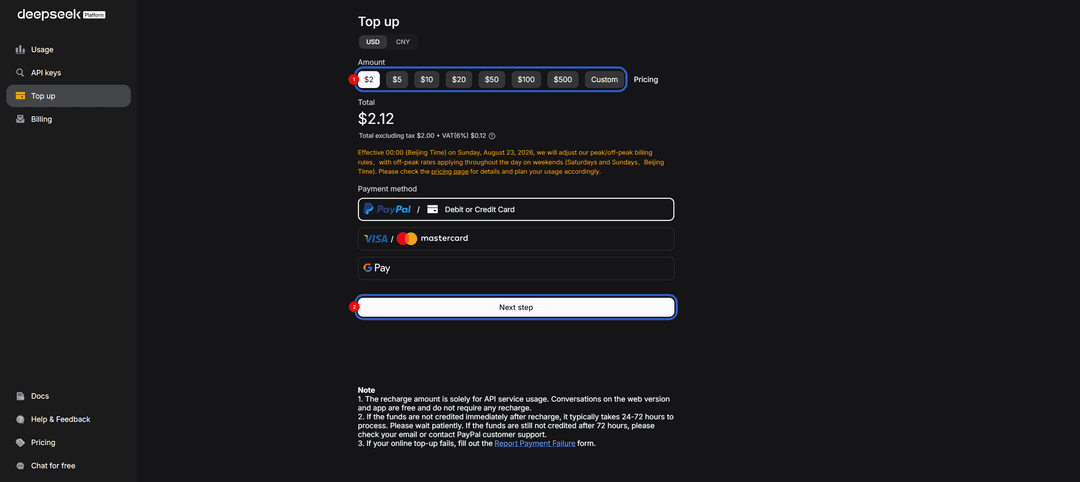
Go to platform.deepseek.com and click "Top up" on the first tab.
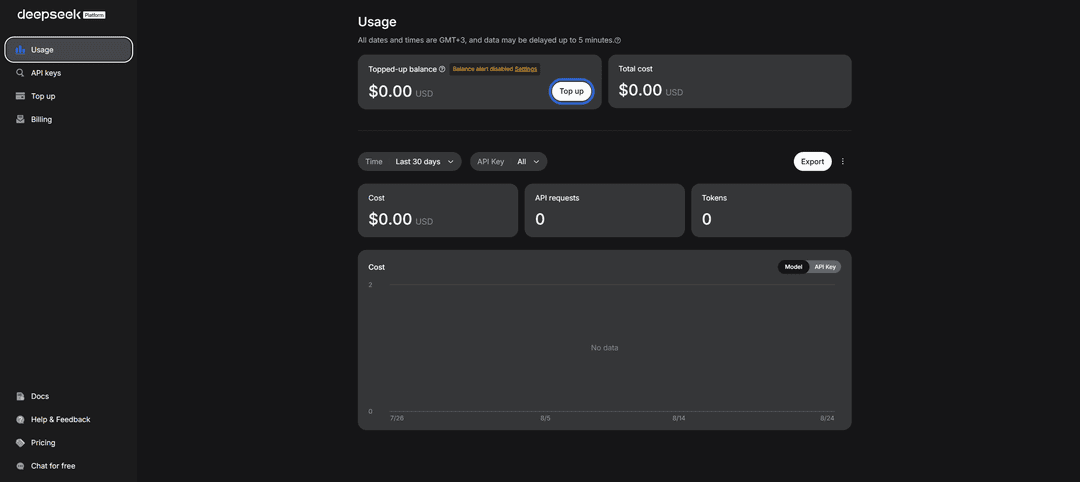
Pick a top-up amount from the presets or enter your own via "Custom" (minimum $2), then click "Next step".
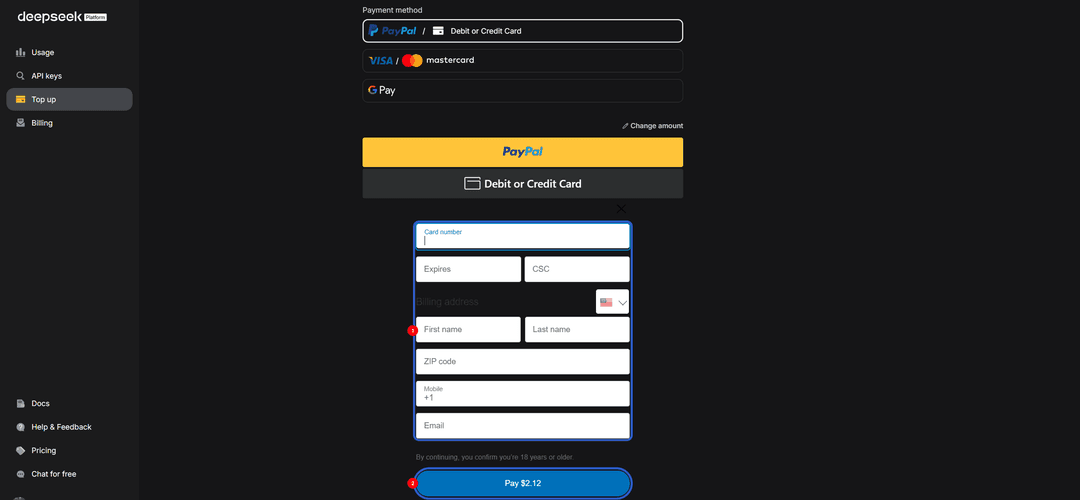
In the window that opens, choose card payment, enter your Mirocard number, expiration date, and CSC code. Confirm the payment with the "Pay" button — the amount will show up on your account balance right after the transaction goes through.
DeepSeek's API runs on a prepaid balance with no auto-renewal, so the card won't charge you automatically on a schedule — you top up manually as you use tokens. But your details stay saved in the account, so the next top-up takes one click on the saved payment method instead of the full five-step process.
Why Mirocard works well for paying for AI services
One card covers several services at once. DeepSeek is rarely the only AI tool in someone's workflow — there's usually another model, project hosting, or design tools alongside it. Instead of finding a separate payment solution for every service, it's easier to have one instrument accepted anywhere there's a checkout with a card field.
No need for an international bank card. Currency from the wallet turns into card balance directly, without a separate step of cashing out to an exchange and converting to fiat — for crypto holders, that's the main way to use funds outside the crypto economy itself.
Recurring payments go through without extra steps. Card details save at checkout the same way a regular bank card would, so topping up the API balance again doesn't mean going through the whole setup again.
How much DeepSeek costs
Cost depends on which model you use and whether it's an input or output token. The base model in the lineup is light and fast, priced at around $0.14 per million input tokens and $0.28 per million output tokens. The more powerful model built for complex reasoning and coding costs more — around $0.435 per million input tokens and $0.87 per million output tokens.
It's worth checking exact numbers in your dashboard before a large top-up. DeepSeek periodically changes model names and pricing, and older aliases can eventually stop working and switch automatically to the current model. A sensible habit is to test a new project with a small amount, see the real cost after a few requests, and only then top up the balance for the actual workload.
Conclusion
Paying for the DeepSeek API doesn't really come down to price — it's one of the more affordable options on the market — but to having a payment instrument the system accepts without question. A crypto holder doesn't need to open a bank account for that, and someone without access to an international bank card doesn't need to spend weeks getting one. A Mirocard virtual card covers both problems with the same tool — quick to issue and suited to paying for tokens on an ongoing basis.