How to Pay for Facebook Ads Manager with Cryptocurrency
Facebook Ads Manager is Meta's workspace for advertising on Facebook and Instagram. In one window, you create campaigns, pick an audience, set a budget, view reports, and pay for results. It's used by shop owners, marketers, freelancers, and agencies.
The account won't launch ads until a payment method is connected to it. That's why a card is added before setting up campaigns, not at the last minute.
Below, we'll go over costs and walk through adding a Mirocard card step by step.
What Facebook Ads Manager charges for
Meta charges for ad results. You choose a campaign goal, and Meta counts payment for impressions, clicks, or another action matching the goal. The specific price is set at an auction each time, so the exact amount can't be named in advance.
All costs are gathered in the Billing section. It shows the amount spent, payment history, and data for each ad account. The "Payment activity" section shows payment activity, and "Payment methods" stores linked cards.
Money is charged under one of two schemes. With automatic payment, Meta charges spending to the card when it reaches a threshold or on the billing date, whichever comes first. With manual payment, you deposit money in advance, and ads spend that balance. This information comes from third-party reviews, so check the exact rules in your own account.
Pay attention to currency. According to reviews, it's chosen when the account is created and doesn't change afterward, and a different currency requires a new account. It's best to pick a card in the same currency so you don't pay for conversion.
Can you pay for Facebook Ads Manager directly with cryptocurrency
Not directly. Meta accepts bank cards, and the payment method form has only card fields. There's no wallet, no address for transferring coins, and no token field.
So the usual route for someone holding coins is long. You have to sell crypto on an exchange, withdraw the money to a bank account, and only then pay for ads. Every step takes time and costs fees, and the exchange rate has time to change.
How the cryptocurrency payment setup works
The setup replaces the exchange with a card. Coins go to a virtual card's balance, and you enter the details in the Meta account's form. The ad system works with an ordinary card, and the service handles conversion into dollars.
You can top up a Mirocard card with coins straight from a wallet; BTC, ETH, USDT, USDC, TON, TRX, and SOL are available. It's best to keep the ad budget in stablecoins so a token's exchange rate doesn't change the amount. A 4% fee is charged on every top-up, so add it to your expense plan.
Mirocard for paying for Facebook Ads Manager
Mirocard offers virtual Visa and Mastercard cards, and for advertising, you need a card for paying for advertising. It costs $5, and top-ups carry a 4% fee. You enter the details into the account yourself and manage the account yourself, without handing access to anyone.
That's an important difference from schemes with intermediaries. The card is needed only for payments, and all advertising decisions stay with you.
How to pay for Facebook Ads Manager with Mirocard
Start with the card. The sign-up, issuance, and first top-up steps are collected in a separate Mirocard guide, so here we go straight to the account. Make sure the ad account has already been created and the card holds the first campaign's budget with a small buffer.
Go to the payment methods page in the Meta account. It's in the "Billing & payments" section and immediately shows "Payment methods." On the left are the "Accounts" and "Payment activity" sections, which we'll come back to when checking.
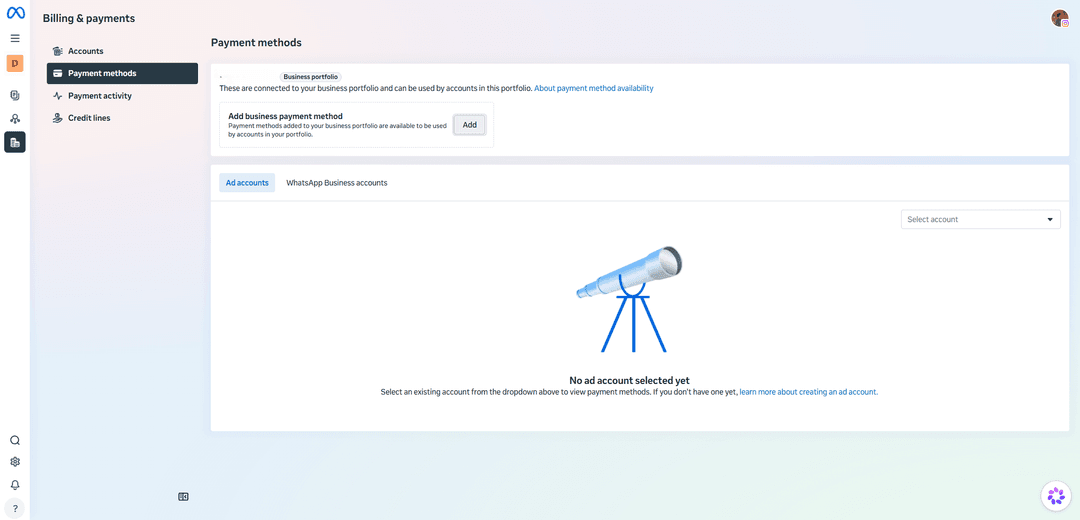
The first block is labeled "Business portfolio." Payment methods you add here are tied to the business portfolio and available to the accounts inside it. Next to the "Add business payment method" title is an "Add" button — click it.
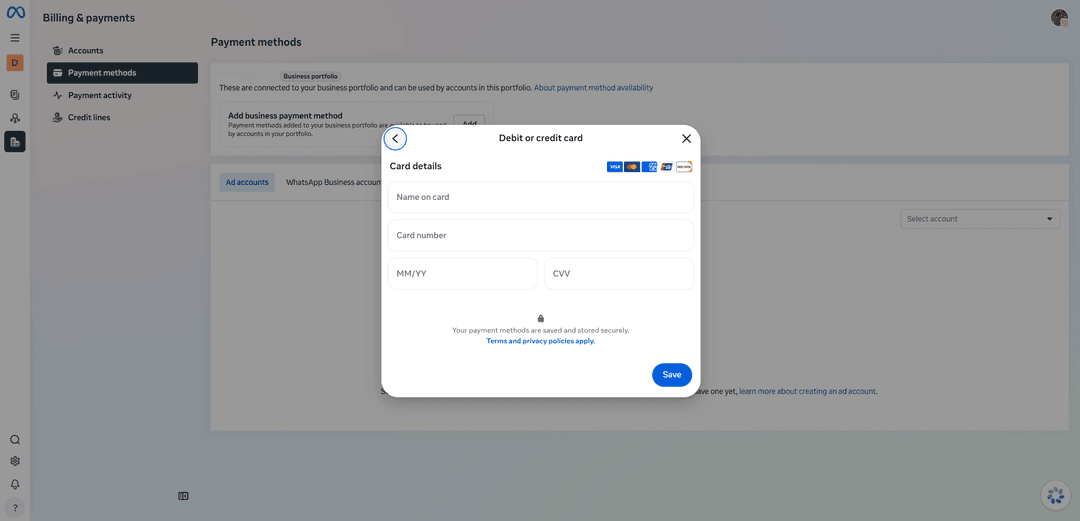
Among the options in the window, choose "Debit or credit card," and a "Card details" form opens. The icons above it show the accepted systems — Visa, Mastercard, American Express, UnionPay, and Discover. Fill in "Name on card," "Card number," "MM/YY," and "CVV" with the details from your Mirocard account and click "Save."
Now make sure the right account sees the card. Under the portfolio block, open the "Ad accounts" tab and choose the account in the "Select account" list. Until an account is chosen, the page says "No ad account selected yet." The "WhatsApp Business accounts" tab is for a different service and doesn't need to be opened.
If Meta didn't save the card, start with the "Name on card" field and the expiration date, because mistakes happen there most often. Then follow the "About payment method availability" link in the top block.
How to avoid ad campaigns stopping
Keep more on the card than the next payment needs. Meta charges money by threshold or on the billing date, and if there's too little at that moment, the payment won't go through. A sensible buffer is the threshold amount plus 10-15%, and with a different currency, add a reserve for conversion.
Watch for debt. According to reviews, when a payment fails, Meta accumulates unpaid spending, and delivery may stop. Open "Payment activity" after every large charge to see a decline before the campaign goes quiet.
Remember charge dates. Automatic payment is tied to the threshold and billing date, so top up the card in advance, not on payment day. A top-up takes time too.
Check campaign status. Paying off a debt doesn't mean ads come back right away, because they need to pass moderation, and settings may stop delivery. Open Ads Manager, find campaigns with a problem status, and fix the cause while the budget isn't sitting idle.
Add a backup payment method. According to reviews, if the primary card fails, Meta uses the backup, and campaigns aren't interrupted. Don't add several cards in a row after a decline. First find the cause.
Conclusion
Money on the card solves only half the task. Moderation also reviews ads, and after a debt is paid, delivery doesn't always turn on right away. If you leave topping up until the last day, part of the budget goes to waiting.
So set up a separate Mirocard card for advertising and top it up with time to spare. Check "Payment activity" after every charge, and open campaign status before the budget runs out.