How to Pay for Todoist
Todoist is a task planner where people manage personal and work to-do lists, set deadlines and reminders, and track progress through completed-task statistics. Adding tasks works through natural language — a phrase like "buy tickets on Friday" automatically turns into a task with a date — and lists can be organized by project, label, and filter. The app works on your phone, computer, and in the browser, syncing across devices, so your to-do list stays on hand no matter which device you're using at the moment.
The free version of Todoist is enough for simple personal planning, and signing up takes a couple of minutes with no payment details required.
What's different between the paid and free versions
The free Beginner plan doesn't limit functionality so much as scale — you get five personal projects, basic reminders, and just three saved filters, and change history only goes back a week. For someone with a couple of work lists and a handful of tasks a week, that's more than enough.
The paid Pro plan removes those limits and adds tools that save time with active use. The number of projects grows to 300 and filters to 150, a calendar view appears right inside the task list, you get task duration and custom reminders tied to a specific deadline, and full change history instead of just the past week. It also unlocks an AI assistant for breaking complex tasks into subtasks. Upgrading to Pro starts to make sense once five projects and three filters simply stop covering your actual workload.
How Todoist billing works
What tiers are available
Todoist has three subscription levels:
Beginner — the free plan with a basic feature set and the limits listed above.
Pro — the main paid tier for personal use, with expanded limits and planning tools.
How the charge works
You choose how often you're billed — monthly, or once a year in a single payment. The annual plan works out cheaper per month, so it makes more financial sense for anyone planning to use Todoist Pro long-term.
What payment methods Todoist supports
Subscription payments go through the international payment processor Stripe. The checkout page accepts card payment — Visa, Mastercard, and other major card networks — plus Apple Pay and the Link quick-checkout service. Some regions also offer local methods like iDEAL, but the exact options on the payment page depend on the country linked to your account.
What payment options are available for Todoist
An international bank card
For someone who already has a card from a bank in another country, setting up the subscription works exactly like the standard scenario — you just enter the card on the payment page, and it passes Stripe's check without any extra hurdles. Opening that kind of account specifically for one task-planner subscription isn't worth the time and effort, but for anyone who already has the account, this route costs nothing extra.
A virtual card
A virtual card with international details covers the same need without opening an account with a bank in another country — it's issued online in a few minutes, and to Stripe, there's no difference between it and regular foreign plastic. This is usually the option people pick when they need to set up payment quickly without a trip to the bank.
Paying for Todoist with Mirocard
Mirocard lets you pay for a range of international digital services and subscriptions from one card, and Todoist is no exception. The card is issued as a virtual Visa or Mastercard and funded with cryptocurrency — no exchange, no separate fiat conversion, no extra steps in between. Issuing a card for subscriptions costs $5, and each top-up carries a 4% fee.
Getting the card isn't complicated, and the full step-by-step process is covered in a separate article. Once the card is ready, all that's left is setting up the Todoist subscription itself.
Go to the Todoist pricing page and compare the tiers against the features you need.
Pro is built for a single user who needs expanded limits and personal productivity tools.
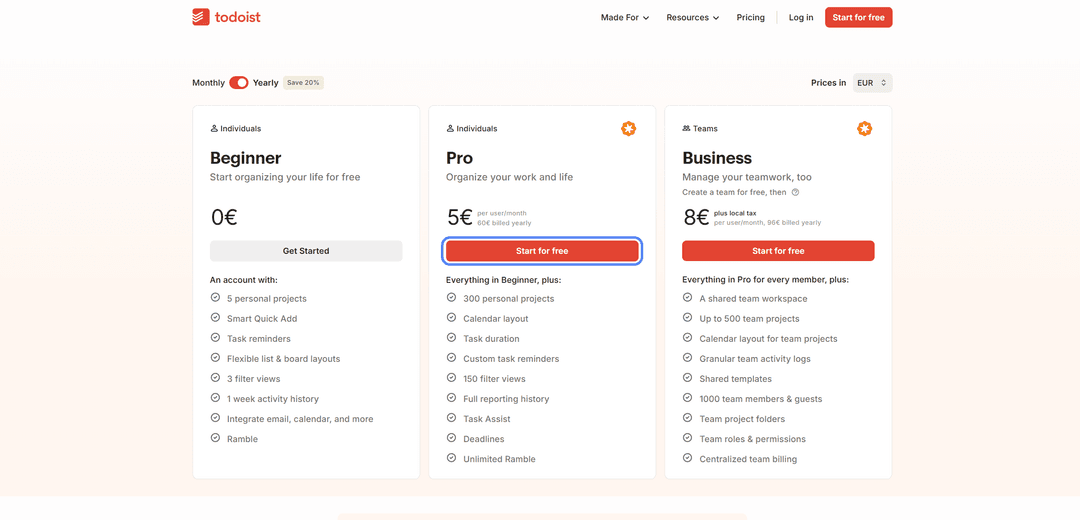
Toggle the switch at the top of the page between "Monthly" and "Yearly" depending on how you'd rather pay — monthly, or upfront for the year at a discount.
Click "Start for free" under the tier you picked — it opens registration, after which the system moves on to setting up the subscription.
On Stripe's payment page, under "Payment method," choose "Card" rather than Apple Pay or Link.
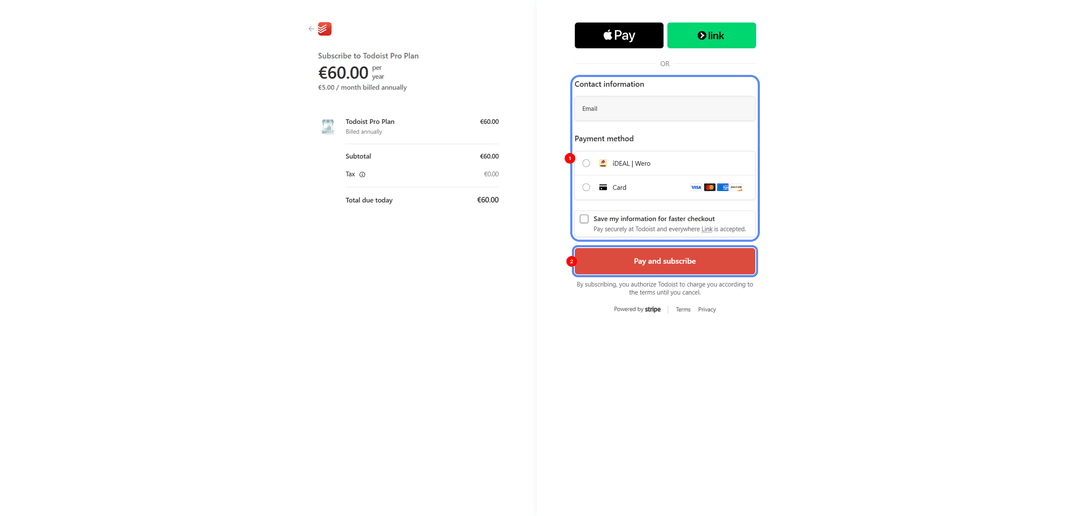
Enter the Mirocard's number, expiration date, and security code under "Card information."
Check the amount due and the billing period at the top of the screen, then click "Pay and subscribe" — access to the tier opens as soon as the payment goes through.
How to avoid losing access to Todoist Pro
Todoist's subscription renews automatically from your linked card every month or year, so you'd only lose Pro access in one case — if a charge fails to go through. Keep enough balance on your Mirocard ahead of time rather than topping it up right on the renewal date — the charge can go through slightly before the expected date.
You can check the next billing date in your Todoist account settings, under the subscription info section — that's also where you'll find the button to turn off auto-renewal if you no longer need the tier. If the subscription doesn't renew, your account isn't deleted and doesn't lose any data — it just drops back to the free Beginner plan with a limit of five projects, and all Pro features come back once you pay again.
Conclusion
The trouble with paying for Todoist comes down to one narrow point — the payment method Stripe will accept — not the service itself or its features. For a crypto holder, and for anyone without an account at an international bank, it comes down to a single tool. A Mirocard virtual card funded with crypto solves it in a matter of minutes, and from there the same card works for any other service — from other planners and AI tools to streaming and cloud storage.