How to Pay for OpenRouter
OpenRouter brings together dozens of language model providers — OpenAI, Anthropic, Google, DeepSeek, and others — under one API. There's no need to set up a separate account and key for every model; one endpoint is enough, and you pick the model you want with a parameter right in the request. Developers get a single balance and a unified view of spending across every model, which makes the service especially handy for anyone comparing models against each other or building a product on top of several providers at once.
The catalog covers hundreds of models across different tiers, from free ones with a daily request limit to top-end paid versions. You don't even need to top up a balance just to try the service — some models are free to use, and OpenRouter gives new accounts a small starting limit for testing.
How the OpenRouter balance works
The balance runs on a pay-as-you-go basis, with no subscription and no fixed monthly fee. You buy credits in dollars ahead of time, and the system charges them based on actual usage — the bill comes from the model's per-token price multiplied by the number of tokens sent and received. The bigger the model and the longer the conversation, the higher the cost, and the exact price per million tokens for each model is shown in the interface before you even send a request.
OpenRouter doesn't mark up the models themselves — according to the service's official FAQ, you pay the same price per token as you would going directly through the model's provider, and the one-time fee only applies when you buy credits, not to individual requests. Credits do expire — the service's rules let OpenRouter clear an unused balance after 365 days from purchase, so stocking up on credits for years ahead isn't worth it. Refunds are only available within 24 hours of payment.
Why a virtual card works well specifically for OpenRouter
Stripe accepts a virtual card with international details the same way it accepts a regular foreign Visa or Mastercard — there's no difference in processing between physical plastic and a digital card. A card like that can be issued online in a few minutes, with no bank visit and no need to open a separate account, which matters a lot for a one-off balance top-up.
The real advantage shows up in the Auto Recharge feature — automatic top-ups that OpenRouter charges to your saved card on its own once the balance drops below a set threshold. That feature only works with a card linked to the account — topping up directly with cryptocurrency doesn't support that kind of automation, so every top-up has to be done manually. A virtual card funded with crypto covers both scenarios at once — crypto turns into card balance, and the card itself works as a regular payment instrument with full support for auto-recharge.
Mirocard as an option for paying OpenRouter
Mirocard issues exactly this kind of card — a virtual Visa or Mastercard funded with cryptocurrency and ready right away for payments through Stripe, including setting up Auto Recharge on OpenRouter. For a crypto holder, it's the most direct way to spend wallet funds on an API balance, skipping a separate cash-out to fiat through an exchange and manually entering USDC for every top-up. A card for paying for subscriptions and services like OpenRouter costs $5 to issue, and topping up the card itself carries a 4% fee.
For anyone looking for an alternative to a personal account with a bank in another country, Mirocard covers the same need without a branch visit or weeks of verification. Getting set up takes a few simple steps and doesn't require any special knowledge. We covered the full process of issuing a Mirocard virtual card in this article.
How to pay for OpenRouter with cryptocurrency using Mirocard
Once the card is ready to top up your balance, here's what the process looks like on OpenRouter's side.
Open your OpenRouter account, go to "Settings," and select the "Credits" tab — this page shows your current balance, with your full top-up history below it.
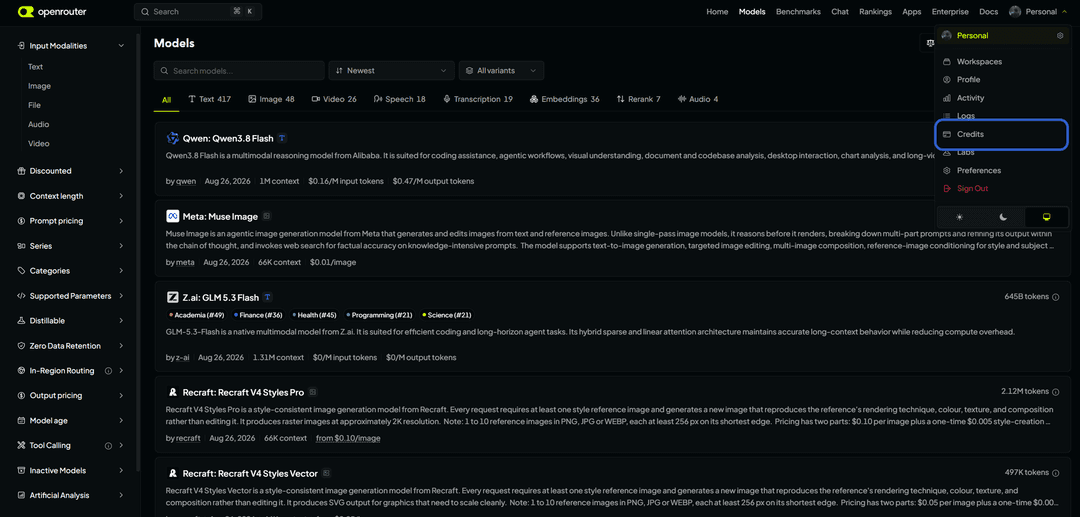
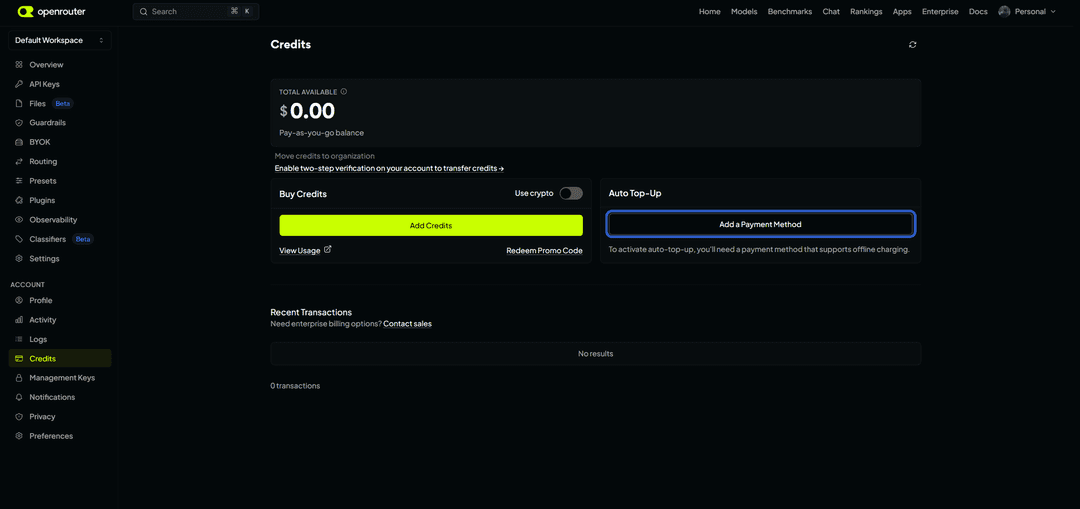
Click "Add a Payment Method" to add our virtual card.
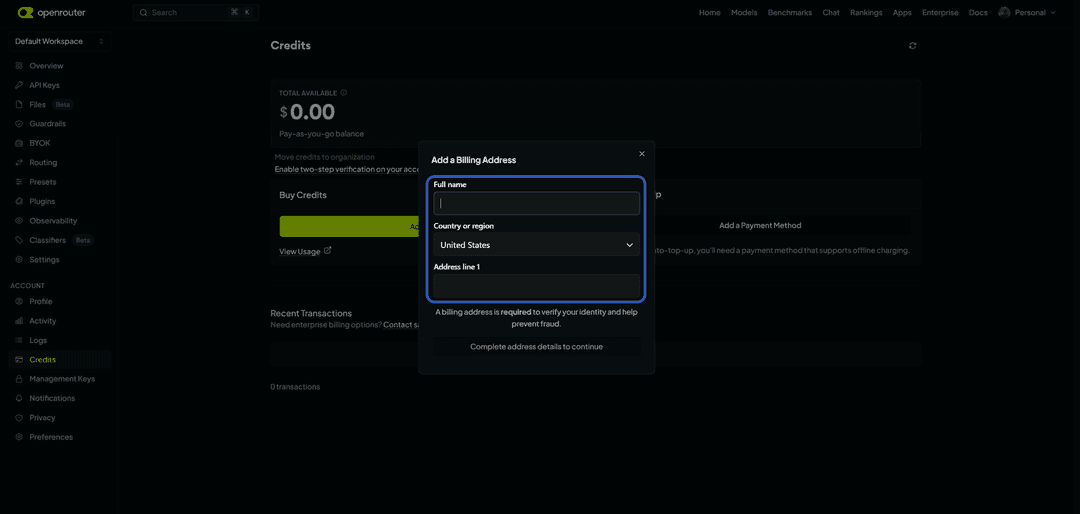
Enter your name, country, and address. Enter a country that matches the Mirocard's BIN.
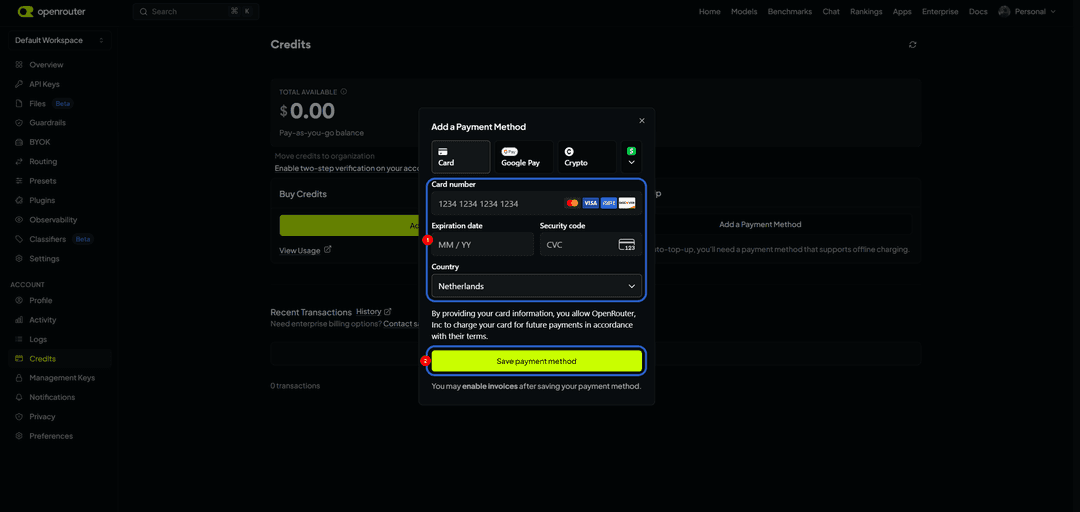
Once the payment goes through, you're free to use the service.
How many credits to buy the first time
Start with a small amount rather than planning months ahead — credits get cleared after 365 days from purchase anyway, and it's hard to predict actual usage from the start. A small top-up, enough for roughly a few days of active work, is enough to see how many tokens a typical request uses and which model is the best price fit for your task.
After the first week of use, it's worth checking the numbers on the "Activity" page — it breaks down spending by model and key separately, and those figures make it far easier to work out a real monthly budget than guessing ahead of time. If your workload stays fairly consistent day to day, it makes sense to turn on auto-recharge with a low threshold — that way the balance never hits zero mid-task, and each charge stays a predictable, controlled amount.
Conclusion
Paying for OpenRouter comes down not to the service itself, but to the payment instrument Stripe will accept — a crypto holder needs a way to turn crypto into a card, and anyone without an international bank account needs a card with international details in the first place. A Mirocard virtual card solves both problems with one instrument, and it also supports automatic balance top-ups, something direct cryptocurrency payment can't do.