How to Book Accommodation on Airbnb with Cryptocurrency
#Payment Instructions
Airbnb is an online platform for renting accommodation from private hosts around the world. Through it, people book apartments, houses, individual rooms, and unusual options like villas or cabins in nature — directly from the owner, without a hotel as an intermediary. For travelers, this is often more affordable than a hotel and more comfortable — with a private kitchen, separate rooms, and a sense of living like a local rather than staying in a hotel room. The service is also valuable for its huge selection — from a budget room to an entire house, for any budget and type of trip.
Not every traveler can book accommodation directly. Some keep their savings in cryptocurrency, which Airbnb doesn't accept. Others have bank cards that don't support international payments. Let's break down both cases and show how to pay for a booking without unnecessary hassle.
What Makes Paying for Airbnb Difficult
Payment difficulties come down to how international payments work, and they look different for different groups of users.
For those who hold funds in cryptocurrency, the key obstacle is that Airbnb doesn't accept crypto. Payments go through bank cards and local payment systems. If your funds are in USDT, BTC, or Ethereum, paying for a booking directly won't work. The crypto first needs to be sold on an exchange, fiat transferred to an account, and only then a card connected. Each link in this chain adds a fee.
There's a second factor too — security checks on the service's side. Accommodation amounts are large and payment is made upfront, so Airbnb carefully verifies card details, the payer's region, and profile history. If something doesn't match up, a booking can fall through even with a perfectly valid card — especially for a new account.
Payment Methods Used for Airbnb
There are several working options, and the right one depends on what funds you have available.
International Bank Cards
A card from a bank in a country where Airbnb operates officially is one of the most common ways to pay for bookings. The platform accepts it as a standard Visa or Mastercard.
For crypto holders there's a limitation here — the card doesn't work with cryptocurrency. To pay with it, crypto assets first need to be exchanged for fiat through an exchange and withdrawn to an account. On top of that, opening an account at a bank in another country usually isn't straightforward — it typically requires being physically present and providing proof of address. For a one-time booking, this route is rarely worth the effort.
Airbnb Gift Cards
In some regions, Airbnb issues gift cards — codes for a set amount that top up an account balance. Bookings are then paid from that balance. This is an alternative option for specific scenarios — for example, when a card is received as a gift or when you'd rather not link bank details.
The downsides are that Airbnb gift cards aren't available in every country and only work for accounts in the corresponding region. Denominations are fixed, and rental costs are often high, so a single gift card may not cover the full amount. For frequent travelers, this option ends up being inconvenient.
Virtual Cards
This is a card that exists only in electronic form — it has details (number, expiry date, CVV) but no physical form. It's a perfect fit for online payments and travel, and for Airbnb there's no difference from a plastic card.
For those whose capital is in crypto, this format is especially convenient. Many services can be topped up directly with digital coins — send crypto to the card, and it's ready to pay for accommodation like a regular Visa. The intermediate steps like selling on an exchange and using a bank account disappear entirely. Issuance happens online and takes just a couple of minutes, which is convenient before a trip.
Why Travelers Choose Virtual Cards
On the road, virtual cards have several strengths, and bypassing payment restrictions is just one of them.
First — fast setup. The card is issued online in minutes, with no bank visit and no waiting for plastic to arrive. It can be prepared the day before departure. Second — the ability to pay for international services. One card covers not just bookings but also taxis, tickets, insurance, and streaming services on the road. Third — support for international online payments. The card works on platforms worldwide that accept Visa and Mastercard.
And separately, on managing money during a trip — spending control. You can set up a card specifically for travel and load it with exactly what's budgeted. All expenses are gathered in one place, and if the card details ever get exposed while paying on an unfamiliar network, it's easy to block and reissue it without touching your main account. This matters especially for bookings, since you're entering your details across many different platforms.
Mirocard for Paying for Airbnb
Mirocard issues virtual cards for paying international platforms and subscriptions. They're built on Visa and Mastercard, the balance is topped up with cryptocurrency, and Airbnb accepts these cards like any other international card.
The service's lineup includes several card types for different purposes. Top-ups are made in crypto — ETH, USDC, USDT, AVAX, BCH, DAI, BNB, BTC, DASH, DOGE, POL, LTC, SOL, TON, TRX, and XMR are available. Funds from an exchange or wallet arrive within minutes and are immediately ready to spend.
One card covers far more than just Airbnb — it works with taxi services, ticket sales, streaming platforms, and online stores. While traveling, this is essentially a single wallet for nearly all expenses, with every payment going directly from the crypto balance.
How to Get a Mirocard
The whole process happens online and usually takes no more than half an hour.
Step 1. Registration
Go to the Mirocard website and click «Get Card».
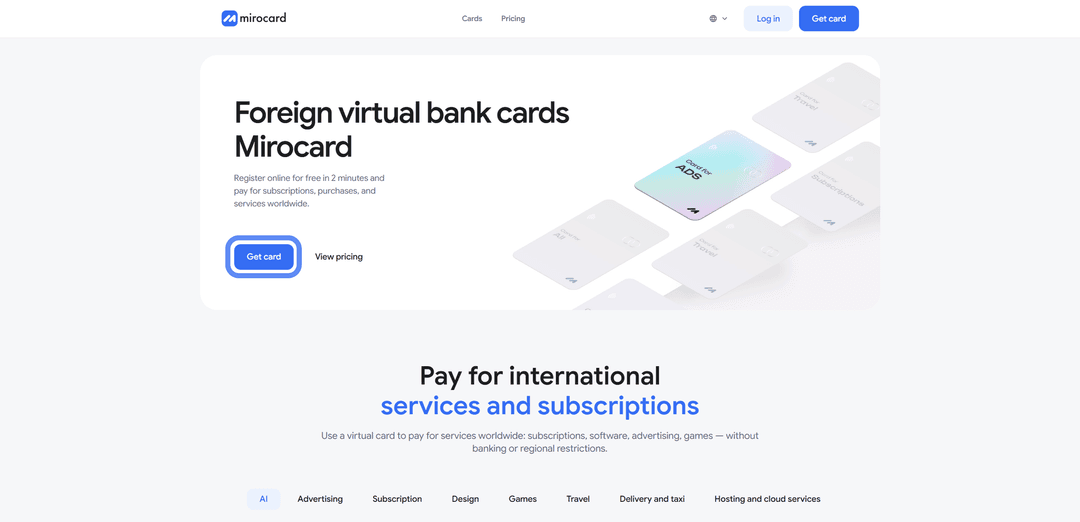
New users need to click «Sign Up» — a working email and password are required, and a confirmation email will be sent.

If you already have a Heleket account, it's easier to sign in through it — your balance and cards will transfer to Mirocard automatically.
Step 2. Top Up Your Master Balance

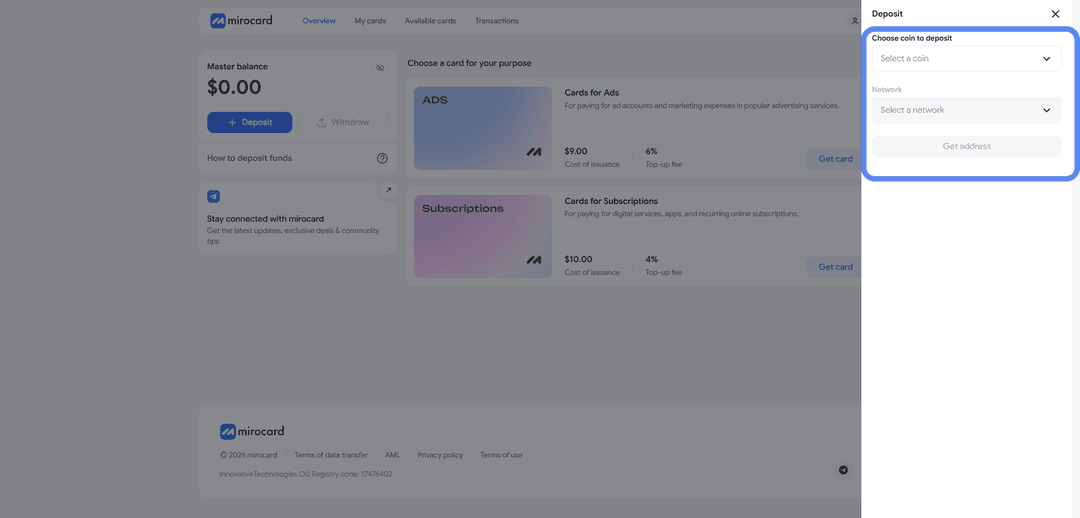
The lowest transfer fee is for USDT on the TRC-20 network. The service will provide a wallet address to which you send crypto from an exchange or external wallet. The balance will be credited once the transaction is confirmed on the blockchain.
Step 3. Select a Card
In the catalog, choose the card type that fits your needs and click «Get Card» on the right side of the block.
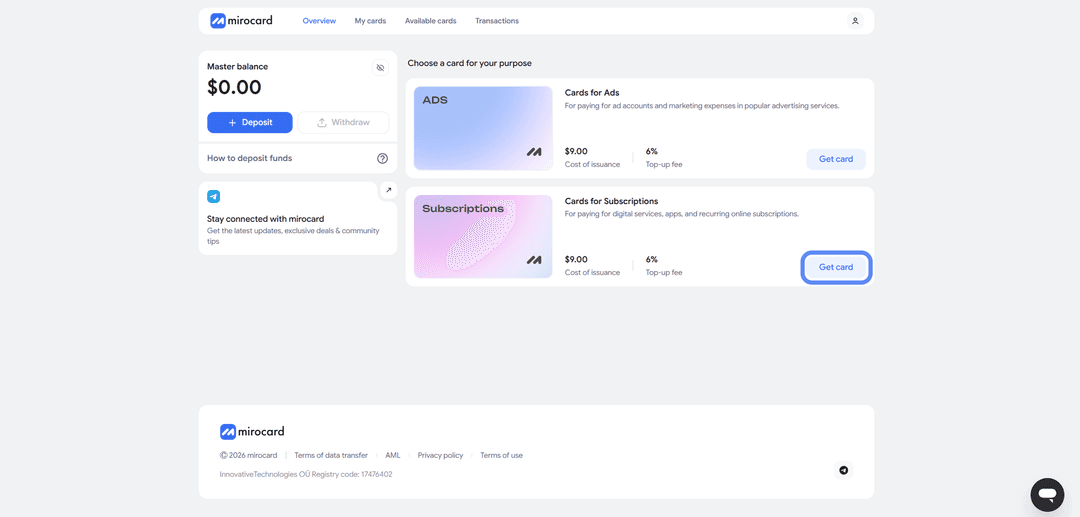
The issuance page will open.
Step 4. Verification
Before issuance, you'll need to upload documents for verification.

This protects your balance — only you will be able to manage it and link new cards. After verification, maximum top-up and spending limits become available.
Step 5. Pay for Issuance
On the issuance page, click «Deposit and Pay».
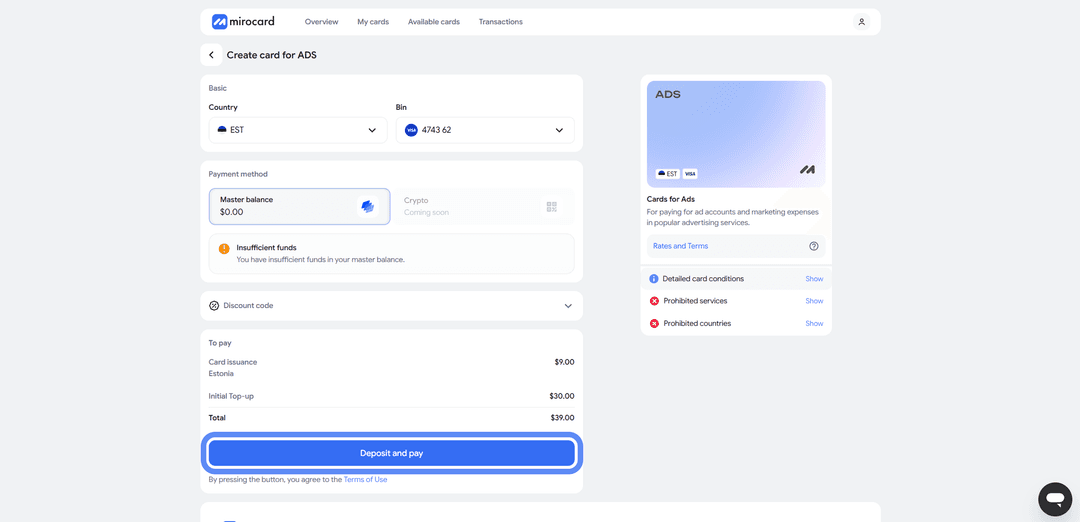
The issuance fee will be deducted from your Master Balance. The remaining amount will go to your card account and be ready for payment.
Step 6. Card Is Ready
The finished card will appear in your dashboard with its details and balance. No separate activation is needed — payments go through immediately after issuance. The dashboard also has transaction history, a top-up button, and a freeze option if you need to temporarily disable the card.
A tip — load the card with a buffer above the cost of the booking. During checkout, Airbnb verifies the card and may briefly hold a slightly larger amount. This is a pre-authorization, and the excess is returned within a few hours. Bookings are often large amounts, so make sure in advance that the card has enough funds with a buffer, or the payment won't go through.
How to Pay for Airbnb via a Mirocard Virtual Card
Paying through Mirocard works the same as paying with any bank card. For Airbnb, it's just a standard international card, and the service processes it no differently.
Step 1. Choose Accommodation
Go to Airbnb.com and find a place that suits you.
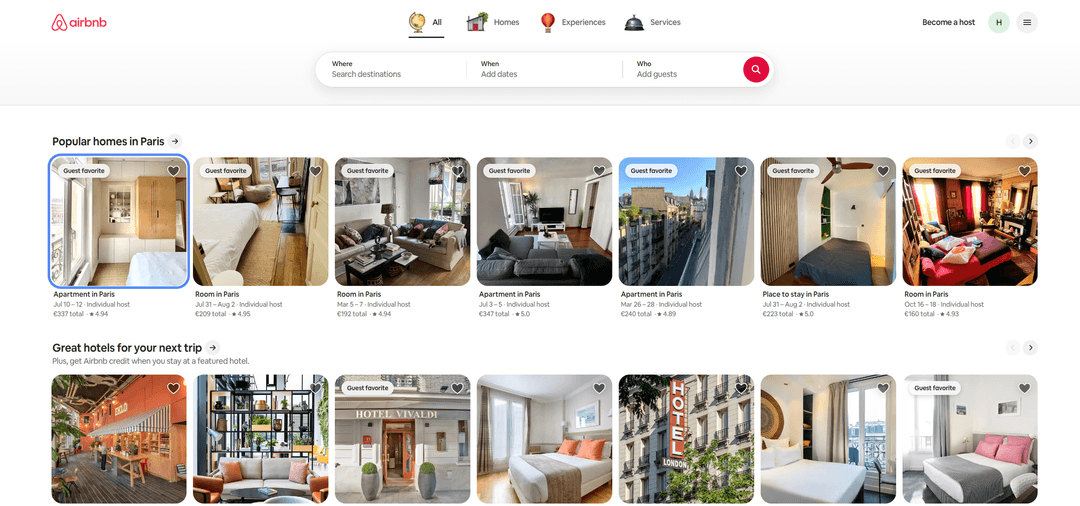
Use filters for dates, price, number of guests, and amenities to narrow your search. Open the listing you like and check the description, photos, and location.
Step 2. Enter the Details
Fill in your check-in and check-out dates, as well as the number of guests. Check the total cost including service and cleaning fees. Then click «Pay now» to proceed to checkout.
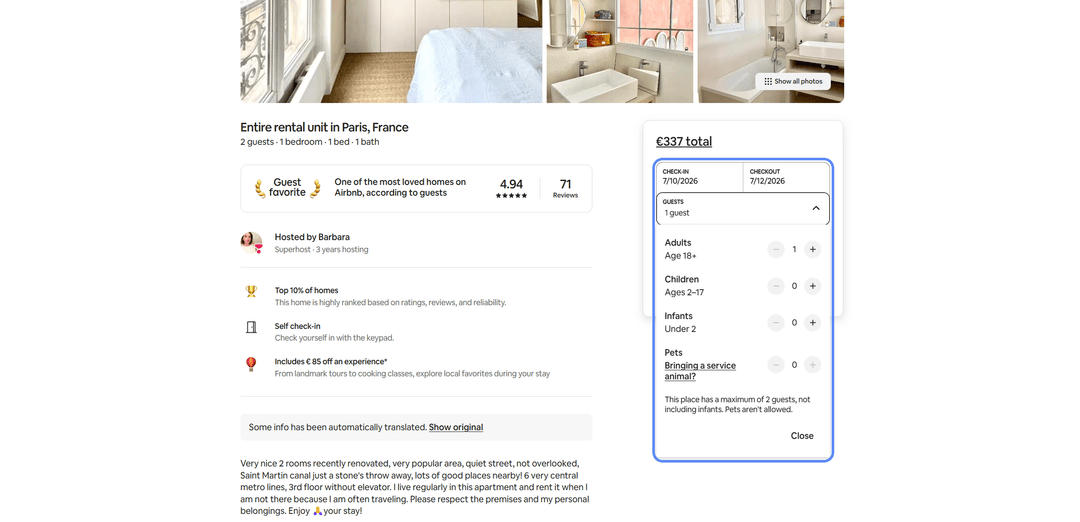
Step 3. Reserve a hotel
On the listing page, click the «Book now» or «Reserve» button.
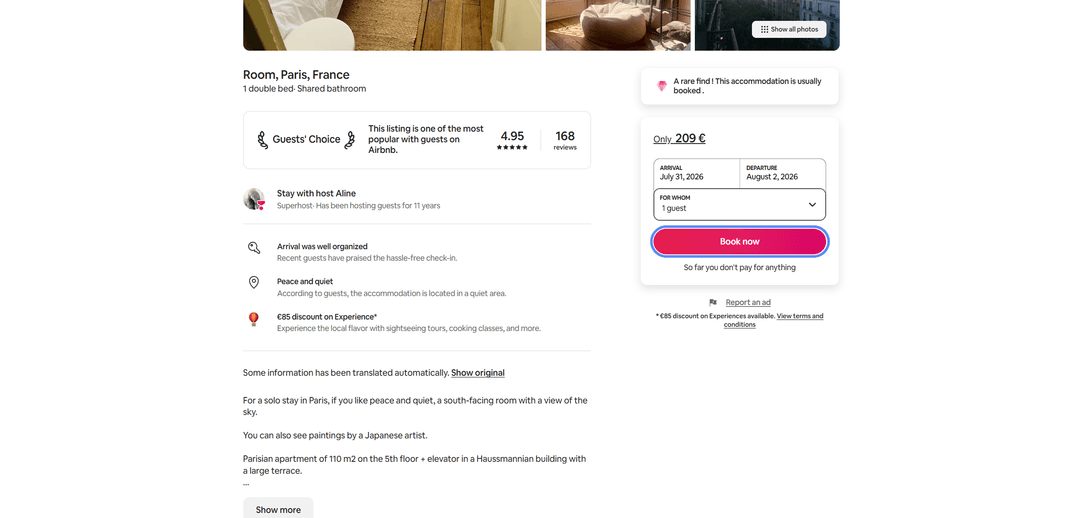
This takes you to the booking process — at this stage no money has been charged yet.
Step 4. Enter Card Details
Fill in the payment form with your Mirocard virtual card details — card number, expiry date, CVV, and cardholder name.
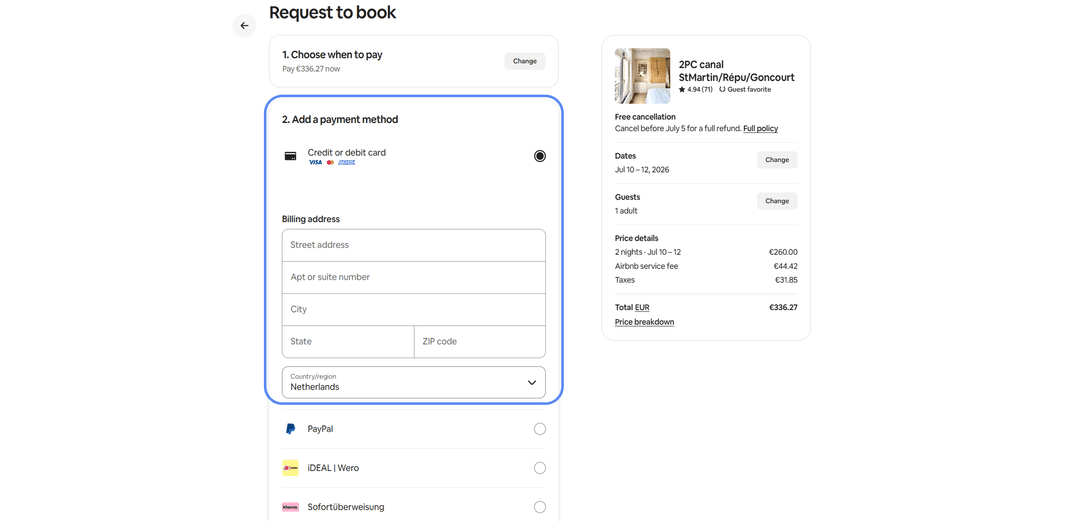
All details are available in your Mirocard dashboard. If Airbnb asks for a billing address, enter a real address that matches the card's country.
Step 5. Confirm the Booking
Fill in and review the booking details, then confirm payment. Airbnb will process the payment and send confirmation to your email. Depending on the host's terms, the charge happens immediately or part of the amount is charged later — this is shown during checkout.
If the Payment Fails
Check the card balance accounting for the pre-authorization — a booking requires the full amount with a buffer. Make sure the details are entered correctly, especially the CVV. If everything looks right but the payment is still declined, check that your account region matches the card's address, then try again after a few minutes.
What to Check Before Booking
Before paying, it's worth checking a few things — this will help avoid unnecessary costs and unpleasant surprises.
Cancellation policy. Every listing has its own terms — from flexible ones, where the money is returned almost in full, to strict ones, with almost no refund. If your plans might change, choose flexible terms. The policy is visible on the listing page before payment.
Reviews of the property. Check the comments from people who've stayed there before — they'll tell you more honestly about cleanliness, the neighborhood, and the host than any description. Look not just at the average rating but at the actual text of the reviews. If a listing has no reviews at all, that's not a dealbreaker, but it's worth a closer look.
Total cost including fees. The price per night isn't the full amount. On top of it, Airbnb adds its own service fee, a cleaning fee, and sometimes a tax. To understand the real cost of the trip, go by the final amount shown at checkout rather than the price on the listing card.
Payment method requirements. Check in advance that the card is suitable for payment and has a balance with a buffer for the pre-authorization. It's better to do this before finding the perfect listing — otherwise, while you're sorting out payment, the place could go to another guest.
Conclusion
There are several ways to book accommodation on Airbnb. International bank cards go through without issues, but obtaining them is a hassle, and they don't work for paying with crypto. Gift cards are tied to a region and don't always cover a large booking. Virtual cards strike a balance in speed, cost, and crypto compatibility.
Mirocard in this setup works like a regular Visa but is topped up with cryptocurrency. Set it up once and pay for bookings directly from your crypto wallet, without cashing out through exchanges. The same card comes in handy for other travel expenses — taxis, tickets, streaming services.
For cryptocurrency holders, this is a short path from crypto assets to paying for accommodation. And for those who can't access standard international cards, a virtual card remains a practical way to book accommodation on Airbnb in any country.