How to pay for Vercel with cryptocurrency
Vercel is a cloud platform for publishing websites and web applications. You connect a code repository, and after every change the platform builds the project and puts it online by itself. The company also develops the Next.js framework, so projects built with it are most often published here, but the platform works with other frameworks and plain static sites too.
You can start for free on the Hobby plan. You have to pay when a project outgrows personal use. You need teamwork, more resources, or protection from traffic spikes, and that's when you switch to the Pro plan.
We'll explain what makes up a Vercel Pro bill, which cards the platform accepts, how to pay for the subscription, and what to do so that renewal doesn't fail.
How much Vercel Pro costs and what you are charged for
The base price of Pro is $20 a month. It includes one seat for a developer who can deploy projects. Each additional seat with deploy rights costs another $20 a month. Viewers, meaning people who only look at analytics, comment on preview versions, and don't change settings, are free, and their number is unlimited.
Along with the plan, you get a usage credit of $20 a month. It covers spending on traffic, compute, and other platform services. In addition, 1 TB of fast data transfer and 10 million Edge Requests are included per month. Unused balance doesn't carry over; at the start of a new month, the credit and quotas are refreshed.
When the credit runs out, the platform switches the team to pay-as-you-go billing. A warning arrives when 75% of the credit has been used, and after you exceed it, Vercel sends daily and weekly summaries. For new teams, a notification at $200 per period is on by default, and you can change this threshold.
The final amount depends on four things.
Number of seats. Each developer with deploy rights adds $20.
Resource usage above the credit. The more traffic and compute, the bigger the extra charge.
Paid add-ons. Observability Plus and Web Analytics Plus cost $10 a month each, and Speed Insights costs $10 a month per project. Enterprise options cost more; for example, SAML SSO will cost $300 a month.
Taxes. Prices on the website are in dollars and exclude taxes. Tax is calculated from the billing address and added to the invoice if the law requires it.
For example, a team of three developers will pay $60 for seats, and the usage that the credit didn't cover will be added to that amount.
Which payment methods Vercel supports
Pro is paid for only by bank card. According to Vercel's help center, American Express, China UnionPay, Discover and Diners, JCB, Mastercard, and Visa are accepted. On the payment page, besides the "Card" tab, "Google Pay" may appear.
Not all cards will work. The help center says that gift and prepaid cards, as well as some virtual ones, are considered invalid methods. So it's better to leave yourself extra time for the first payment.
You can pay in any currency, as long as your bank allows a charge in dollars after conversion. There's no annual billing on Pro, only monthly. Annual payment is available on the Enterprise plan.
Money is charged at the start of each billing period. The invoice includes seats and add-ons for the next period, as well as the usage accumulated in the previous one. If accumulated usage exceeds the threshold, Vercel may issue an interim invoice without waiting for the end of the period.
Can you pay for Vercel with cryptocurrency
No. Vercel accepts only bank cards, and cryptocurrency isn't among the payment methods. You can't link a wallet or an exchange to your account.
The platform doesn't let you postpone a payment or get a grace period. The money is needed at the moment the invoice is issued, and if the payment fails, some features are switched off, which we'll cover below.
How to pay for Vercel with cryptocurrency via a virtual card
The scheme is simple. You send coins to the balance of a virtual card service, top up the card from there, and enter its details on the Vercel payment page. For the platform, it's an ordinary card, and the source of the money is unknown to it.
Calculate the amount with a margin. It includes the plan price, extra seats, and the top-up fee. If the team already works on the platform, add the expected extra charge for resources, since it will be charged with the next invoice.
For topping up, choose stablecoins such as USDT or USDC. Their rate is pegged to the dollar, and the plan is priced in dollars, so the amount on the card won't drift while the transfer is in progress.
Because of the restriction on some virtual cards, Vercel may decline a payment. If that happens, don't retry many times. Check the balance, the correctness of the details, and the 3-D Secure confirmation.
How to pay for Vercel with a Mirocard virtual card
A Vercel bill has two parts, a fixed one for seats and add-ons and a variable one for the resources you used in the previous period. Because of the second part, the amount differs every month, and a card with a reserve on the balance protects you from a declined payment. Mirocard issues virtual Visa and Mastercard cards online, without a visit to a bank.
Mirocard is topped up with cryptocurrency; BTC, ETH, USDT, USDC, TON, TRX, and SOL are supported. Coins are credited to your account balance, and then you transfer the amount you need to the card.
The subscriptions card suits Vercel. Issuance costs from $5, and the top-up fee is from 4%. It's designed for recurring charges, which means it's suitable for monthly renewal. If the team runs ads for its project, there's a separate advertising card from $5, and for travel there's a card from $15 with Apple Pay and Google Pay.
We covered card issuance in the Mirocard guide. After that, payment takes a few minutes.
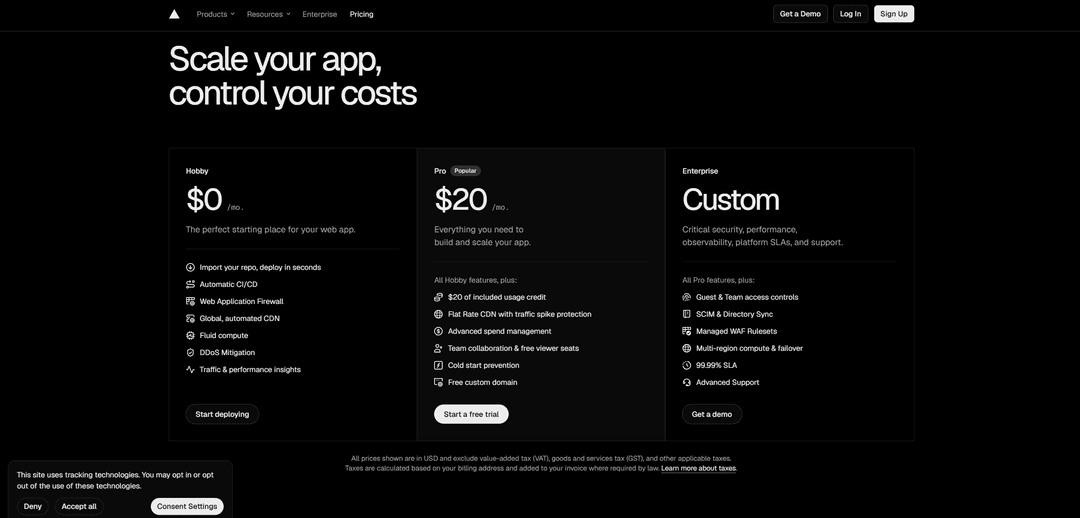
Open the Vercel pricing page and sign in to your account or create a new one by clicking "Sign Up". In the Pro column, choose "Start a free trial". If a team has already been created, switch to the paid plan in the billing settings.
In the payment window, on the left you'll see the list of the plan's features, for example "Flat Rate CDN", "Free domain", and "Free Viewer seats". On the right, switch to the "Card" tab if it isn't selected.
Enter the details from your Mirocard account. Paste the card number into the "Card Number" field, the expiration date into "Expiration Date", and the code into "Security Code". In the "Full Name" field, enter your first and last name in Latin letters. Then choose the country in "Country" and enter the street in "Street Address". If Mirocard shows a billing address for the card, use it. Fill in the "Tax ID (Optional)" field only if you're paying for the subscription as a company.
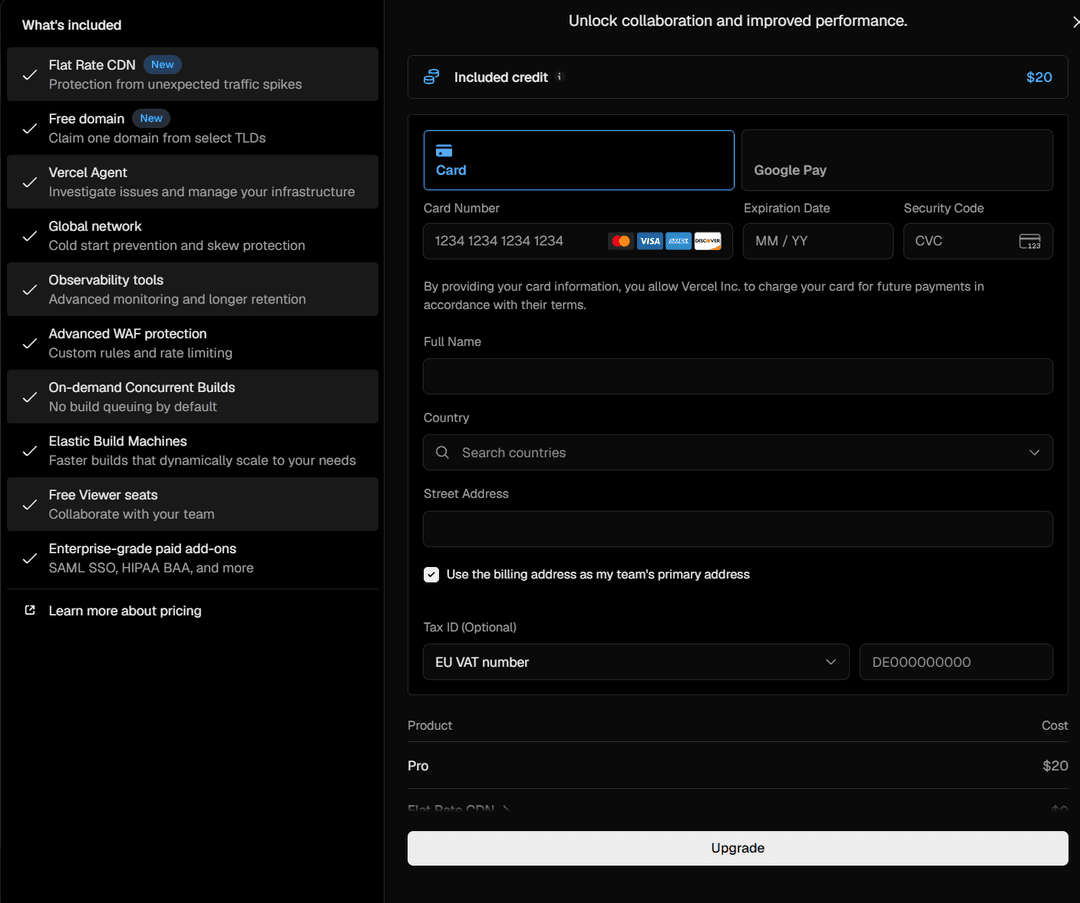
Leave the "Use the billing address as my team's primary address" box ticked if this address also works as the team's address. At the bottom of the window, check that the "Pro" line shows $20, and click "Upgrade".
How to set up automatic renewal on Vercel
There's no separate auto-renewal button on Vercel. The subscription renews on its own as long as a working card is linked to the account. The payment window says so directly. By entering the details, you authorize Vercel Inc. to charge the card for future payments.
Every month, the platform charges payment at the start of the new billing period. The date is determined by the day the account was created, or the day the trial ended, and it can't be changed. After the charge, a receipt arrives at the email of the team's first owner, and all invoices are in the "Invoices" section in the team settings.
To make renewal go through without failures, do a few things.
Keep a reserve on the card. You need money for the plan price, extra seats, usage above the credit, and the top-up fee. With a 4% fee, a $20 payment will cost about $20.80.
Top up the card in advance, not on the day of the charge.
Coins are credited after confirmation on the network, so send them a day or two before the charge.
Watch the usage thresholds. In the team settings you can set notifications and automatic actions for when a certain amount is reached, and then the bill won't be a surprise.
Change cards in the right order. First click "Add new card" in the "Billing" section, and only then remove the old one. If no card is left, the payment won't go through.
Remember what happens with a late payment. While an invoice is unpaid, you can't create new projects, add members, or redeploy existing ones. If the renewal isn't paid within 14 days, all deployments on the account are suspended. For the first payment of a new plan, the deadline is even shorter, 24 hours. A paid invoice can't be paid again with another card, so before paying, make sure the right one is selected.
If you're trying out the platform, start with the Pro trial. It lasts 14 days, and no card is needed at that point. If you don't add one, the account returns to the Hobby plan at the end of the trial with no charges. To stay on Pro, add a card before the trial ends. The trial is given once per account.
Conclusion
A Vercel Pro bill is made up of team seats, resource usage, and add-ons, and the second part raises the most questions because it changes from month to month. Usage notifications and a reserve on the card help keep it under control.
Before your first payment, check that the card is accepted and that the balance has enough money with the fee taken into account. Use the trial first, then sign up for the subscription, and the platform will renew without interrupting your deployments.