How to Pay for a Tinder Subscription with Cryptocurrency
Tinder is a dating app in which users browse other people's profiles and swipe to like them. If the likes are mutual, a match appears, and you can start chatting. Tinder works on a phone and in a browser and belongs to Match Group, which also owns other dating services.
You can use Tinder for free, but with limitations. Paid subscriptions lift them and add features that help you get more attention and save time. They're set up on the website or through an app store and renew automatically.
We'll explain how Tinder's subscriptions differ, how to pay for them, and what to do if a payment doesn't go through.
Which paid subscriptions Tinder has and how they differ
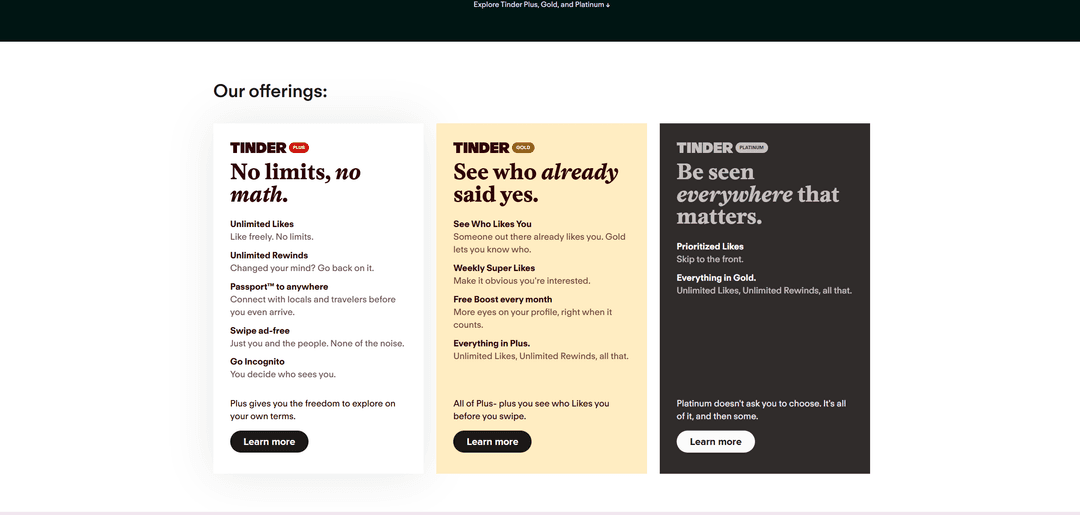
There are three subscriptions, and each next one includes the features of the previous one. You should choose based on which feature you really need.
Tinder Plus removes the basic limitations. It has unlimited likes, unlimited Rewinds, meaning the ability to bring back a profile you swiped by accident, and Passport mode, which lets you meet locals and travelers even before you arrive in another city. In addition, Plus has no ads, and Go Incognito mode lets you decide who sees your profile. This subscription suits those who use Tinder a lot and don't want to run into limits.
Tinder Gold adds the ability to see who has already liked you, before you make your choice. It also has weekly Super Likes, which show that you're interested in someone, and a free Boost every month, meaning a temporary increase in your profile's visibility. Gold saves time, since you immediately know who likes you.
Tinder Platinum includes everything from Gold and puts your likes at the front of the queue, so the person will see them before the rest. This subscription is for when you want to be the most noticeable.
Super Likes and Boosts can also be bought separately, without a subscription. For a one-off goal, such as standing out on a weekend, it may cost less than a subscription.
Does Tinder accept payment in cryptocurrency
No. According to Tinder's help center, the website accepts Visa, Mastercard, and American Express bank cards, and American Express isn't available in all countries. In some regions there's also PayPal. Cryptocurrency isn't among the payment methods.
The subscription also renews automatically. For that, Tinder needs to be able to charge the money itself, and a one-off cryptocurrency transfer doesn't fit.
Ways to pay for Tinder with cryptocurrency
There's one practical route, a virtual card topped up with cryptocurrency. For Tinder it's an ordinary Visa or Mastercard, so you won't need American Express.
You send coins to a card service, top up the card, and enter it when subscribing on the Tinder website. If you can't pay on the website, you can link the card to your Apple ID or Google account and buy the subscription through an app store.
Keep in mind where you pay. You need to cancel the subscription in the same place where you set it up, meaning in Tinder, in Apple, or in Google. So it's better to choose one method right away and remember it.
To top up the card, use stablecoins, such as USDT or USDC, so the amount doesn't change with the exchange rate. Funds are credited after network confirmation, so top up the card in advance, not on the renewal day. Check the transfer network too, since coins sent over an unsupported network can disappear.
How to pay for Tinder with a Mirocard virtual card
A bank card statement shows that the payment went to Tinder. If you want to keep such spending separate from your main expenses, a separate virtual card is convenient for it. Mirocard issues it online as a Visa or Mastercard, and Tinder accepts it as an ordinary card.
Mirocard is topped up with cryptocurrency; BTC, ETH, USDT, USDC, TON, TRX, and SOL are supported. Coins arrive on your account balance, and from there you transfer the subscription amount to the card.
For Tinder, the subscriptions card is the right fit. Issuance costs from $5, and top-ups from 4%. Since Tinder usually doesn't refund money for an unused term, top up the card only with the amount for the nearest subscription.
We covered card issuance in the Mirocard guide. After that, signing up for the subscription takes a few minutes.
Open the Tinder subscriptions page. In the "Our offerings" block, choose the subscription you want, Plus, Gold, or Platinum, and click "Learn more" under it.
Then choose a term and sign in to your Tinder account. On the payment screen, enter the card details from your Mirocard account dashboard, meaning the number, expiration date, security code, and cardholder's name. Check the final amount and confirm the purchase.
If card payment isn't available on the website, it's not an error. According to Tinder, web payment and Apple Pay are being rolled out only in certain markets. In that case, link the Mirocard card to your Apple ID or Google account and subscribe in the app.
After the purchase, look into the "Manage Payment Account" section in your profile. It shows the subscription, and if necessary you can cancel it with the "Cancel Subscription" button. An order number that starts with TNDR means you paid by card on the Tinder website or in the Android app.
What to do if a Tinder payment doesn't go through
Check where you're paying. If payment on the website isn't available for your region, the payment won't go through. Subscribe through an app store by linking the card to your Apple ID or Google account.
Check the card type. On the website, Tinder accepts Visa, Mastercard, and American Express, but American Express isn't available everywhere. For a Mirocard virtual card this isn't a problem, since it works as a Visa or Mastercard.
Verify the amount. The final price on the payment screen may differ from the price on the subscriptions page because of tax, and after the top-up fee, exactly the final amount must remain on the card.
Double-check the card details. A mistake in the number, expiration date, or code leads to a decline. It's safer to copy the details from your account dashboard than to type them by hand.
Don't click pay many times in a row. A series of declined attempts may alert the anti-fraud system, and payments from the card will be temporarily blocked.
If the money was charged but the features didn't appear, close and reopen the app and look into "Manage Payment Account". If the subscription isn't visible there, write to support through the Help Center on the Tinder website and attach the receipt.
If the subscription didn't suit you, mind the deadlines. Tinder accepts refund requests only within 14 days of payment and mainly for purchases made directly by card or PayPal. Money for purchases through Apple and Google is returned through those platforms.
Conclusion
A paid Tinder subscription solves specific tasks, whether it's unlimited likes, profile visibility, or the ability to find out who already likes you. Choose a subscription for one of them rather than taking the most expensive one.
Pay where you can later manage the subscription, meaning on the website or in an app store. Then you can cancel and request a refund in time.