LinkedIn is the largest social network for professional networking. In your profile, you gather your résumé, experience, and skills, and then look for work, get to know colleagues, follow companies, and message specialists directly. Employers and recruiters use LinkedIn to find candidates.
A basic account is free and works for business networking and simple job searching. The paid Premium subscription adds tools for a specific goal, from job hunting to sales and hiring.
We'll explain what Premium gives you, how to pay for it, and how not to pay for a subscription longer than you need it.
What a LinkedIn Premium subscription gives you
Premium works as an add-on to a free account. You still search for jobs and apply through "Easy Apply" where it's enabled, find colleagues and classmates, and ask for recommendations. The subscription adds what the free version doesn't have.
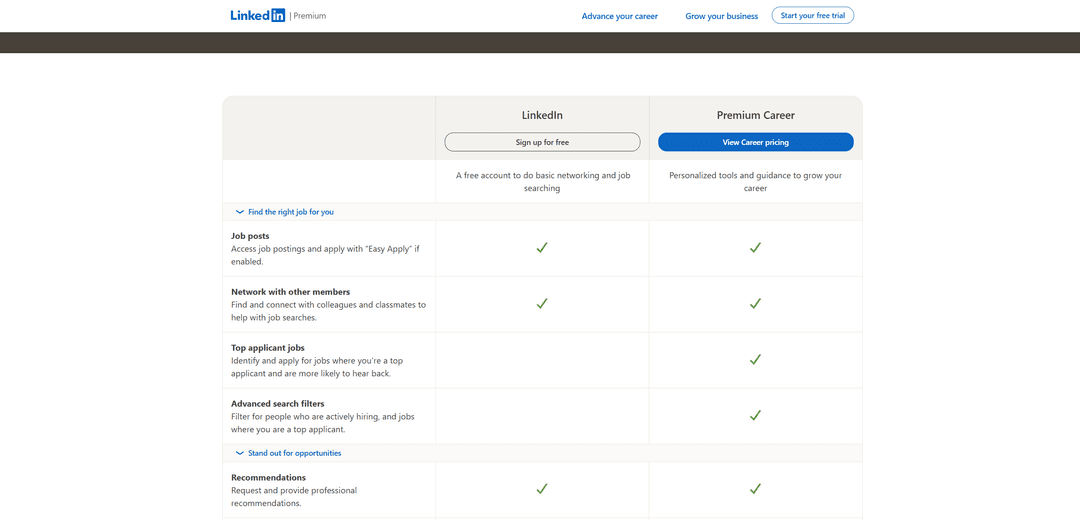
The plan comparison page shows what sets Premium Career apart. It highlights jobs where you're among the top candidates and helps you apply where you have a better chance of getting a response. It also has advanced filters. You can select people who are hiring right now and the jobs that fit you best.
For other goals, there are other plans. Premium Business is for those who grow their own business or consult, Sales Navigator helps find B2B clients, and Recruiter Lite helps hire people. For small companies, LinkedIn offers Premium All-in-One, which combines finding clients, promotion, and hiring. The business, sales, and hiring plans include InMail, meaning messages to people outside your network of contacts.
Premium is for active job seekers and those who constantly meet new people for work. If you look into LinkedIn once a month, a free account is enough.
Can you pay for LinkedIn Premium directly with cryptocurrency
No. LinkedIn accepts bank cards and, depending on the region, also PayPal, Apple Pay, and other methods. Cryptocurrency isn't among them.
For a subscription, this is especially important. Premium renews automatically, and the free trial month begins only after you link a payment method. LinkedIn must be able to charge the money itself, and a one-off cryptocurrency transfer doesn't fit that.
How to use cryptocurrency to pay for LinkedIn Premium
Before paying, turn coins into a payment method that LinkedIn understands. A virtual card topped up with cryptocurrency works for that. LinkedIn sees an ordinary Visa or Mastercard and doesn't know where the money on it came from.
The procedure is simple. You send coins to a card service, top up the card, and link it when you sign up for the subscription. Later, you can change the payment method in the "Manage Payment Methods" section in your Premium subscription settings.
So that the amount doesn't change with the exchange rate, top up the card with stablecoins USDT or USDC. Funds are credited after network confirmation, so do it before the trial period ends, not on the day of the first charge. Check the transfer network too, since coins sent over an unsupported network can disappear.
How to pay for LinkedIn Premium with Mirocard
To start the Premium trial month, you first need to link a card, and if you don't cancel the subscription in time, the money will be charged automatically. For such a case, a separate virtual card holding only the amount you need is convenient. Mirocard issues it online as a Visa or Mastercard, and LinkedIn accepts it as an ordinary bank card.
Mirocard is topped up with cryptocurrency; BTC, ETH, USDT, USDC, TON, TRX, and SOL are supported. Coins arrive on your account balance, and from there you transfer the subscription amount to the card.
The subscriptions card suits LinkedIn. Issuance costs from $5, and top-ups from 4%. Don't top it up several months ahead at once. Keep on the card the amount for the nearest charge, and increase it only once you've decided you need the subscription.
We covered card issuance in the Mirocard guide. After that, signing up for the subscription takes a few minutes.
Open the plan comparison page. In the table, free LinkedIn is on the left and Premium Career on the right. Click "View Career pricing". If you want a trial subscription, use the "Start your free trial" button in the top right corner.
Choose a plan and billing period, then sign in to your account or create one via "Sign up for free". On the payment screen, enter the card details from your Mirocard account dashboard, meaning the number, expiration date, security code, and cardholder's name, and then the billing address. Check the final amount and confirm the subscription.
After signing up, you can check or replace the saved card in your Premium subscription settings, in the "Manage Payment Methods" section.
How to choose a LinkedIn Premium plan and keep spending under control
Choose a plan by goal, not by price. For job hunting, Career is the right fit; for growing your own business and consulting, Business; for finding clients, Sales Navigator; for hiring, Recruiter Lite. If you need to find clients, promote the company, and hire all at once, look at All-in-One. Paying for a hiring plan when you're looking for a job is pointless.
Start with the trial month. It requires a card, and when the term ends, the subscription renews automatically, so set a reminder in advance. If Premium didn't suit you, cancel it via "Cancel free trial" or "Cancel subscription" before the trial period ends. According to reviews, each type of subscription can be tried for free once per account, so choose a plan carefully.
Know about refunds. Under LinkedIn's rules, a subscription can be refunded within seven days of the charge if you haven't used Premium's features. So after the first payment, check whether you need the subscription without using its features.
Subscribe on the website, not through an iPhone. LinkedIn explicitly warns that it can't change the payment method or refund money for subscriptions bought through Apple.
Compare monthly and annual billing. Annual billing is usually cheaper than monthly, but it's charged as a single sum. For a job search that takes one or two months, it's more sensible to pay monthly.
Look at the final amount on the payment page. Premium prices depend on the region and change, so go by the total line, not the figures from reviews. Build in the card top-up fee too. At 4%, to end up with $100 on the card, you need to top it up by about $104.
Conclusion
LinkedIn Premium makes sense when you have a specific goal, whether it's a new job, clients, or hiring. Then the subscription becomes a tool rather than yet another monthly payment.
First try the trial month and decide right away how you'll evaluate the result. If Premium didn't help during that time, cancel the subscription before the trial ends and return to a free account.