How to Pay for Telegram Premium with Cryptocurrency
What a Telegram Premium subscription gives you
The most notable features are as follows.
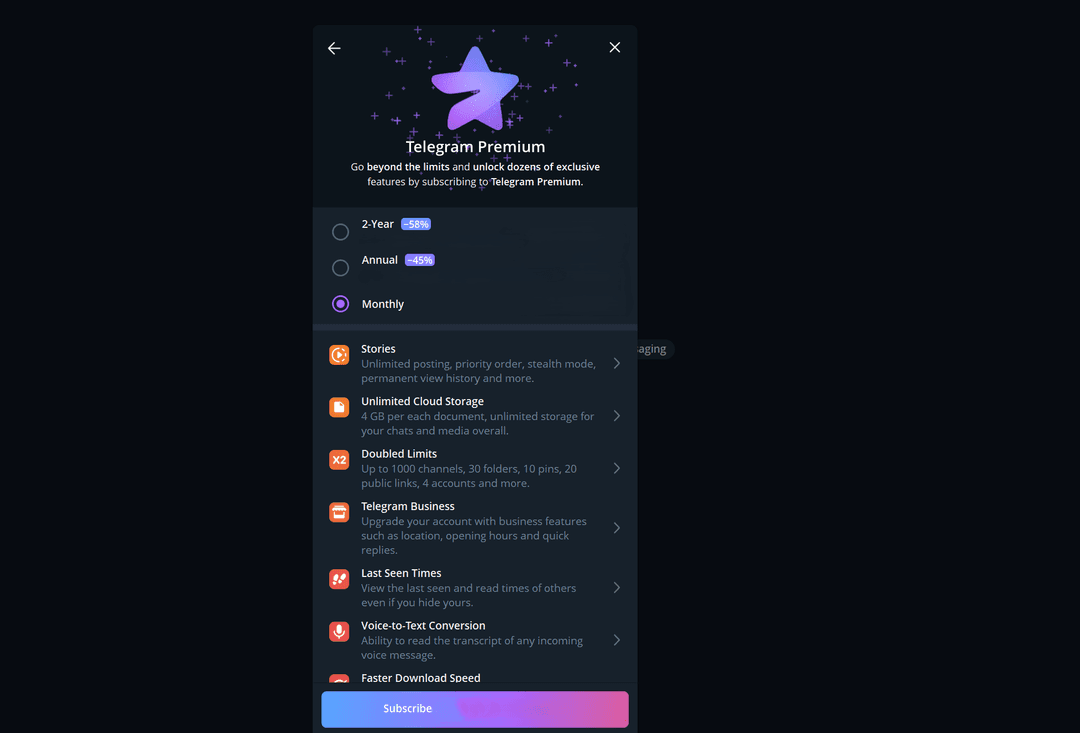
Unlimited cloud. The size of a single file grows to 4 GB, and the total volume of chats and media is unlimited.
Doubled limits. You can subscribe to up to 1,000 channels, create 30 chat folders, pin 10 chats, get 20 public links, and connect 4 accounts.
Telegram Business. Your profile gets features for a small business, such as an address, business hours, and quick replies.
Voice message transcription. Any incoming voice message can be read as text.
Who might find Telegram Premium useful
For subscribers to many channels and chats, the doubled limits will come in handy. For working with large files, such as videos or archives, the 4 GB per document limit and fast downloads are useful. For those who receive a lot of voice messages, transcription into text will help.
If you use Telegram only for chatting with friends, the free version is usually enough.
Can you pay for Telegram Premium with cryptocurrency
First, only TON is accepted. If you hold BTC, ETH, or USDT, you first have to exchange them for TON, and the exchange adds costs. Second, a subscription on Fragment is sold for a fixed term, three, six, or twelve months, and the system treats it as a gift even if you buy it for yourself. Such a subscription has no automatic renewal, and you need to buy it again. Third, the price in TON changes with the exchange rate, and the network charges its own fee for the transfer.
If you want to pay without exchanging your coins for TON, or you need a subscription with automatic renewal, a virtual card topped up with cryptocurrency is more convenient. For Telegram, it works like an ordinary bank card.
How to pay for Telegram Premium with Mirocard
Mirocard is topped up with cryptocurrency; BTC, ETH, USDT, USDC, TON, TRX, and SOL are supported. Coins arrive on your account balance, and from there you transfer the subscription amount to the card.
For Telegram, the subscriptions card is the right fit. Issuance costs from $5, and top-ups from 4%. If you have several Telegram accounts, pay through the bot, because in app stores a purchased subscription may end up on a different account.
We covered card issuance in the Mirocard guide. After that, signing up for the subscription takes a few minutes.
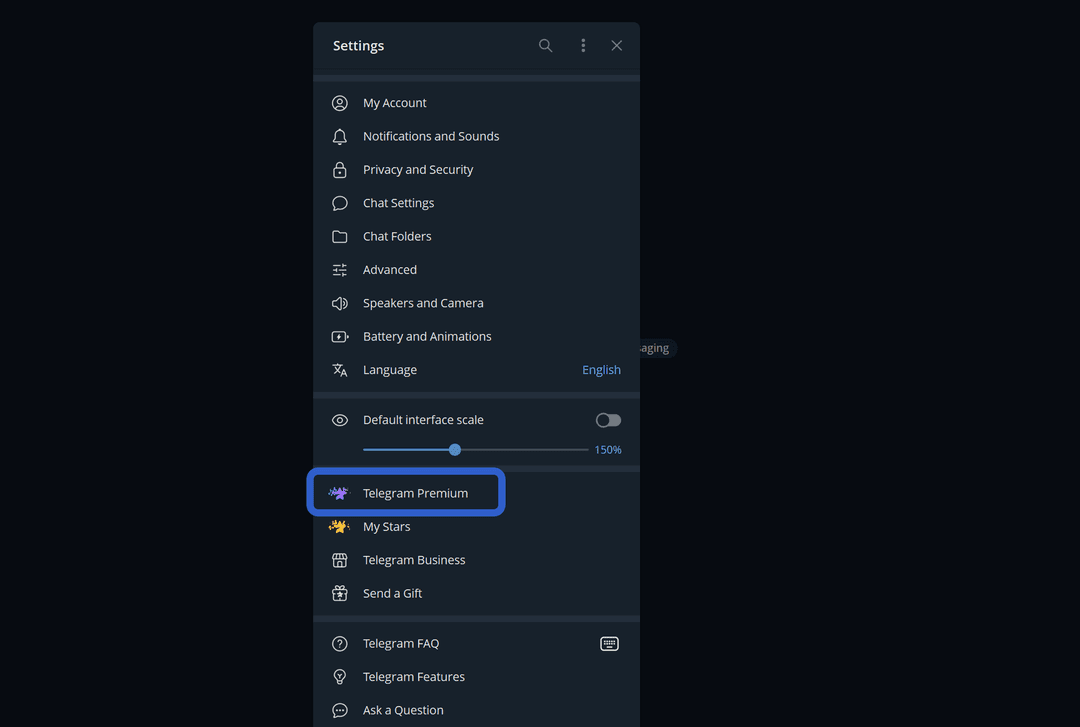
Choose the billing period, "Monthly", "Annual", or "2-Year", and click "Subscribe".
If payment through the bot isn't available after clicking "Subscribe", check the app version. The bot works in Telegram versions downloaded from the Telegram website, for desktop, macOS, and Android. In versions from the App Store and Google Play, this payment isn't available, so use Telegram Desktop or the web version.
How much Telegram Premium costs and how to choose a payment method
The bot usually works out cheapest. In app stores, the Apple or Google commission is added to the price, while the bot has none. The difference is visible if you compare the amount in the app's settings and in the bot's window.
The subscription is paid in TON, and its price in dollars changes with the exchange rate. The network fee for the transfer is added to it, and when exchanging other coins for TON, the exchange fee as well.
Account for the card top-up costs. A 4% top-up fee means that to have $10 on the card, you need to top it up by about $10.40.
You need to manage the subscription where you set it up. A subscription from the App Store or Google Play is turned off in the store, and a subscription from the bot, according to help materials, can be turned off with the "/stop" command. Remember your payment method right away, otherwise canceling later will require some searching.
What to do if you can't pay for Telegram Premium
Read the error message. If the app says the feature isn't available in your version, it was downloaded from an app store. Open Telegram Desktop or the web version and pay through the bot.
If an "unknown error" appears when paying by card, wait a bit or try another payment method. Such a failure is often temporary.
Check the money on the card. The amount in the payment window may differ from the price in settings, and after the top-up fee, exactly the final amount must remain on the card.
Double-check the card details. A mistake in the number, expiration date, or code leads to a decline. It's safer to copy the details from your account dashboard than to type them by hand.
If you're trying to buy a second subscription for another account through an app store, the payment may fail. For several accounts, pay through the bot.
Don't try to pay many times in a row. A series of declined payments may alert the anti-fraud system, and the card will be temporarily blocked.
Conclusion
Before paying, decide which period you need and divide the amount by the number of months. That way you'll see whether a long subscription pays off for you specifically.