How to Pay for Miro Plans with Cryptocurrency
Miro is an online whiteboard for collaboration. On it, teams draw diagrams and process maps, run brainstorms and retrospectives, plan projects, and build prototypes. All participants see changes in real time and can work on one board at the same time.
You can start working in Miro for free, but with limitations. Paid plans are billed per team member, monthly or annually, by card or by invoice.
We'll look at what the paid plans offer, how to pay for them, and how not to pay for extra seats on your team.
How Miro's paid plans differ from the free one
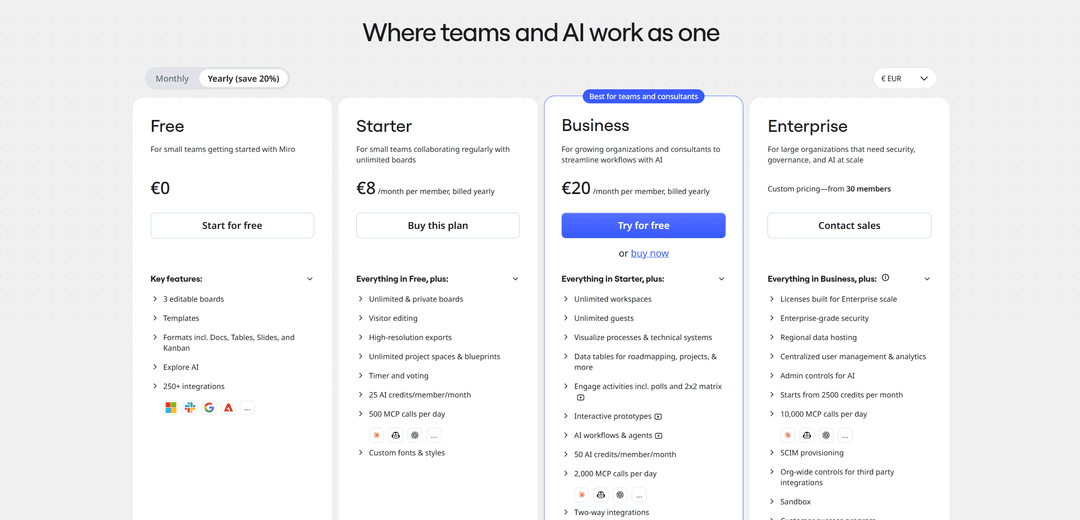
The free Free plan gives three editable boards, templates, documents, tables, slides, and kanban boards, as well as more than 250 integrations with other services. It's enough to try Miro or run a couple of small projects.
The main limitation of the free plan is the number of boards. Once you need more than three, you have to move to a paid plan.
The Starter plan removes this limit and gives an unlimited number of boards, including private ones. It also adds high-resolution export, board editing by guests without registration, a timer and voting for meetings, and custom fonts and styles. Starter suits small teams that work in Miro regularly.
The Business plan is designed for growing companies and consultants. It adds unlimited workspaces and guests, data tables for roadmaps, surveys, interactive prototypes, AI agents, and two-way integrations that sync Miro's data with other services.
With each plan, the amount of AI credits per member per month grows, as does the limit on AI assistants' calls to boards via the MCP protocol. For large organizations, Miro offers the Enterprise plan with custom pricing, starting from 30 members.
For working in Russia, many teams are moving to Russian online whiteboards. Some of them support importing boards from Miro, so projects don't have to be rebuilt from scratch.
If you live and work outside Russia, the restriction doesn't apply to you. In that case, you can pay for Miro with a card from your country of residence's bank or with a virtual card topped up with rubles via SBP.
Can you pay for Miro with cryptocurrency
No. Miro accepts payment by bank card, and for teams also by invoice. Cryptocurrency isn't among the payment methods.
A Miro subscription also renews automatically, and the service charges for all team members every month or year. That requires a payment method that can be charged repeatedly, and a one-off cryptocurrency transfer doesn't work that way.
How to use cryptocurrency to pay for Miro
You can pay for Miro with cryptocurrency through an intermediary tool, a virtual card. You top it up with coins, and Miro sees an ordinary Visa or Mastercard and charges the payment to it.
Calculate the top-up amount from the number of members. Miro's price is quoted per person, so a team of five on the Starter plan pays five times one member's price. Tax and the card top-up fee are added on top.
With annual billing, the whole amount is charged at once, and for a team this can be a sizable payment. Top up the card with stablecoins like USDT or USDC so the amount doesn't change because of exchange-rate swings before the payment.
How to pay for a Miro plan with Mirocard
Miro charges for the whole team in a single payment, and it grows with each new member. Mirocard issues virtual Visa and Mastercard cards that are handy for keeping a budget for work services separate from personal spending.
Mirocard can be topped up in BTC, ETH, USDT, USDC, TON, TRX, or SOL. Funds are credited to your account balance, and you transfer to the card an amount that's enough to pay for the team.
For Miro, the subscriptions card with issuance from $5 and a top-up fee from 4% is the right fit. It supports recurring charges, so Miro will renew the plan without your involvement.
We showed how to issue a card in a step-by-step guide. After that, setting up the plan takes a few minutes.
Open the Miro pricing page and choose the billing period, "Monthly" or "Yearly". For Starter, click "Buy this plan"; for Business, the "buy now" link under the "Try for free" button.
At the "Plan" step, enter the number of members in the "Team size" field and the period in "Billing period". In the "Choose payment method" block, choose "Card".
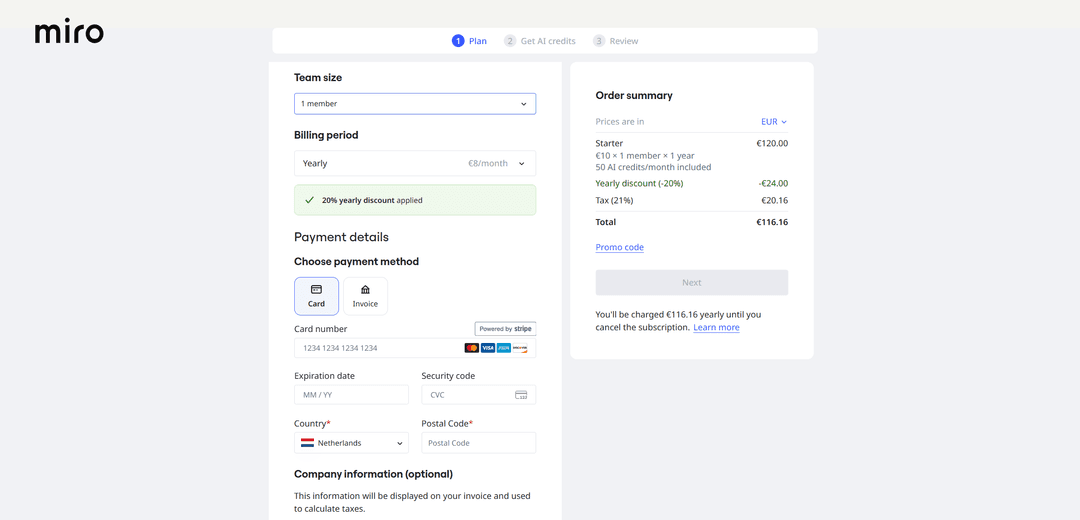
Enter the card number, expiration date, and CVC from your Mirocard account dashboard, then the country and postal code. Check the amount in "Order summary" and click "Next". In the following steps, Miro will offer to buy additional AI credits and show the order total before you confirm.
What to do if a Miro payment doesn't go through
Check the final amount. The price on the pricing page is shown without tax, while in "Order summary" it's already added. If you top up the card at the website's price, there may not be enough money.
Verify the number of members. If "Team size" is set to more people than you planned, the amount will grow proportionally. Make sure the card balance covers exactly that amount.
Check the country and postal code. Miro calculates tax based on the country in the billing details, and without a postal code the form won't let you continue with payment.
Verify the card details. A mistake in the number, expiration date, or CVC leads to a decline. Copy the details from your account dashboard instead of typing them by hand.
If the decline repeats, don't try to pay many times in a row. Take a pause and write to Miro support or to the service that issued the card.
How to choose a Miro plan and keep spending under control
Start with Free. If three boards are enough for you, you don't need to pay. Move to a paid plan when you hit the board limit or need private boards.
Try Business for free. This plan has a trial period, the "Try for free" button on the pricing page. That lets you check whether you need its features before paying.
Compare monthly and annual billing. Annual billing gives a 20% discount. For example, Starter comes to €8 a month per member instead of €10. But the whole year's sum is charged at once.
Pay only for those who work in Miro. The price is calculated per member, so extra seats on your team directly increase the bill. And if you need to invite outside people, note that on Business the number of guests is unlimited.
Don't buy extra AI credits. When you check out, Miro offers to buy them as a separate step. If you rarely use AI, the credits included in the plan may be enough.
Build in tax and the fee. Starter for one member for a year in the Dutch store costs €116.16 with tax, and with a 4% top-up fee, the card needs to be topped up by about €120.81.
Conclusion
Miro's paid plans are needed when three boards are no longer enough or the team needs private boards, AI agents, and integrations. The price is calculated per member, so the cost depends directly on team size.
Before paying for a plan, test Business for free and calculate the final amount with tax for the whole team. That way you'll pay only for what your team actually uses.