How to Pay for a Zoom Pro Subscription with Cryptocurrency
Zoom is a video conferencing service used by companies, teachers, consultants, and freelancers. Besides meetings, it includes chat, a calendar, email, online whiteboards, and an AI assistant, which is why Zoom's main product is now called Zoom Workplace.
You can join a meeting and hold a short call for free. But the free plan has a hard limit, and for regular work it quickly becomes too little. Then you need a Pro subscription, which is paid by card or through PayPal.
We'll explain what Zoom Pro gives you, how to pay for it, and how not to overpay for the subscription.
What a paid Zoom Pro subscription gives you
The main thing people pay for in Pro is meeting time. On the free Basic plan, a single conference lasts no more than 40 minutes, while in Pro it can last up to 30 hours. For lessons, consultations, and work meetings, that's a decisive difference.
The number of participants is the same on both plans, up to 100 people. If you need more, you can add the Large Meeting add-on to Pro, while the Business plan allows 300 participants right away.
The second important part of Pro is the AI features. On the free plan, summaries are available for only three meetings a month, and AI notes are limited to three uses. In Pro, meeting summaries are unlimited, and the AI assistant takes notes not only in Zoom but also in meetings on other services and even in in-person conversations.
Pro suits personal use and small teams. If you're a tutor, a consultant, or hold regular calls longer than 40 minutes, the free plan won't be enough. Business is for companies that need large meetings, single sign-on through corporate accounts, and unlimited online whiteboards.
Can you pay for Zoom Pro directly with cryptocurrency
No. Zoom accepts bank cards and PayPal, and in mobile apps, payment through the App Store and Google Play. Cryptocurrency isn't among these methods.
A Zoom subscription also renews automatically, charging a saved payment method. For that, Zoom needs a card or account it can charge repeatedly, and a one-off cryptocurrency transfer doesn't work that way.
The alternative is a virtual card that you can top up with cryptocurrency. To Zoom, it's an ordinary Visa or Mastercard.
How to use cryptocurrency to pay for Zoom Pro
The scheme is built around a virtual card. You send cryptocurrency to a card service, transfer the subscription amount to the card, and enter the card when subscribing to Pro on the Zoom website.
With annual billing, Zoom charges the whole year's sum at once, and it includes tax. Top up the card with the final amount from the order block, not the price on the plan card.
Before renewal, the card again needs to hold the right amount. It's more convenient to top it up with stablecoins USDT or USDC so the amount doesn't change because of exchange-rate swings.
How to pay for Zoom Pro with Mirocard
A failed renewal in Zoom is noticeable right away, because meetings start cutting off after 40 minutes again. So for a subscription you need a card whose charges go through reliably. Mirocard issues virtual Visa and Mastercard cards, and Zoom accepts them in its card payment section.
Mirocard is topped up with cryptocurrency; BTC, ETH, USDT, USDC, TON, TRX, and SOL are supported. Coins are credited to your account balance, and the amount needed for the subscription is transferred to the card.
For Zoom, it's worth issuing the subscriptions card. Issuance costs from $5, and top-ups from 4%. The card supports recurring charges, so Pro will renew on time.
Signing up and issuing a card are described in the Mirocard guide. All that's left is to subscribe on the Zoom website.
Open the Zoom pricing page, choose annual or monthly billing with the "Annually" toggle, and click "Buy now" under the Pro plan.
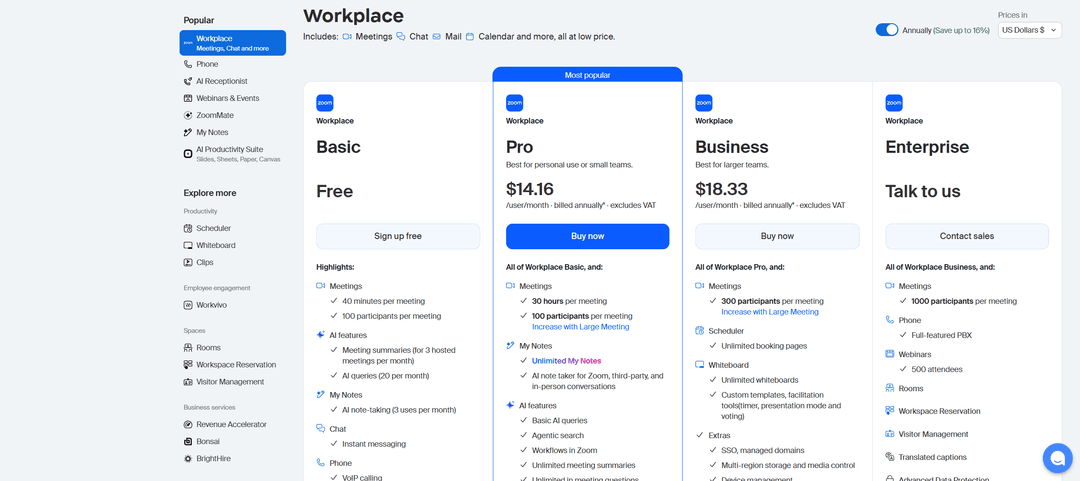
On the "Address" screen, fill in your address. In the "Account type" field, choose "Personal account" if you use Zoom not for business. For a company, choose "Business account" and enter the name, company size, and the country of the head office.
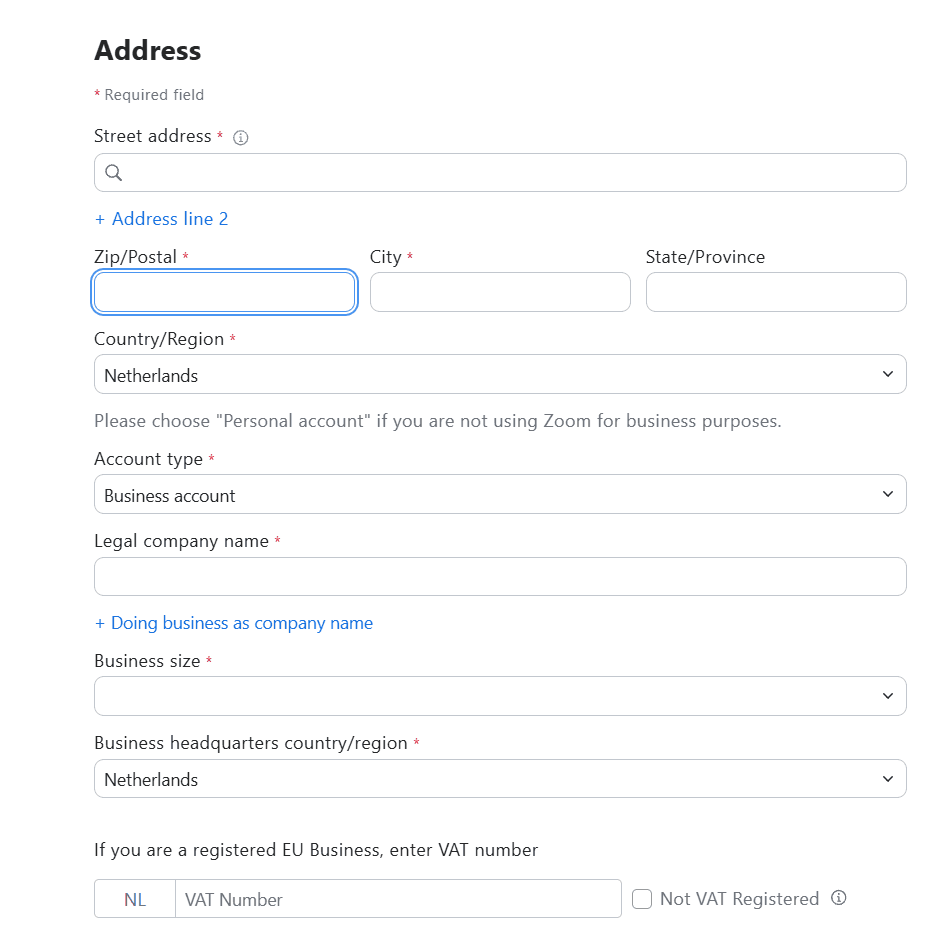
In the "Payment method" block, select "Credit or debit card". Enter the cardholder's name in "Cardholder name" as it appears on the card, then the number in "Card number", the expiry date in "Expiration date", and the code in "CVV". Take the card details from your Mirocard account dashboard.
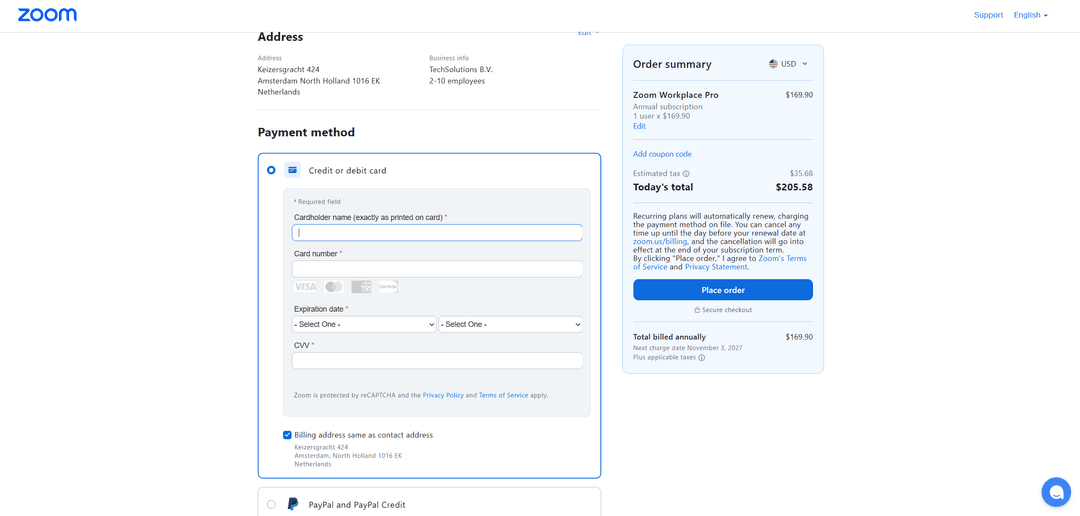
Check the amount in the "Today's total" line and click "Place order". The 40-minute limit is lifted right after payment.
How to choose a Zoom Pro plan and keep spending under control
Compare annual and monthly billing. Annual saves up to 16%, and Pro then comes to $14.16 a month per user before tax. But Zoom charges the whole year's sum at once; in the dollar store that's $169.90 per user plus tax.
Account for tax. The prices on the pricing page are shown without VAT, and on the payment screen it's added to the amount. For example, in the Dutch store, an annual Pro subscription with tax comes to $205.58.
Pay only for the number of users you need. Pro's price is calculated per person with a license. Participants in your meetings don't need a license; they can join for free.
Don't take Business without need. If you don't need meetings of more than 100 people and corporate features, Pro handles the tasks for less. For one-off large meetings, you can add Large Meeting instead of changing plans.
Cancel the subscription in advance. Zoom lets you cancel it at any time up to the day before renewal on the zoom.us/billing page. Cancellation takes effect at the end of the paid period, and until then Pro keeps working.
Build in the card top-up fee. At 4%, an annual subscription at $205.58 with tax will require a top-up of about $213.80.
Conclusion
Zoom Pro is for those for whom 40 minutes per meeting isn't enough and who need unlimited AI notes. For personal work and small teams it's sufficient, while Business is justified only for large meetings and corporate requirements.
Before paying, choose the account type, check the final amount with tax, and decide whether to pay annually or monthly. Then the subscription will work without interruptions, and your expenses will stay predictable.