How to Donate in PUBG Mobile (Buy UC) with Cryptocurrency
PUBG Mobile is a mobile battle royale for a hundred players. Players parachute onto the map, collect weapons and gear, and the safe zone gradually shrinks until only one player or one team is left alive.
You can play for free and with no time limits. In PUBG Mobile, money goes toward UC, the game's in-game currency. Its name stands for Unknown Cash. UC buys passes, outfits, and weapon skins that you'd otherwise have to grind for months or wouldn't get at all.
Below, we'll explain what UC is spent on, how to top up your balance, and which pack is the better deal.
What UC is spent on in PUBG Mobile
Most often, UC is bought for the Royale Pass, the seasonal pass. It has a free track, but the most noticeable rewards, such as the season's outfits and weapon skins, unlock only in the paid version. The season is time-limited, and missed rewards can't be recovered later.
The second big expense is appearance. UC buys character outfits, vehicle skins, and weapon finishes. Some skins can be upgraded, and with each level they gain new effects and animations.
Another part of UC goes toward crates and event draws. They randomly drop rare items, and getting a specific one can sometimes take many attempts. This is where spending grows fastest, so it's best to cap such purchases at a set amount in advance.
UC doesn't affect a character's strength in battle. Purchases change appearance and give rewards, while winning still comes down to skill.
How to donate in PUBG Mobile and buy UC with cryptocurrency
Midasbuy, the official PUBG Mobile top-up site, doesn't accept cryptocurrency. Depending on the country, bank cards, PayPal, Klarna, Paysafecard, and local systems like iDEAL are available there. In the game itself, purchases go through the App Store or Google Play, which don't take crypto either.
Third-party stores sell UC gift codes for cryptocurrency. The code is entered on the Midasbuy redemption page along with your player ID. Midasbuy has versions of the site for different regions, so before buying, check where exactly your code is redeemed.
The risk with such stores is higher than when paying on the official site. If a code turns out to be already used, getting your cryptocurrency back is nearly impossible, since a blockchain transfer can't be reversed.
How a virtual card can help
A virtual card lets you pay for UC on Midasbuy directly, even if all your money is in cryptocurrency. You top up the card with coins, and the site sees an ordinary Visa or Mastercard.
This way you buy UC without intermediaries. There's no need to look for a code seller, check their reputation, and hope the code works. The price and bonuses will be exactly what's listed on the official page.
The card is also handy for regular spending. If you buy the Royale Pass every season, it's enough to keep the amount for your next purchase on the card. While the money sits on the card, fluctuations in the coin's price don't affect it.
Mirocard for online payments
Mirocard issues virtual Visa and Mastercard cards that are accepted by game top-up sites, online services, and app stores. On Midasbuy, such a card can be used to buy UC, the Royale Pass, and other PUBG Mobile items.
Mirocard is topped up with cryptocurrency. Send BTC, ETH, USDT, USDC, TON, TRX, or SOL to your balance, transfer the amount you need to the card, and use it to pay for UC on Midasbuy.
The subscriptions card, with issuance from $5 and a top-up fee from 4%, suits donations. If you spend on games regularly, it's convenient to keep a separate gaming budget on it, without mixing it with your other expenses.
Paying by card on Midasbuy comes with a nice bonus. The site awards double VIP points for such payments, which can then be exchanged for rewards in Midasbuy's loyalty program.
We explained how to issue a card in a detailed guide. Once the card is ready, move on to topping up.
Open the PUBG Mobile top-up page on Midasbuy. Click "Enter Your Player ID Now" and enter your ID. You can find it in the game, in your profile under your nickname.
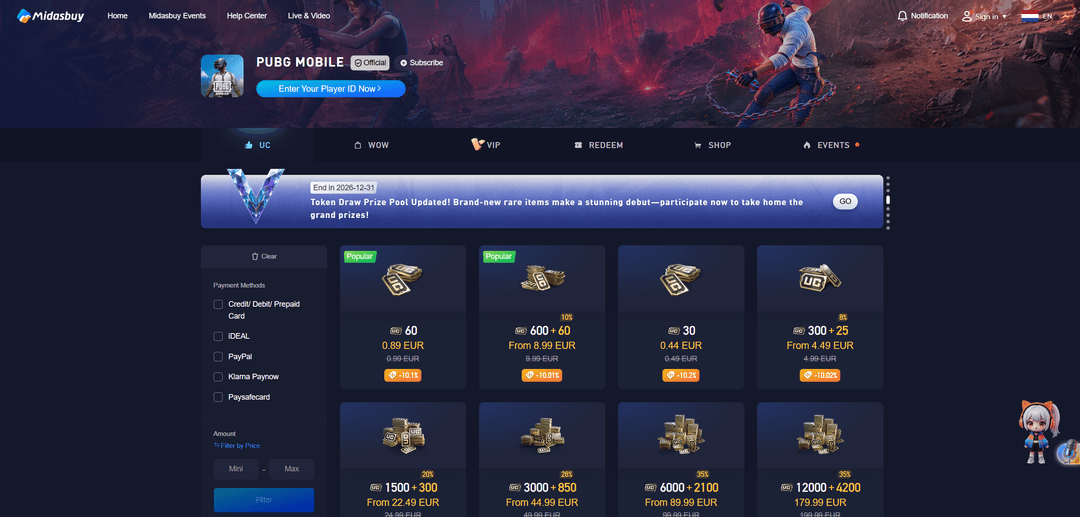
Choose the amount of UC and, among the payment methods, select "Credit/ Debit/ Prepaid Card". The site will ask you to sign in to your Midasbuy account; to do so, click "Login".
Fill in the payment details through "Add billing information" and enter the card number, expiration date, and CVC from your Mirocard account dashboard. Check the player ID and the amount on the right side of the window, then click "Pay".
How to choose a good-value UC pack
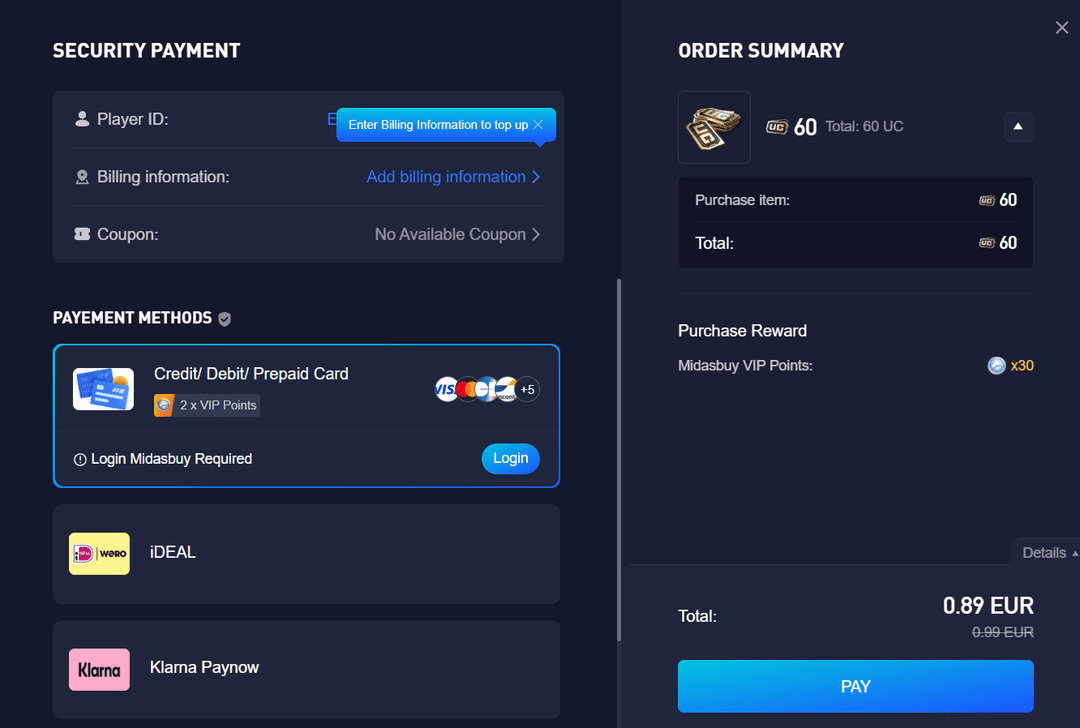
Let's look at Midasbuy's prices for the euro region, not counting discounts. A 60 UC pack for €0.99 gives about 61 UC per euro. A 600 + 60 UC pack for €9.99 gives already around 66, and 3,000 + 850 UC for €49.99 around 77. The largest packs, 6,000 + 2,100 and 12,000 + 4,200, come to about 81 UC per euro.
So it's not worth buying many small packs in a row. If you know you'll spend 1,800 UC in a season, one 1,500 + 300 pack is a better deal than several 300 + 25 packs.
But stocking up isn't always sensible either. A large pack is a good deal only if you'll really spend that UC. Before buying, estimate your season's expenses, such as the Royale Pass and a couple of skins, and pick the nearest pack above that.
Keep an eye on Midasbuy promotions. The site regularly has discounts on packs and events that give extra rewards for purchases. Check the "Events" tab before paying.
Also take the cost of payment itself into account. The card top-up fee is added to the pack price, and at 4%, a €9.99 purchase comes to about €10.39.
Conclusion
UC in PUBG Mobile is needed for the Royale Pass, skins, and events, and buying it on the official Midasbuy is the best deal. It offers pack bonuses and promotions that intermediaries don't.
Before buying, estimate how much UC you'll spend in a season and pick a pack for that amount. That way you'll get the maximum bonuses and won't leave currency sitting idle on your balance.