
Can You Get a Virtual Card in a Minute and Without Delivery
#reviews
The short answer is yes. Many services show your card details a couple of minutes after you sign up, and neither a courier nor a bank branch is needed. But "in a minute" doesn't work out for everyone, or every time.
A virtual card is a card you can't hold in your hands. Instead of a piece of plastic with a chip, you have an entry in an app that lists the number, expiration date, and security code. That's enough to pay on websites and in apps.
How fast you get it depends on three things. The first is who issues the card. A bank usually does it instantly only for its own customers, and a newcomer has to open a main account first. The second is identity verification. Until the service completes it, there won't be any card details. The third is paying for issuance. If it's paid, the card appears once the payment goes through.
How a virtual card works after issuance
Card details on the screen don't guarantee that a purchase will go through. Before paying, it's worth sorting out the balance, the settings, and the rules of the platform where you're buying.
Start with the money on the card. If the card is standalone, you can spend only what you've put on it. If it was issued as an add-on to a main account, there's nothing to transfer, but it's important to know what limit is set on it.
Then check the settings. Many cards cap the amount of a single payment or monthly spending, and the owner can change some of these limits on their own. If the limit is lower than the price of the purchase, the payment will be declined even when there's enough money.
Also find out what the card can't do. Often a virtual card can't be added to Apple Pay or Google Pay, and you can't withdraw cash with it. For subscriptions that's not a problem, but if you were counting on paying with your phone at a café, it's better to find out right away.
Finally, see what the platform itself will ask for. Besides the number and expiration date, some services ask for a billing address or send a code to confirm the payment.
How to get a virtual card without delivery
For online purchases, you don't need a physical card. It comes in handy if you want to withdraw cash at an ATM or insert the card into a terminal. The digital version, which doesn't need to be manufactured and shipped, can do everything else.
There are two ways to get one. The first is through a bank you're already a customer of. Applying in the app takes a couple of minutes, and the card immediately appears alongside your other accounts, with no activation needed.
The second way is through a payment service that issues cards without opening a bank account. You sign up, choose a card, pay for issuance, and top up the balance. The money is held on a balance inside the service, and the card is linked to your account.
If you hold your money in cryptocurrency, your own bank won't help here. The problem isn't the card, it's that platforms don't accept payment in coins. You need a card that can be topped up directly from a crypto wallet or exchange, without withdrawing the money to a bank account.
How to issue a card with Mirocard
With Mirocard, everything to do with the card happens online, and it's issued right after your application is approved. You won't have to receive anything by mail or go to an office.
The service has several cards, and you should choose based on where you plan to pay. For subscriptions and online services, there's a $5 card with a 4% top-up fee, which works by entering the card details on a website. For those who want to pay for purchases with a smartphone, the $15 travel card with Apple Pay and Google Pay support is a better fit. There's also a corresponding card for paying for advertising, with various BINs and protection.
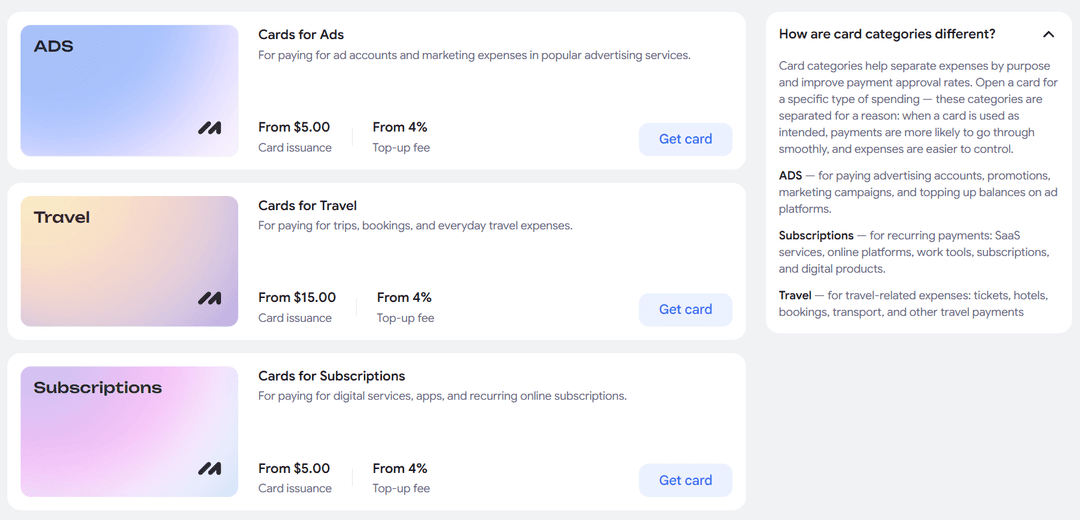
Each card has its own fees, and the exact figures are visible in its terms before you sign up. That means you can top up your balance right away with the fee in mind.
If you have a question about the card or a payment isn't going through, Mirocard support replies on Telegram. And we've covered the whole path from signing up to ready-to-use card details in this guide.
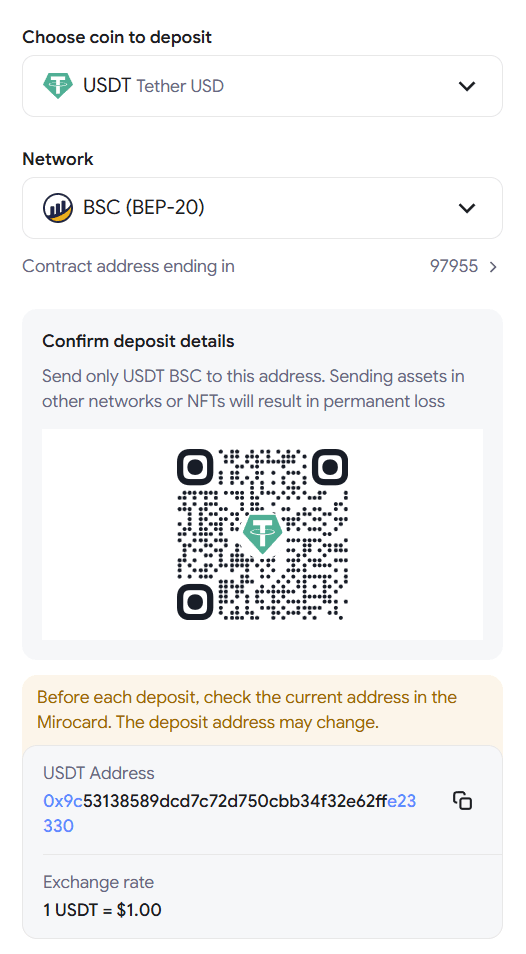
Topping up Mirocard with cryptocurrency happens in two stages. First, the coins arrive in your account's main balance, and then you transfer to the card as much as you need for the payment. The rest sits safely on the balance until your next purchase.
When a virtual card is especially handy
A virtual card comes to the rescue when you need to pay now, and there's neither the time nor the point in waiting for a regular card to be made and delivered.
Your main card is lost or blocked. Reissuing will take time, but subscriptions and bills won't wait. You can get a virtual card the same day and move your recurring payments to it.
There's no branch of the bank you need in your city. A regular card is hard to get in that case, while a virtual one can be set up anywhere there's internet.
You want to try a service without the risk of a surprise charge. After a trial period, many platforms automatically take payment. If you link a card with a small balance, the service can't charge more than what's on it.
You want to see how much goes toward online purchases. A separate card for online spending keeps it apart from your everyday expenses.
A virtual card is also handy when most of your money is in cryptocurrency and you need to pay for regular services. You don't have to sell coins and withdraw money to a bank; it's enough to top up the card with the amount of the purchase.
What can block a payment even after quick issuance
Getting card details quickly and paying successfully are two different things. A card can appear in a minute, and your first payment may still be declined. Here are the common reasons.
Not enough money after fees. Top-up and currency conversion fees reduce the amount that reaches the card. If you load exactly the price of the subscription, it may not be enough.
The card is the wrong type. Single-use cards often can't be topped up again, and they stay valid only briefly. That's fine for a single purchase, but you shouldn't link a monthly-billed subscription to them.
A limit kicks in. Cards issued without identity verification usually have modest spending limits. If the purchase costs more, the payment won't go through.
The platform asks for more data. Some services require a billing address or payment confirmation with a code. If the card doesn't support this, you won't be able to pay.
Identity verification isn't finished. Until the service confirms your details, the card may work with restrictions or not appear at all. If the payment is urgent, find out about verification in advance.
If you top up the card with cryptocurrency, the funds will appear on the balance only after the transfer is confirmed on the network. If you've sent the coins and immediately try to pay for a subscription, the payment may be declined because the card is still empty.
How to use a virtual card safely
A virtual card can't be pulled out of your bag or forgotten in an ATM, but card details can be lost in other ways. A few simple habits protect your money better than any technology.
Check the website address before paying. Fake pages copy the design of well-known stores to get your card details, and sometimes differ from the original by a single letter in the address.
Keep on the card only the amount you plan to spend. If the details do get stolen, no more than what's on the card can be charged, and your main money stays intact.
Turn on payment notifications. That way you'll notice an unfamiliar charge right away and have time to block the card.
If the service allows it, set a limit per payment or per month. This is especially useful for a card used for subscriptions, since even if the details leak, a large sum can't be taken from it.
Conclusion
Getting a virtual card in a minute is realistic if the service doesn't require lengthy verification and you pay for issuance right away. Delivery simply isn't needed in this case, since everything required to pay online arrives in your account dashboard.
And to make sure fast issuance ends in a successful purchase, learn the platform's requirements in advance, account for the fee in your balance, and don't keep more on the card than you need.