
How to Top Up Apple ID and Pay for the App Store with Cryptocurrency
Every iPhone, iPad, or Mac owner uses an Apple ID, even if they rarely think about it. Apple now calls this account an Apple Account. It syncs your photos and contacts, downloads apps, and handles all payments on Apple devices.
Apple takes the money for any purchase from a single source that you've specified in your profile. It can be a card or an internal balance. As long as the source works, games are bought with a single tap and cloud storage renews itself. The moment it fails, everything stops at once, from a new game to photo storage.
In this article, we'll explain what the App Store charges for, how to add funds to your Apple ID, and what to do if a payment is declined.
What you can pay for with an Apple ID
Picture an ordinary month for an iPhone owner. They buy extra iCloud storage because their photos no longer fit in the free 5 GB. They listen to Apple Music and, in the evening, watch a series on Apple TV+. When several such services pile up, it's cheaper to switch to Apple One, where they're bundled into a single plan.
There's also content bought piece by piece. Movies are rented or bought outright in the Apple TV app, books in Apple Books, and music as individual tracks and albums in the iTunes Store.
The easiest way to find out what your monthly money goes toward is the "Subscriptions" section in your Apple ID settings. You can also cancel any subscription there.
Why people look for ways to pay Apple with cryptocurrency
Apple doesn't accept cryptocurrency in any country where the App Store operates. Depending on the region, cards, an internal balance, PayPal, or carrier billing are available, but not bitcoin or stablecoins.
For someone whose money sits in a crypto wallet, this is inconvenient. For storage that costs a couple of dollars, you have to sell your coins on an exchange, withdraw them to a bank, and only then pay. Each step costs time, and sometimes part of the amount in fees.
Some platforms sell Apple gift codes for cryptocurrency. That's enough for a one-off purchase, but subscriptions paid from a balance renew only as long as money remains on it. Once the code runs out, you have to buy the next one.
How to use cryptocurrency to pay for the App Store
The way out is to put a virtual card between your wallet and Apple. Coins top up the card, and Apple receives payment from an ordinary Visa or Mastercard without knowing where the money came from.
You choose a card service that supports your coin, send the funds, and transfer to the card an amount for the purchase or for several months of a subscription. Then the card details are added to your Apple ID the same way as the details of any bank card.
Keep the crediting time in mind. The network doesn't confirm a transaction instantly, so top up the card a couple of days before renewal, not on the day of the charge.
Mirocard for topping up your Apple ID and paying for the App Store
Mirocard is a service for virtual Visa and Mastercard cards. Apple accepts its card as an ordinary bank card, and you can use it to pay for games, iCloud+, Apple Music, and subscriptions set up inside apps.
Mirocard accepts BTC, ETH, USDT, USDC, TON, TRX, and SOL. Coins arrive on your Mirocard account balance, and from there you transfer to the card the amount for your App Store purchases.
The subscriptions card is the one that suits the App Store. Issuance costs from $5, and the top-up fee is from 4%. The card is designed for monthly charges, so Apple renews your subscriptions without reminders as long as there's money on it.
If you need your iPhone for payments while traveling too, Mirocard has a travel card from $15 with Apple Pay support. And for advertising accounts, there's a separate card, also from $5.
We described how to issue a card in a separate guide. Next, you need to link it to your Apple ID.
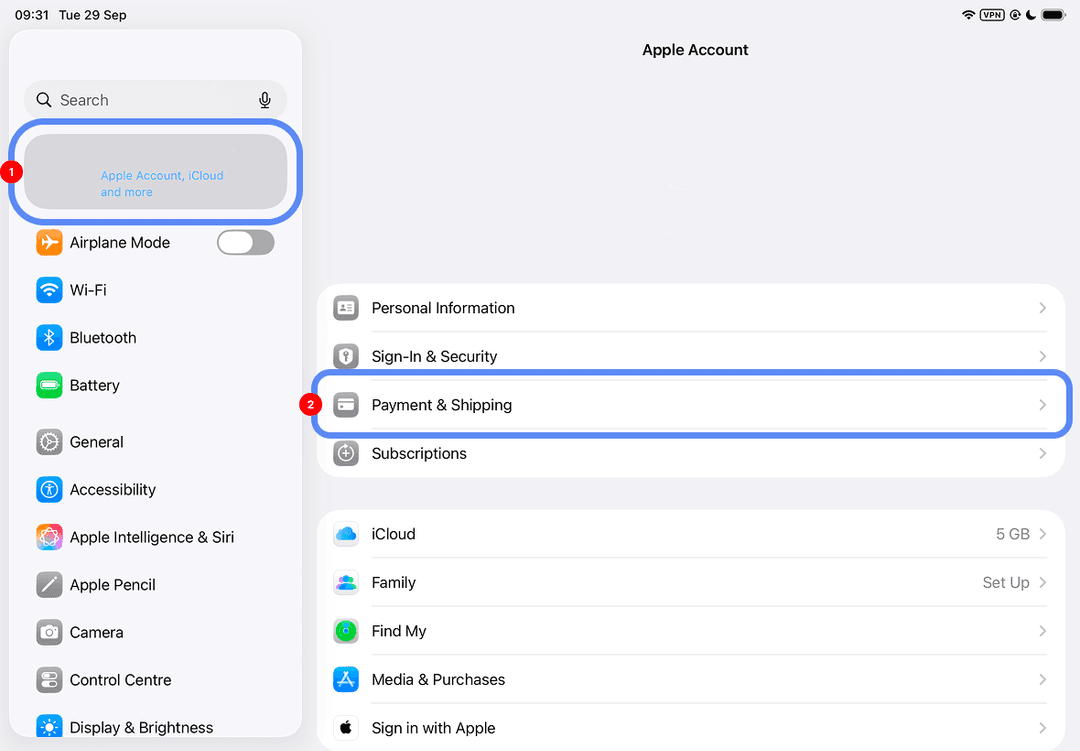
Open "Settings" on your iPhone or iPad and tap your name at the top. In the "Payment & Shipping" section, add a new payment method and choose "Credit / Debit Card".
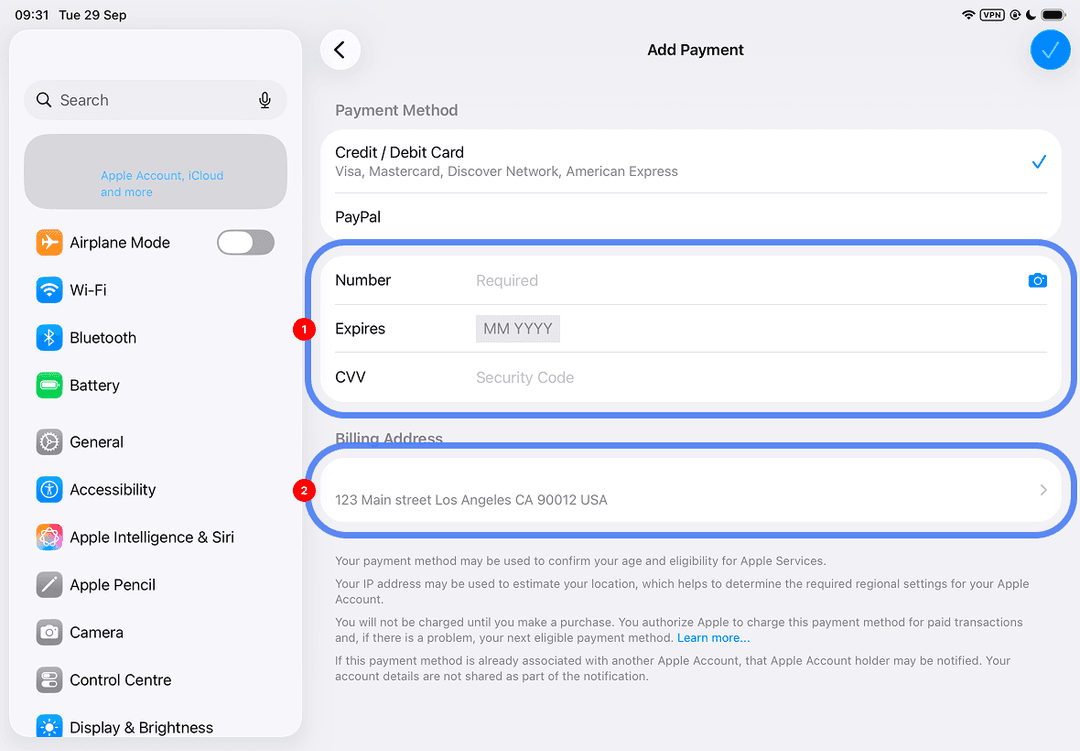
Fill in the "Number", "Expires", and "CVV" fields with the details from your Mirocard account dashboard. Enter the address in the "Billing Address" block, then confirm with the checkmark at the top right.
For those who prefer to keep money on their Apple balance, "Add Money to Account" will do. This button appears in the App Store after you tap the profile icon, if balance top-ups are supported in your region.
What to do if topping up your Apple ID doesn't work
Start with the money. The amount on the card is less than the transfer by the size of the fee, and when you link a card, Apple sometimes briefly holds a small amount for verification. Put a little more on the card than the price of the purchase.
Then compare the country of the card and the profile. Apple requires them to match, and this applies to gift codes too. When the countries don't match, the company offers to move your profile to the right region.
The third check is typos. Verify the card number, date, CVV, and address. The address must be from the country specified in your profile.
If everything is correct and purchases still don't go through, look for an outstanding balance. An unsuccessful past charge blocks new purchases until it's paid, and a reminder about it appears in the App Store or in "Payment & Shipping".
When nothing has helped, remove the card from your profile, link it again, and buy something inexpensive. A series of repeated attempts in a row will only put the payment system on alert, so it's better to contact Apple support or the service that issued the card right away.
How to top up your Apple ID safely
The money on the card isn't the most valuable thing you can lose. It's much worse to lose your Apple ID, and with it your photo archive in iCloud, purchased apps, and subscriptions.
Don't give intermediaries your login and password, even if they promise to top up your balance for less. Once inside your profile, a person can change the password and the trusted phone number, and regaining control will be hard.
Check in the "Sign-In & Security" section whether two-factor authentication is on. With it, signing in from someone else's device is impossible without a code that only you receive.
Buy gift codes from sellers who take responsibility for them working, and check the region before activating. A code from another country simply won't be credited.
Keep on the card the amount for the next month of purchases. If the details leak, an attacker can't spend more than that.
Once a month, look into "Subscriptions". That's the easiest way to catch a trial period that's about to turn into a paid subscription.
Conclusion
You can still pay in the App Store if you choose a payment method that fits your profile's country. After that, purchases take a single tap again, and iCloud and music renew without your involvement. Connect a suitable card or balance and check once a month whether there's enough money for the upcoming charges.