How to pay for a Crunchyroll subscription with cryptocurrency
Crunchyroll is a streaming service that specializes in anime. The platform is owned by Sony and brings together series and films from Japan in a single app, including new episodes that come out soon after the Japanese premiere. You can watch in a browser, on a smartphone, a tablet, and a TV.
What a Premium subscription gives you
Offline mobile viewing saves data on the road. Episodes are downloaded in advance over Wi-Fi, and you can watch them on the subway or on a plane.
Can you pay for Crunchyroll with cryptocurrency
No. On the subscription checkout page, two methods are available, PayPal and a bank card. Cryptocurrency and crypto wallets aren't on the list.
PayPal doesn't solve the problem either, since it has to be linked to a bank card or account. So for a cryptocurrency holder, what remains is a card topped up with coins.
Keep in mind that the subscription renews automatically. The card must accept recurring charges, not just the first purchase.
How to pay for Crunchyroll with cryptocurrency via a virtual card
The scheme has two steps. First you send coins to a virtual card, then you enter its details in Crunchyroll's payment form. The service sees an ordinary Visa or Mastercard and isn't interested in the source of the money.
Calculate the amount from the plan price in euros with a margin for conversion and the top-up fee. The prices are in euros, and the card is usually held in dollars, so the exchange rate may shift the total by a few cents.
For topping up, it's better to choose the stablecoins USDT or USDC. Their rate is pegged to the dollar, and while the transfer is in progress, the amount doesn't change. Send coins in advance and check the transfer network, because coins sent over an unsupported network can be lost.
Keep the restriction in mind too. Crunchyroll's help center says that prepaid Visa gift cards don't work for the subscription. It says nothing about virtual cards, so it's worth making your first payment in advance, so that if it's declined, you have time to sort it out.
How to pay for a Crunchyroll subscription with a Mirocard virtual card
Crunchyroll's payment form has few fields, but one of them can't be corrected after registration. Next to the country in the form is a note that it can't be changed, so a mistake in the account's region can't be fixed later. Mirocard issues virtual Visa and Mastercard cards online, and their details can be entered into this form just like those of an ordinary card.
Mirocard is topped up with cryptocurrency; BTC, ETH, USDT, USDC, TON, TRX, and SOL are supported. Coins are credited to your account balance, and from there you transfer the subscription amount to the card.
The subscriptions card suits Crunchyroll. Issuance costs from $5, and the top-up fee is from 4%. It's designed for recurring charges, which means it's suitable for monthly renewal. For ad accounts there's an advertising card from $5, and for travel a card from $15 with Apple Pay and Google Pay, but you don't need them for streaming.
We covered card issuance in the Mirocard guide. Once the card is ready, payment takes a few minutes.
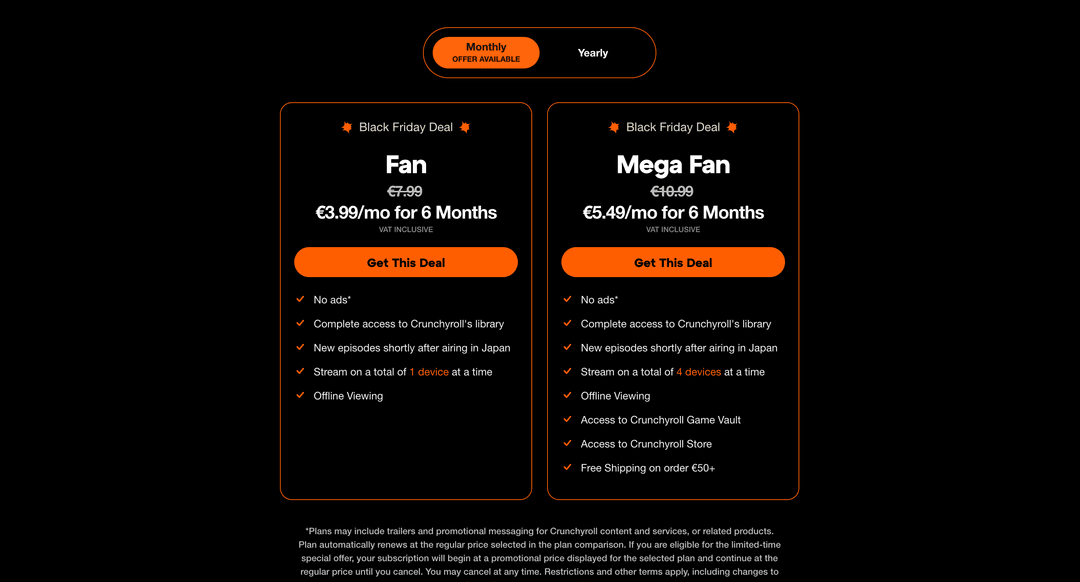
Open the official Crunchyroll website and sign in or register. Go to plan selection. Above the cards there's a "Monthly" and "Yearly" switch; choose the period you need. Then click the button under the selected plan, for example "Get This Deal" if a promotion is running.
On the "Payment Information" page, select "Credit or Debit Card". Enter the details from your Mirocard account. Paste the card number into the "Card Number" field, the expiration date into "Expiration Date", and the code into "Security Code (CVC)". Don't change the country in the "Country" field, since it's already set. In the "Postal Code" field, enter the postal code. If Mirocard shows a billing address for the card, use its postal code.
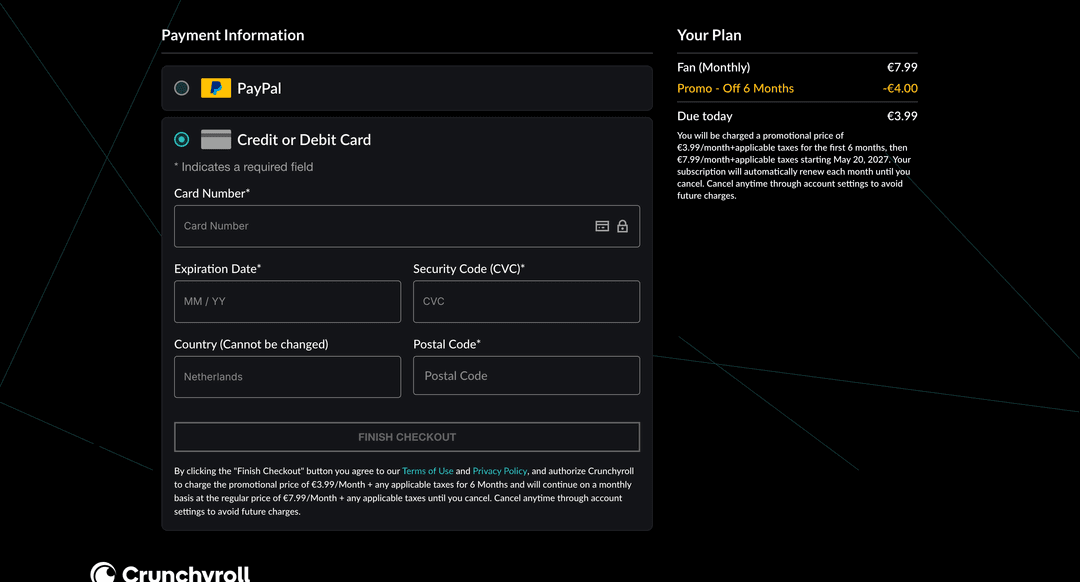
In the "Your Plan" block on the right, check the amount in the "Due today" line. If a promotion is running, it will show the discounted price, and below it is the price at which the subscription will renew after the promotion. Click "Finish Checkout".
Which Crunchyroll plans exist and how they differ
On the plans page, which we opened with an address in the Netherlands, two plans are available, Fan and Mega Fan. Prices in euros include tax and depend on the region.
Fan costs €7.99 a month. It includes ad-free viewing, the full catalog, new episodes soon after they air in Japan, offline viewing, and simultaneous viewing on one device. The plan is suitable if you watch alone.
Mega Fan costs €10.99 a month. On top of Fan's features it adds simultaneous viewing on four devices, access to Game Vault and the Crunchyroll store, and free delivery on orders of €50 or more. The plan is a good fit for a family or a group of friends sharing one account, and for those who buy merch in the service's store.
According to Russian media, the third plan, Ultimate Fan, is available only in the US. Check on the plans page whether it's offered in your country.
The service offers payment monthly and yearly. The switch is above the plan cards, and it's worth finding out about the annual terms on the plan selection page before paying, since the yearly price differs between regions.
Promotions change the picture. During sale season, new subscribers were offered Fan for €3.99 a month and Mega Fan for €5.49 a month for six months. After that, the subscription renews at the regular price. If a promotion is running when you sign up, the prices along with the terms will be shown on the payment page.
Choose a plan by scenario.
One viewer, watching at home. Fan will do, because one device is enough.
Two or more people. Take Mega Fan, so you don't have to wait for a stream to free up.
A fan of merch and mobile games. Mega Fan pays for itself through the store and Game Vault.
You watch on the road. Episode downloads are available on both plans.
How to set up automatic renewal on Crunchyroll
There's no separate renewal button. The subscription renews on its own as long as a working card is linked. The payment form says so directly. By clicking "Finish Checkout", you authorize Crunchyroll to charge money every month at the regular price until you cancel the subscription. You can cancel it at any time in the account settings.
The main thing to take into account is the price after the promotion. If you subscribed at a discount, the service charges the promotional amount for six months and then the regular one. In our example, the change is from €3.99 to €7.99 a month. The payment almost doubles, and if only the amount for the promotional price is left on the card, the renewal won't go through.
To keep the subscription from being interrupted, follow these rules.
Keep an amount on the card for the regular price. With a 4% fee, Fan at €7.99 will cost about €8.30, and with the exchange rate taken into account, the amount may differ by a few cents.
Top up the card in advance, not on the day of the charge.
Coins are credited after confirmation on the network, so send them a day or two before the charge date.
Check the card's expiration date. If the card expires or is replaced, the payment won't go through. The service's help center lists exactly these reasons for declines, as well as an incorrect name, code, and postal code.
Don't try to repeat the payment many times. After a decline, check the balance and card details, wait a few minutes, and only then try again.
If you want to change the card, first add the new one in the account settings rather than leaving the account without a payment method. And if you no longer need the subscription, cancel it ahead of time, before the charge date.
Conclusion
A Crunchyroll subscription is for those who want to watch new episodes without ads and in the full catalog. Fan is enough for one viewer, while Mega Fan pays for itself for a group and for merch buyers.
Before paying, check the account's country, since it can't be changed, and verify the price after the promotion. Leave a reserve on the card for the regular charge, and then the subscription will renew without interrupting your viewing.