How to Pay for Adobe Photoshop
Your installed copy of Photoshop probably still works fine — the cloud syncs, the Firefly AI tools respond, and your layers and masks are right where you left them. Everything trips up on paying with cryptocurrency. Here's why that happens and how to get the payment through.
Why Photoshop Remains One of the Essential Tools
Layers, masks, and RAW handling make Photoshop the standard wherever precise retouching matters, not a quick filter. A professional editor gives you control over every pixel — you can select an object along its contour, correct the color of a single channel, and build a composition out of a dozen layers with different blend modes. Most photo-editing apps don't offer that kind of depth.
AI features in recent versions are built into the workflow rather than living as a separate module. Generative Fill paints in missing background based on the scene's context, and the 27.8 update added the ability to switch between different Firefly models right inside the generation tool — you can compare results from several algorithms without leaving the document. For retouching, packaging design, and social media graphics, that saves hours of manual work.
The ecosystem around the app matters too. Photoshop files open in Illustrator and Premiere without conversion, Creative Cloud fonts and libraries are available across every app in the suite instantly, and cloud storage syncs a project between your computer and tablet. Replacing one editor isn't hard; replacing the whole bundle around it is a different question.
How Adobe Photoshop Is Distributed Now
You can no longer buy the program outright — Adobe moved the product to a subscription model, which changes the whole logic of owning the tool. Instead of a one-time license purchase, you pay for access every month or year, and stopping payments means losing access to the app, even after years of reliably renewing.
Adobe has put together several separate plans for different needs. If you only need the editor itself without the rest of the Creative Cloud suite, a standalone Photoshop subscription fits. Photographers make more sense taking a plan that already bundles Lightroom and cloud storage for RAW files. Anyone working with video, layout, and animation all at once should look at Creative Cloud Pro — it unlocks more than twenty apps at once, including After Effects, plus credits for Firefly generations. Photoshop Elements stands apart — a lightweight version of the editor sold under a three-year license instead of a monthly subscription. It's often confused with full Photoshop, though the two are fundamentally different products.
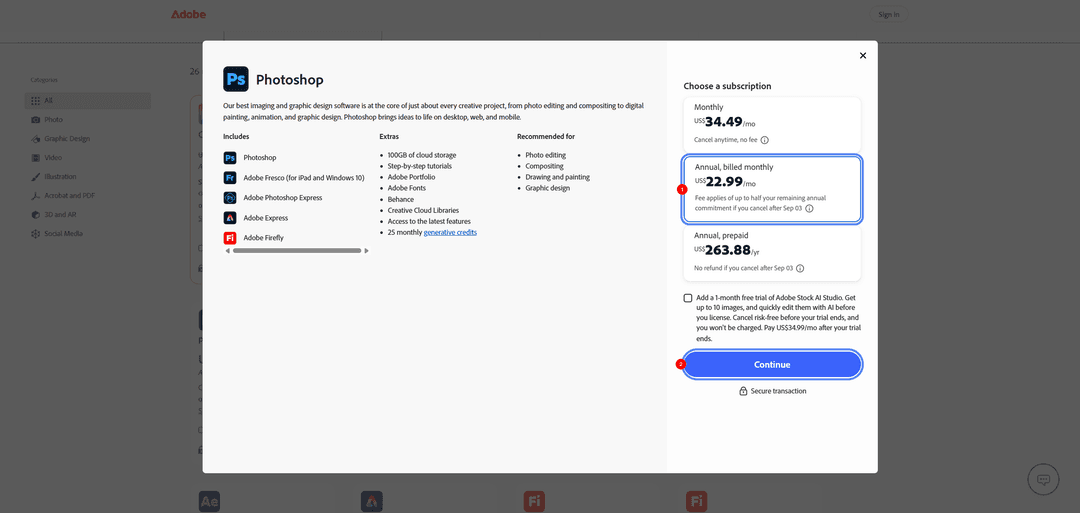
Keep in mind that the best-value option is called an "annual plan, paid monthly" — you commit to Adobe for a full year up front, while billing happens in separate monthly charges. If you decide to leave early, say after three months, the company charges a penalty — half the sum of the remaining payments through the end of the year. You can only avoid the penalty within the first two weeks after signing up. That creates a direct requirement for your payment method — the card needs to stay active for the entire paid year, not just a single month.
Which Payment Methods You Can Use
An international bank card. The direct route if you already have an account at a bank in another country — the card clears Adobe's check with no extra steps, since its BIN belongs to a supported region. Getting a card like this from scratch is hard: it usually requires a branch visit, a set of documents, and time to open the account, and for a crypto holder, it still doesn't solve the problem of paying with digital assets directly.
A virtual card. Set up online in a few minutes, with no branch visit and no physical plastic. To the payment system, a card like this is indistinguishable from an ordinary one as long as it has a foreign BIN, and some providers let you fund the balance with cryptocurrency — which solves both the access-to-an-international-account problem and the direct-coin-payment problem at once.
Why a Virtual Card Works Well for Adobe
Recurring charges are exactly where a virtual card handles the job better than one-off payment methods. Adobe renews the subscription automatically every month, and this is especially strict on an annual contract billed monthly — the card needs to stay active for the entire paid period, or a lapse leads to blocked access in the middle of a working project.
Matching the region gets solved when you choose the card, not after the fact. Adobe checks the issuer's country against the account's region, so the logical order is: first find out which country your virtual card is tied to, and only then set up an Adobe ID for that region. That avoids a situation where a perfectly working card fails the check just because of one mismatched detail.
The same tool covers not just Photoshop but the rest of your working stack too. Stock photos, fonts, other design and development services — all of it gets paid for with the same card, with no need to set up a separate payment method for each service individually.
How to Pay for Photoshop with Cryptocurrency via Mirocard
Mirocard issues Visa and Mastercard virtual cards you can use to pay for online services. Setting up the card takes just a few clear steps, and you don't need any special knowledge. We covered a detailed guide to getting a Mirocard virtual card in this article.
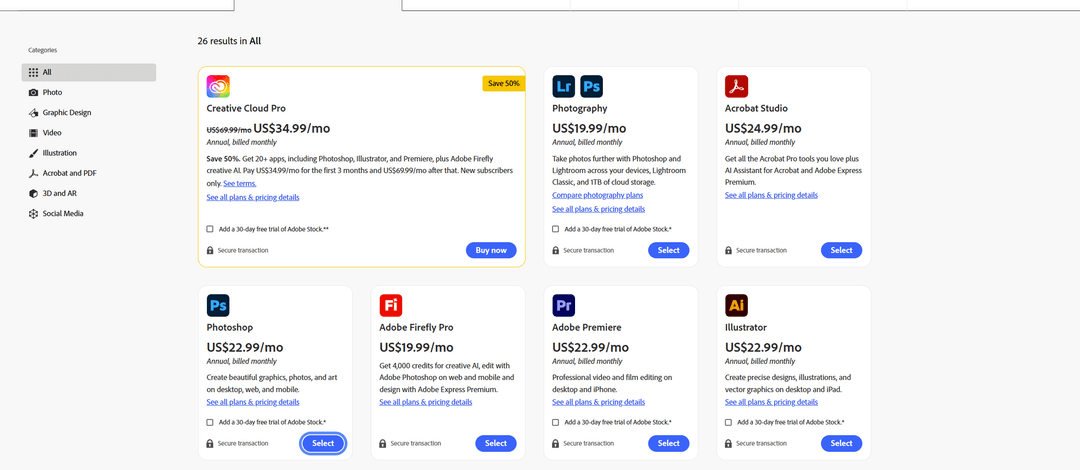
Once you've set up the card, go to Adobe's plans page. From the full catalog of plans, pick the one that fits — for example, a standalone Photoshop subscription or the Creative Cloud Pro bundle if you need the whole app suite.
On the next step, Adobe shows you the subscription options — monthly with no commitment at a higher price, annual billed monthly at a better price but with a year-long commitment, and annual paid in full upfront.
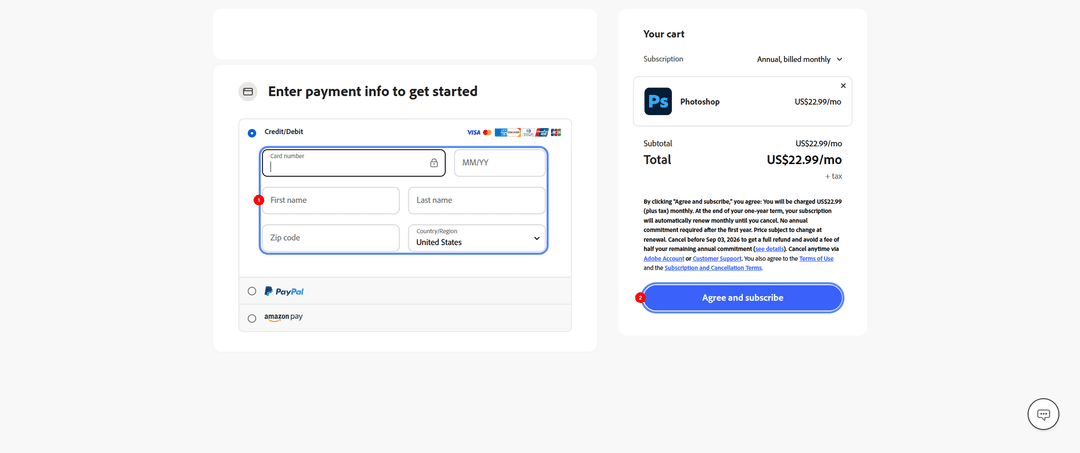
After picking a plan, the payment form opens. Enter the email for your account, then at checkout choose card payment, enter your Mirocard details — number, expiration date, cardholder name, postal code, and country — and confirm the payment with the subscription agreement button. For services with auto-renewal, the card stays linked and charges the payment automatically every period.
What to Keep in Mind for Automatic Renewal
The date of your next charge is visible right in your Adobe account, under subscription management, and it's worth keeping in mind ahead of time rather than finding out after a failed payment attempt. On an annual plan billed monthly, the date repeats on the same day every month, so it's easy to plan when to top up your card.
Your card balance needs a small buffer above the plan's price. Local tax often gets added to the subscription cost, and on the first payment, the service sometimes temporarily holds a slightly larger amount to verify the card — if your balance holds exactly the plan's price, the charge might not go through.
A failed charge doesn't cancel the subscription right away, but it starts a countdown. Adobe gives you time to retry, shows a payment-issue notice in your account, and blocks access to the apps only after several failed attempts in a row, while your obligation under the annual contract keeps running regardless of whether the payment went through.
You can cancel the subscription, if you no longer need Photoshop, through your Adobe account settings, under plan management. It's worth understanding the difference: on a no-commitment monthly plan, cancellation works penalty-free at any time. On an annual plan billed monthly, canceling before the year is up almost always means an extra charge — half the remaining payments — and without paying it, you can only end the contract within the first two weeks after signing up. Sometimes it's cheaper to switch to a less expensive Adobe plan instead of canceling outright — changing plans doesn't trigger a penalty.
Conclusion
You can pay for Photoshop with cryptocurrency, but the method you choose determines whether you'll have to repeat this process by hand every month. An international card works directly, but you still can't spend cryptocurrency through it. A crypto-funded virtual card removes that barrier — it lets you pay with coins where a regular card can't.
Set it up once, and Photoshop renews itself, with no risk of losing access to your working files mid-project over a missed payment. The same card pays for the rest of Adobe's apps and other design services, so one tool covers your whole working stack, not just a single editor.