How to Pay for Grab with Cryptocurrency
Grab is an app for Southeast Asia that brings together taxis, food delivery, grocery orders, and payments. It operates in Thailand, Singapore, Malaysia, Vietnam, Indonesia, the Philippines, Cambodia, and Laos, so one account comes in handy across several countries at once.
For a tourist, the main convenience is that the price of a ride is visible before you order. There's no haggling with a driver or explaining an address — just pick a point on the map and tap a button.
But all of this only works if the app has a payment method it will accept. Below, we'll look at what you can spend money on in Grab, why linking a card sometimes fails, and how to solve it through Mirocard step by step.
What Grab services you can pay for
The app's main screen has tiles for different services. "Transport" handles taxis and rides, "Food" food delivery, "Mart" grocery orders, and "Dine Out" restaurant tables. Below those are bike rentals, the "Mall" marketplace, and "PayLater" installments, while the "Finance" block shows the balance of the in-app wallet.
A payment instrument is needed almost anywhere you have to pay for a service. Most often that's a ride, since the payment method selection sits right on the order screen, under the list of cars. For food and grocery delivery, payment is chosen when you check out your cart.
The in-app wallet from the "Finance" block usually doesn't work for a tourist, because activating it requires a local phone number. So the simplest path for a visitor is to link a card to the app.
In some countries and cities, you can pay in cash, and on the order screen, you can tell by the "Cash" option. But that isn't available everywhere or for every car category, so relying on cash alone is risky.
Can you pay for Grab directly with cryptocurrency
In the usual scenario, no. Grab accepts Visa, Mastercard, American Express, and Discover bank cards, plus Apple Pay, and the app has neither a crypto payment button nor a field for entering a wallet address.
There's an exception, but it applies only to Singapore. There, users can top up a GrabPay wallet with digital assets through the payment provider Triple-A. That option doesn't exist in other countries, so you can't count on it on a trip around the region.
To pay in any country where Grab operates, you need a card. What's left is working out how to turn crypto into money on a card with the smallest losses.
Three ways to turn cryptocurrency into a Grab payment
There are three ways, and they differ in the number of steps, fees, and how reliably they work from country to country. Let's go through each in turn.
Paying directly with cryptocurrency
Direct payment is available in Singapore and works as a GrabPay wallet top-up. Bitcoin, Ethereum, USDC, USDT, and the Singapore stablecoin XSGD are accepted, and the provider Triple-A converts them to dollars immediately.
In practice, this isn't paying with coins at the moment of the order but topping up a wallet, after which you pay with regular money. On top of that, the service works only for users in Singapore, and outside Singapore, it won't help.
Converting cryptocurrency
The second way is to sell coins on an exchange and withdraw the money to a bank card. After that, the card is linked to the app and you pay with it as usual.
The downside is the number of actions. Each time, you pay an exchange fee, wait for the withdrawal, and make sure the card is accepted in Grab and allows international payments. For one trip, it's tolerable, but repeating that chain regularly is inconvenient.
A virtual card
The third way is a virtual card that's topped up straight from a crypto wallet. Coins turn into card balance inside the service, so there's no need to sell them on an exchange.
The details of a card like this are entered into Grab the same way as an ordinary card's, and the app sees no difference. This method doesn't depend on the country and doesn't require an exchange, so it suits a trip through several countries.
A virtual card topped up with cryptocurrency
This scenario is simpler than the others, because it takes just three actions. You top up the card from your wallet, link it to the app, and order a ride. The money passes through once, not through an exchange and a bank.
There's a practical plus too. If you top up the card with a stablecoin like USDT or USDC, the balance doesn't depend on exchange-rate swings, and there will be enough money for exactly the ride you planned.
Keep currency in mind. The app shows prices in local money, for example Singapore dollars, while the card is usually kept in US dollars, so a conversion happens at the time of the charge. It's best to keep a small buffer on top of the ride price.
Mirocard for paying for Grab with cryptocurrency
Mirocard issues virtual Visa and Mastercard cards that are topped up with cryptocurrency. BTC, ETH, USDT, USDC, TON, TRX, and SOL all work. Conversion into dollars happens inside the service, so an amount ready for payment shows up on the card's balance right away.
Setup happens entirely online, with no bank visit and no paperwork. For trips, a card built for paying for services is enough. It costs $5, and we cover sign-up and issuance in detail in a separate article, so here we'll move on to what matters specifically for Grab.
The card is issued once and stays with you for the whole trip around the region. The linked card can be used in different countries where the app operates.
How much cryptocurrency you need to pay
The amount on the card is made up of several parts, and the ride's cost is only the first. It's best to take it at the upper bound. If the app shows a price range for the "Fast" category, count by the larger number so there's a buffer either way.
On top of that comes currency conversion. Grab shows the price in local money, while the card charges dollars, so the final amount on the statement can differ slightly from the figure in the app.
Finally, leave a small buffer for toll sections of road and possible price changes. It's better to send a bit more than needed and use the remainder on the next ride than to be stuck on the payment screen with no money.
How to pay for Grab with Mirocard
Install Grab on iOS or Android, sign in, and open the main screen. Tap the "Transport" tile if you need a taxi. For food or groceries, pick "Food" or "Mart," and the steps that follow are similar.
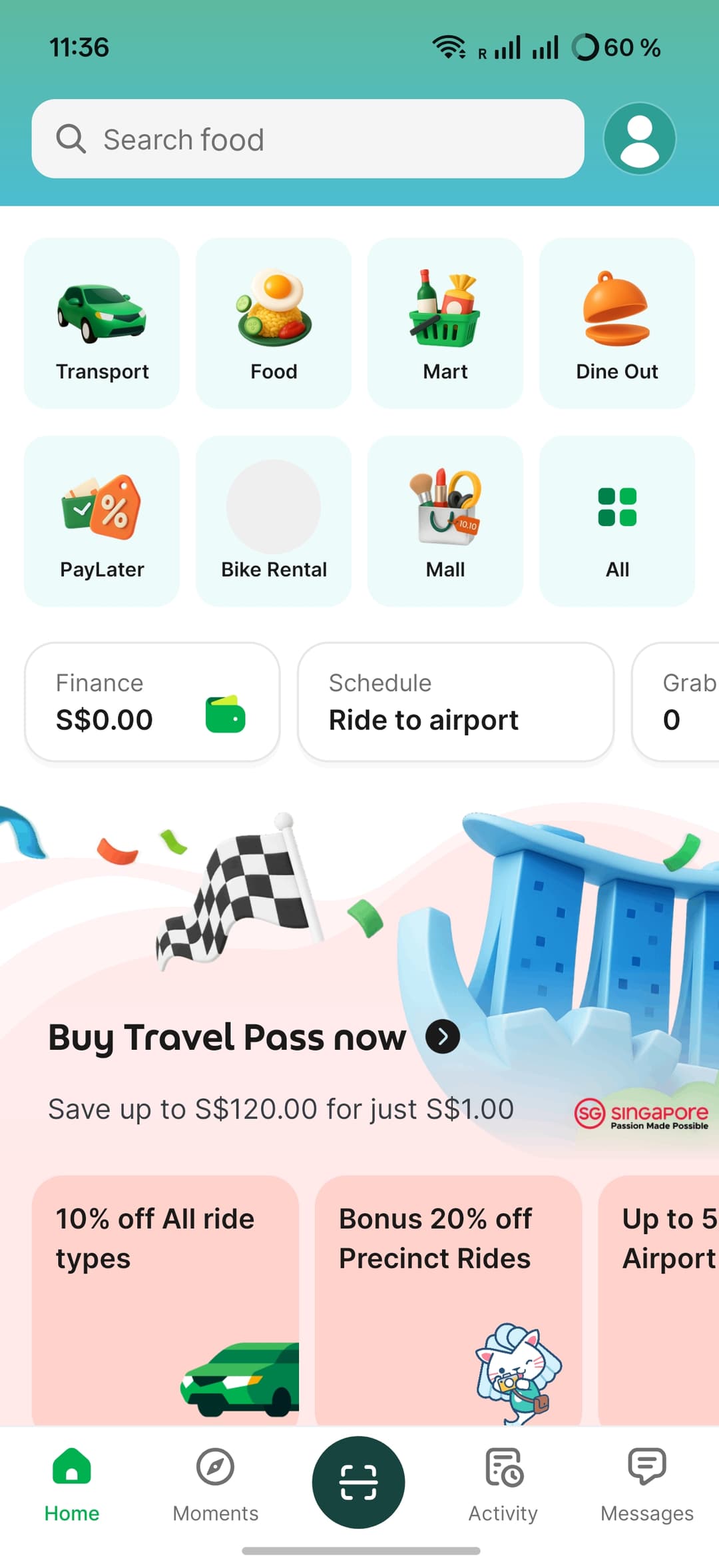
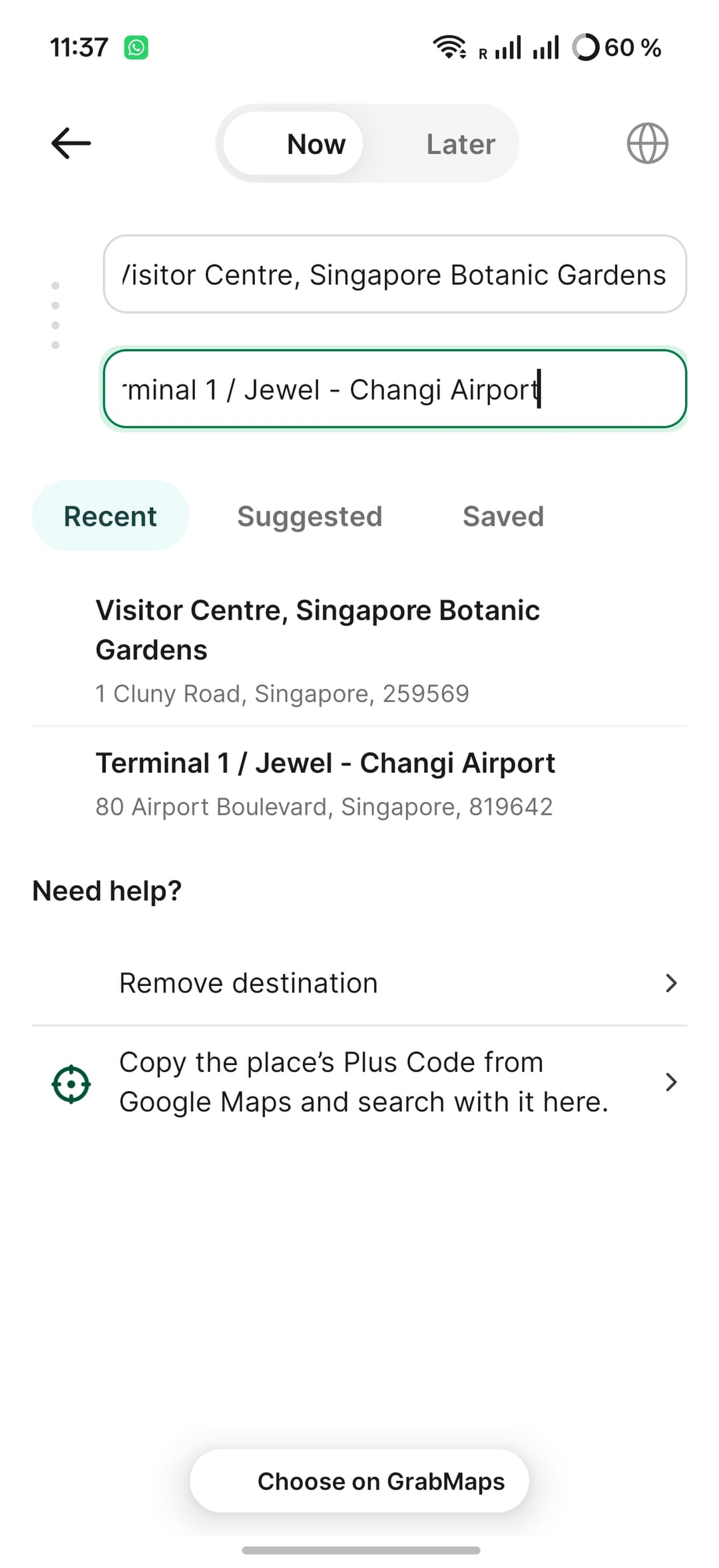
On the ride screen, there's a "Now" / "Later" toggle at the top. "Now" calls a car right away, while "Later" lets you schedule a ride in advance, for example to the airport. Below are two fields, the first for the pickup point, the second for the destination.
Enter the destination address. The app suggests places in the "Recent," "Suggested," and "Saved" tabs, and if the spot you need isn't there, use the "Choose on GrabMaps" button and mark the place right on the map. After you choose both addresses, a route screen opens showing travel time, distance, and a note about toll sections.
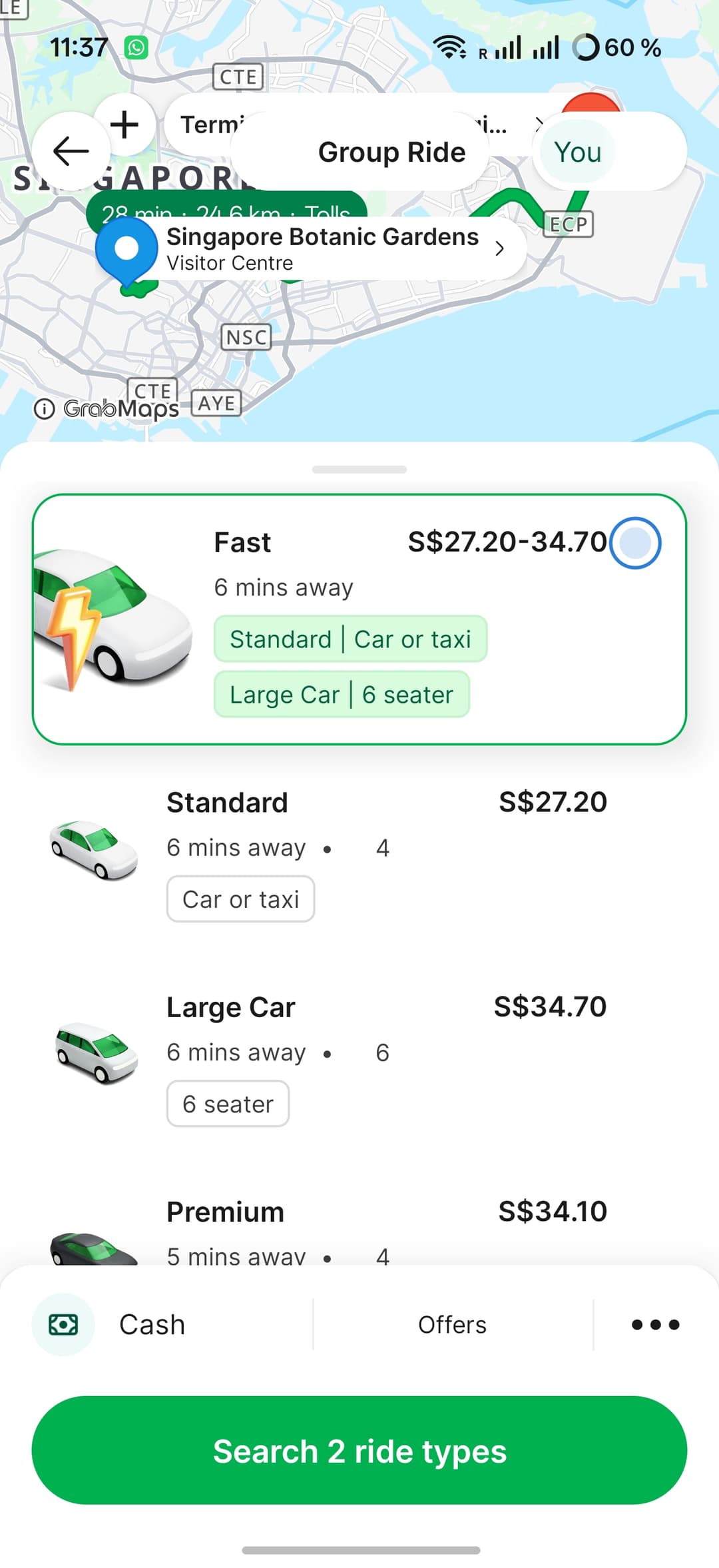
Choose a car type and look at the bottom panel. There's a payment method row, which currently reads "Cash." Tap it, choose adding a card ("Add a card"), and enter the Mirocard virtual card's details. That's the number, expiration date, and the code on the back. If the app asks you to confirm the card through 3-D Secure, enter the code from the message.
After a successful check, your card will appear in the row in place of "Cash." Now tap the big green button at the bottom of the screen, and the driver search begins. You can also link the card ahead of time without an order, through the account and payment methods section.
How to pay in Grab during a trip
Once the card is linked, almost everything happens inside the app. You choose a car, see the price, tap the order button, and ride, while the money is charged to the card automatically, with no cash handed to the driver.
Keep an eye on the price before ordering. If you pick a category with a range, like "Fast," keep the upper-bound amount on the card. Toll sections of road can affect the total, so check the receipt after the ride.
If a ride is scheduled through "Later," for example to the airport early in the morning, check the balance the evening before. A top-up put off until morning can easily lead to a failed order.
All your rides are collected in the "Activity" tab at the bottom of the screen. That's where you can find receipts and check how much was charged. For scheduled rides, the money has to be on the card at the time of the order, so check your balance in advance.
Conclusion
Rides in Grab take minutes, but it's better to set up the payment method before you fly. At home, you have time and a stable internet connection to issue a card, top it up, and link it to the app, and after that, all that's left is opening the app and ordering a car.
With Mirocard, that preparation comes down to three actions. You issue a card, top it up, and enter the details in Grab. From there, the app works the same as for any tourist with a local card.