
How to Pay for Replit with Cryptocurrency
Replit is an online environment where an app or website is built right in the browser. You describe the task to an AI agent in plain text, it writes the code, and a built-in database and project publishing spare you from setting up servers and installing software on your computer.
You can start for free, but the agent's daily credit allowance is small, so serious work quickly hits the limit. That's when you have to move to a paid tier, and the payment screen is where many people run into trouble.
Below, we'll look at what exactly a user pays for, why a card sometimes fails, how to replace it with a separate virtual card, and how to set up a subscription through Mirocard step by step.
What you actually pay for in Replit
The paid part of Replit is a tier subscription that includes a monthly credit allowance. Credits are spent primarily by the AI agent as it writes and fixes code, so the more complex the project, the faster the allowance runs out.
There are four tiers. Starter is free and gives daily agent credits, a database, and one published project. Core costs $20 a month and adds more free agent usage, planning mode, an unlimited number of workspaces, and the ability to remove the "Made with Replit" badge. Pro at $100 a month is built for collaboration, while Enterprise is negotiated individually.
Annual billing brings a discount of up to ten percent. Prices on the pricing page are listed before tax, and the final amount at checkout may differ depending on the country.
Paying for Replit with a bank card
Replit's payment page runs on the Stripe payment service and accepts cards from the major payment systems, with Apple Pay and Link offered at the top for quick payment. The card number, expiration date, security code, cardholder name, and billing address are entered in one form.
Replit's payment form has no crypto wallet and no transfer-to-address option — only a card, Apple Pay, and Link. Coins in a wallet never reach this form, so they need to be turned into card balance ahead of time, not at the moment you buy the subscription.
A virtual card for paying for Replit
A virtual card is useful when you want a separate payment instrument just for Replit. It has a number, an expiration date, and a security code like a regular one, but it's issued online, and the balance on it is limited to what you've transferred there yourself.
For a credit-based subscription, that's doubly convenient. The service gets access to neither your main account nor your other cards, and there won't be an extra charge as long as there's no extra money on the card.
The balance of a card like this is topped up with cryptocurrency, so you can pay for Replit straight from your coin savings. Conversion into dollars happens inside the service, and Replit sees an ordinary card.
Mirocard for paying for Replit
Mirocard issues virtual Visa and Mastercard cards that can pay for software and cloud services like Replit. Setup happens entirely online, with no bank visit and no paperwork, and the details appear in your account right after issuance.
For a subscription, a card built for paying for services is enough. It costs $5, and the details on sign-up and issuance are covered in a separate Mirocard guide, so here we'll stick to what matters specifically for Replit.
The card can be topped up directly from a crypto wallet in BTC, ETH, USDT, USDC, TON, TRX, or SOL. Coins are converted into dollars inside Mirocard, and an amount for the tier shows up on your balance right away.
The top-up fee is charged by Mirocard, not Replit, so it's only visible on the transfer screen. That's also where you can work out right away how much to send so the card ends up with the full tier price including tax.
How to pay for Replit with Mirocard
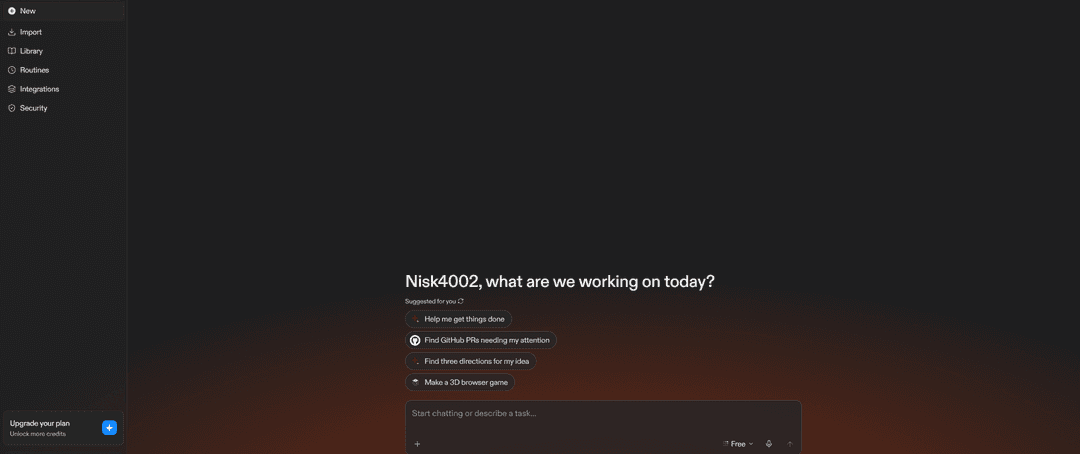
Open Replit and sign in. On the main page in the bottom-left corner, there's an "Upgrade your plan" block with a note about extra credits. Click it, and the "Compare plans" window opens with all the tiers.
At the top of the window, there's a "Monthly" / "Yearly" toggle, and the annual option is noticeably better value if you plan to work in Replit regularly. Below it are four cards, and it's worth choosing between them based on the task.
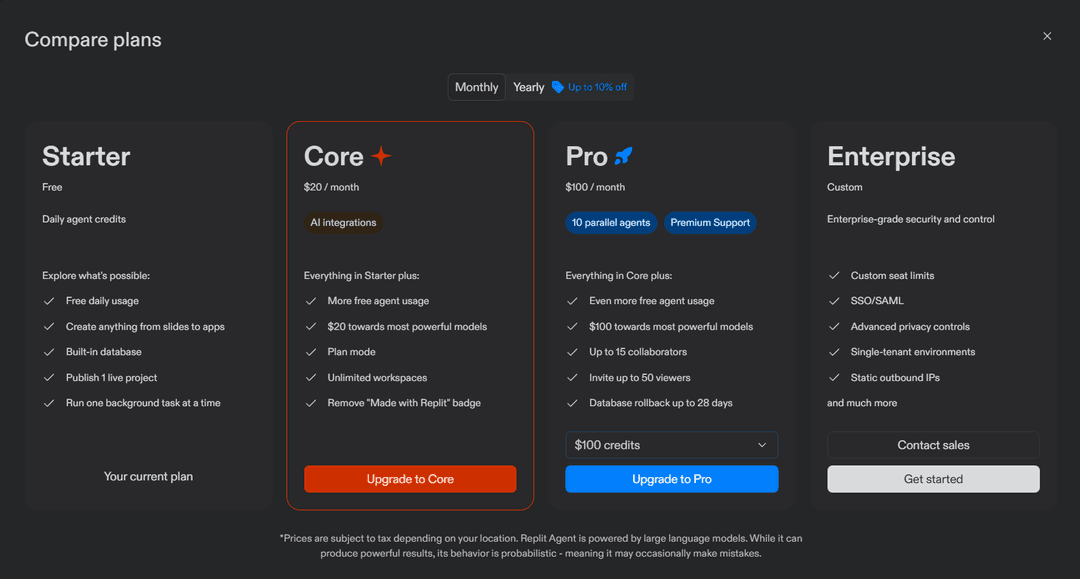
Starter is labeled as the current plan and works for trying out the platform. Core suits you if you build projects solo and daily credits aren't enough. Pro is for team work, since it lets you invite up to 15 collaborators and 50 viewers, run up to 10 agents in parallel, and roll back the database up to 28 days. Above the Pro button, there's a dropdown with the credit amount, with $100 selected by default. Enterprise, with its "Contact sales" button, is aimed at companies that need single sign-on and advanced privacy settings.
For most people, Core is the right fit. Click "Upgrade to Core," and the payment page opens. On the left, the price appears with a currency toggle, next to a note that the charge depends on the exchange rate. If you want to pay for a year right away, turn on the annual billing toggle under the tier's name.
On the right side of the page, ignore the Apple Pay and Link buttons, and in the "Card information" block, enter the Mirocard virtual card's number, expiration date in MM / YY format, and the CVC code. In the "Cardholder name" field, enter the name exactly as it appears in the card's details.
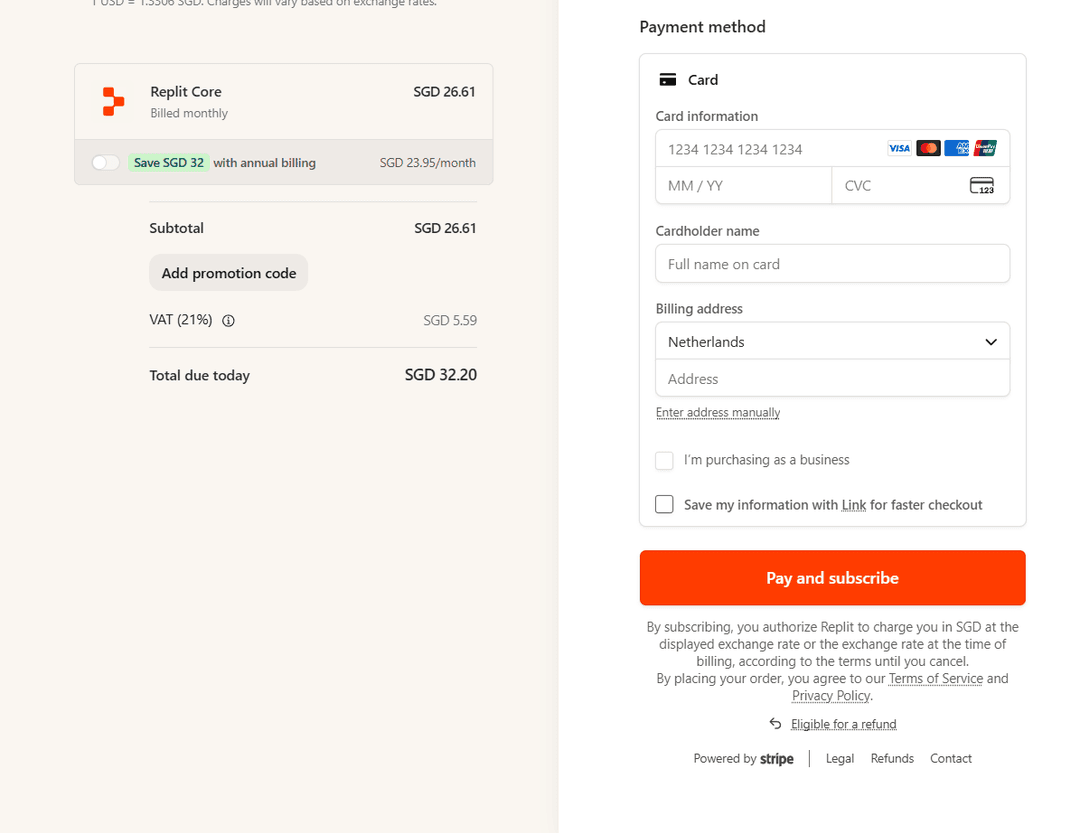
In the "Billing address" block, choose from the dropdown the country that matches the card's own details, then enter the address. If suggestions don't appear, click "Enter address manually" and fill in the fields by hand. Check "I'm purchasing as a business" only if you're paying as a company, and you can skip saving details to Link.
Check the total in the "Total due today" row and click "Pay and subscribe." Once you confirm, the tier turns on right away, and credits are added to the account.
What to keep in mind with recurring charges
Replit's subscription renews automatically every month, and the charge comes from the same card you provided at setup. So the card's balance needs to cover not just the tier price but also exchange-rate fluctuations, since the payment window states directly that the amount depends on the exchange rate on the day of the charge.
Tax is added to the tier price, depending on region. It's also included in the "Total due today" row, so when working out the amount you need, go by the final figure, not the price on the tier card.
Annual billing changes the math. It's charged as a single payment, and the card needs the full amount at once, not the cost of one month. If there isn't enough, the payment will be declined, and the tier won't renew until you top up the card and retry the payment.
Conclusion
With Replit, you're not paying for access to a site, but for the volume of the agent's work, so the main question when choosing a tier is about workload, not about setup. Starter is enough for your first projects, Core for steady solo work, and Pro for a team.
A separate Mirocard card adds control over spending on top of that. The subscription lives on its own balance, and the service can't charge more than you've transferred to it yourself, while the payment process itself comes down to filling out one form.