How to Pay for Bolt with Cryptocurrency
#Payment Instructions
Bolt is a service for ordering rides, renting scooters, and food delivery that operates in many countries. At its core it's an app through which you call a car, track it on a map, and pay for the ride directly from your smartphone. In a number of cities, Bolt has become the main alternative to Uber and local taxi services.
Not everyone can pay for a ride directly. Some users keep their funds in cryptocurrency, which Bolt doesn't accept. Others have bank cards that don't support international payments. Let's break down both situations and show how to link a working payment method.
Why Payment Difficulties Can Arise
The core problem involves international payments, and it shows up differently for different groups of users.
For cryptocurrency holders the difficulty is that Bolt doesn't accept crypto. Payment goes through bank cards and local payment systems. If your funds are in USDT, BTC, or Ethereum, paying for a ride directly won't work. The crypto first needs to be sold on an exchange, fiat withdrawn to a bank account, and only then a card linked. A chain of steps with fee losses at every stage.
Payment Methods Users Rely On
There are several working options, and the right one depends on what funds you have available.
International Bank Cards
A card from a bank in a country where Bolt operates officially links to the app without issues. It's a standard Visa or Mastercard, and the service accepts it as a default payment method.
For crypto holders there's a limitation — such a card doesn't work with cryptocurrency. To pay with one, crypto assets first need to be exchanged for fiat through an exchange and withdrawn to an account. On top of that, getting a physical card from a foreign bank isn't always easy — a personal visit to the country and proof of address are usually required. For a one-time trip, this route is rarely worth it.
Specialized Payment Services
These are intermediaries that process the payment on your behalf or provide payment access through their own solution. You send them money, including crypto, and they handle the payment.
The convenience is that you can pay in various ways. But a markup is charged, usually 15 to 30%. For taxi use, where rides are frequent and amounts are small, intermediaries are inconvenient — every trip becomes a separate operation with an overpayment. For regular use, this method doesn't work well.
Local Payment Methods
In some countries Bolt supports local payment methods — local wallets, payment through a mobile operator, or cash directly to the driver. If you're in a country where this option is available, it's the simplest route.
The downside is that local methods only work in a specific region and aren't available everywhere. Not all drivers accept cash, and a local wallet requires registration with local documents. As a universal solution for a traveler, this doesn't hold up.
Virtual Cards
A virtual card is a bank card without the plastic — with a card number, expiry date, and CVV. Bolt accepts it like a standard international card.
The key advantage for crypto holders is that some virtual card services can be topped up directly with cryptocurrency. Crypto goes onto the card, and from there a standard payment goes to the ride. No exchanges or bank accounts needed. The card is issued online in minutes, which is convenient when you need to prepare before a trip.
Paying for Bolt via Mirocard
For paying international services, many users turn to virtual cards like Mirocard. The service issues Visa and Mastercard cards that are topped up with cryptocurrency and accepted by Bolt as standard international cards.
Mirocard offers several card types for different purposes. The card is topped up with cryptocurrency — ETH, USDC, USDT, AVAX, BCH, DAI, BNB, BTC, DASH, DOGE, POL, LTC, SOL, TON, TRX, and XMR are supported. A transfer from an exchange or wallet takes a few minutes, and funds are immediately available for payment.
One card can pay for more than just Bolt. It works with other ride services, streaming platforms, games, and stores. For a traveler this is convenient — a single payment instrument covers most expenses on the road, and all charges go directly from the crypto wallet.
How to Get a Mirocard
The process is fully online and usually takes less than half an hour.
Step 1. Registration
Open the Mirocard website and click «Get Card».
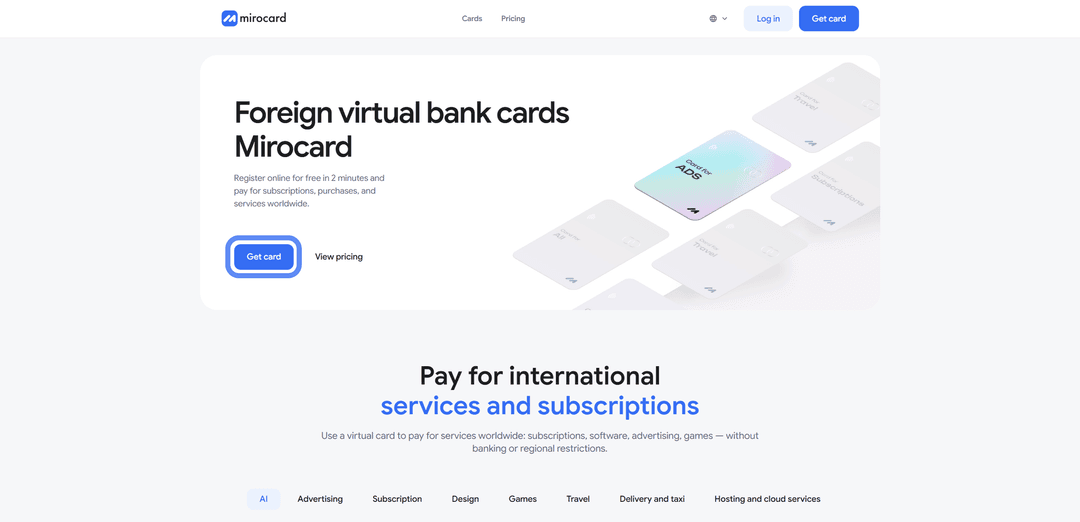
First time on the platform — select «Sign Up».

You'll need a working email and password — a confirmation link will be sent to your inbox. If you have a Heleket account, sign in through it and all your funds and cards will transfer to Mirocard automatically.
Step 2. Top Up Your Master Balance

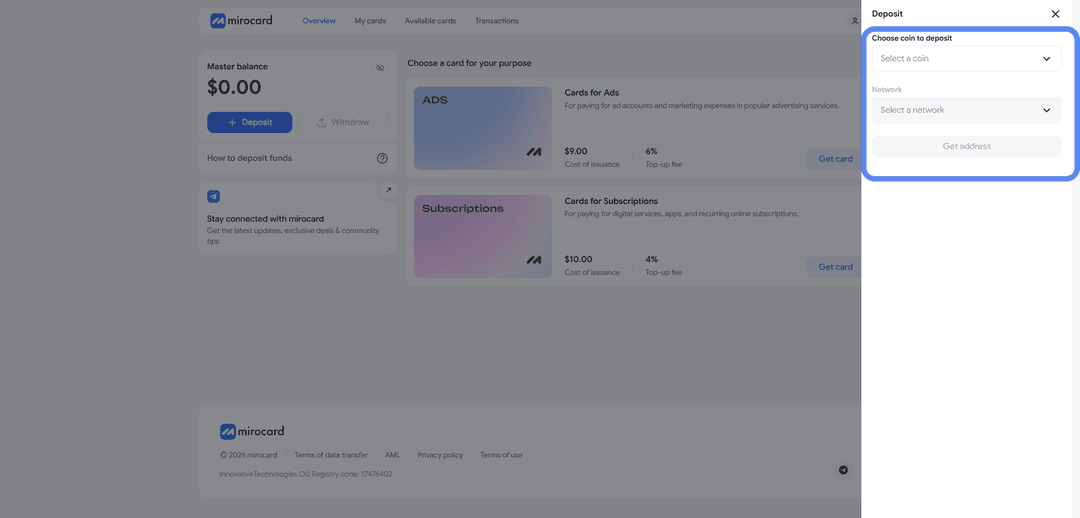
The lowest transfer fee option is USDT on the TRC-20 network. The service will provide a wallet address — send crypto to it from an exchange or external wallet. The balance will be credited after the transaction is confirmed on the blockchain.
Step 3. Select a Card
In the catalog, select the card type that fits your purpose and click «Get Card» on the right side of the block.
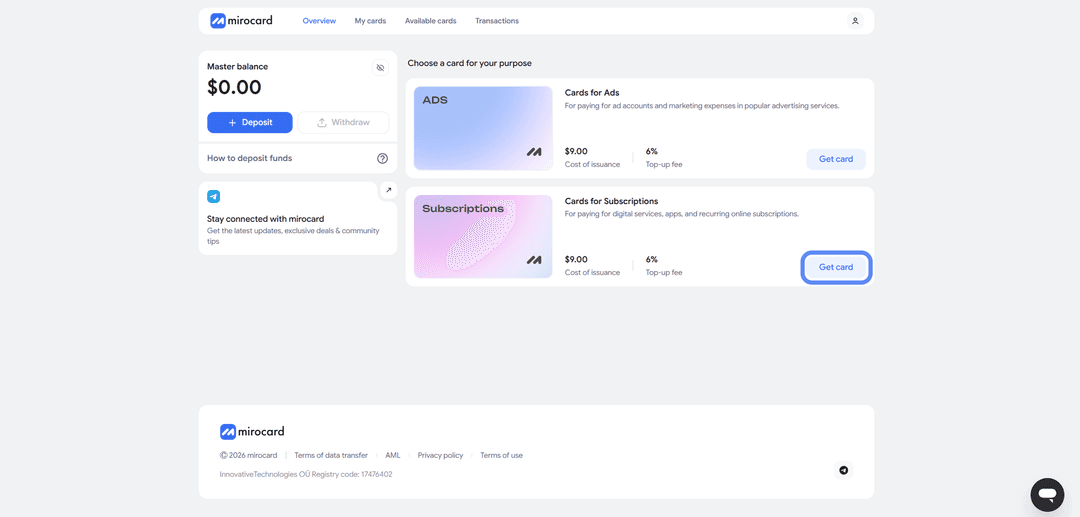
The issuance page will open.
Step 4. Verification
Before issuance, you'll need to upload documents for verification. This protects your balance — only you will be able to manage it and link new cards.

After verification, maximum top-up and spending limits become available.
Step 5. Pay for Issuance
On the issuance page, click «Deposit and Pay».
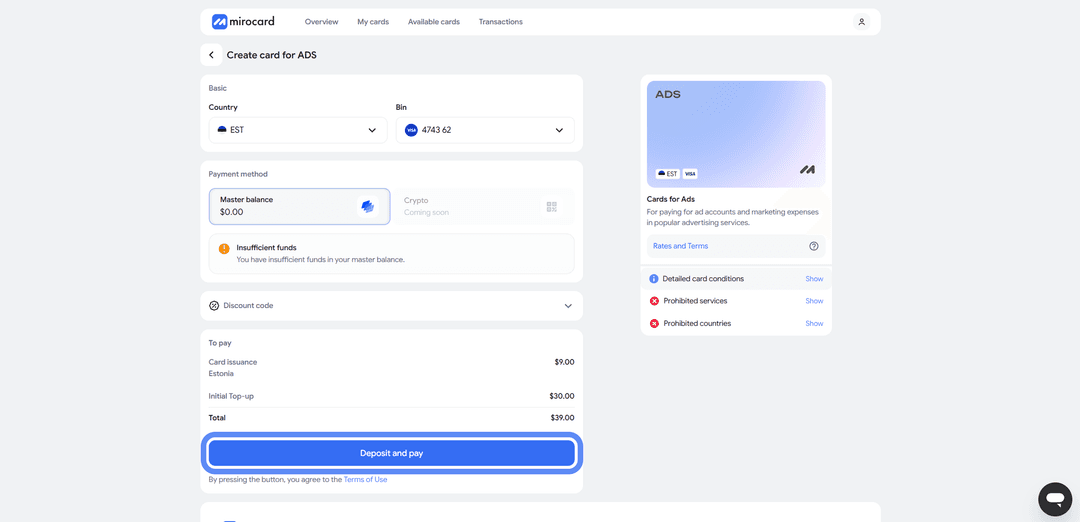
The issuance fee will be deducted from your Master Balance. The remaining amount will go to your card account and be ready for payment.
Step 6. Card Is Ready
The card will appear in your dashboard with its details and balance. No activation needed — it accepts payments immediately. The dashboard provides access to transaction history, top-ups, and the option to freeze the card if needed.
A tip — keep a small buffer on the card above the ride cost. When processing payment, Bolt may temporarily reserve a slightly larger amount to verify the card. This is a pre-authorization hold, and the excess will be returned within a few hours. If the balance is exactly the ride amount, the check may not pass. A buffer is especially important for taxi rides, where the final amount is sometimes higher than the initial estimate due to traffic or route changes.
How to Add a Card to Bolt
Linking a card in Bolt works the same as any standard bank card payment. The entire process happens in the app.
Step 1. Open the App and Choose a Route
Launch the Bolt app on your smartphone. On the home screen, select a service — taxi, car, bike and scooter rentals, or pre-booking. Then choose your route — where you're departing from and where you want to go.
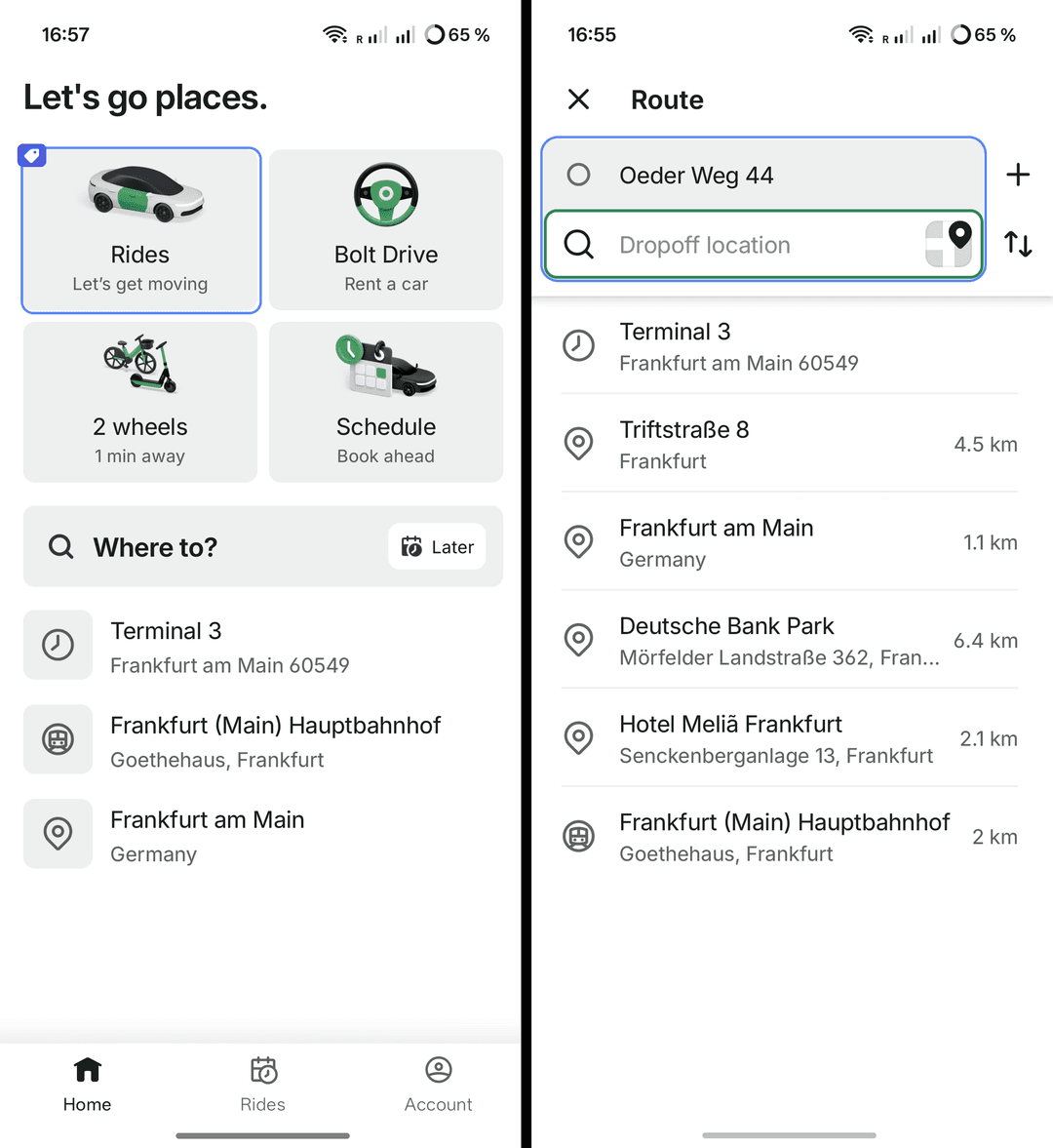
Step 2. Go to Payment Method and Enter Card Details
After choosing a route, the app will prompt you to select a payment method. Tap «Add payment method» — «Add bank card».
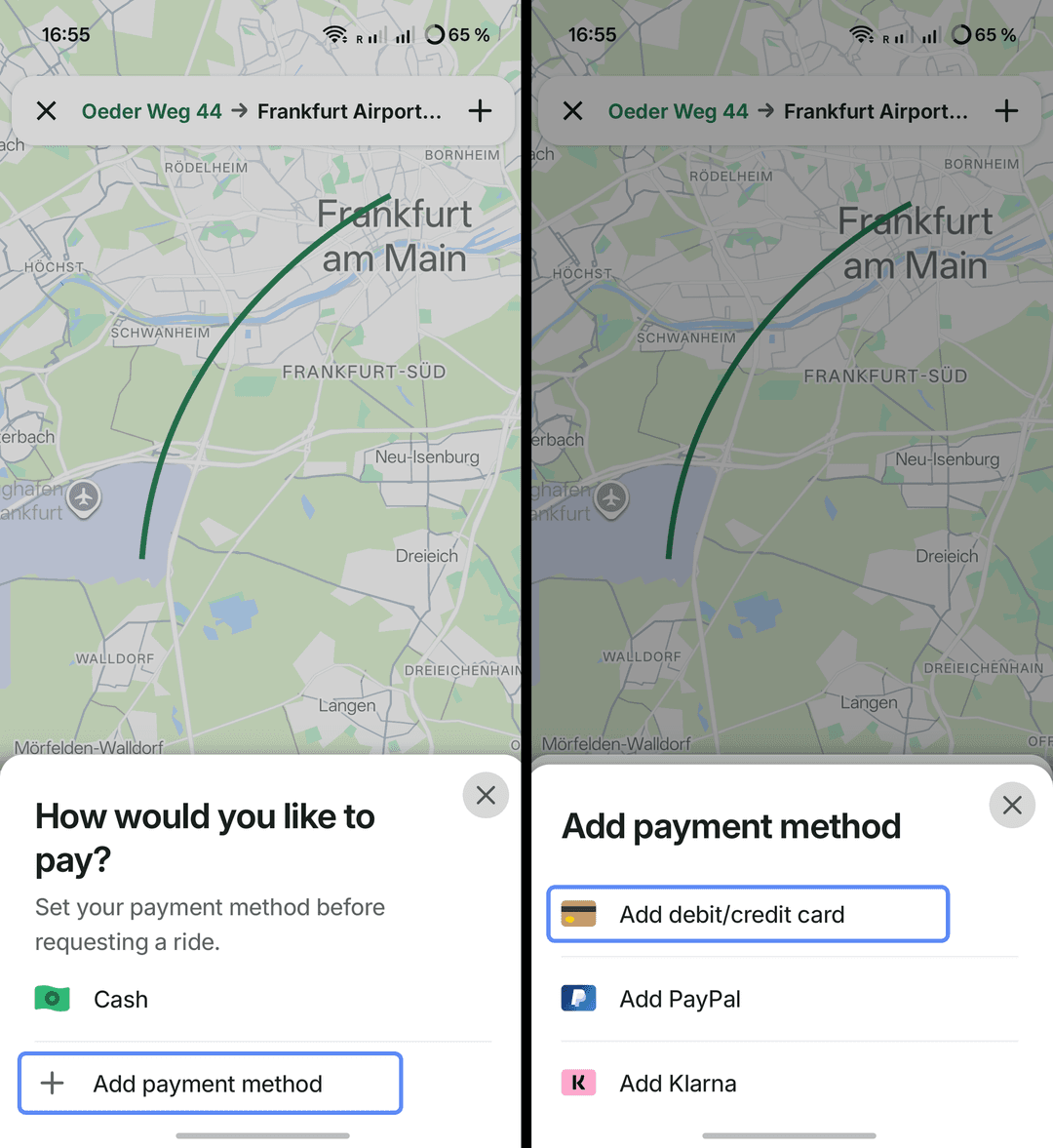
Fill in the fields with your Mirocard virtual card details — card number, expiry date, CVV, and cardholder name. All details are available in your Mirocard dashboard. Once saved, the card becomes available as a payment method.
Step 3. Pay for the Ride
Select the added card as your payment method and confirm the order. From then on, Bolt will charge ride costs to this card automatically. You can add multiple cards and switch between them before each order if needed.
If the Card Won't Link
Check the balance — the card needs sufficient funds, as Bolt sometimes charges a small verification amount and returns it immediately. Make sure the card details are entered correctly, especially the CVV. If the card still won't add, check that it's active in your Mirocard dashboard.
A Useful Tip for Travelers
When traveling, it's convenient to have one payment instrument for multiple platforms at once. Different countries have different ride services — Bolt in some, Uber in others, local services elsewhere. Setting up a separate card for each makes it easy to lose track of credentials and balances.
One virtual card solves this. Mirocard works with Bolt, Uber, and other international services, as well as accommodation booking, streaming platforms, and stores. Before a trip, just top up the card with crypto, and all expenses on the road come from a single instrument.
It's also convenient from a security standpoint. While traveling, you enter card details across different apps and networks, and the risk of card data being exposed is higher than usual. A virtual card can be frozen and reissued easily if needed, without touching your main funds. And you can keep on it exactly as much as the trip requires.
Conclusion
There are several ways to pay for Bolt. International bank cards work directly, but paying with crypto requires conversions and they're not always easy to obtain. Intermediaries charge markups and are inconvenient for frequent small rides. Local methods only work in their specific region. Virtual cards strike a balance in speed, cost, and crypto compatibility.
Mirocard in this setup works like a regular Visa but is topped up with cryptocurrency. Set it up once and pay for rides directly from your crypto wallet, without cashing out through exchanges. The same card works for other services on the road — from taxis to accommodation booking.
For cryptocurrency holders, this is a short path from crypto assets to paying for rides. And for those who can't access standard international cards, a virtual card remains a practical way to use Bolt in any country where it operates.