How to Pay for a Claude Pro Subscription
#Payment Instructions
Claude by Anthropic has become a daily tool for thousands of professionals — copywriters, developers, analysts, marketers. A Claude Pro subscription unlocks access to the most advanced models and higher usage limits, but you can't pay for it directly with crypto. Anthropic only accepts standard bank cards.
For crypto holders this is a familiar issue. Your assets sit in USDT, BTC, or Ethereum, yet spending them on services you actually use means selling on an exchange, withdrawing fiat to a bank account, and only then attaching a card. Every step costs time and fees.
A virtual Mirocard card solves this. It works like a regular Visa or Mastercard but tops up directly with crypto. Below we'll walk through how it works and how to subscribe to Claude in just a few minutes.
What Claude Pro Is
Claude is developed by Anthropic. It is an AI assistant capable of generating text, analyzing code, processing uploaded files, and holding multi-step conversations. One of Claude's strong points is its context window size. The model retains up to 200,000 tokens at a time, which allows you to load large documents into a chat and receive answers that take the full content into account.
The free plan gives access to the Claude Sonnet model. The daily limit is around 20–30 requests. This is enough to test the service, but for full-time daily use the ceiling is reached too quickly.
The Pro plan removes this limitation. The cost is $20/month when billed monthly, or $17/month when billed annually. Subscribers get access to the full Claude model lineup, a fivefold increase in limits compared to the free plan, and a set of advanced features — including extended thinking, context retention between sessions, organizing chats into projects, email and calendar integration, the Claude Code tool for working with code via terminal, and priority request processing during high server load.
Existing Payment Methods
Despite the restrictions, users found working workarounds. Each has its own pros and cons.
Payment intermediaries. The scheme is simple — you send rubles, and the intermediary makes the payment using their foreign card. Speed — from 15 minutes to an hour. The main drawback is a 15–25% surcharge on top. On a $20 Claude Pro subscription, the overpayment reaches $3–5 every month. Some intermediaries ask for your Claude account login and password, which puts your data security at risk.
A foreign bank card. If you have an account at a bank in Kazakhstan, Armenia, Turkey, or another country, that card will work on Claude without any issues. However, opening such an account requires an in-person visit, a package of documents, and often a minimum deposit. A reliable option, but labor-intensive to set up.
Friends or acquaintances with a foreign card. Zero commission, instant payment. But asking someone to pay for you regularly is not the most convenient solution, especially with monthly renewals.
App Store gift cards. Works for iPhone users. You buy a gift card for the required region, add the funds to your Apple ID, and sign up for the Claude subscription through the mobile app. Limitations — it's not always easy to find a card at a fair price, and the Apple ID region must match the gift card region.
A virtual card with crypto top-up. You issue a Visa card yourself, load it with crypto, and pay Claude directly. No one gets access to your account. The overpayment is minimal — only the top-up fee. Mirocard stands out among similar services with a low 4% fee and instant card issuance.
How the Mirocard Virtual Card Can Help
Mirocard is our virtual card service — the cards are accepted in online stores and on platforms that support card payments, such as Claude.
The principle works as follows. Cryptocurrency arrives in your wallet inside Mirocard, is converted into dollars, and is credited to the virtual card balance. You then use the card details (number, expiry date, CVV) in the payment form on the Claude website — the process is no different from paying with a regular debit card. The charge is instant, and if the transaction fails for any reason, the funds are returned to the card balance.
Here are the terms in detail.
Top-up fee — 4% of the amount. For example — when topping up by $25 (enough for a month of Claude Pro with some to spare), the fee is $1. With intermediaries, the same operation would cost $3–5.
Minimum start of $25. This is the amount you need to deposit into your Mirocard wallet before issuing a card. After the $10 issuance fee is deducted, $15 remains on the balance, ready to use.
16 coins supported. You can top up your Mirocard virtual card via ETH, USDC, USDT, AVAX, BCH, DAI, BNB, BTC, DASH, DOGE, POL, LTC, SOL, TON, TRX, XMR.
Built-in 3D Secure. Anthropic requires payment confirmation via 3DS — the Mirocard card passes this check without any issues.
No verification required. The account is created with an email address, without uploading a passport scan or selfie. Full terms of service are available in your personal account after registration.
In addition to Claude, the same card can be used to pay for ChatGPT, Midjourney, Spotify, Netflix, Amazon, and other platforms that accept foreign cards.
How to Issue a Mirocard Virtual Card
The entire card issuance process takes place online. Here is a step-by-step guide.
Step 1. Open the Virtual Cards Section
Go to the Mirocard website and click "Get a Card."
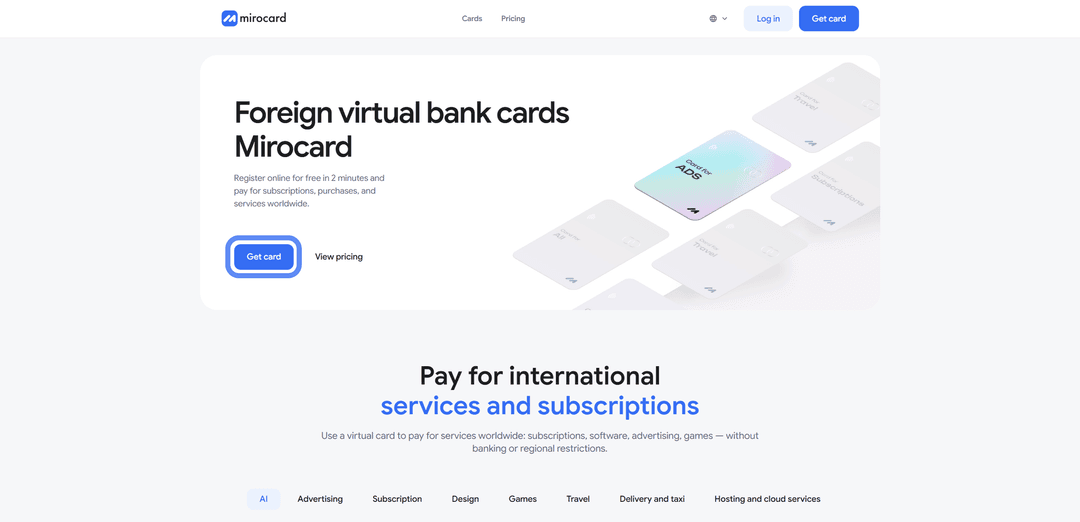
You will land on the registration or login screen.
Step 2. Create an Account or Log In
If you are on the platform for the first time, click "Register." You will need a working email address (a confirmation link will be sent to it) and a password. If you have previously used Heleket virtual cards, log in through it to transfer all your funds and cards.

Step 3. Top Up Your Master Balance with $25
Inside your personal account, find the "Top Up" button.

You will be offered a list of coins and networks — for example, USDT via TRC-20 (one of the cheapest networks in terms of transfer fees) or others of your choice.
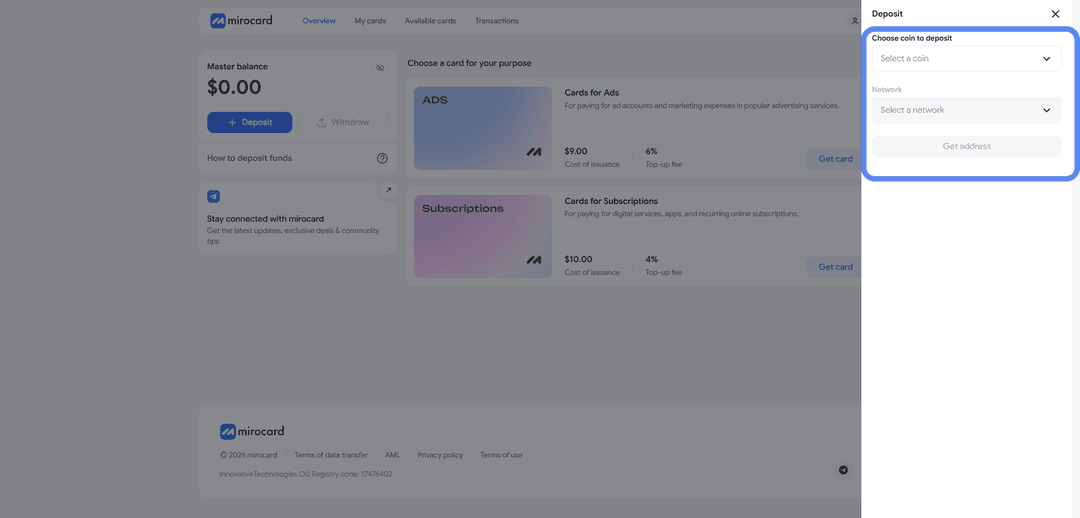
After choosing a coin and network, click "Get Address," which Mirocard will generate. Transfer crypto to it from an exchange account or external wallet. Crediting will occur after blockchain confirmation. Of the deposited amount, $10 will be deducted as a one-time card issuance fee; the remaining $15 will go to the card account.
Step 4. Choose a Card to Issue
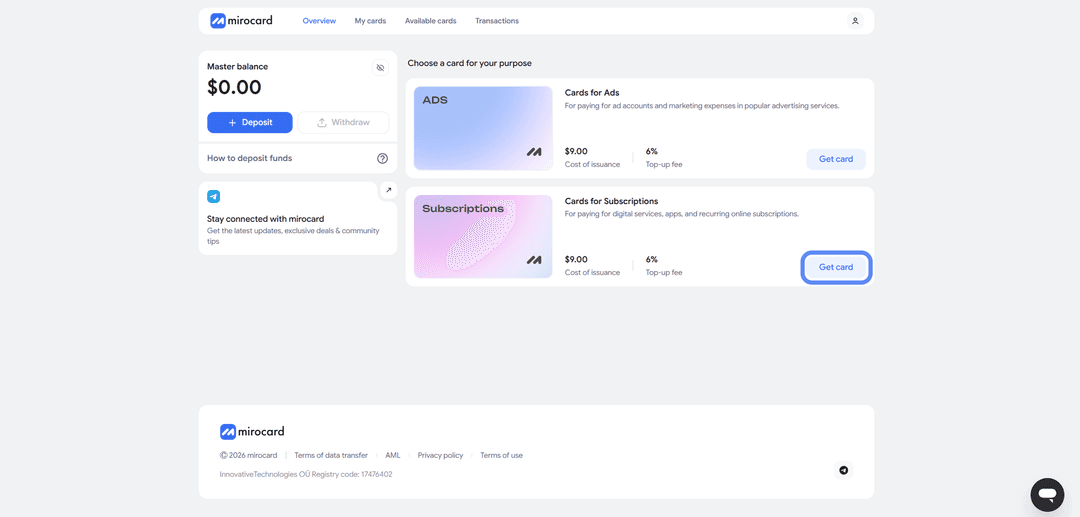
After topping up the Master Balance, you need to select the card you want to issue. In our case, this is a subscriptions card. Click the "Get Card" button located on the right side of the subscriptions card block.
Step 5. Issue the Card
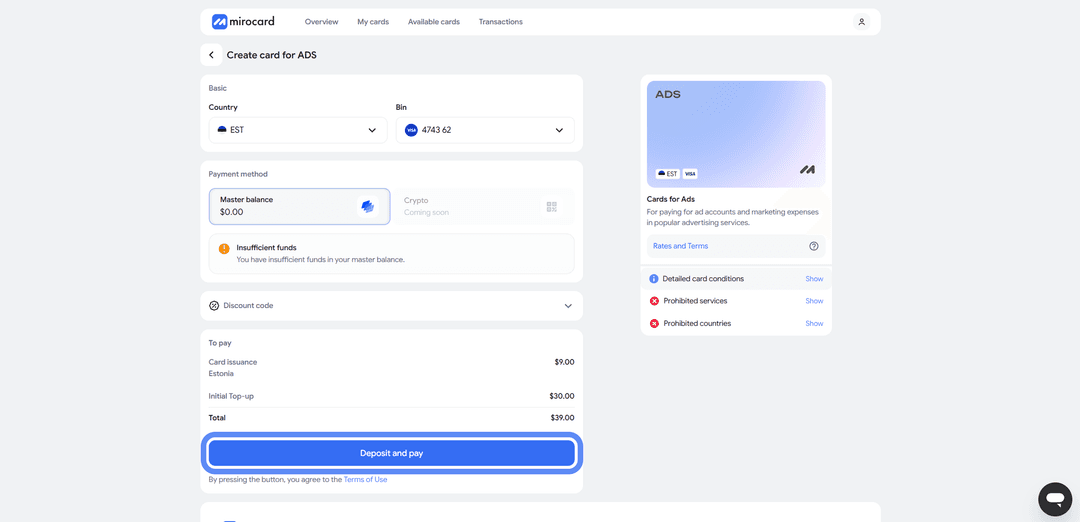
You will be taken to the card issuance section. First, you need to complete verification by providing your documents. This ensures that no one other than you can withdraw funds or link a new card. After verification, maximum purchase and top-up limits will become available to you.

After completing verification, click the "Deposit and Pay" button on the same page. This action will pay for the card issuance from your Master Balance, which you topped up earlier.
The Card Is Ready to Use
The issued card appears in your personal account along with the current balance. Here you can always view the card details, check the remaining funds, and top up the card if needed. The card works immediately after issuance — no additional activation steps are required. You can proceed to paying for Claude Pro.
How to Pay for a Claude Pro Subscription
The Mirocard card has been issued and has funds on it — now let's go through how to pay for a Claude subscription. The entire process takes place on the Claude website and takes a few minutes. Below is a detailed guide covering every step.
Step 1. Go to the Claude Website and Log In
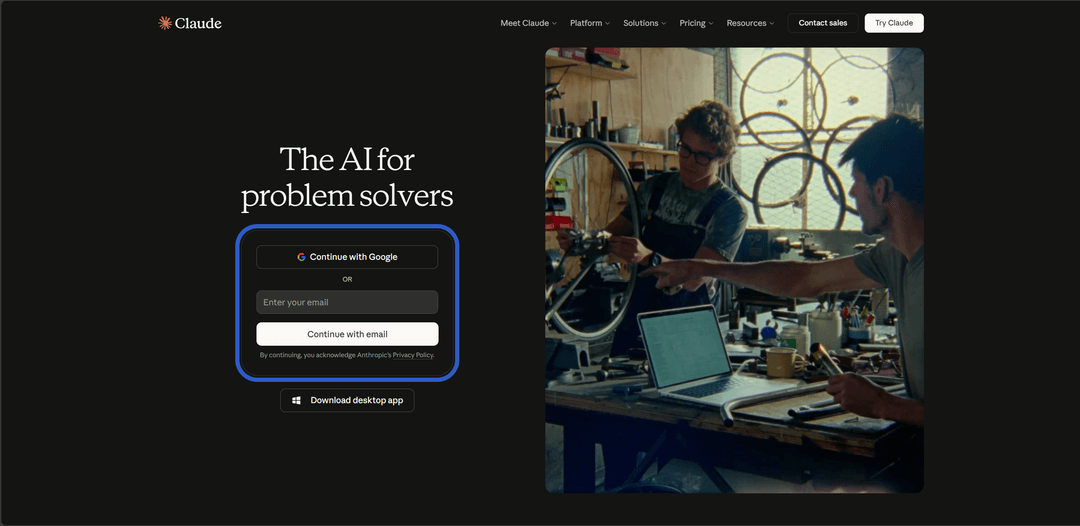
Open Claude in your browser. If you already have an account — click "Enter your email" and enter your email and password. You can also log in via a Google account. If you don't have an account, you will need to register. You'll need to provide an email address, confirm it, and create a password. Registration gives you access to the free Claude plan.
Step 2. Click Upgrade on the Main Page
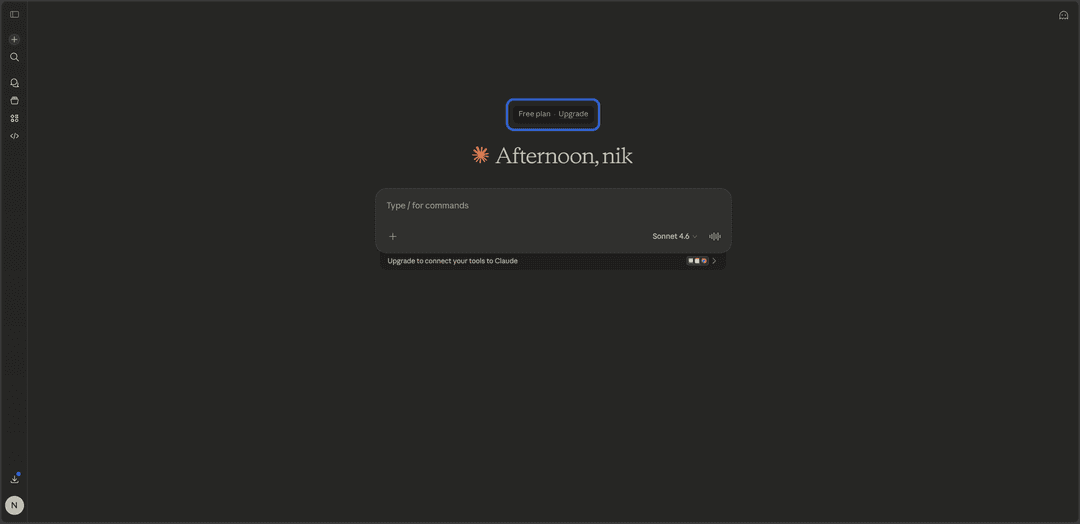
After logging into your account, you will be on the main Claude chat page. Find the "Upgrade" button — it is located slightly above the welcome screen and leads to the plan selection page. Click it to proceed to subscription checkout.
Step 3. Choose a Suitable Plan
Claude will offer several subscription options. Here is what they include.
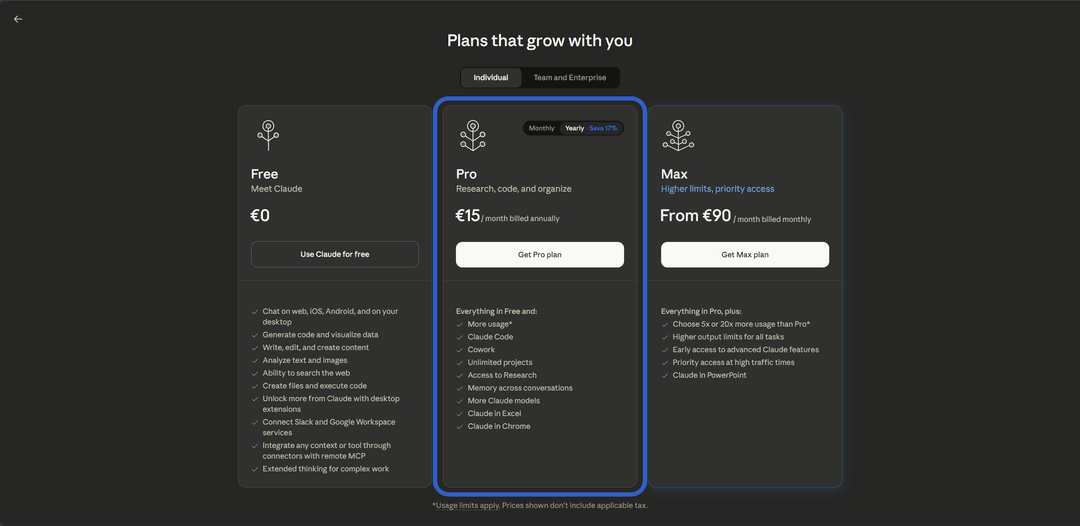
Pro — $20 per month (or $17 with annual billing). Message limits are approximately five times higher than the free plan. Access to all Claude models, including flagship ones. Extended thinking mode, Projects, Claude Code, integrations, memory between sessions, and priority access. For most users, Pro is the optimal choice.
Max — two options. For $100 per month you get limits five times higher than Pro. For $200 per month — twenty times higher than Pro. Max suits those who work with Claude all day — copywriters handling large volumes, developers, analysts.
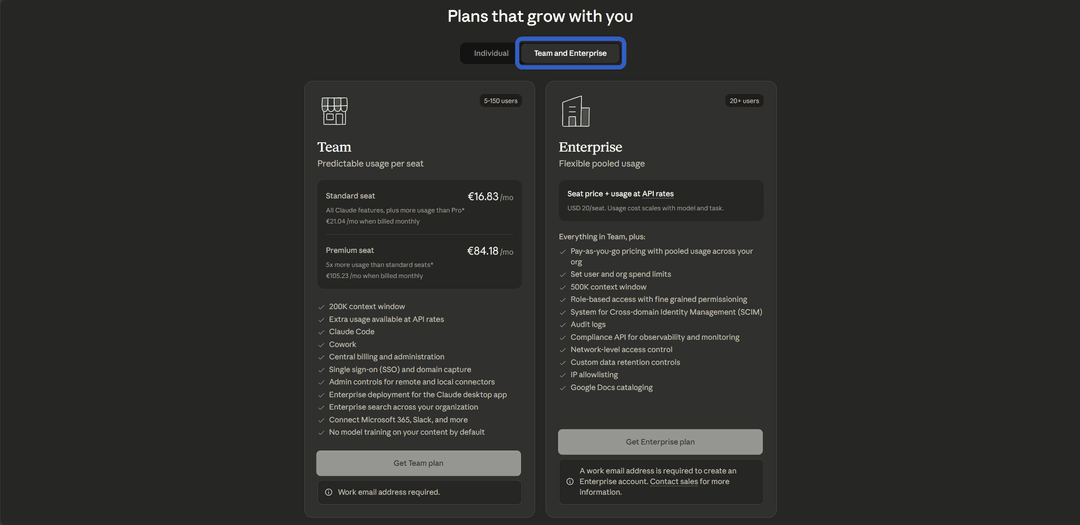
Team — from $25 per user per month, minimum five people. Includes all Pro features as well as collaboration, member management, unified billing, and corporate security features.
Enterprise — a plan with individual pricing for large organizations. Anthropic does not publish a fixed price — it is calculated for a specific company depending on the number of users and requirements. Enterprise includes all Team features plus advanced security capabilities, a dedicated account manager, an expanded context window, priority technical support, and flexible payment terms. This plan is designed for companies with dozens or hundreds of employees who need full Claude integration into their workflows. To sign up, you need to contact Anthropic's sales team.
Choose the plan that fits your needs. For starters, Pro is recommended — it covers the requirements of the vast majority of users.
Step 4. Choose a Subscription Period
Claude will offer two payment options — monthly or annual. The annual subscription costs less per month and saves around 17% off the base price. If you are confident you will use Claude regularly, the annual plan is more cost-effective. If you want to try it first — choose monthly billing, which can be cancelled at any time.
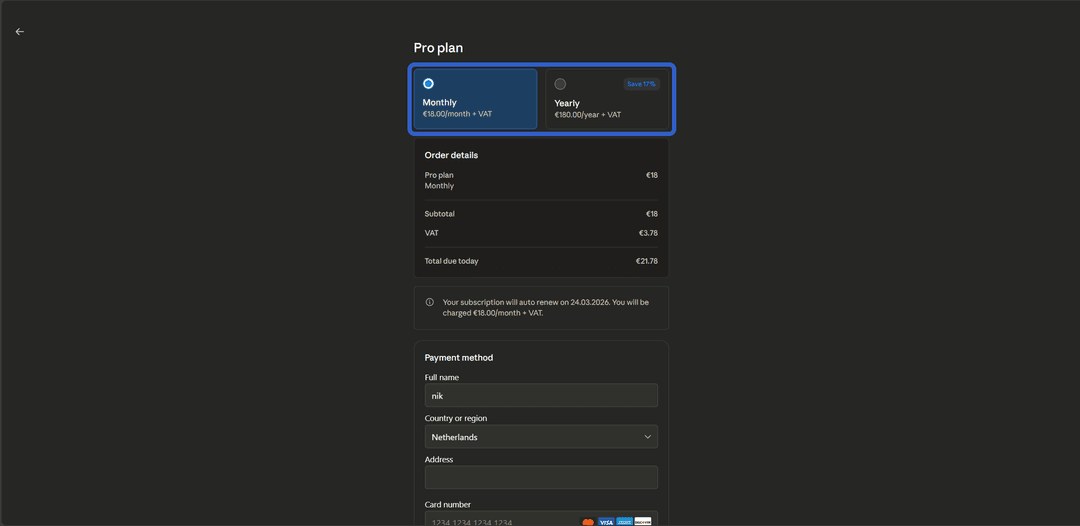
Step 5. Fill In the Payment Details
A form for entering card details will open. Fill in the following fields.
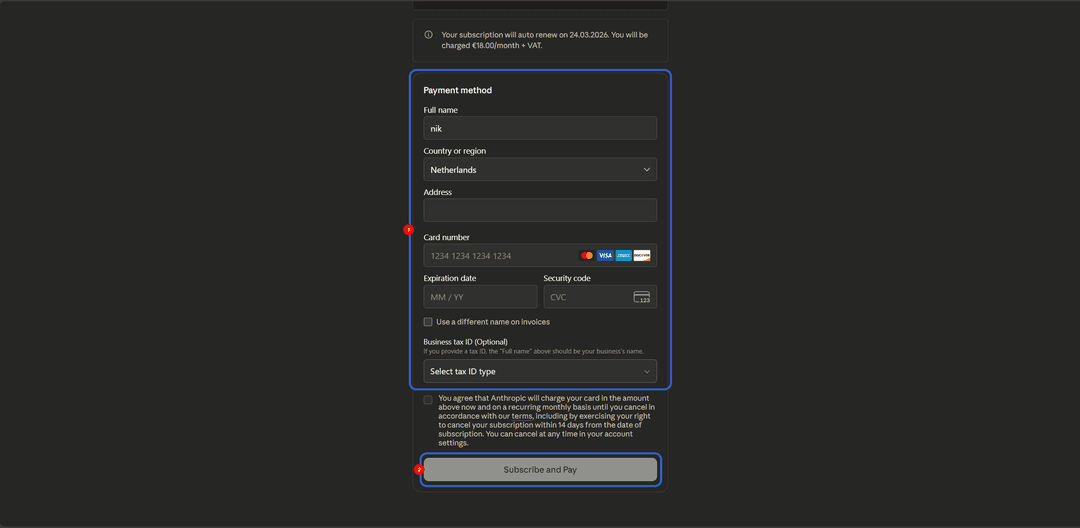
Full name — enter your name in Latin characters. Any name can be used; it must match the format (Latin letters only).
Country or Region — select a country from the dropdown list. You need to select the United States, as it corresponds to the BIN of your Mirocard card.
Card number — enter the 16-digit number of your Mirocard virtual card. It is recommended to copy it from your personal account after creating the card to avoid typos.
Expiration date — the card's expiry date in month/year format. This data is also available in your personal account.
Security code — the three-digit CVV code (in our case it is also displayed in your personal account after the card is created).
Business Tax ID (optional) — an optional field for entering a company tax identifier. If you are paying as an individual, skip it.
Check the box confirming your agreement with the service terms and click the payment confirmation button.
What to Know After Subscribing
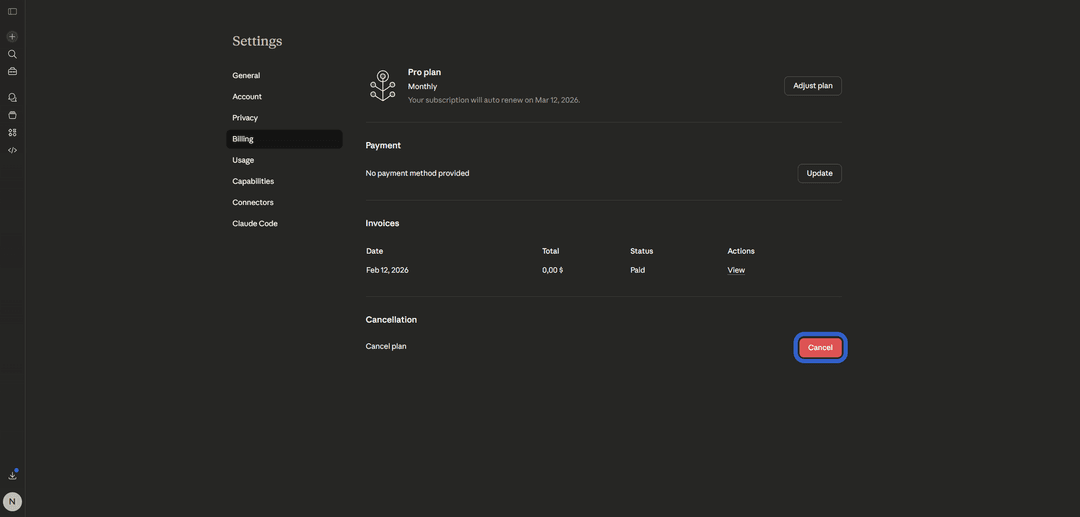
After the payment is successfully processed, the subscription is activated instantly. The current plan and next billing date will be displayed in your Claude account settings.
Claude automatically renews the subscription each month (or each year with the annual plan). Top up your Mirocard card in advance — 3–5 days before the billing date. If the card doesn't have sufficient funds, the subscription will not renew and you will return to the free plan. All progress, projects, and chat history are preserved.
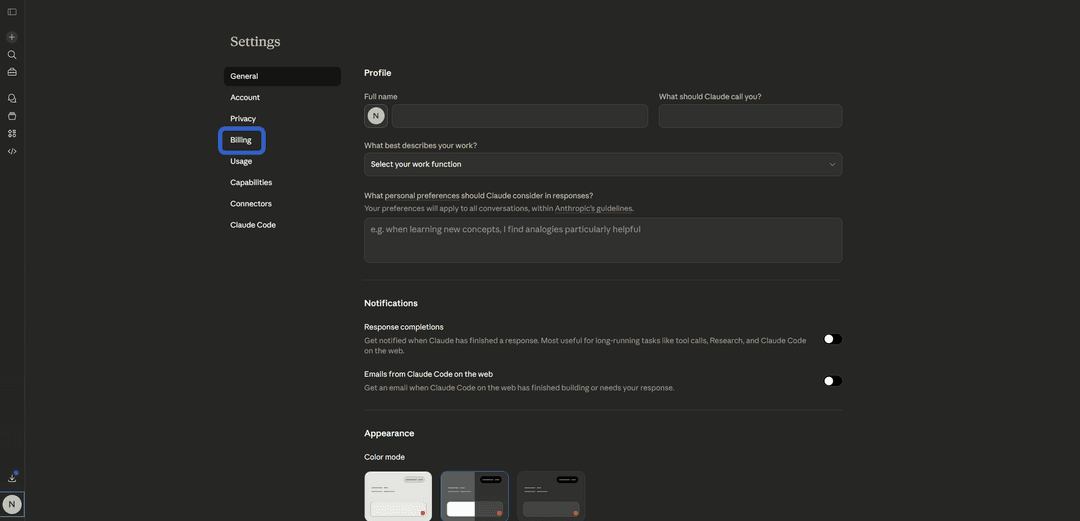
To cancel the subscription, go to your Claude account settings.
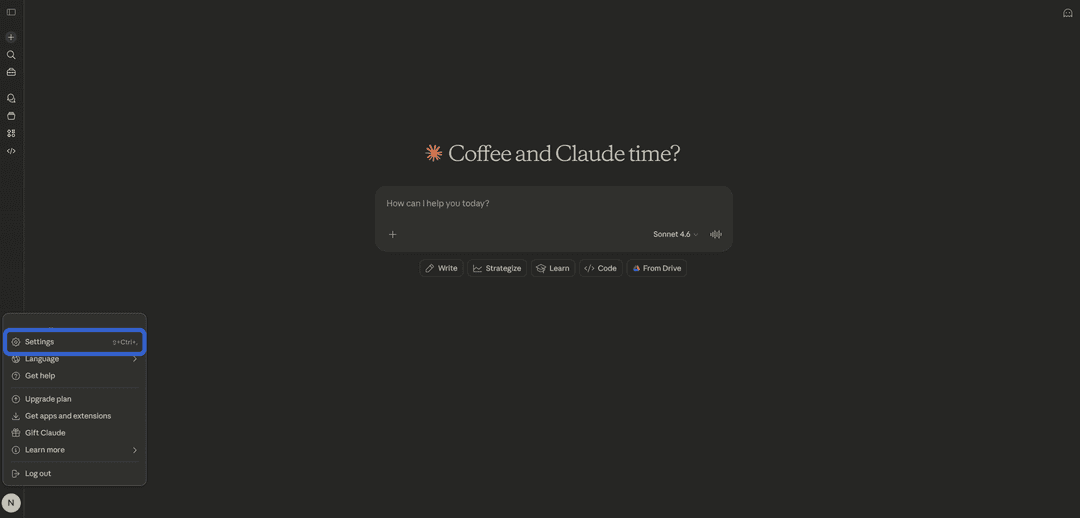
Go to the "Billing" section.
Click "Cancel." Access to the subscription will be retained until the end of the paid period.
The subscription is tied to the account, not the device. You can use Claude Pro on a computer, phone, and tablet simultaneously — simply log in with the same account.
Conclusion
Claude Pro turns an AI assistant from a "try it once" tool into a fully functional work instrument — with expanded limits, advanced models, and a set of professional features. Payment restrictions for cards are resolved in a few minutes using a Mirocard virtual card. One-time issuance from $7, top-up fee of 3.5%, support for all popular cryptocurrencies.
From creating a Mirocard account to the moment Claude Pro is activated and ready to use, less than an hour passes. You control the entire process yourself — without sharing unnecessary data with intermediaries and without overpaying 15–25%.