How to Pay for a Disney+ Subscription with Cryptocurrency
#Payment Instructions
Disney+ is a platform from The Walt Disney Company. It's a streaming service that brings together content from several major studios, along with films and series under the Star brand. Subscribers watch classic animated films and franchises alongside original projects that release exclusively on the platform.
Not everyone can pay for the subscription directly. Some viewers keep their funds in cryptocurrency, which Disney+ doesn't accept. Others have bank cards that don't support international payments. Let's break down both situations and show a working solution.
What the Subscription Offers
Disney+ gives viewers several significant advantages over pirated content and fragmented streaming services.
First — exclusive content. Many Marvel and Star Wars projects, original series and films release only on Disney+. They can't be found on other platforms through legal means.
Second — image quality. The service supports 4K, HDR, and Dolby Vision on compatible devices, with audio in Dolby Atmos format. Picture and sound at the level of a home cinema.
Third — ad-free viewing on standard plans. Films and series play in full, without interruption. Fourth — offline downloads. Content can be saved to a phone or tablet and watched without an internet connection. Fifth — multiple profiles within one account and simultaneous viewing on different devices, which is convenient for families.
Worth noting separately is Kids Mode — dedicated profiles for children with age-filtered content. Parents don't need to worry about their child stumbling across unsuitable films.
What Makes Paying for the Subscription Difficult
The core issue involves international payments, and it shows up differently for different groups of users.
For cryptocurrency holders, the difficulty is that Disney+ doesn't accept it. Payment goes through bank cards and local payment systems only. If your funds are in USDT, BTC, or Ethereum, paying for the subscription directly won't work — you'd first need to exchange crypto for fiat on an exchange, move it through a bank, and only then use a card. A chain of steps with fees eating into your funds at every stage.
Popular Ways to Subscribe to Disney+
There are several working options, and the choice depends on what funds you have available.
International Bank Cards
A Visa or Mastercard from a country where Disney+ is officially available pays for the subscription without issues. The service accepts it as a standard bank card.
For cryptocurrency holders there's a limitation — a regular card doesn't work with crypto. To pay with one, you'd first need to sell the crypto assets on an exchange, withdraw fiat to a bank account, and only then use the card. Each step takes time and a portion of the funds goes to fees. It's also worth noting that getting a physical card from an international bank isn't always straightforward — in some countries these cards aren't available at all.
Virtual Payment Instruments
A virtual card is a bank card without the plastic — it has a card number, expiry date, and CVV. Disney+ accepts it on equal terms with physical cards.
The key difference from regular cards is that some virtual card services can be topped up directly with cryptocurrency. For crypto holders, this solves the main problem — crypto goes onto the card, and from there a standard payment goes to Disney+. No exchanges or bank accounts needed. A card like this is issued online in minutes and can be linked to a subscription immediately.
Subscription Payment Services
These are intermediaries who arrange the Disney+ subscription on your behalf. You send them money in a convenient way, they pay for the subscription from their own funds.
Payment can be made in various ways, including crypto, but a markup is charged — usually 15 to 30%. The main risk is depending on the service's honesty. If the intermediary disappears with your money or provides an account with a short lifespan, recovering the funds will be nearly impossible. Crypto transfers are irreversible.
The Solution for Buying Subscriptions — Mirocard
Mirocard makes it possible to pay for various subscriptions and digital services, including Disney+. We issue virtual cards that are topped up with cryptocurrency and accepted by Disney+ as standard bank cards.
For paying for an online service, the subscription card is the right fit. It's designed for recurring charges, so Disney+ will renew automatically without issues. Issuance costs $10, and the top-up fee is 4%. The card's US BIN means Disney+ recognizes it as a card from the United States — convenient for an account registered in the American region.
The card can be topped up with ETH, USDC, USDT, AVAX, BCH, DAI, BNB, BTC, DASH, DOGE, POL, LTC, SOL, TON, TRX, and XMR. A transfer from an exchange or wallet takes a few minutes.
How to Get a Mirocard
The process is fully online and usually takes less than half an hour.
Step 1. Registration
Open the Mirocard website, click «Get Card», and sign in to your account.
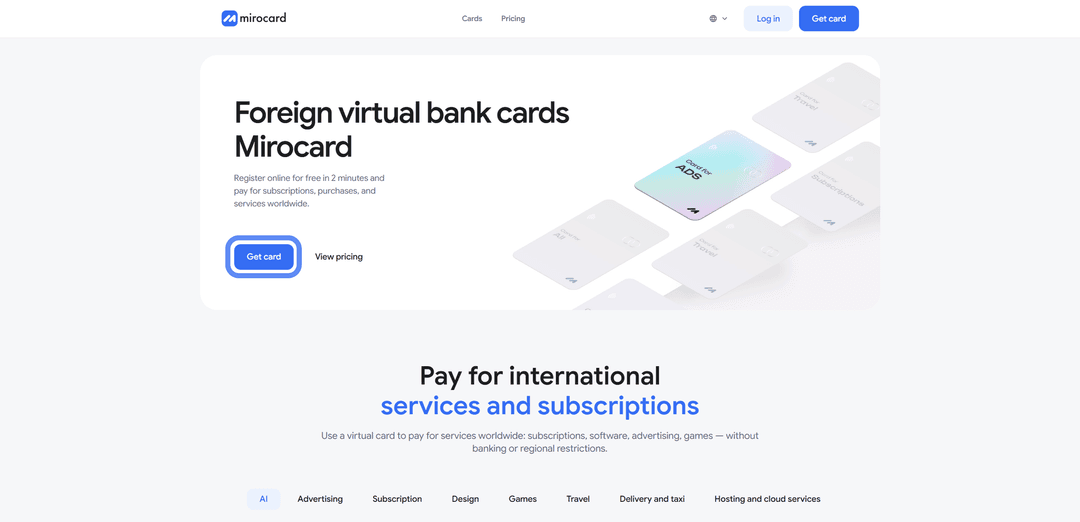
If you're new to the platform, select «Sign Up». You'll need a working email and password — a confirmation link will be sent to your inbox.

If you have a Heleket account, sign in through it and all your funds and cards will transfer to Mirocard automatically.
Step 2. Top Up Your Master Balance

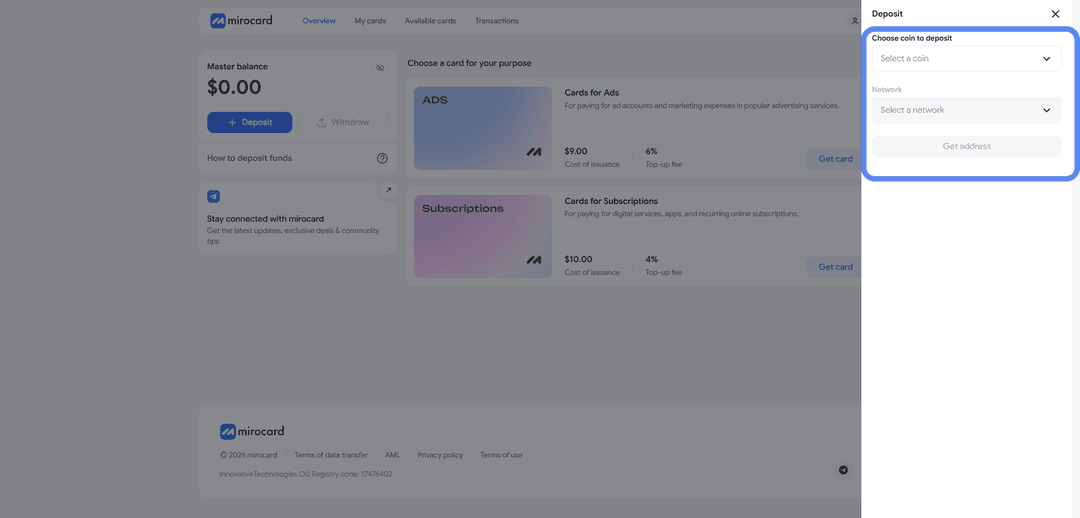
The lowest transfer fee option is USDT on the TRC-20 network. The service will provide a wallet address — send crypto to it from an exchange or external wallet. The balance will be credited after the transaction is confirmed on the blockchain.
Step 3. Select a Card
In the catalog, find the subscription card and click «Get Card» on the right side of the block.
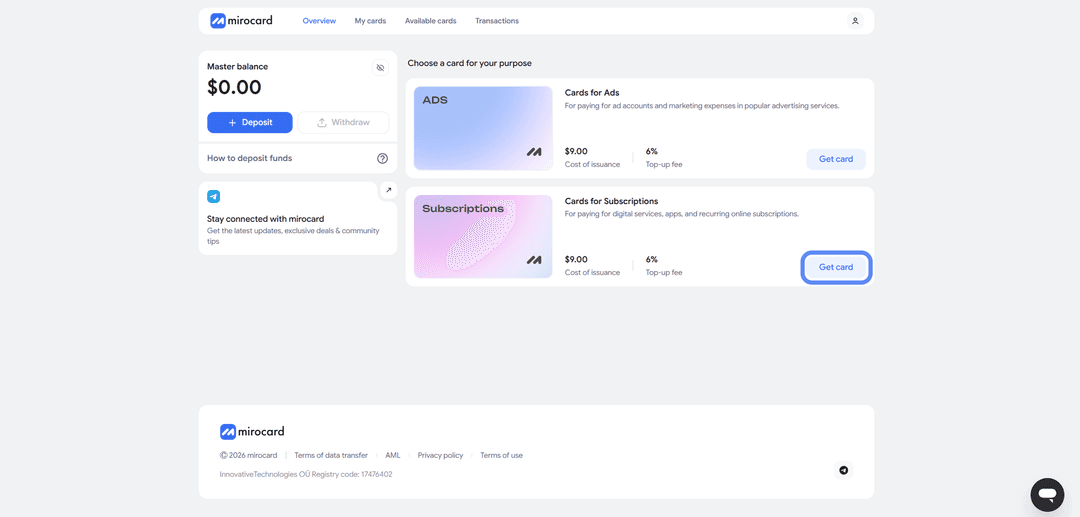
The issuance page will open.
Step 4. Verification
Before issuance, you'll need to upload documents for verification — click «Complete Verification».

This protects your balance — only you will be able to manage it and link new cards. After verification, maximum top-up and spending limits become available.
Step 5. Pay for Issuance
On the issuance page, click «Deposit and Pay».
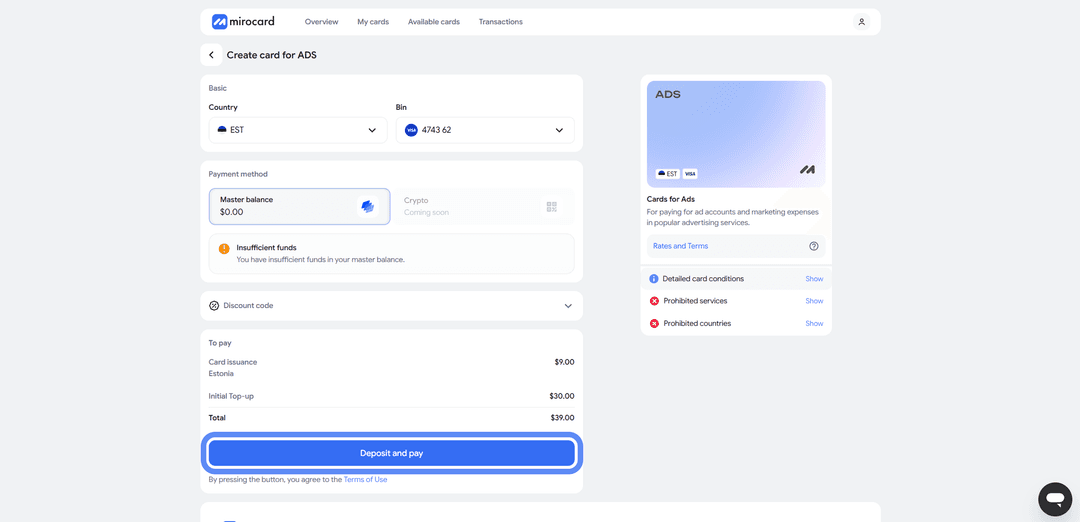
The issuance fee of $10 will be deducted from your Master Balance. The remaining amount will go to your card account and be ready for subscription payments.
Step 6. Card Is Ready
The card will appear in your dashboard with its details and balance. No activation needed — it accepts payments immediately. The dashboard provides access to transaction history, top-ups, and the option to freeze the card if needed.
A tip — keep a small buffer on the card above the subscription cost. When paying, Disney+ may temporarily reserve a slightly larger amount to verify the card. This is a pre-authorization hold, and the excess will be returned within a few hours. If the balance is exactly the subscription amount, the verification won't pass and the payment will be declined. Keeping a buffer eliminates this issue.
How to Pay for Disney+ via Mirocard
Once the card is ready, subscribing takes just a couple of minutes.
Step 1. Sign In to Your Account
Go to Disneyplus.com. Click «Sign up now» to register, or «Log in» if you already have an account.
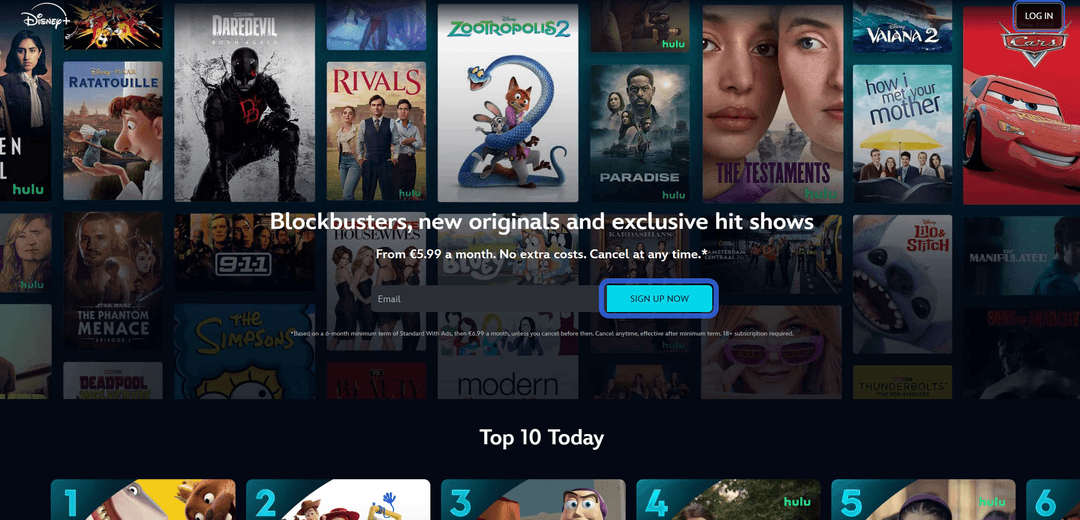
For a new account, select a country where Disney+ is officially available during registration — the region determines both the price and the content library.
Step 2. Enter Your Account Details
Fill in your login credentials — email and password.
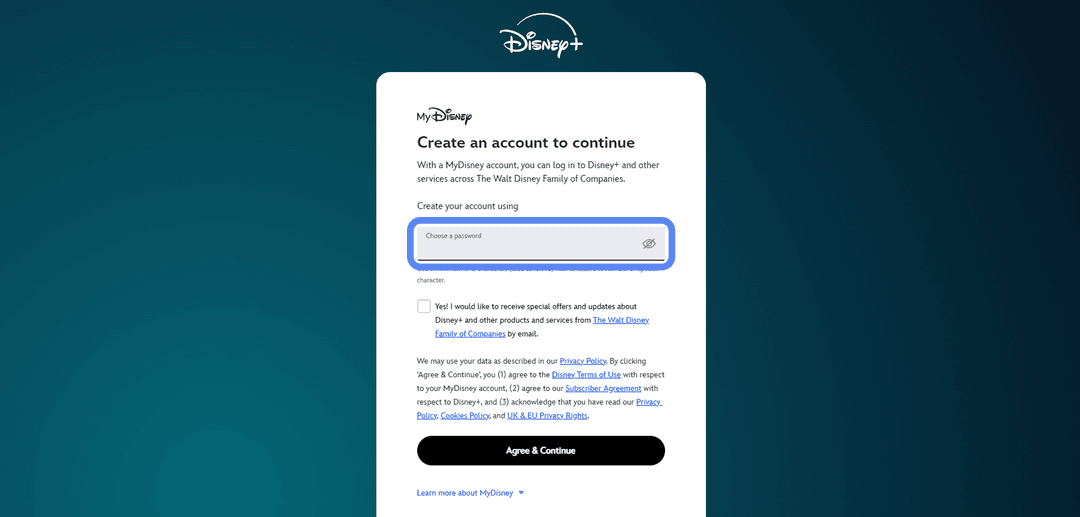
If registering a new account, confirm your email via the link in the confirmation message. The system will then redirect you to subscription plan selection.
Step 3. Choose a Subscription Plan
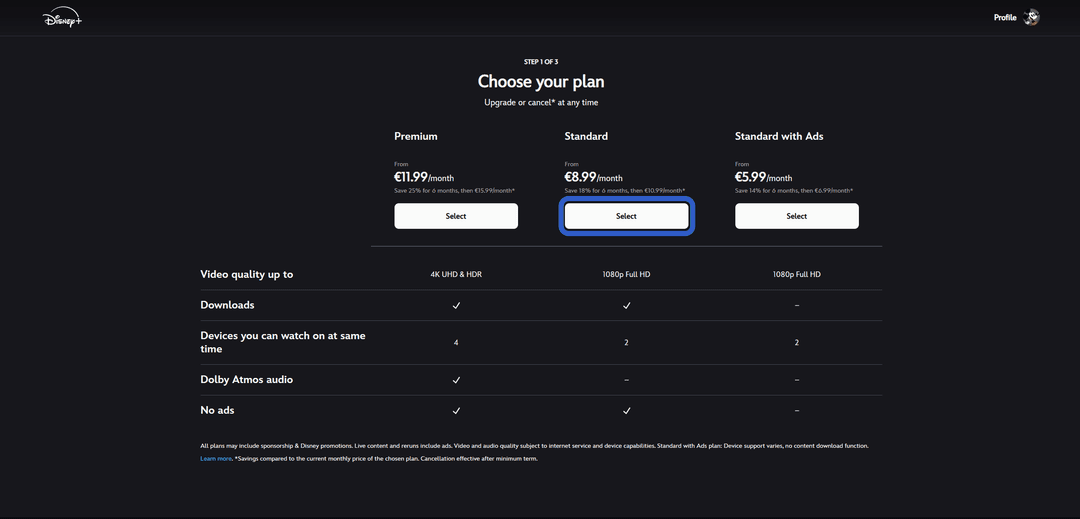
Choose the one that suits your quality preferences and budget by clicking on it.
Step 4. Choose a Subscription Duration
Disney+ offers a choice between monthly, semi-annual, and annual billing.
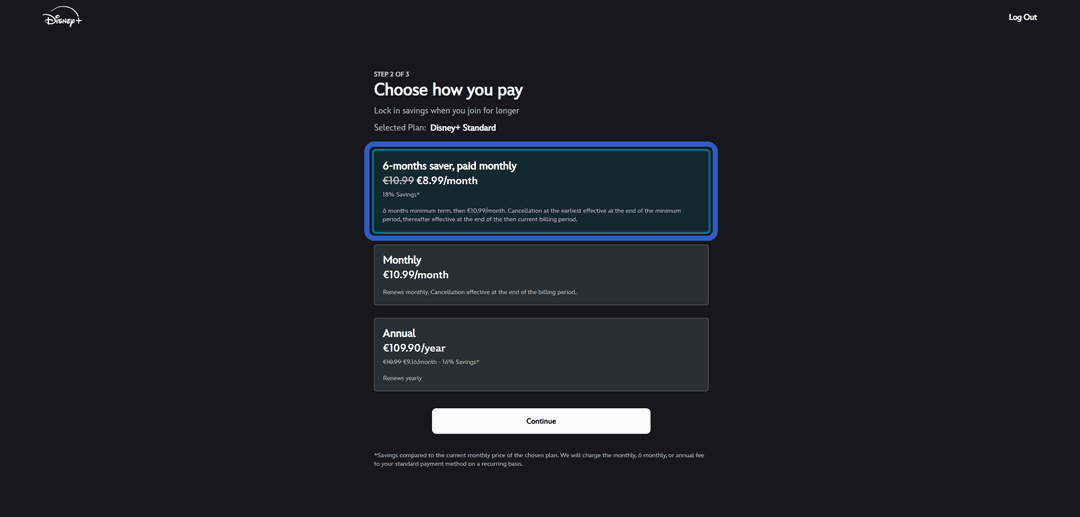
An annual subscription costs more upfront but works out cheaper per month — the savings typically amount to one or two months' worth. Monthly billing is more convenient if you want to try the service without a long commitment. Choose the option that works for you.
Step 5. Select Card Payment
From the available payment methods, select «Credit card». A form for entering card details will open.
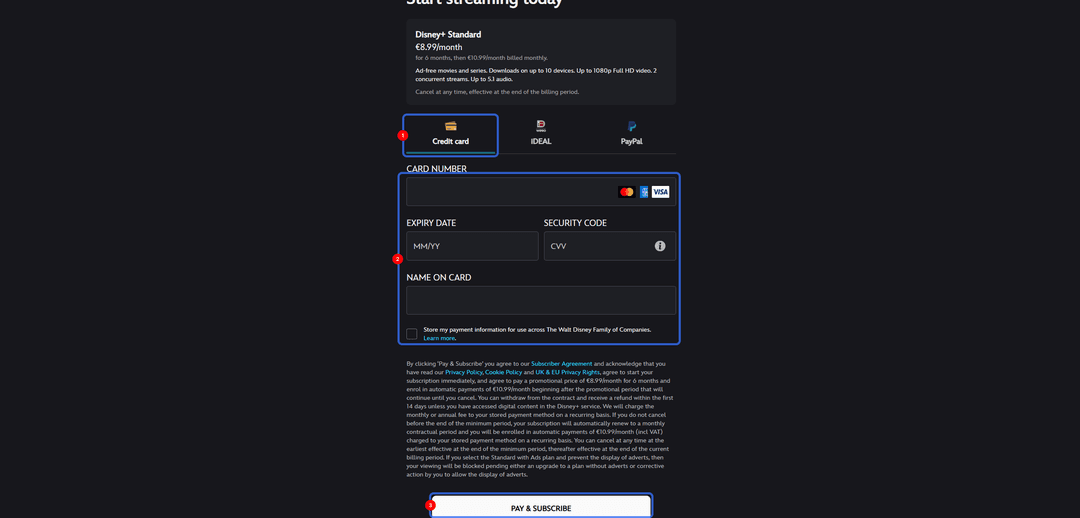
Step 6. Enter Card Details
Fill in the fields with your Mirocard virtual card details — card number, expiry date, CVV, and cardholder name. All credentials are available in your Mirocard dashboard. For the address fields, enter a real address from the US region with the corresponding ZIP code to match the card's country.
Step 7. Confirm the Purchase
Review the selected plan and amount, then click the purchase confirmation button. Disney+ will process the payment and the subscription will activate immediately. From then on it renews automatically based on the billing period you chose. You can cancel renewal at any time in your account settings — access will remain until the end of the paid period.
If the Payment Fails
Check your card balance accounting for the pre-authorization hold. Make sure the card details are entered correctly, especially the CVV and ZIP code. If everything looks right but the payment is still declined, check that your account region matches the card's address. If needed, try again after a few minutes.
What You Get After Payment
Once payment goes through, the subscription activates instantly and the full Disney+ catalog becomes available right away.
You get complete access to the library — Marvel and Star Wars films and series, Pixar, classic Disney, National Geographic documentaries, and Star content. Up to seven profiles can be created within one account, including children's profiles with age restrictions. Simultaneous viewing on multiple devices is allowed, depending on the plan.
Content is available on any device — phone, tablet, computer, Smart TV, and gaming consoles. Viewing progress syncs across them, so a film started on a phone can be finished on a TV. Downloaded offline films and series remain available without an internet connection as long as the subscription is active.
Conclusion
There are several ways to pay for Disney+. International bank cards work directly, but paying with crypto requires additional conversion steps. Virtual cards strike a balance between speed and crypto compatibility. Intermediary services charge markups and offer no guarantees. The choice depends on what you have available and how much stability matters to you.
For cryptocurrency holders, this is the shortest path from crypto assets to a subscription — with no losses on unnecessary conversions. And for those who can't access standard international cards, a virtual card remains a reliable way to get full access to Disney+.