How to Pay for Gamma App
Gamma is a builder for presentations, websites, and documents, where a neural network assembles the layout from a text prompt instead of you manually dragging blocks around a slide. Type in a topic and structure, and within a minute you have a draft with text, images, and layout ready to go, which you can then fine-tune to your liking. The built-in AI agent can go beyond simple generation — searching for information, pulling material from several sources, and putting together a presentation on its own, with no step-by-step oversight on every slide.
A free account is enough to get a feel for the service, while a paid subscription lifts generation limits and unlocks tools for regular work — branding, advanced image models, and collaborative work with a team.
Gamma App pricing tiers
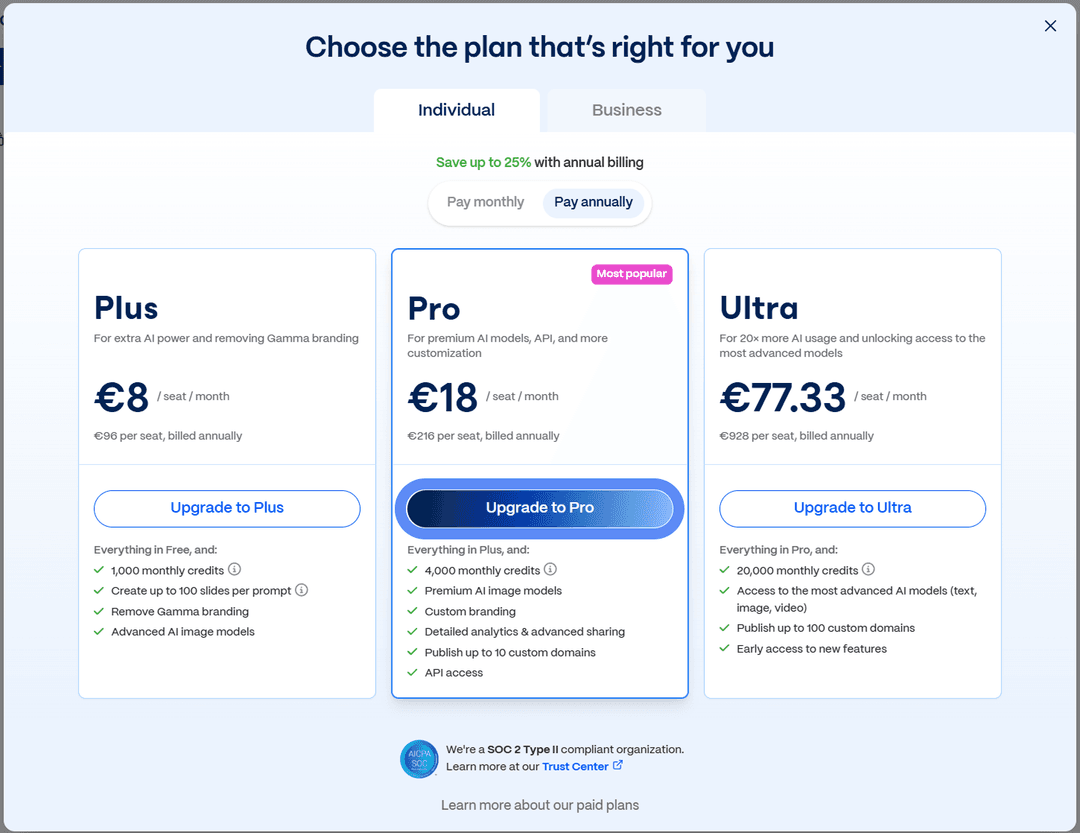
The free plan lets you try the service with no time limit, but every finished presentation carries the "Made with Gamma" badge, and only the basic set of AI models is available. The three paid tiers — Plus, Pro, and Ultra — remove that badge and raise the monthly credit allowance spent on each generation.
How the Gamma subscription is billed
Payment is charged on the billing cycle you pick — monthly or annually, with the annual rate noticeably cheaper than paying month to month. You set it up by going to the pricing section inside the service itself, where you pick a plan and a payment method — a card, Google Pay, or a local method like iDEAL if it's available in your region. The card form is standard — number, expiration date, security code — and the subscription renews on its own once the paid period ends, unless you cancel ahead of time.
Why paying for Gamma can be tricky
The reason is that Gamma only accepts fiat payment methods — a card, Google Pay, or local methods like iDEAL — with no direct crypto option at checkout. Funds sitting in a wallet just stay an asset until they're converted into a regular payment instrument, and the service doesn't offer a built-in bridge between cryptocurrency and a subscription.
A virtual card for paying for Gamma
To a payment system, a virtual card works just like any other bank card with international details — the same input form, the same check when it's linked. The only difference is where the details come from — they're issued online in a few minutes instead of requiring a branch visit or waiting for a card in the mail.
One thing that matters specifically for a subscription service — the card needs to hold up not just for a single payment, but for a series of regular charges throughout the whole subscription. An instrument built for only one transaction will handle the first payment just fine, but might fail as early as the second month, when Gamma tries to renew access automatically.
Mirocard for paying for AI services
By the time a Gamma user gets to the payment form, they often already have a tab open with another AI tool — for text, images, or video — and every one of these services demands the same set of requirements from a card. Mirocard solves that not with a separate fix for every site, but with one virtual Visa or Mastercard that passes the standard issuer check anywhere international cards are accepted, Gamma included.
Technically, the card runs on the same payment rails as any other international Visa or Mastercard — Gamma gets confirmation from the processor and sees no difference between virtual card details and one from a traditional bank with branches. That's exactly what removes the main risk for anyone with several AI subscriptions in regular use — if you need Gamma today, an image generator tomorrow, and another tool next week, you don't have to solve the payment question separately for each service.
The card balance is built straight from cryptocurrency in your wallet — no exchange, no exchanger, and no third party handling the payment for you. Funds become available on the card within a few minutes.
Issuing a card for subscriptions like Gamma costs $5, a one-time fee, and every top-up after that carries a 4% charge. The full path to getting the card — from application to finished details — is covered in a separate article on issuing a Mirocard virtual card.
How to pay for Gamma App with cryptocurrency through Mirocard
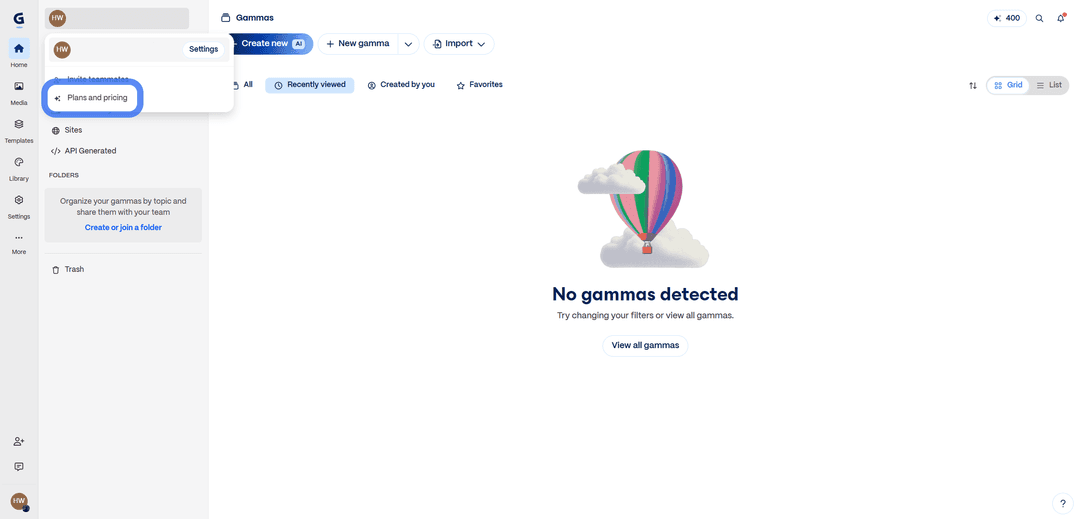
That takes you to the plan comparison window, where you can toggle at the top between "Individual" mode for personal use and "Business" for a team, and choose monthly or annual billing with the "Pay monthly" / "Pay annually" switch. Under the tier you want — Plus, Pro, or Ultra — click "Upgrade to Plus," "Upgrade to Pro," or "Upgrade to Ultra" accordingly.
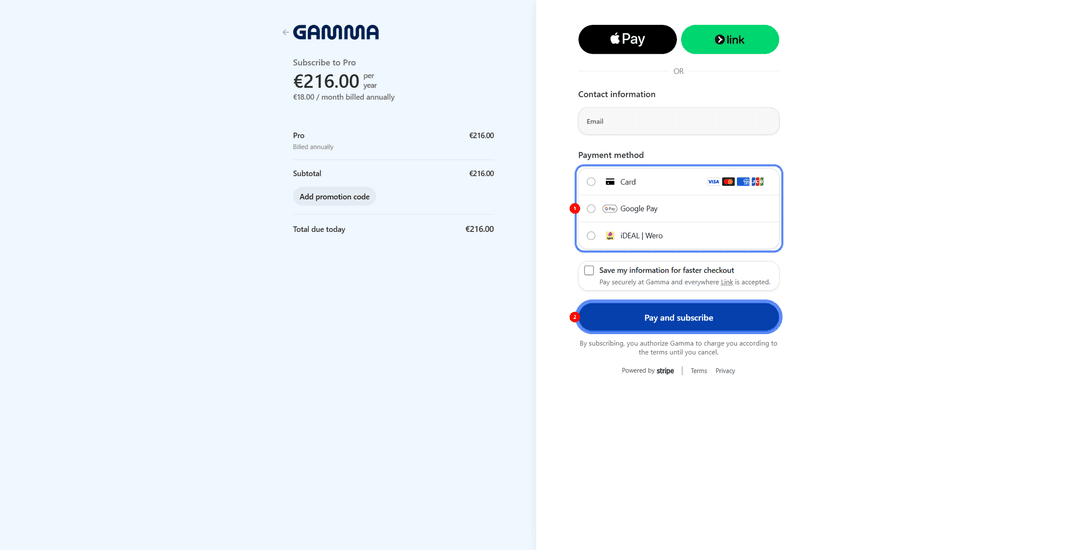
A checkout page opens showing the name of the selected plan and the total amount. Under "Payment method," choose "Card" rather than Google Pay or iDEAL | Wero, and fill in the three fields with the Mirocard's details — number, expiration date, security code. The system usually pulls the receipt email from your account automatically, but it's worth checking that it's correct. The "Pay and subscribe" button finishes checkout — access to the tier you picked and the higher credit limit opens right after the payment is confirmed.
How to pay less for Gamma — monthly or annual
Annual billing gives a noticeable discount compared to the monthly price of the same tier — the difference shows right on the plan selection page, where the savings percentage appears under the toggle. For anyone using Gamma regularly and confident they won't drop the subscription in the coming months, the annual option is almost always the better deal financially, and it also means fewer charges on the card — the payment happens once a year instead of every month.
Monthly billing, in turn, gives more flexibility — if Gamma is needed for a specific project or a seasonal task rather than continuously, overpaying for unused months of an annual plan can cancel out the entire benefit of the discount. There's no universally right answer here — the choice depends on how predictable your use of the service is over the coming year, not on which tier looks better on paper.
Conclusion
Of every step in working with Gamma, paying for the subscription is the one where the speed of the neural network doesn't matter at all — what matters is purely whether the card passes the payment system's check. A Mirocard virtual card handles that step in a few minutes, and from there, the question stops being about payment and becomes about what to write in your first prompt to the AI agent.