How to Pay for Higgsfield
Higgsfield is a platform for generating cinematic-quality video and images that runs on top of several leading neural network models at once, including Kling, Nano Banana, and Seedance. Instead of a static image, the output is a clip with natural camera movement, realistic animation, and believable physics that's hard to tell apart from actual camera footage. The toolkit includes text-to-video generation, creating images in a cinematic style, editing through inpainting and outpainting, lip sync and voice cloning, plus ready-made presets for specific content formats like ads or social media.
The service is built for people who make video regularly for commercial purposes — content creators, marketers, and small production teams who need to turn an idea into a finished clip quickly without a film crew.
What a paid tier is for
Free access lets you get familiar with the interface, but not with the platform's real capabilities — generations are heavily limited in number, and finished clips carry the Higgsfield watermark. For content meant to be published under a brand's name or handed off to a client, that watermark alone rules out the free tier.
A paid subscription lifts that restriction and unlocks the top models, which aren't available on the free plan at all — those are exactly what deliver the cinematic quality people choose Higgsfield for, rather than simpler generators. It also raises the number of parallel generations, which matters when working on several clips at once, and commercial usage rights become official, which is important when working with brands and advertising.
How Higgsfield's tiers and credits work
The three paid plans for personal use — Starter, Plus, and Ultra — differ from each other not in their feature set, but in the amount of resources and unrestricted access to top models.
Credits are counted in a monthly pool and don't carry over to the next period, so any unused balance simply expires when the subscription renews. Credit cost per generation depends on the model you pick, the resolution, and the clip's length — a heavier model or a longer video costs more than a short generation at base quality. Annual billing offers a noticeable discount compared to the monthly price of the same tier, which is worth factoring in when choosing a plan for the long term.
Why paying for Higgsfield can be tricky
The reason is that Higgsfield only accepts card payment or similar fiat methods — there's no direct crypto option at checkout. Funds sitting in a wallet just stay an asset until they're converted into a regular payment instrument, and the service doesn't offer a built-in bridge between cryptocurrency and a subscription.
How to pay for Higgsfield
Higgsfield doesn't accept crypto payment directly, so a card from a bank in another country doesn't work here as a substitute for crypto — it's simply the only way to confirm a payment at all, and if you already have that kind of account, linking it goes through with no issues. Opening one specifically for a single subscription, when your main assets sit in cryptocurrency rather than fiat, is an extra step that solves a symptom rather than the actual problem. A virtual card with international details addresses the need directly — crypto from a wallet turns into a card that Higgsfield accepts just like a regular international one, with no account to open and no intermediaries.
Mirocard for paying for Higgsfield
The principle here is simple — Mirocard doesn't create a copy of an international bank account, it's a full replacement for it in one specific function: passing the payment system's check. The card is issued as a virtual Visa or Mastercard, and from Higgsfield's perspective, it's no different from a card held by a user in any other country — the same three fields with details at checkout, the same authorization result.
Money lands on the card straight from a crypto wallet — no exchange, no exchanger, and no person handling the payment for you anywhere in the chain. The transfer takes a few minutes, and you can pay with the card right after.
Issuing a card for subscriptions like Higgsfield costs $5 once, not per payment, and topping up the balance carries a 4% fee. Every step of setting it up, from application to a working card, is laid out in detail in a separate article on issuing a Mirocard virtual card — the process is designed for someone with no technical background.
How to pay for Higgsfield with cryptocurrency through Mirocard
With the card details in hand, all that's left is paying for Higgsfield.
Go straight to the pricing page. On the page that opens, first pick a tab — "Individual plans" for a personal account or "Business plans" for a team one — and use the toggle at the top right to choose "Annual" if you want to lock in the discount, or "Monthly" for more flexible billing. Under each tier, to the right of its name, you'll see the credit allowance and its equivalent in specific model generations — enough to gauge whether a plan covers your workload without opening a separate calculator.
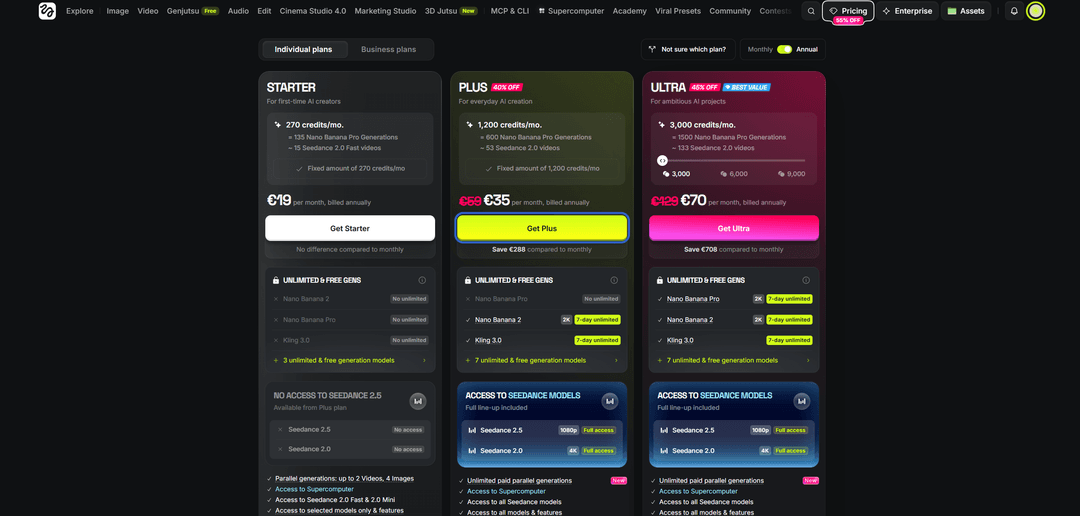
Click the button under the tier you picked — "Get Started," "Get Plus," or "Get Ultra" — and the system opens a payment form with the total for the period. In the payment methods section, choose the card option rather than Apple Pay, and fill in the fields — the Mirocard's number, expiration date, and security code — then below that, enter the cardholder's name and select the country matching the card's details in your Mirocard account. If you're subscribing on behalf of a business, check the "I'm purchasing as a business" box — otherwise leave it unchecked.
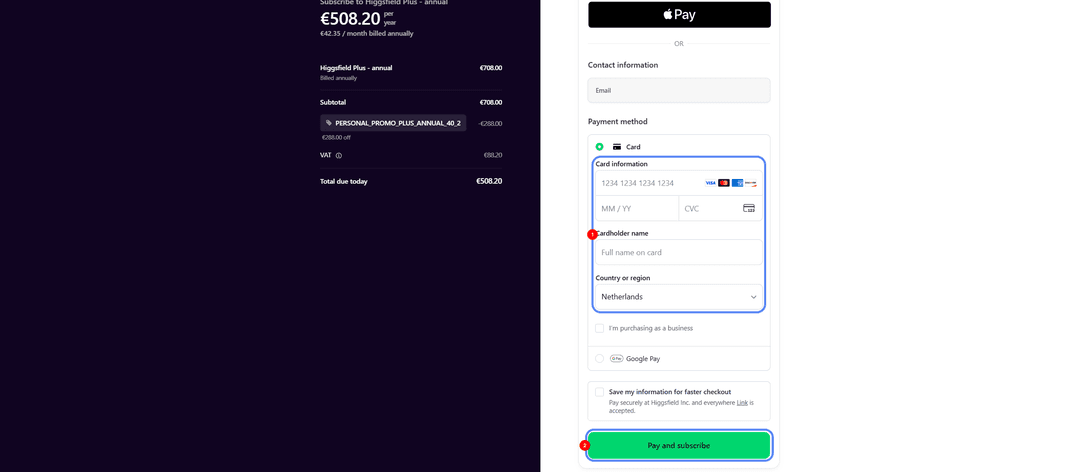
Check the total including tax and finish checkout with the "Pay and subscribe" button — access to the tier and its credits opens right after the payment is confirmed.
What's more worth it — buying extra credits or switching tiers
Credits ran out once
If your limit ran out before the end of the month for the first time in a while, and credits are usually more than enough, buying a one-off extra credit pack makes more sense than switching tiers for the whole next period. Check the exact price and size of that one-off pack directly in your account at the time of purchase, since terms can vary depending on your current tier and region.
Credits regularly run short
If running short on credits keeps happening month after month, one-off top-ups almost always end up costing more in total than switching to a tier with a higher limit from the start. Before deciding, work out how much you've spent on average buying extra credits over the last two or three months, and compare that amount to the price difference between your current tier and the next one — if top-ups regularly eat up a significant chunk of that difference, upgrading pays for itself within the first month of use.
Conclusion
Higgsfield turns out a clip in minutes, but the card check at checkout doesn't speed up based on generation quality — it either passes or it doesn't, and that's the only real thing standing between you and a working tier. A Mirocard virtual card handles that faster than your first video renders on the model you picked.