How to Pay for iCloud
Apple iCloud is Apple's cloud service that stores backups of your iPhone and iPad, syncs photos, notes, passwords, and documents across devices, and runs in the background without requiring anything from you beyond turning it on in settings. Free accounts only get 5 GB, which at best covers a single fresh phone backup with no photos, so sooner or later almost every active iPhone user runs into the prompt to upgrade to paid iCloud+.
The difference between free and paid iCloud isn't in the feature set, but purely in storage — Private Relay, Hide My Email, and security camera backup are all available on any iCloud+ tier, even the smallest one. For many users, the question isn't whether they need iCloud+, but how to pay for it when the usual method that covers everything else doesn't work here.
Why paying for iCloud can be tricky
iCloud payment isn't tied to the card itself, but to your Apple account's region — the system expects the card's country, the billing address, and the account region to all match, and declines the payment with no detailed explanation on screen at any mismatch. This works the same way for every Apple user in every country, not just places with local restrictions, so trouble paying for iCloud shows up worldwide — it's just different for each audience.
For a crypto holder, the problem is that Apple doesn't accept crypto as a payment method in any country at all, so a wallet holding BTC or USDT is useless on the payment screen no matter what region the account is set to. To turn crypto into money Apple will accept, you first have to sell it on an exchange and withdraw it to a card from the country your account is tied to — which adds a separate step of conversion and fees before you even attempt to pay.
Paying through Apple Account balance
Apple Account balance is a separate account inside your Apple account that you can load in advance, and Apple then charges the subscription cost from it on the renewal date, without touching a bank card at all. You top up the balance with a code of a specific value, entered in the App Store through the profile icon and the "Redeem Gift Card or Code" option, after which the money shows up on the balance right away and stays there until the next charge. There's one strict condition — the code only works in the region it was issued for, so the account's region and the code's region need to match exactly, with no exceptions.
For a crypto holder, this method works, but it adds an extra step — the top-up code is still only sold for fiat money, so you need to exchange your crypto first and only then buy a code for the right region, whereas a card with direct crypto conversion skips that intermediate exchange entirely.
A virtual card for paying for iCloud
A virtual card closes exactly these gaps — it's issued online in a few minutes, doesn't require opening an account with a bank in the right country, and connects to Apple Account like a regular card rather than a one-off code. Because of that, iCloud+ renews automatically instead of needing a new code entered by hand every month, which is convenient if you're paying for the tier on an ongoing basis rather than once. The condition is the same as for any other card — the account's region needs to match the country the card is tied to, and Apple checks that link strictly every time you try to connect it.
Mirocard for paying for iCloud with cryptocurrency
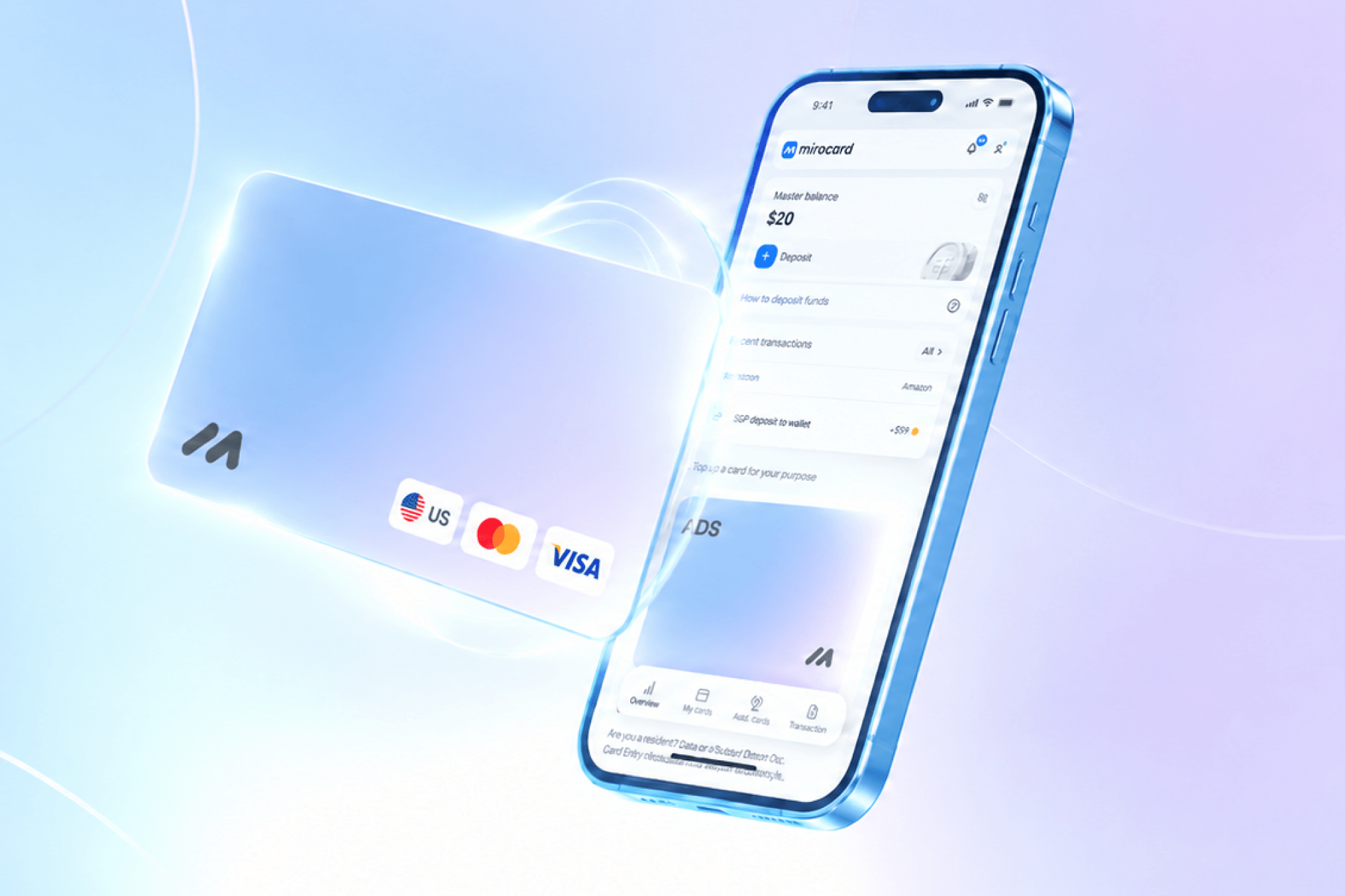
Mirocard issues exactly this kind of virtual Visa and Mastercard — the card is tied to a specific country Apple supports and connects to Apple Account the same way a card from any other bank would, with no extra checks beyond the usual ones. The card is set up entirely online in your account within a few minutes, with no bank visit and no paperwork (for a detailed look at issuing the card itself, see a separate guide), and you can always see exactly which country the card is tied to right in your account — you'll need that to set the matching region in your Apple Account settings.
The card balance is topped up directly from a crypto wallet in BTC, ETH, USDT, USDC, TON, TRX, or SOL, with conversion happening inside Mirocard itself, so the money goes from the wallet straight to the card, skipping the exchange and a bank account.
Paying for iCloud
Before linking the card, it's worth checking two things on the account — the balance needs to be fully spent, and every active subscription needs to be canceled, or Apple won't let you change the region and link a card from another country. Open Settings on your Apple device with your account, and tap your name at the top of the screen. On the "Apple Account" page that opens, choose "Payment & Shipping."
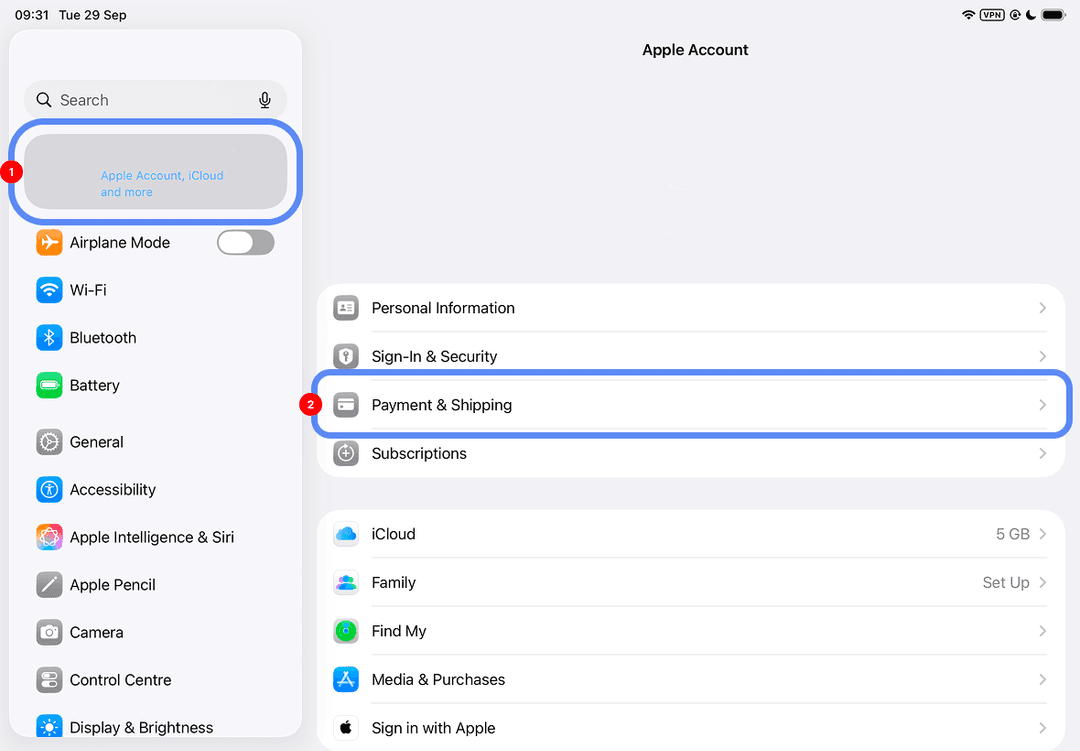
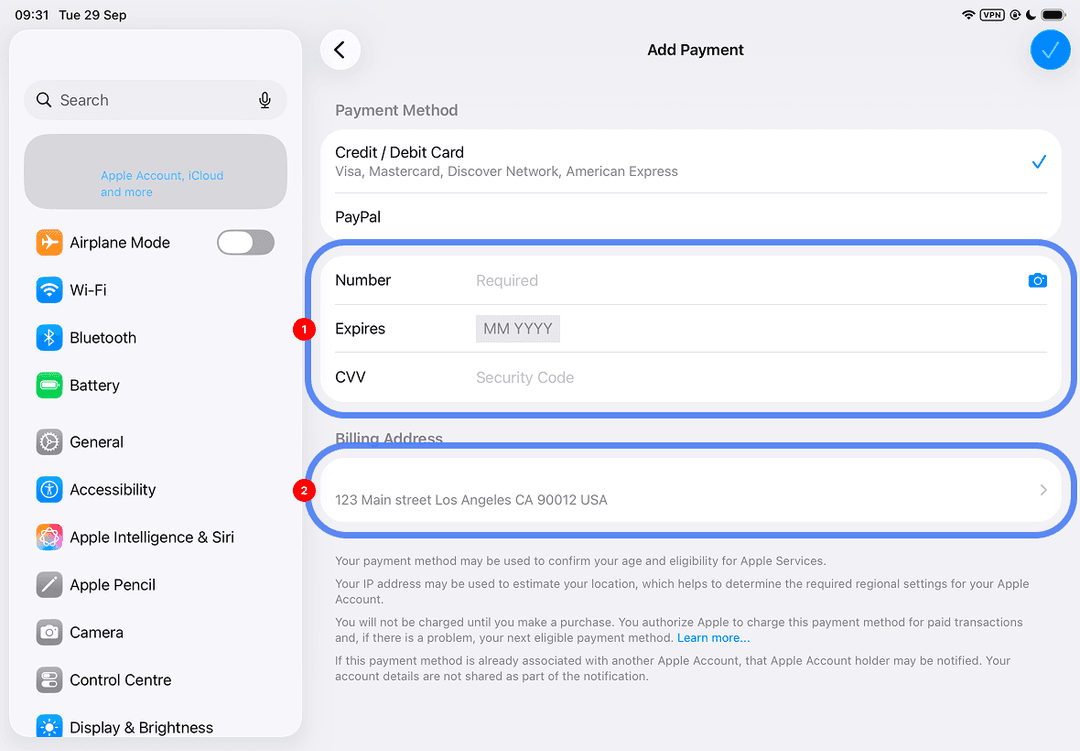
There, tap to add a new payment method and enter the Mirocard's number, expiration date, and code, and for the billing address, enter the address of the country the card is tied to — that information is already in your Mirocard account.
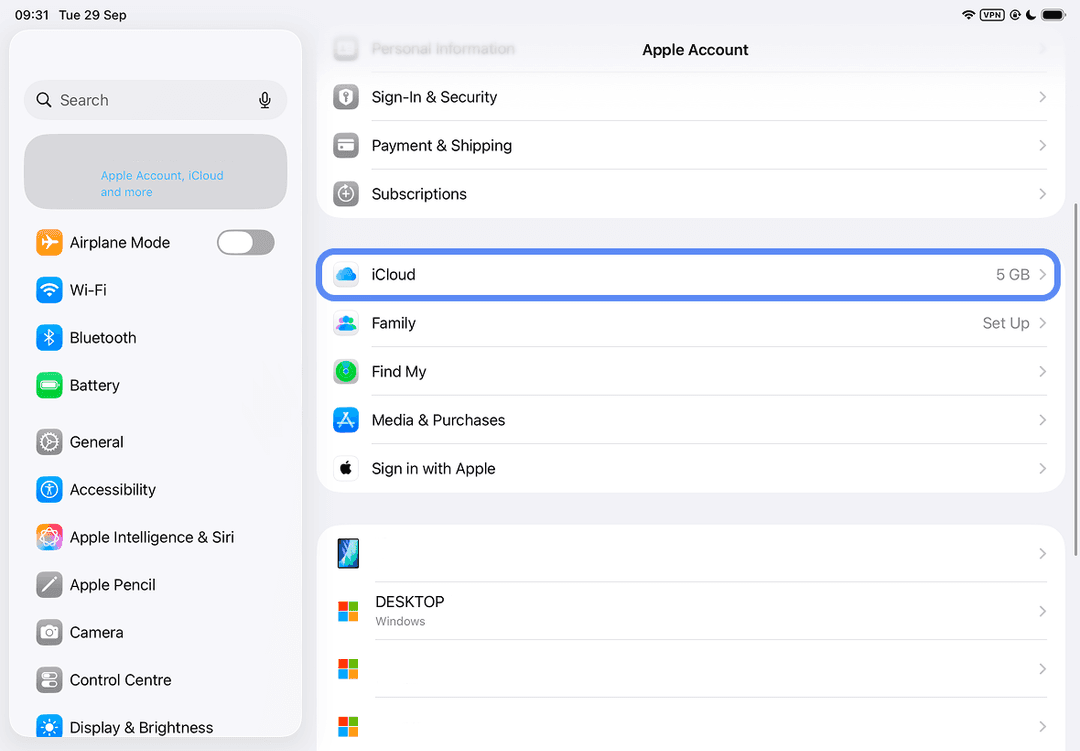
Once the card is saved, go back to your account settings and tap "iCloud."
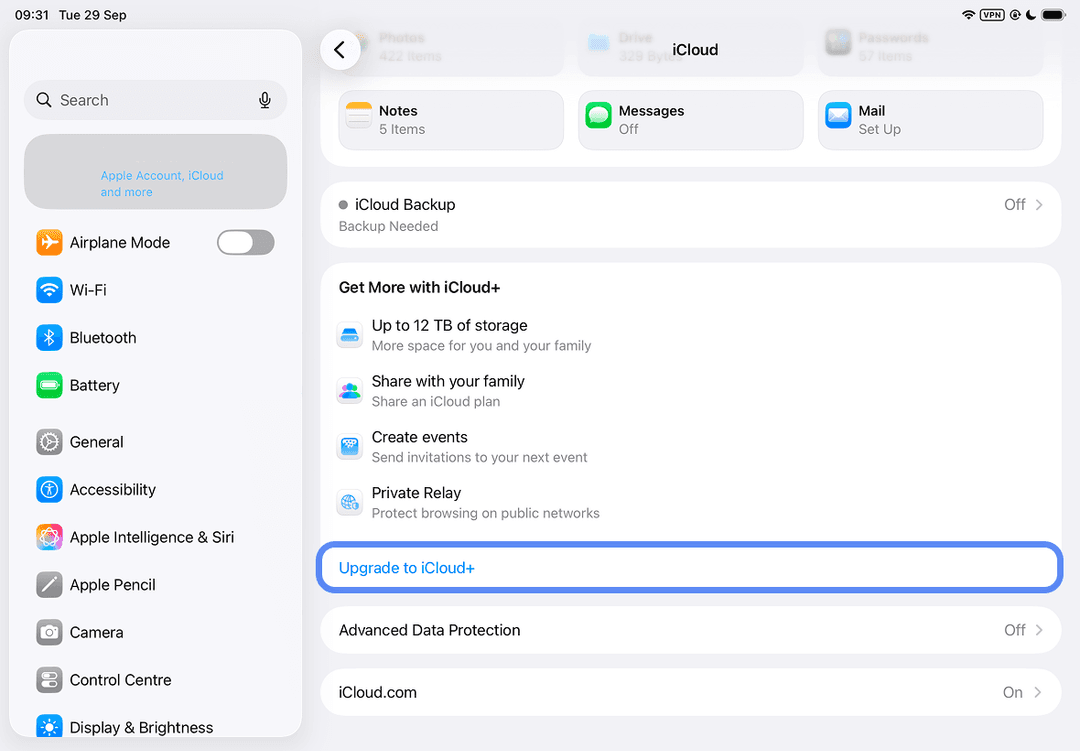
Next, tap "Upgrade to iCloud+."
A list of tiers with their storage and price opens — pick the plan you want and confirm with the "Upgrade to iCloud+" button.
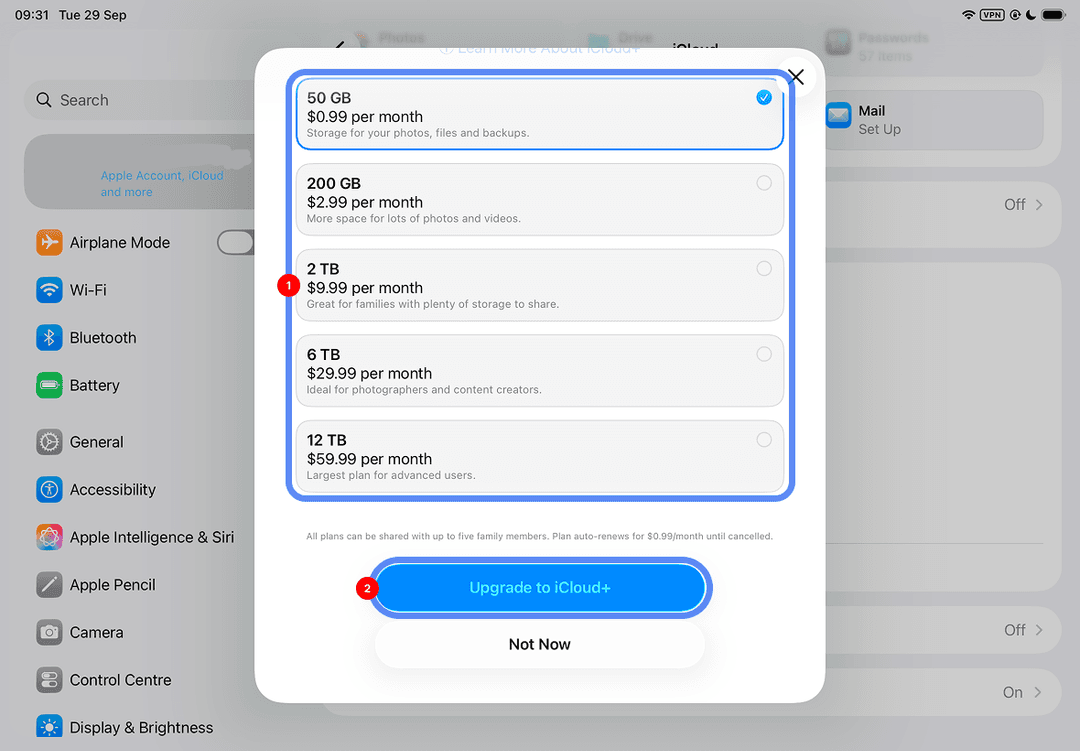
Money charges from the Mirocard right away, and the expanded storage becomes available immediately.
How to pay for iCloud with auto-renewal
The main task after the first payment is not forgetting about the next one, because Apple charges the money strictly on the renewal date and doesn't warn you in advance if the payment source isn't ready for the charge. If a payment fails, iCloud+ doesn't shut off instantly — first you get a notification about the failed charge, the tier rolls back to the free 5 GB, and any files above that limit stop syncing, though they aren't deleted right away.
For a card funded with cryptocurrency, it's worth building in a buffer for the exchange rate ahead of time — if you transfer funds right on the renewal date, any hiccup with the conversion could mean the needed amount doesn't make it to the card in time for the charge.
Conclusion
Paying for iCloud+ has one condition that needs to hold for every method listed here — the account's region, the card's or code's country, and the billing address all need to match, and any payment method that doesn't conflict with that condition will work just as reliably. The difference between a one-off code, borrowing a card from a friend in another country, and a virtual card like Mirocard isn't in how reliably the charge goes through — it's in how many manual steps you have to repeat every month. A card only needs to be connected and topped up once, while a code has to be bought and entered again before every renewal — and the time spent setting things up the first time usually pays for itself by the third or fourth payment.