
How to Pay for Trip.com
Trip.com is an international travel booking platform that brings hotels, flights, train tickets, and car rentals together in one interface. The service operates in around two hundred countries, showing prices in different currencies right away and offering filters for a specific budget and travel dates. Every booking ties back to one account, so your trip history, vouchers, and loyalty status all show up in a single dashboard instead of being scattered across different sites.
What you can book on Trip.com
The core of the service is hotels, from budget options to five-star chains, each with photos, a neighborhood map, and a detailed list of amenities. Alongside hotels, there's flight search across dozens of airlines at once, plus train ticket booking in countries where rail travel is a major mode of transport. Car rental with airport pickup, tours, and attraction tickets are also available separately, and bundling "flight plus hotel" into one order can sometimes work out cheaper than booking the same services individually.
What payment methods Trip.com offers
At Trip.com's checkout, the main option is a bank card, and the site accepts several card networks at once, including Visa, Mastercard, UnionPay, and Amex. Alongside the card form, there's Apple Pay and a separate "Other payment methods" group — that includes PayPal, iDEAL, Google Pay, and e-gift cards, with the exact set of options on any given payment page depending on the booking's country and currency. None of these options include direct crypto payment on the site.
Why paying for Trip.com with cryptocurrency can be tricky
Trip.com doesn't accept cryptocurrency payment through any of the options available at checkout — not directly, and not through a connected wallet. Because of that, a crypto holder first has to convert wallet funds into a regular payment instrument before setting up a booking, since there's no direct bridge between cryptocurrency and payment on the site.
Mirocard for paying for Trip.com
Mirocard has a dedicated virtual card built specifically for travel payments and international bookings — it's accepted at Trip.com's checkout the same as a regular international Visa or Mastercard, with no extra checks from the service.
The card balance is built straight from cryptocurrency in your wallet, with no exchange and no third party handling the payment for you — the money becomes available on the card almost immediately.
Issuing a card for paying subscriptions and travel costs $5, a one-time fee, and every top-up carries a 4% charge. The full path from application to finished card details is covered in detail in a separate article on issuing a Mirocard virtual card.
How to pay for Trip.com with cryptocurrency via Mirocard
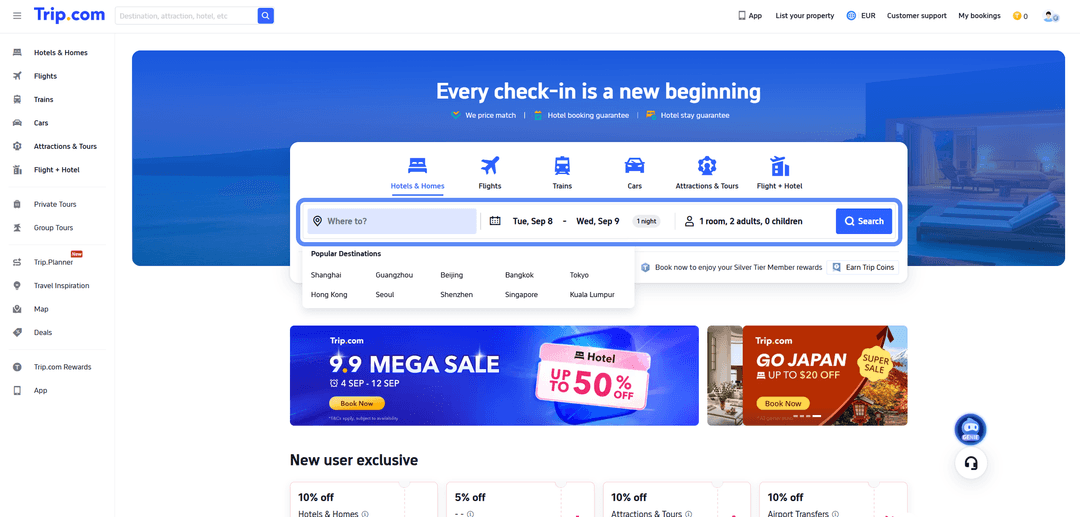
Once the card is ready, you can book your trip directly on trip.com. Pick the section you need at the top of the page — hotels, flights, or car rental — and enter the city, travel dates, and number of guests in the search bar, and the system will show matching options with prices and ratings.
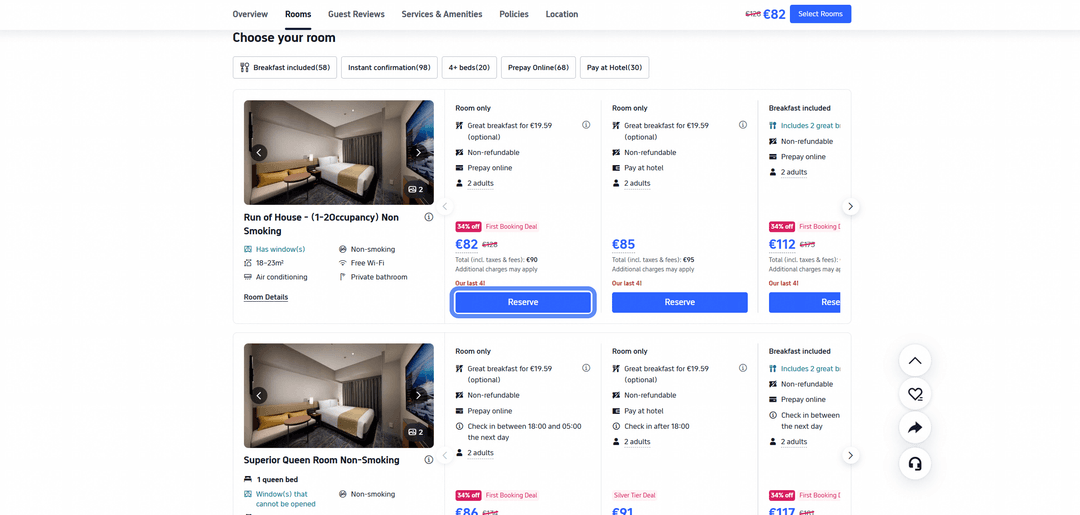
Open the listing for the hotel or flight you like, review the fare conditions, and click the button to select a room or ticket to move on to checkout.
On the booking page, enter the guest's details exactly as they appear on their passport and a contact email for the voucher, then under payment methods choose the card option and enter the Mirocard's number, cardholder name, expiration date, and security code.
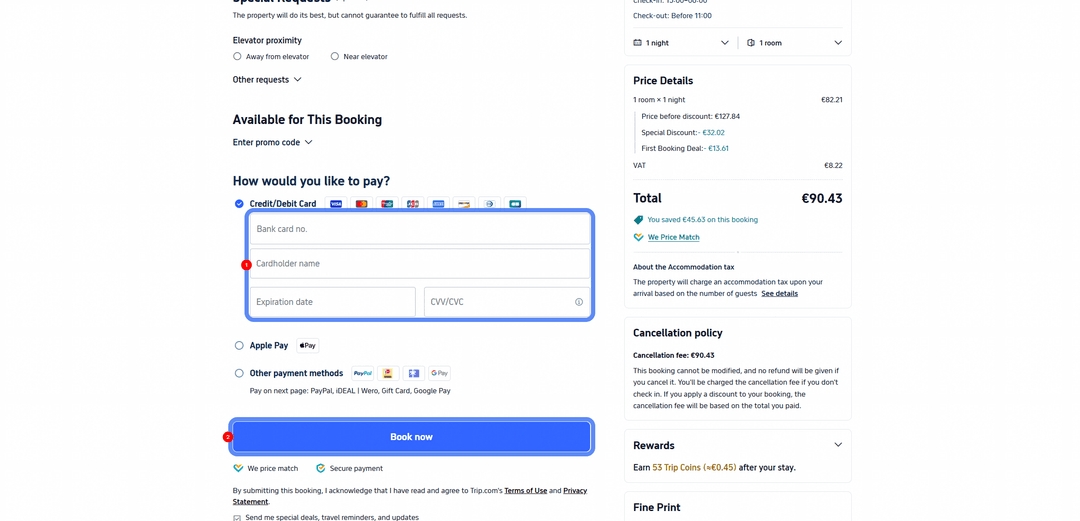
Check the total, including fees and taxes, in the panel on the right and confirm the booking with the payment button — confirmation usually arrives by email within a few minutes.
What to keep in mind when booking a hotel
Full online payment charges the entire amount right at booking, which is the most predictable option for planning your trip's budget. Partial prepayment, by contrast, reserves the room for a small amount, with the rest charged later — to the card linked to the booking — so it's worth making sure there's enough on it by the time that second charge happens too. Paying directly at the hotel doesn't require a card at booking on some rates at all, but then the booking itself works more like a reservation than a guaranteed, paid-for night.
It's also worth checking the rate type before confirming — a refundable rate lets you cancel the booking and get your money back, usually depending on the cancellation window, while a non-refundable rate is often cheaper but won't return any money at all, even if your plans change on the day you're due to check in. The price difference between the two should be worth the risk that the trip might not happen — otherwise the savings from the non-refundable rate can easily turn into losing the whole amount.
What to do if a Trip.com payment doesn't go through
First, check the card's balance — it needs more on it than the booking costs, since currency conversion sometimes adds a few percent on top of the listed price. Next, double-check the details themselves — the card number, expiration date, and security code need to go in without spaces or typos, and the cardholder name needs to match what's on file in your Mirocard account.
If the balance and the details are both fine and the payment still gets declined, the reason might be an extra verification step — some bookings ask for a one-time code or biometric confirmation right in the middle of paying, and a missed confirmation step looks just like an ordinary decline. If none of that helps, the fastest way to sort it out is to go straight to Mirocard support — describe exactly which step of the Trip.com payment shows the error.
Conclusion
Paying for Trip.com comes down not to the service itself, but to which payment instrument the system will accept when confirming a booking — a crypto holder needs a way to turn assets into a card, and anyone without an international bank account needs a card with international details in the first place. A Mirocard travel virtual card solves both problems with the same tool, and once issued, you can use it for other international services with a similar checkout too.