How to Pay for YAZIO
The food diary in YAZIO is built around what's actually on your plate rather than numbers — the app recognizes a dish from a photo or a database search and works out its calories and macros on its own, with no manual math. On the home screen, that turns into a clear picture of your day — how much you've eaten, how much is left toward your goal, how much you've burned through activity — with water tracked separately alongside it and a streak counter for consecutive days with no gaps, which is exactly what keeps people coming back to the app every day instead of dropping it after a week.
The free version is enough for basic tracking, but once you want a ready-made system built around a specific goal — losing weight, gaining muscle, or just eating more mindfully — that's where PRO comes in.
How the YAZIO PRO subscription works
The difference between the free version and PRO comes down to the depth of the analytics and the ready-made tools that save time on planning. The free version gives you the core food diary, a water tracker, and basic statistics, while detailed nutrient breakdowns, personalized meal plans, a recipe catalog matched to a specific calorie target, and intermittent fasting all unlock with PRO. The paid version also adds AI-powered food recognition from photos, which noticeably speeds up keeping the diary if you're not in the mood to log every dish by hand, plus syncing with Apple Health or Google Fit, which pulls in steps and workouts automatically.
Keep in mind that the exact feature set and price of the subscription can vary a bit depending on the country and platform where you subscribe to PRO, so it's worth checking the current list in your own account before paying rather than going by someone else's screenshot. YAZIO usually offers a choice between a discounted annual subscription and a shorter three-month plan at a higher monthly rate — the annual option is the better deal if you're confident you'll use the service for more than a couple of months in a row.
Where you can subscribe to YAZIO
Through the YAZIO website
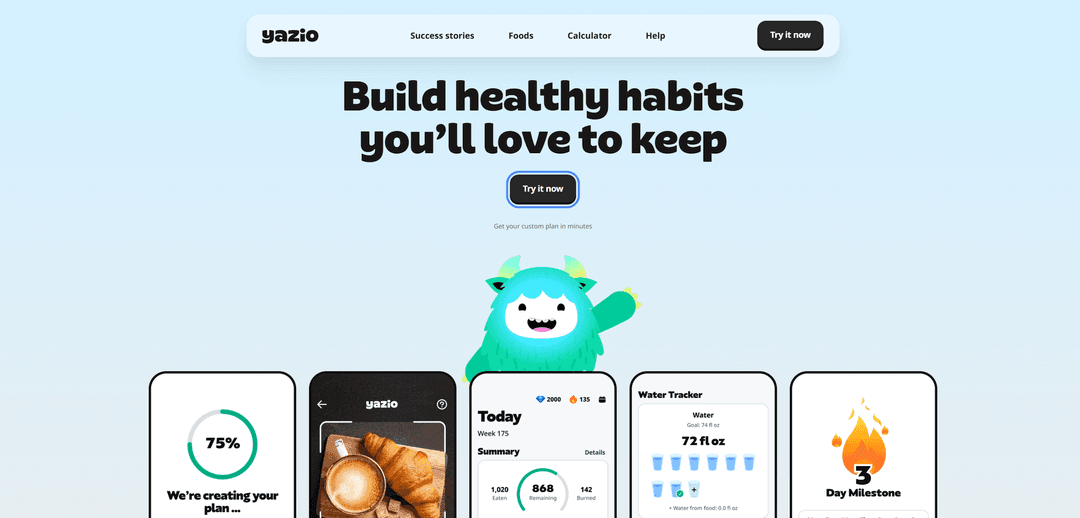
Subscribing on the site is the most direct route, since payment goes through the service itself rather than through an app store with its own rules and regional restrictions. On yazio.com's homepage, click "Try it now," answer a few questions about your goals and stats, and the system builds a plan on its own — after that, a page opens showing the tier options and a link to pay by card.
Through iPhone or iPad
On Apple devices, the subscription is set up as an in-app purchase through the App Store, meaning payment is tied to your Apple ID rather than directly to YAZIO's site. This route works well if you already have a payment method set up in Apple ID — adding a new one specifically for one subscription means going into your profile settings separately, before making the purchase in the app itself.
Through Android
On Android, the logic is the same as on iOS, just with a different intermediary — Google Play handles the entire payment flow, and YAZIO only receives confirmation that the payment went through. If a card is already saved in Google Play for other purchases, setting up PRO takes just a couple of taps; if not, the system brings up the form to add a payment method right at the moment of purchase, with no need to go into settings separately.
Why paying for YAZIO can be tricky
The only way to confirm a payment on YAZIO is a card or Google Pay — there's no direct crypto payment option, either on the site or in the apps. So crypto from a wallet first has to turn into ordinary money on a card, and only then can the payment go through — the service doesn't offer a built-in path straight from a wallet to a subscription.
What payment methods you can use for YAZIO
An international card already linked to a region matching your account passes the check with no extra questions and works for all three subscription routes at once — the site, the App Store, or Google Play. The downside is the cost of entry — opening an account with a bank in another country rarely pays off for a single calorie tracker, unless you have other needs where that kind of card would come in handy too.
A gift card covers a similar need for the mobile scenario — a code with a fixed amount lands on your account balance, and the purchase is then charged from there, with no card details field at all. The catch is the same as with any regional link — the code has to match the account's country exactly, and any uneven leftover from the card's face value just sits on the balance until your next purchase.
A virtual card solves the problem faster than either of the previous options — the details are issued online and work for all three subscription routes at once, as long as the card supports international transactions and repeat charges.
Paying for YAZIO with a virtual card from another country
The scenario with a virtual card is almost identical to paying with a regular plastic one — you link the card directly to the site or add it as a payment method in Apple ID and Google Play, and from there YAZIO charges it just like any other international card. The only difference is where the details come from — you don't have to wait for them in the mail or physically open a bank account, the whole process happens online.
The one thing worth checking beforehand is whether a given virtual card supports repeat charges, not just a single payment. YAZIO renews the subscription automatically once the paid period ends, and a card built for only one transaction might successfully pay for the first month and then fail when it comes time to renew.
Mirocard for paying for online subscriptions
Mirocard is built for exactly this kind of task — not a one-off purchase, but recurring charges like YAZIO PRO, so the card was designed from the start around a subscription model rather than a single payment. On the payment page, it behaves just like a regular international Visa or Mastercard — three standard fields for card details, with no special logic or extra requirements from the service.
Crypto from your wallet turns into card balance with no extra steps — no need to open an exchange account specifically for this transfer or hunt for an exchanger with a decent rate. The money shows up on the card within a few minutes, and from that point the card is ready for any payment, YAZIO included.
Issuing the card for subscriptions costs $5, paid once at issuance rather than per transaction, plus a 4% fee on every top-up amount. The full path to getting the card, from application to finished details, is covered in a separate article on issuing a Mirocard virtual card — the process is designed for someone with no technical background and requires nothing beyond ordinary sign-up.
How to pay for YAZIO with Mirocard
With the card ready, setting up the subscription on the site takes a few minutes.
Start with the "Try it now" button on yazio.com's homepage — it launches a short quiz about your goals, and based on your answers, the service builds a plan and shows matching tiers.
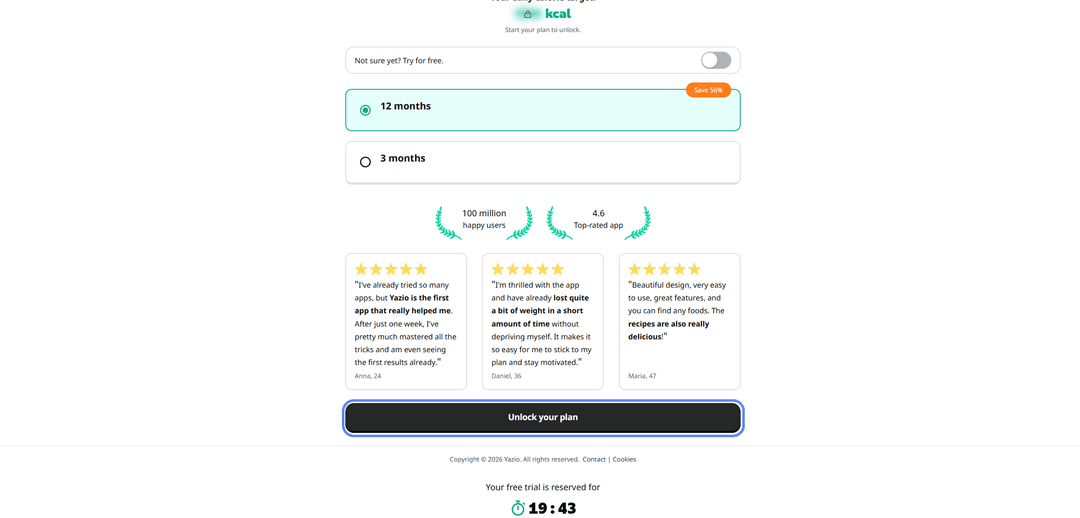
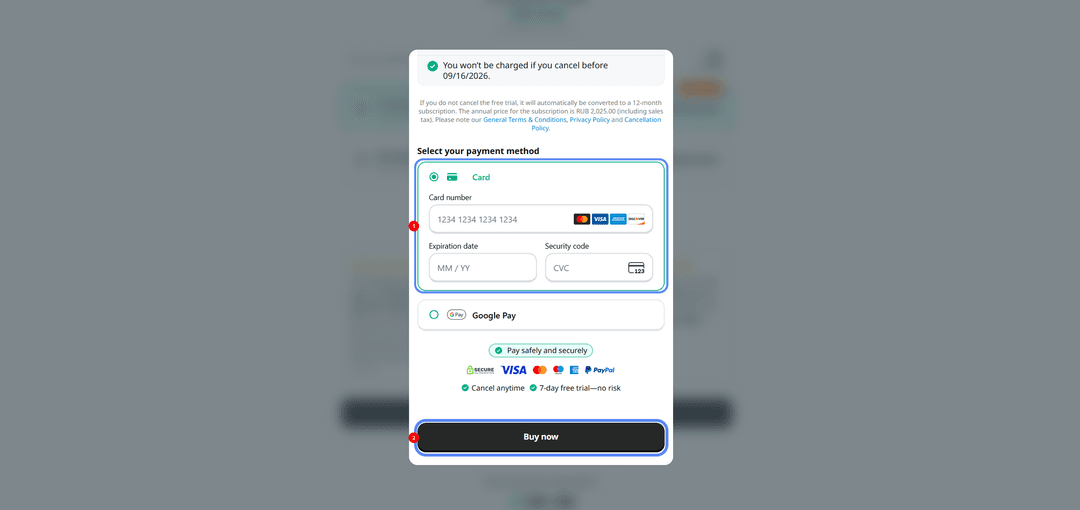
Pick a plan based on the length and price, click "Unlock your plan," and in the window that opens, select "Card" as the payment method rather than Google Pay — the form will then ask for the Mirocard's number, expiration date, and security code.
Click "Buy now" to finish signing up, and PRO features activate immediately, with no waiting.
For the mobile scenario on iPhone, it makes more sense to link the card ahead of time through the payment section in Apple ID settings — that way, the purchase in the YAZIO app itself comes down to picking a tier and confirming through the standard App Store window. On Android, the card is added right at the moment of purchase through Google Play's payment methods if it isn't there yet — you'll need the same three details as on the site.
What to keep in mind with auto-renewal
The first thing worth doing right after a successful payment is checking the subscription section and noting the next charge date for yourself, rather than relying on memory. YAZIO renews access automatically, and that date determines when to top up the card again — with a small buffer, since the charge sometimes goes through a day earlier than the calendar suggests.
The second thing is price. If the first period was paid at a promotional rate, the next charge will almost certainly be at full price, and it's worth budgeting for that difference ahead of time rather than discovering it after the fact. If the plan stops being needed at some point, you can turn off auto-renewal in the same place where you originally subscribed — on the YAZIO site, in Apple ID's subscription management, or in Google Play's payments section.
Conclusion
Crypto holders don't run into trouble with the YAZIO subscription itself, but with the lack of a card that the payment system will accept. A Mirocard virtual card with support for repeat charges solves that, and from there you can keep it on hand for any other service with similar recurring payments, not just YAZIO.