10 Best AI Text Generators
#AI models
An AI model can draft an article in a minute, but picking the right one is harder — there are dozens of them, and each is strong at something different. One holds the structure of a long piece better, another finds sourced facts faster, a third writes in a more natural tone. We rounded up 10 services that actually write text and broke down what each one can do, what it costs, and where it falls short.
The list is grouped by the developer's country, which makes it easier to spot where access or payment issues might come up. One thing worth flagging right away for anyone holding money in cryptocurrency: none of these services accept crypto directly, only cards. We cover how to work around that at the end.
We gave every model the same writing prompt:
"Write an Instagram post for a coffee shop announcing a new seasonal drink — a Pumpkin Spice Latte. Keep it to about 1000 characters. Use emoji, but don't overdo it. Tone: warm, friendly, with a light touch of humor. Avoid ad clichés like 'treat yourself' or 'don't miss out.'"
Below are the results from each model, so you can compare directly how different AI tools handle the same writing task.
Chinese AI Models
DeepSeek
What sets this Chinese-built model apart is that it's completely free for individual users. Its answers have recently caught up to the level of leading Western models, and it still doesn't cost anything to use.
Two tools help with text here: "Deep Thinking" breaks complex tasks into steps, and the built-in search pulls in fresh data straight from the web. The model writes articles, SEO copy, and scripts, processes data sets, codes, and can even read the content of photos. Its tone is friendly, and the finished output comes out logically organized, so DeepSeek drafts are usually presentable right away, without a heavy edit.
Coffee shop post:

Qwen3 (Alibaba)
Qwen3 from Alibaba Cloud stands out for supporting more than 100 languages. If you run a blog or a newsletter in several languages at once, it's the most convenient free option available.
The model writes business and creative content, translates, handles logic problems, and works with code. Alibaba claims Qwen3 outperforms DeepSeek and other rivals, but in practice the models are on par, so the choice comes down to which interface you prefer.
The service is free for regular users on its website. Things get less convenient for companies — there's no flat monthly subscription, so businesses pay for tokens through cloud platforms, and that format doesn't suit everyone.
Coffee shop post:

American AI Models
Gemini (Google)
Gemini is Google's fast model, deeply integrated into its ecosystem. If you work in Google Docs and Sheets, the AI shows up right inside the tools you already use.
The model writes text, translates into dozens of languages, generates code, and analyzes data. Its answers are substantive and well-structured — in testing, it broke a product description into sections and added a call to action on its own. It sometimes suggests keywords for the text without being asked.
The basic version is free with limits. Paid Google AI plans start around $7.99 a month, the mid tier runs about $19.99, and the top tier around $249.99. The weak spot is that the model occasionally loses context in a long conversation.
Coffee shop post:

Copilot (Microsoft)
Copilot is Microsoft's assistant, built into the company's work apps. Its main advantage isn't the quality of the text but the fact that the AI lives right inside Word, Excel, and Outlook, where you're already working.
Copilot writes text and code, analyzes data, and works with images, PDFs, and voice. Its answers read close to ChatGPT's, since it's built on OpenAI's models. A separate plus for teams — output lands directly in the corporate environment, with no copy-pasting from a chat window.
Basic features are free, and the Copilot Pro plan costs about $20 a month, adding AI features to Microsoft 365 apps.
Coffee shop post:

Claude (Anthropic)
Claude from Anthropic is the strongest option for long texts and precise instruction-following. The model holds a given style, structure, and length better than its competitors, which is why editors and copywriters favor it.
Claude has a large context window — a whole document fits inside it, so you can work with it without chopping it into pieces. There are projects that store task context, and a mode where the output is formatted directly into a finished document. The model lineup splits into faster and more powerful versions, so you can adjust speed to the task.
The free plan works with limits. The Pro subscription costs $20 a month, or $17 a month billed annually; Max plans run $100 and $200 a month. The typical downside of American services applies here too: access is restricted in a number of countries, and payment is accepted only by foreign-issued card.
Coffee shop post:
ChatGPT (OpenAI)
The model handles text and code, generates images, analyzes data, runs deep research, and understands voice. It now offers eight tones of voice to choose from, and recently added a mode where it builds a reasoning plan before answering. In terms of speed and accuracy, it's one of the strongest options on the market.
A scaled-down version is free. Paid tiers start around €8 a month, the mid-tier Plus plan runs about €23 (in the US, $20), and the professional tier costs around €103.
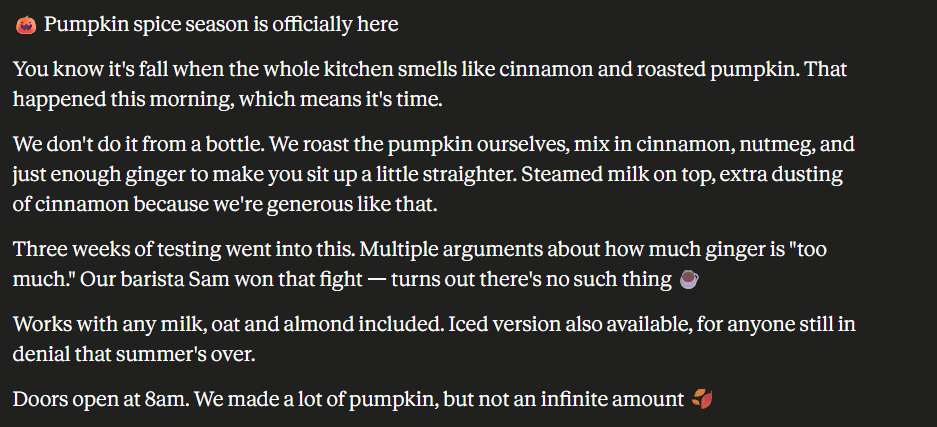
Coffee shop post:

Grok (xAI)
Grok from xAI stands out for real-time access to fresh data from X. That's handy when you need copy on a hot topic rather than a rehash of last year's news.
The model analyzes documents, images, and spreadsheets, writes content and code, and runs an in-depth topic investigation in DeepSearch mode. Its tone is looser and a bit ironic, so it holds up well for social media copy. In testing, Grok structured a product description and counted characters on its own — a small thing, but useful.
The free version is limited by request count. The SuperGrok subscription costs about $30 a month, the tier with X access runs about $40, and the top tier costs about $300.
Coffee shop post:

Perplexity
Perplexity is less a text generator and more an AI-powered search engine that answers and shows sources right away. Under the hood, it uses other companies' models, including ones from OpenAI and Anthropic, and picks whichever fits the task.
For writing, the value here is verifiable sourcing. The service gathers data, links to original sources, breaks down uploaded documents, and runs research — saving time on overviews, analysis, and any material where numbers matter. It also has its own browser, Comet, and voice input.
The basic mode is free and gives you 5 advanced queries a day. The Pro tier costs about $20 a month and raises the limit to over 300 queries; the unlimited Max tier runs about $200. As a pure generator of creative or sales copy, Perplexity is weaker than specialized models, but it's invaluable at the research stage.
Coffee shop post:
Notion AI
Notion AI is built into the Notion workspace and sees the context of your documents. That's what sets it apart from chatbots — it doesn't write from a blank page; it works inside your existing knowledge base. Like Perplexity, it runs on third-party models.
The assistant writes and edits directly in a document, shortens and expands text, searches for answers across the whole workspace, and takes meeting notes. In testing, it followed prompts precisely and stuck closely to a given length — where other models ran twice over the limit, Notion AI stayed within bounds.
The full set of AI features comes with the Business plan — about $20 per user a month billed annually, or about $24 billed monthly. The standalone AI add-on has been discontinued. The free and starter plans only offer limited trial access.
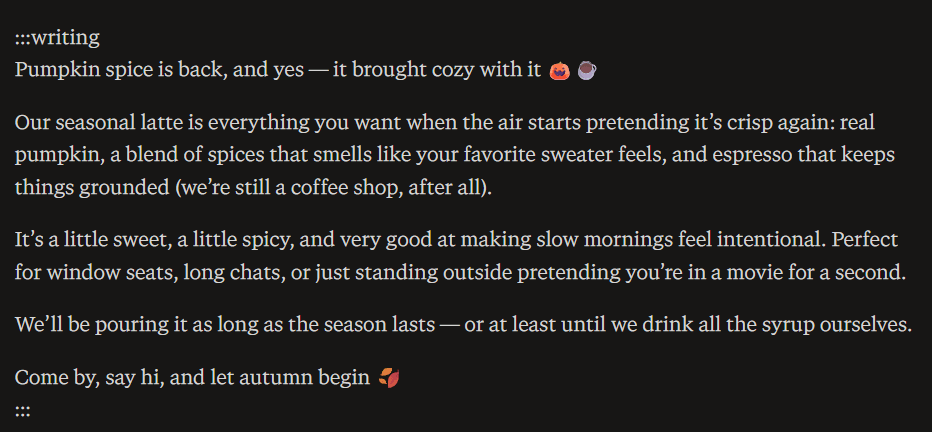
Coffee shop post:

European AI Models
Mistral
Mistral is a French model and Europe's main answer to American services. Companies pick it when privacy and EU-based data storage matter, and some of its models are released with open weights.
Le Chat, Mistral's chat service, writes text, works with code and images, and responds noticeably faster than many competitors. Paid plans unlock a no-telemetry mode — the service then doesn't use your prompts or its responses for training. For EU companies and anyone handling sensitive data, that's a solid argument in its favor.
The free plan is softly limited to about 25 messages a day. The Pro subscription costs $14.99 a month — the cheapest paid subscription among the major AI services — and the team plan runs $24.99 per user. On complex tasks and ecosystem depth, Mistral still lags behind the leaders, but it wins on the balance of price and capability.
Coffee shop post:

Takeaways on the Models
There's no single AI model that fits every task, so pick the tool to match the job. Here's a quick summary of all 10 models.
The easiest way to start with no upfront cost is DeepSeek — among the free models, it structures text best, though it still needs a proofread. For content in several languages at once, go with Qwen3, which supports over a hundred languages for free.
Among the paid options, Claude wins on long-form material and strict briefs, ChatGPT on general-purpose tasks, and Grok on copy tied to breaking news. When you need verifiable facts with sources, gather the material in Perplexity and hand the actual writing to another model. Notion AI suits anyone maintaining a knowledge base who wants AI right inside their documents, and Mistral is worth a look for anyone who cares about privacy and EU-based data storage — it's also the cheapest paid subscription in this lineup.
How to Pay for AI Subscriptions with Cryptocurrency
You can't pay for an AI subscription directly with cryptocurrency — not one of the services on this list accepts coins. ChatGPT, Claude, Gemini, Perplexity, and the rest only offer a bank card, and occasionally PayPal. There's no way to link a wallet holding USDT, bitcoin, or Ethereum to a subscription.
For a crypto holder, that means extra steps. You have to sell the coins on an exchange, cash out into regular money, and wait for it to land in your account — losing something to the rate and fees at every stage. With a dozen subscriptions, that routine repeats every month.
There's a second problem too. Not everyone can get an international bank card: banks require an in-person visit, documents, and address verification, and in some countries there's simply nowhere to open an international account.
A crypto-funded virtual card solves both problems. Mirocard issues Visa and Mastercard cards that you top up with crypto, while the AI service sees an ordinary international card and charges the subscription as usual. The card built for paying subscriptions fits recurring payments — it costs $10 to issue, and the top-up fee is 4%. One card covers every service in this roundup at once.
Issuing the card takes a few minutes and happens entirely online. If you want to get a Mirocard virtual card, here's how to do it — check the link.
Conclusion
Choosing an AI model comes down not just to text quality but to accessibility. Free models like DeepSeek and Qwen3 cover the basics with no subscription and no card needed. The more powerful tools — ChatGPT, Claude, Gemini, Perplexity — require a paid plan, and none of them let you pay with cryptocurrency.
A Mirocard crypto-funded virtual card solves that problem. With it, you pay for subscriptions straight from your crypto wallet, with no exchanges or cashing out, and one card covers as many services from this list as you need.