How to Top Up Your OpenAI API Balance with Cryptocurrency
OpenAI is a company that develops artificial intelligence models, including the ones that power ChatGPT. Besides ChatGPT itself, OpenAI gives access to its models through an API, a programming interface. With it, developers embed the models into their own apps, chatbots, and services.
Working with the API is paid for separately from ChatGPT and under a different scheme. Instead of a fixed subscription, you top up a balance in advance, and the money is charged as you use it.
We'll explain how OpenAI API billing works, how to top up your balance, and how not to spend more than you planned.
What the OpenAI API balance is for
The API balance and a ChatGPT subscription are two different things. A ChatGPT Plus or Pro subscription gives access to the chat on the website and in the app. The money on the API balance is needed to call the models from your own code. One doesn't replace the other, and paid ChatGPT doesn't give access to the API.
Money is charged from the API balance for tokens, meaning the fragments of text the model receives and produces. The price depends on the model and is calculated separately for input tokens, your request, and output tokens, the model's answer. The more powerful the model and the longer the texts, the more each request costs.
Besides text models, the balance also pays for image generation, speech recognition and synthesis, and other API tools. The prices for each of them are listed in the "Pricing" section in the billing settings.
How OpenAI API billing works
New OpenAI API accounts work on prepayment. You buy credits, and they're used up as you use the API. When the credits run out, requests start returning an error until you top up the balance.
The minimum top-up is $5, and by default OpenAI suggests $10. How much you can hold on the balance in total depends on the account's trust level. It grows with the history of your payments and usage.
Purchased credits are valid for a year and are non-refundable. So there's no point topping up the balance with a big reserve if you're not sure you'll manage to spend it.
On your first purchase, OpenAI offers to turn on auto-recharge. When the balance drops below a set threshold, the service buys more credits itself with the linked card. This feature is on by default, and if you don't need it, you should turn it off before confirming the purchase.
Can you top up the OpenAI API with cryptocurrency
No. OpenAI accepts payment for the API only by bank card. Cryptocurrency isn't among the payment methods, and you can't top up the balance directly with coins.
There's a second complication. If you use auto-recharge, OpenAI will charge the linked card itself, without your involvement. That means you need a payment method that supports recurring charges.
To pay for the API with cryptocurrency, top up a virtual card with it and add the card to your OpenAI billing settings. For the service it's an ordinary card, and credits will be bought from its balance.
Which cryptocurrencies and networks you can use
The choice of coin depends on how much you care about the amount staying stable. Stablecoins, such as USDT and USDC, are pegged to the dollar, so the amount doesn't change between sending and crediting. If you hold BTC, ETH, or other coins, keep in mind that their price may shift during the transfer.
The choice of network affects the fee and speed. The same coin can exist on several networks, and transfer fees on them differ widely. Before sending, compare the transfer cost in your wallet or on the exchange and choose a suitable option.
The main rule is that the network must match on both sides. Before the transfer, check which network the service you're sending to accepts for the chosen coin. Coins sent over an unsupported network may be lost.
Can you top up the OpenAI API through Mirocard
Mirocard issues virtual Visa and Mastercard cards for paying for online services. The card can be added to your OpenAI billing settings and used to buy API credits.
Mirocard is topped up with cryptocurrency. BTC, ETH, USDT, USDC, TON, TRX, and SOL are supported, and from your account balance you transfer to the card the amount needed to buy credits.
The subscriptions card, with issuance from $5 and a top-up fee from 4%, suits the API. It supports recurring charges, so it also works for OpenAI's auto-recharge.
We explained how to issue a card in a step-by-step guide. Once the card is ready, go to OpenAI's billing settings.
Open the OpenAI billing section and sign in to your account. If you haven't added a card yet, on the "Overview" tab click "Add payment details".
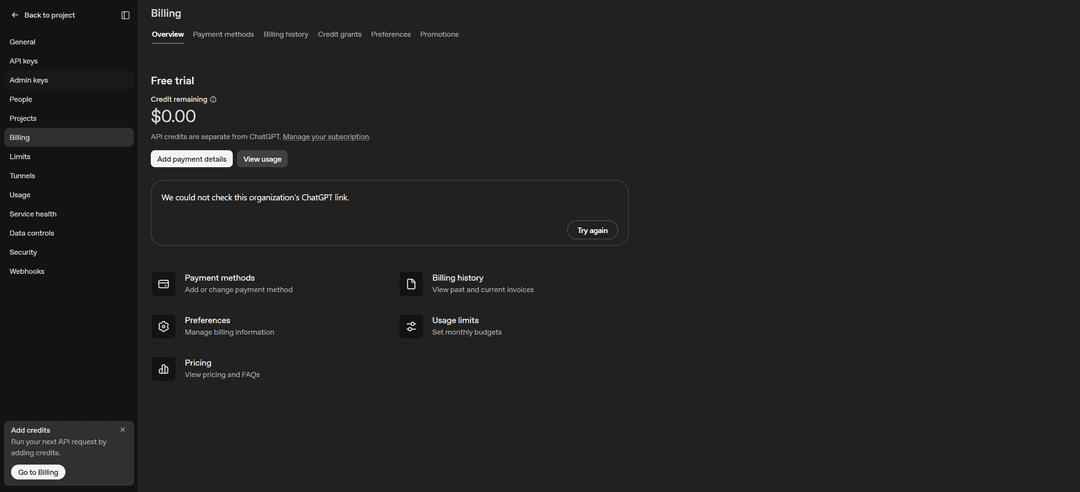
In the window that opens, enter the number, expiration date, and CVC from your Mirocard account dashboard in the "Card number", "Expiration date", and "Security code" fields. Click "Continue".
Then choose the amount of your first top-up, from $5. Decide whether you need auto-recharge, and if necessary turn it off or set a threshold and a monthly limit. Confirm the purchase. The balance will update within a few minutes.
How to keep control of API spending
Set a monthly budget. In the "Usage limits" section, you can cap how much the organization spends on the API per month. It's the most reliable protection against unexpected costs if an error occurs in your code and requests run nonstop.
Limit auto-recharge. If it's on, set a monthly limit on automatic purchases. Manual top-ups don't count toward this limit, and automatic ones will stop once it's used up.
Don't treat the balance as an instant kill switch. OpenAI warns that API access may not stop right after the credits run out. Usage during that time goes into the negative and is deducted from your next top-up.
Review your usage regularly. The "View usage" button on the billing page shows which models and projects the money goes to. That makes it easier to notice if some request costs more than you expected.
Protect your API keys. Anyone who gets your key can spend your balance with it. Don't publish keys in open code, store them in protected environment variables, and delete the ones you no longer use.
Don't top up the balance years ahead. Credits expire after a year, so it's better to top up as you spend than to keep a large sum on the balance.
Conclusion
The OpenAI API works on prepayment. You top up the balance by card from $5, and money is charged for each request to a model depending on its price and the amount of text.
To keep spending from getting out of control, set a monthly budget right after your first top-up and decide whether you need auto-recharge. Then you'll pay exactly for what you use.