How to Pay for GitHub Pro with Cryptocurrency
GitHub Pro is GitHub's paid plan for a developer's personal account. It doesn't replace free GitHub but extends it. It adds tools for working with private repositories, raises limits on automation and cloud development, and unlocks email support.
GitHub Pro costs $4 a month. You can pay for it by card in your account settings, after which the plan renews automatically.
We'll explain who really needs Pro, how to pay for it, and how not to spend extra on GitHub's additional services.
What a GitHub Pro subscription gives you
The main reason to get Pro is control over private repositories. On the free plan, many rules for teamwork are available only in public repositories. Pro lifts this restriction.
Protected branches. You can forbid direct changes to the main branch so that code gets there only after review.
Required reviewers. Changes won't enter the project until the right person approves them. There can be several reviewers.
Code owners. Responsible people are assigned to individual files and folders, and GitHub itself calls them in to review changes.
GitHub Pages for private repositories. A static site can be published from a private repository, not only from a public one.
In addition, Pro raises the included monthly limits. GitHub Actions, the tool for automatically building and checking code, gets 3,000 minutes instead of 2,000. GitHub Packages storage grows from 500 MB to 2 GB, and Codespaces cloud development environments give 180 core hours and 20 GB of storage instead of 120 hours and 15 GB.
Pro is for those who keep their projects in private repositories and want order in changes, or who often hit the Actions and Codespaces limits. If your projects are open, the free plan is usually enough.
And an important clarification. GitHub Pro and Copilot Pro are different subscriptions, despite the similar names. Pro doesn't include the AI assistant, and Copilot is paid for separately.
Can you pay for GitHub Pro with cryptocurrency
No. GitHub takes payment only by bank card and through PayPal. Neither USDT, BTC, nor other coins are accepted in the billing settings.
In addition, Pro is charged automatically every month or year. GitHub needs a payment method it can charge without your involvement, and a one-off cryptocurrency transfer can't work that way.
How to pay for GitHub Pro if your funds are held in cryptocurrency
You need an intermediary tool that turns coins into a payment method GitHub understands. The most convenient one for this is a virtual card topped up with cryptocurrency.
The scheme is simple. You transfer coins to a card service, send the amount you need from there to the card, and enter it in GitHub's billing section. GitHub sees an ordinary Visa or Mastercard card and charges it for Pro.
Pro is inexpensive, so it's better to top up the card several months ahead at once. Use stablecoins like USDT or USDC for this. They're pegged to the dollar, and the amount on the card won't shrink because of exchange-rate swings.
How to pay for GitHub Pro with a Mirocard virtual card
A small monthly payment that you can't forget is exactly the situation the Mirocard card was made for. It's a virtual Visa or Mastercard that GitHub accepts in billing settings on a par with a bank card.
Mirocard accepts top-ups in BTC, ETH, USDT, USDC, TON, TRX, and SOL. Coins first land on your account's main balance, and you move to the card exactly as much as you need for payment.
For GitHub, the subscriptions card is the right fit. Issuance costs from $5, and top-ups from 4%. It's designed for scheduled charges, so GitHub will be able to renew Pro without your involvement.
The procedure for signing up and issuing a card is described in the Mirocard guide. With the card ready, setting up Pro will take a couple of minutes.
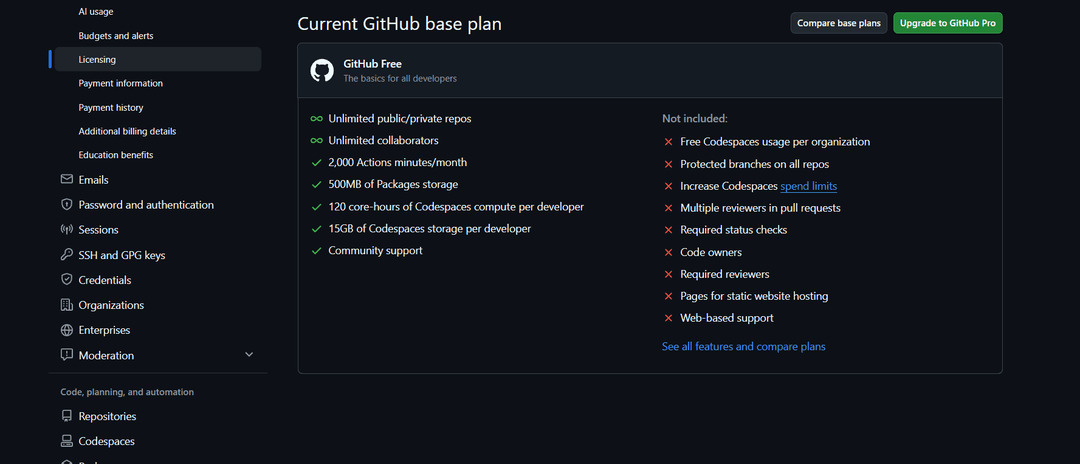
Choose monthly or annual billing and enter the card number, expiration date, and CVC from your Mirocard account dashboard, along with the billing address. Confirm the purchase. Pro's new limits and features will turn on right after payment.
What to do if GitHub Pro doesn't get paid
First, check the card balance. The top-up fee reduces the amount that reaches the card. At 4%, to pay for Pro at $4, you need to transfer about $4.16 to the card. If you top up exactly $4, the payment may not go through.
Verify the billing address. GitHub checks billing details, and empty or inaccurate fields can be the reason for a decline. You can fix the card details and address in the "Payment information" section.
Check the card details. A mistake in one digit of the number, the expiration date, or the CVC leads to a decline. Copy the details from your account dashboard instead of typing them by hand.
Don't repeat the payment many times in a row. A series of declines can temporarily block attempts. Take a pause, fix the details, and try again.
How not to overpay for GitHub Pro
Check whether you're entitled to Pro for free. Students can get it free through the GitHub Education program. You can apply in the "Education benefits" section in billing settings.
Set up budgets. If you exceed the included Actions minutes or Codespaces hours, GitHub may bill you for additional usage. In the "Budgets and alerts" section, set a spending limit and notifications so you don't get an unexpected charge.
Remember that Actions is free in public repositories. If your projects are open, you may not need Pro's increased minutes limit.
Track usage in the "Usage" section. It shows how many Actions minutes and Codespaces hours you've already used. If the Free limits are more than enough for you, you can turn Pro off.
It's better to turn Pro off in advance. The return to the free plan usually happens at the end of the paid period, and until then all Pro features remain.
Conclusion
GitHub Pro is inexpensive, but not everyone needs it. It's justified if you work in private repositories with change review rules or if the free plan's limits aren't enough for you.
Before subscribing, check whether you're entitled to Pro for free, and right after paying, set budgets. Then you'll pay only for the plan itself, with no unexpected bills for additional usage.