How to Pay for Runway AI with Cryptocurrency
Runway is a platform for creating videos and images with the help of artificial intelligence. From a text description or a picture, it generates video clips, paints in and changes frames, adds voiceovers to clips, and upscales their resolution. It's used by content creators, marketers, designers, and video studios.
You can start for free, but the free allowance is only enough for a few tries. For regular work, you need a subscription, which is paid by card on the website and renews automatically.
We'll look at what Runway's plans offer, how to pay for a subscription, and how to choose a plan so you don't overpay.
What a paid Runway subscription gives you
All generations in Runway use up credits. The free plan gives 125 credits once, not every month, and unlocks only some of the models. That's enough to find out whether the service suits you.
Paid plans credit you monthly and unlock all models for video and image generation. Already on the Standard plan, clips come out without watermarks, and you also get music, voice, and sound effect generation, upscaling to 4K, and several videos in progress at the same time.
On the Pro plan, you can create your own voice clone, add a brand's signature style, and buy extra credits at any time. Max adds early access to new models, export in professional formats like ProRes and HDR, and unused credits roll over to the next month.
A paid plan is worth considering if you make videos regularly, publish them, or work for clients. For one-off experiments, the free allowance is enough.
Can you pay for Runway with cryptocurrency
No. Runway accepts payment by Visa, Mastercard, American Express, and JCB bank cards. Cryptocurrency isn't among the payment methods, and you can't pay for a subscription directly with coins.
There's a second reason. A Runway subscription renews automatically, and the service charges the money itself every month or year. That requires a payment method that can be charged repeatedly, and a one-off cryptocurrency transfer doesn't work that way.
How paying for Runway with cryptocurrency works
In this scheme, cryptocurrency is needed only to top up a virtual card. You send coins to the card service, transfer the amount to the card, and Runway charges the payment to a Visa or Mastercard card.
To keep the subscription from lapsing, keep a reserve on the card for the renewal date. It's most convenient to top it up with stablecoins, such as USDT or USDC. Their rate is pegged to the dollar, so the amount won't shrink if the market drops before the charge.
Check the network before transferring. You need to send the coin over the network the card service accepts, otherwise the funds may be lost. The money will appear on your balance after the transaction is confirmed.
How to pay for Runway with a Mirocard virtual card
Mirocard issues virtual Visa and Mastercard cards for paying for online services and subscriptions. Runway accepts such a card the same way as any bank card.
Mirocard is topped up with cryptocurrency. BTC, ETH, USDT, USDC, TON, TRX, and SOL are supported. Coins arrive on your account balance, and from there you transfer the subscription amount to the card.
The subscriptions card, with issuance from $5 and a top-up fee from 4%, suits Runway. It supports recurring charges, so Runway will be able to renew your plan automatically.
We showed how to issue a card in a step-by-step guide. Once the card is ready, go to the Runway website.
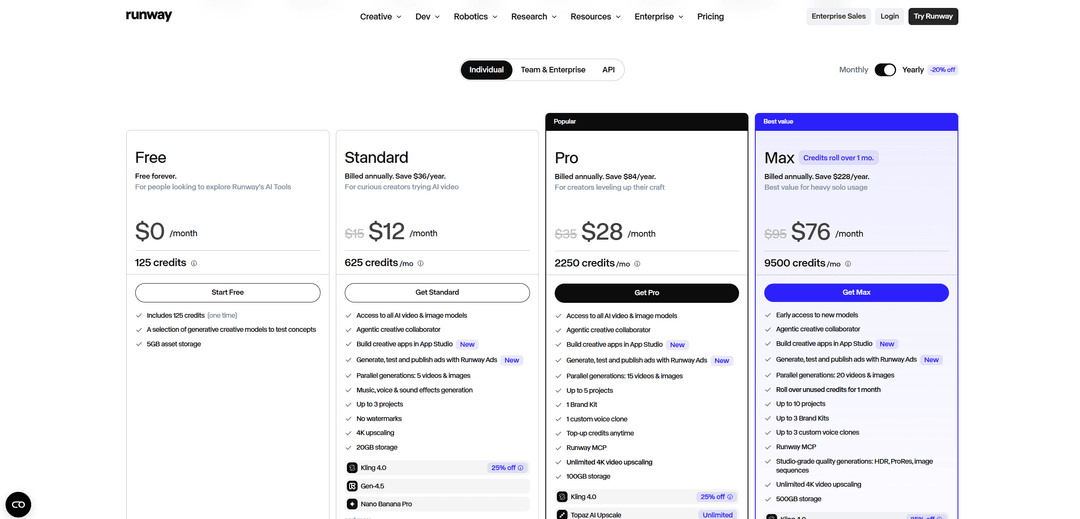
Open the "Pricing" section on the Runway website and sign in to your account. Choose the "Individual" tab, use the "Monthly" and "Yearly" toggle to set the billing period, and click the button for the plan you want, such as "Get Standard" or "Get Pro".
On the payment page, choose a currency. It's best to choose USD, so the amount is charged without extra conversion. In the "Card" section, enter the number, expiration date, and CVC from your Mirocard account dashboard, then the cardholder's name in the "Cardholder name" field and the billing address.
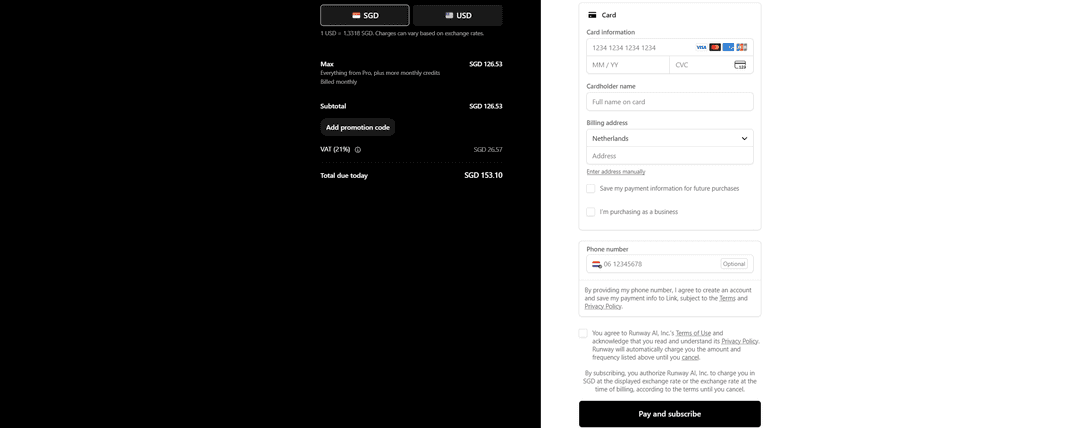
Tick the box to agree to Runway's terms and click "Pay and subscribe". Your new plan's credits will appear in your account right after payment.
What to do if a payment doesn't go through
Check the final amount. The payment form adds tax depending on the country in your billing address, and in the "Total due today" line, the amount may be noticeably higher than the plan's price. If the card has only enough money for the price without tax, the payment will be declined.
Account for the card top-up fee. At 4%, a Standard subscription at $15 a month will require a top-up of about $15.60, and more with tax.
Check the currency. If a local currency is selected, Runway will convert the amount at its own rate, and it may differ slightly from what you expected. Choosing USD removes that difference.
Don't forget the checkbox. Without agreeing to the terms of use, the "Pay and subscribe" button won't work.
Double-check the card details and address. A mistake in the number, expiration date, or CVC, as well as an empty address field, is often the reason for a decline. It's safer to copy the card details from your account dashboard.
Don't click pay many times in a row. A series of declines can temporarily block payment attempts. If the payment still doesn't go through after checking everything, contact Runway support or the service that issued the card.
How to choose a plan and not waste money
Compare plans by the price of a credit, not the price of the subscription. With monthly billing, Standard at $15 gives 625 credits, which is about 42 credits per dollar. Pro at $35 gives 2,250 credits, about 64 per dollar. Max at $95 gives 9,500 credits, about 100 per dollar.
But a cheap credit is a good deal only if you'll use it. Credits on the regular plans don't roll over to the next month. Rollover for one month is available only on Max. If you make a few clips a month, a big plan may turn out to be an overpayment.
Remember that different models use up credits differently. More powerful models generally use more credits per second of video. Before choosing a plan, estimate which models you'll use and how many videos you'll make.
Annual billing saves 20%; for example, Standard comes to $12 a month instead of $15. But the whole year's sum is charged at once. Start with a monthly subscription and switch to annual once you realize you use the service constantly.
If you only occasionally run short of credits, don't rush to upgrade your plan. On Pro and above, you can buy extra credits at any time, and that may cost less than moving up to the next level.
Conclusion
Runway is paid for by card on the website, and the subscription renews automatically. Choose a plan based on how many videos you actually make, and compare plans by the price of a single credit.
Before paying, check the final amount with tax and the billing currency. Then your first payment will go through without declines, and the subscription will pay for itself.