How to Pay for a GitHub Copilot Subscription with Cryptocurrency
GitHub Copilot is an AI assistant for programmers from GitHub. It suggests code completions right in the editor, answers questions about your project, reviews changes before they're published, and can carry out tasks itself as an agent. Copilot works in popular code editors, such as VS Code, as well as in the command line and on the GitHub website.
Copilot has a free plan, but with limitations. A paid subscription is set up on the GitHub website, paid by card, and renews automatically.
We'll explain how Copilot's plans differ, how to pay for a subscription, and how not to pay for features you don't use.
What a GitHub Copilot subscription gives you
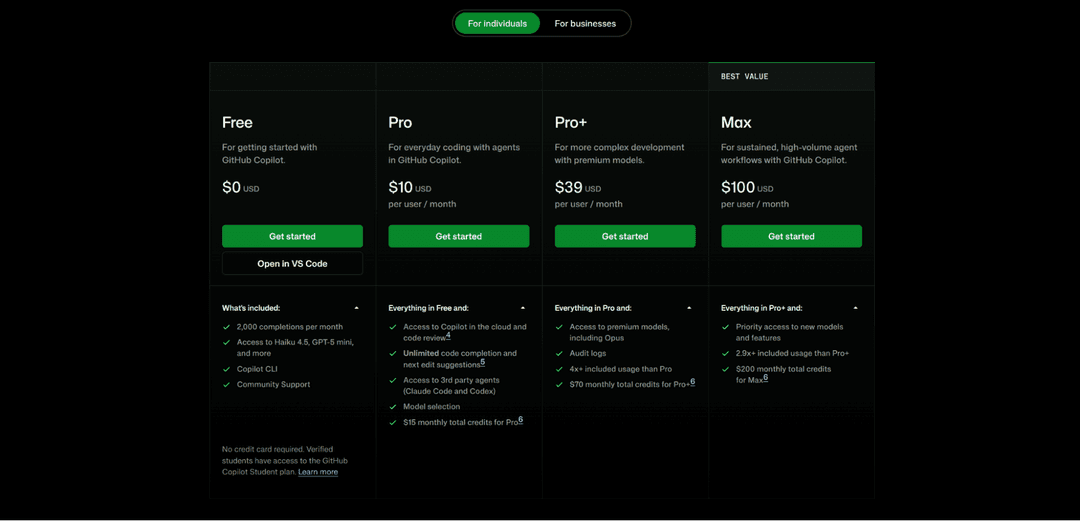
The Free plan is good for trying Copilot. It gives 2,000 code completions a month, access to basic models like Haiku 4.5 and GPT-5 mini, and the Copilot CLI tool for working in the command line. No card is needed for it.
The Pro plan, at $10 a month, removes the limit on completions. With it, Copilot suggests code and edits without a limit, works as a cloud agent, and reviews code. On Pro you can also choose a model and connect third-party agents, such as Claude Code and Codex.
Every paid plan includes a monthly amount of credits for model usage. On Pro it's $15, on Pro+ $70, and on Max $200. This amount shows how actively you can work with agents and powerful models.
For teams, GitHub has separate plans on the "For businesses" tab. They're paid for by the organization, and licenses are distributed among members, so a personal subscription isn't needed in that case.
For study and small projects, Free or Pro is usually enough. Pro+ and Max are for those who hand Copilot big tasks every day and work with the most powerful models.
Can you pay for GitHub Copilot directly with cryptocurrency
No. GitHub accepts payment by bank card and through PayPal. Cryptocurrency isn't among the payment methods, and you can't subscribe to Copilot directly with USDT, BTC, or other coins.
There's a second complication. The subscription renews automatically, and GitHub charges the payment itself every month or year. That requires a payment method that can be charged repeatedly, and a one-off cryptocurrency transfer doesn't work that way.
The solution is to top up a virtual card with cryptocurrency and enter it in your GitHub billing settings. To GitHub it's an ordinary card, and renewals will be charged from its balance.
How to pay for GitHub Copilot through Mirocard
Mirocard issues virtual Visa and Mastercard cards for paying for online services and subscriptions. You can enter the card as a payment method on GitHub and subscribe to a Copilot plan with it.
Mirocard is topped up with cryptocurrency. BTC, ETH, USDT, USDC, TON, TRX, and SOL are supported. Coins arrive on your account balance, and from there you transfer the subscription amount to the card.
For Copilot, the subscriptions card with issuance from $5 and a top-up fee from 4% is the right fit. It supports recurring charges, so GitHub will be able to renew the subscription automatically.
We showed how to issue a card in a step-by-step guide. Once the card is ready, move on to subscribing.
Open the Copilot plans page and choose the "For individuals" tab. Click "Get started" under the plan you want and sign in to your GitHub account.
On the payment page, enter the number, expiration date, and CVC from your Mirocard account dashboard, then provide your name and billing address. Check the amount and confirm the subscription. Copilot will become available in the editor after you sign in to your GitHub account.
How to keep control of GitHub Copilot spending
Start with the free plan. Free lets you evaluate Copilot without a card. If 2,000 completions a month isn't enough, move up to Pro, and go to Pro+ and Max only when you hit usage limits.
Compare monthly and annual billing. Pro costs $10 a month or $100 a year, so the annual subscription comes out two months cheaper. But the whole amount is charged at once, so choose annual billing when you're already sure about the plan.
Keep an eye on the included credits. Agents and powerful models use them up faster than regular completions. Check usage in your GitHub billing settings and set a limit on extra spending so you don't get an unexpected bill.
Check whether you already have access through work. If your company has enabled Copilot for the team, a license has already been issued to your account, and you won't have to pay for a personal plan.
Build in the card top-up fee. At 4%, a $10 Pro subscription will require a top-up of about $10.40.
Downgrade in time. If you moved to Pro+ for a big project and the workload later dropped, go back to Pro in your Copilot settings. A downgrade or cancellation usually takes effect from the start of the next billing period.
Conclusion
You can try GitHub Copilot for free, and the paid plans differ in the amount of usage and access to models. For most developers Pro is enough, and the higher plans are needed for intensive work with agents.
Start with the minimum plan, keep an eye on credit usage, and upgrade only when the current one really isn't enough.