How to Pay for a JetBrains License with Cryptocurrency
JetBrains is a company that makes development environments, meaning programs for writing and debugging code. The best known is IntelliJ IDEA for Java and Kotlin, and JetBrains also has PyCharm for Python, WebStorm for JavaScript, Rider for .NET, and other tools for specific languages and tasks.
Some JetBrains products are free, while the professional versions require a paid license. You buy it in the JetBrains store for a year or a month and pay by card.
We'll look at what you need to pay for at JetBrains, how to buy a license, and how to make each following year cost less.
Which JetBrains products require a license
A paid license is needed for professional work, especially commercial work. You can buy it for a single program or for a whole bundle at once.
A standalone IDE. For example, IntelliJ IDEA Ultimate, a license for one development environment. It already includes the free tier of the JetBrains AI assistant.
dotUltimate. A bundle of seven tools for .NET development and game creation. It includes the extended AI assistant JetBrains AI Pro.
All Products Pack. The full bundle of 16 tools, including 10 development environments, two profilers for finding slow spots in code, and JetBrains AI credits every 30 days. It suits those who write in several languages.
You don't always need a license at all. Some JetBrains development environments are free for non-commercial use, such as for study or personal projects. If you don't make money from code, first check whether there's a free version of the tool you need.
Can you pay for JetBrains with cryptocurrency
No. The JetBrains store accepts bank cards, PayPal, and local payment methods like iDEAL. Cryptocurrency isn't among the options.
In addition, an annual license renews automatically, and for a monthly subscription, charges happen every month. JetBrains needs a payment method it can charge repeatedly, and a one-off cryptocurrency transfer doesn't fit.
How to use cryptocurrency to pay for a JetBrains license
You can use cryptocurrency if you turn it into a payment method the store accepts. A virtual card topped up with coins works for that.
The procedure is as follows. You transfer cryptocurrency to a virtual card service, send the card an amount equal to the license price with tax, and enter the card when placing your order in the JetBrains store.
Account for tax in advance: an annual license costs hundreds of euros, and even a small shortfall on the card will lead to a decline. On the payment page, tax is already included in the final amount. Top up the card with stablecoins like USDT or USDC so the amount doesn't change because of exchange-rate swings while you place your order.
How to pay for JetBrains with a Mirocard virtual card
An annual license is a large one-time payment, and it's important that the card goes through on the first try. Mirocard issues virtual Visa and Mastercard cards for this, which the JetBrains store accepts in its card payment section.
You can send BTC, ETH, USDT, USDC, TON, TRX, or SOL to Mirocard. The funds arrive on your account balance, and you send to the card as much as the license costs.
For JetBrains, the subscriptions card is the right fit: issuance costs from $5, and the top-up fee is from 4%. It supports recurring charges, so the next year of the license will renew automatically.
Issuing a card is described step by step in our guide. After that, placing the order takes a few minutes.
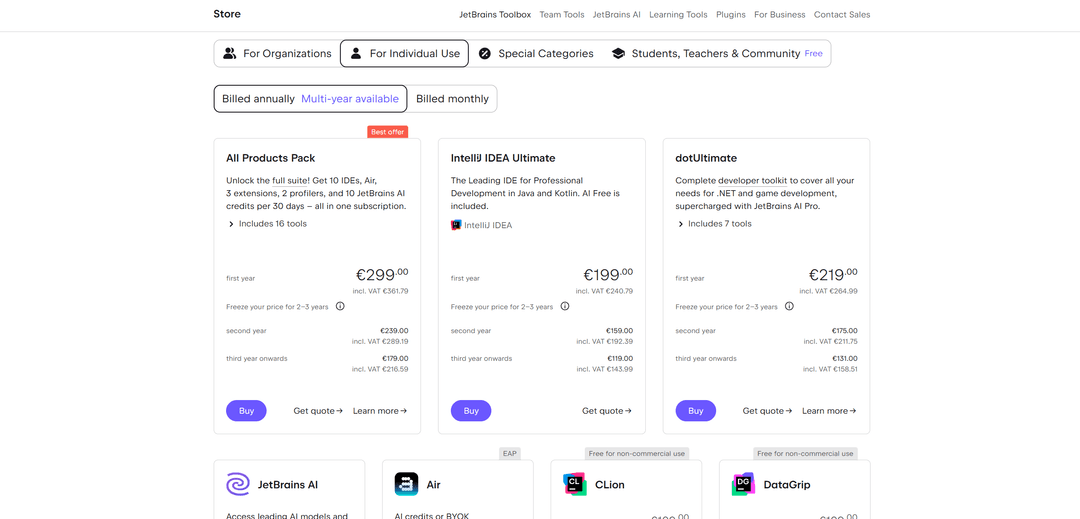
Open the JetBrains store on the tab for personal licenses. Choose billing for a year, "Billed annually", or monthly, "Billed monthly", and click "Buy" under the product you want.
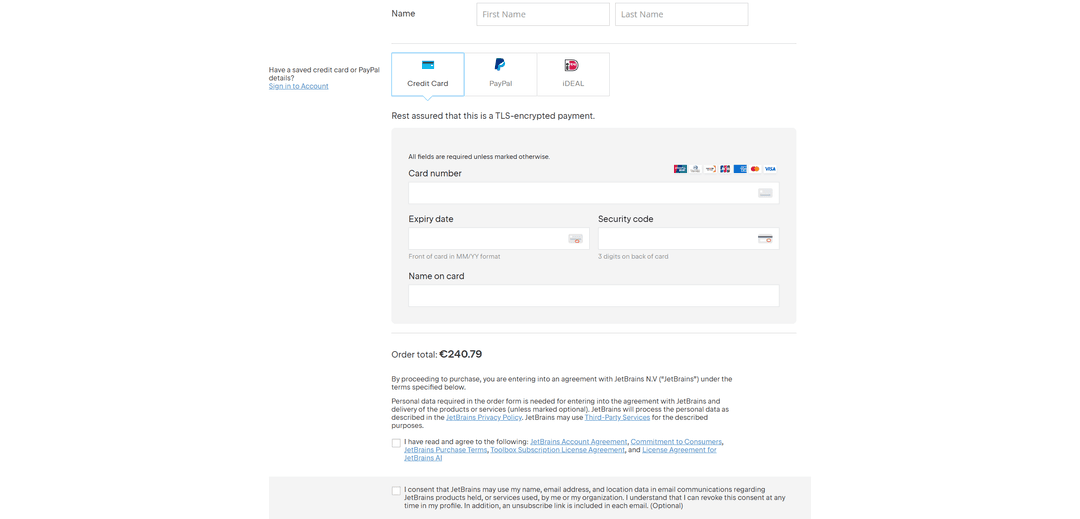
Enter your first name, last name, and address. If you already have a JetBrains account, sign in via "Sign in to Account" so the license links to it right away.
Among the payment methods, choose "Credit Card". Transfer the card number from your Mirocard account dashboard into the "Card number" field, the expiration date into "Expiry date", and the code into "Security code", then enter the name in "Name on card". Check the amount in the "Order total" line and confirm the order.
What to do if a JetBrains payment doesn't go through
Most often, the problem is a lack of money. The price on the product card is shown without tax, while the amount billed includes it, and the difference can be noticeable. Top up the card with the amount from the "Order total" line plus the top-up fee.
Check the address. JetBrains calculates tax based on the country in the billing details, and mistakes in the address can lead to a decline or a wrong amount.
Verify the card details. The expiration date is entered in MM/YY format, and the security code is the three digits on the back of the card. Copy the details from your account dashboard to avoid mistakes.
If the payment is declined several times, don't retry in a row. Take a pause, check the details, and try again. If that doesn't help, contact JetBrains support or the service that issued the card.
How much a JetBrains license costs and how to keep spending under control
The license price goes down if you renew it without a break. For example, IntelliJ IDEA Ultimate costs €199 for the first year, €159 for the second, and €119 from the third on. All Products Pack costs €299, €239, and €179 respectively, and dotUltimate €219, €175, and €131. These prices are without tax.
Don't interrupt your subscription if you plan to keep using it. With a break, the continuous-renewal discount is lost, and you'll have to pay the first-year price again.
Compare annual and monthly billing. Annual is more profitable over the long run, while monthly suits a case where you need an IDE for a short project.
Work out whether you need a bundle. If you use two products, for example IntelliJ IDEA Ultimate and dotUltimate, separately they cost €418 in the first year. All Products Pack at €299 costs less and includes the other tools.
Consider the option to lock in the price. When you buy, JetBrains offers to fix the cost for 2–3 years ahead. This protects against future price increases.
Build in tax and the fee. An IntelliJ IDEA Ultimate license at €199 costs €240.79 with tax in the Dutch store, and with a 4% top-up fee, the card needs to be topped up by about €250.42.
Conclusion
A JetBrains license is bought for a year or a month and gets cheaper with each year of continuous renewal. Before buying, check whether a free version of the IDE you need exists and whether a bundle is a better deal than several separate licenses.
When paying for a license, go by the final amount with tax, and renew it without breaks. Then each following year will cost noticeably less than the first.