How to Pay for Webzilla with Cryptocurrency
#Payment Instructions
Cryptocurrency holders often run into the same situation. There are funds in the account, but spending them directly on the service they need doesn't work. The platform only accepts bank cards. Webzilla is exactly that kind of case. It's an infrastructure provider that works with international clients and expects standard payment instruments.
This article covers what Webzilla is and what services are paid for most often. It walks through the payment process in detail — from preparing the card to confirming the payment. And it explains how to complete payment with a virtual card that's topped up with cryptocurrency.
What Webzilla Is
Webzilla is a hosting and server infrastructure provider. The company has been operating for more than two decades. Over that time it has built its own data center network and a client base around the world.
The service offers dedicated servers, cloud infrastructure, and data storage solutions. Data centers are located on several continents — in Europe, North America, and Asia. This gives clients a choice of geographic placement and helps keep latency low for the target region.
Server configuration is highly flexible. Single- and multi-core processors are available, along with large amounts of RAM and SAS, SATA, and SSD storage. Traffic can be metered or unmetered — clients choose based on their load.
Webzilla is oriented toward businesses and technical specialists. People turn to it when they need a stable platform for high load, control over configuration, and data protection. The provider offers both managed and unmanaged servers. With managed servers, setup and maintenance are handled by the company itself. With unmanaged, the client administers the server independently. Technical support operates around the clock, and issues are handled through a ticketing system.
What Services Webzilla Users Most Often Pay For
Webzilla has several service lines. Most payments fall into three categories.
Server Rentals
This is one of the most common reasons to use the platform. A client rents a dedicated server for their specific task — a high-traffic website, a gaming project, or a resource-intensive application. Configuration is selected by processor, memory, and storage type. Webzilla builds a server to the client's requirements rather than limiting them to preset plans. This suits projects that need predictable performance and full control over the machine.
Cloud Infrastructure
Cloud is suited for hosting web projects, applications, and internal company systems. Resources can be scaled — adding capacity when load increases and reducing it when it drops. This is convenient for projects with variable traffic. There's no need to pay for idle resources. Launching a cloud configuration is typically faster than ordering a separate server.
Data Storage
This service line is used for backups and working with large volumes of data. Backups, archives, and files that need reliable access go here. Webzilla emphasizes security — redundancy, protection, and round-the-clock monitoring. For businesses, this reduces the risk of losing critical data during a failure or error.
Payment Methods Users Rely On
There are several approaches to paying for an online service. Each has its own terms.
International Bank Cards
A bank card solves the problem directly. It works in international payment systems without restrictions. But obtaining one isn't always simple. A bank account is usually required, and often a personal visit to a specific country and proof of address. Not everyone has that option.
Corporate Payment Solutions
Companies use corporate cards and accounts to pay for services. This is convenient for recurring payments and accounting. But this option is designed for businesses, not individual users. Setup takes time and requires a legal entity.
Virtual Cards
A virtual card exists only in digital form. There's no plastic — payment details are available immediately after issuance and work without delay. Some cards of this type allow the balance to be funded with cryptocurrency. This removes the main barrier — paying with crypto for a platform that expects a standard card. That's what Mirocard is built on.
| Payment method | Who it suits | What's needed to set up | Time to obtain | Crypto payment | |
|---|---|---|---|---|---|
| International bank cards | Who it suitsIndividuals and businesses | What's needed to set upBank account, often personal presence in the country and proof of address | Time to obtainLong, not available to everyone | Crypto paymentNo | |
| Corporate payment solutions | Who it suitsBusinesses | What's needed to set upLegal entity and documentation package | Time to obtainLong, setup takes time | Crypto paymentUsually no | |
| Mirocard virtual cards | Who it suitsIndividuals and businesses | What's needed to set upRegistration and online verification | Time to obtainImmediately after issuance | Crypto paymentYes |
Paying for Webzilla via Mirocard
Mirocard is a service for issuing international virtual cards. The balance is funded with cryptocurrency, and the cards work everywhere Visa and Mastercard are accepted. This kind of card is convenient for settling Webzilla invoices, as well as SaaS subscriptions, cloud plans, and other IT products.
The service offers several card types for different purposes. There's a subscription card on a US BIN. There's a card with 3D Secure support — useful where payments require additional confirmation. A card on a Hong Kong BIN with Apple Pay and Google Pay support is in preparation. For paying for hosting and cloud services, the subscription card or the 3D Secure card is typically the right fit.
The balance can be topped up with popular cryptocurrencies. For the lowest fee, USDT on the TRC-20 network is the most convenient option.
Issuing a card takes a few steps.
Registration
Go to the Mirocard website and click «Get Card».

If a Mirocard account already exists, sign in. To register, a password and email are all that's needed — the email will need to be confirmed.

Topping Up the Balance

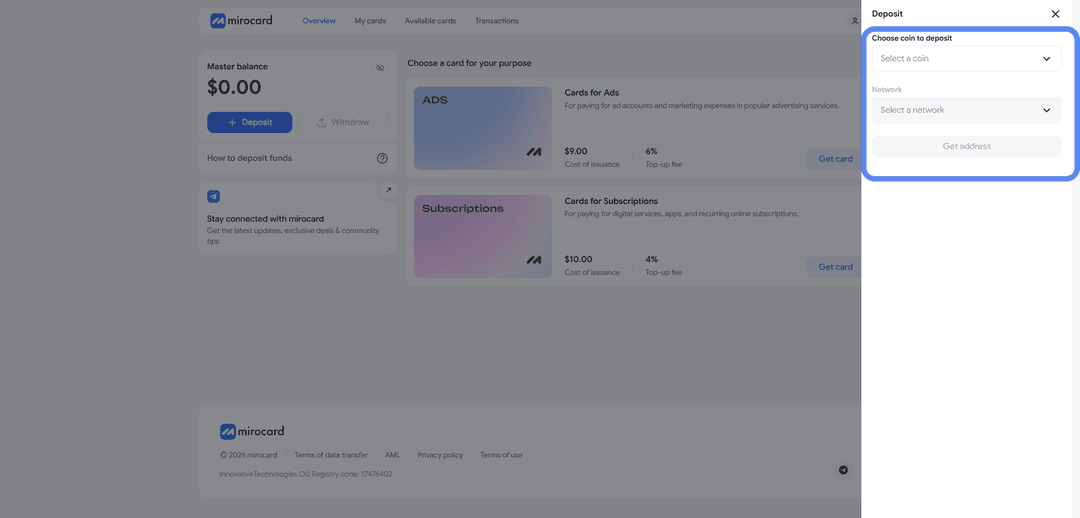
Funds appear on the balance after network confirmation. Speed depends on the selected coin and network. A USDT transfer via TRC-20 is faster and cheaper than other options.
Selecting a Card
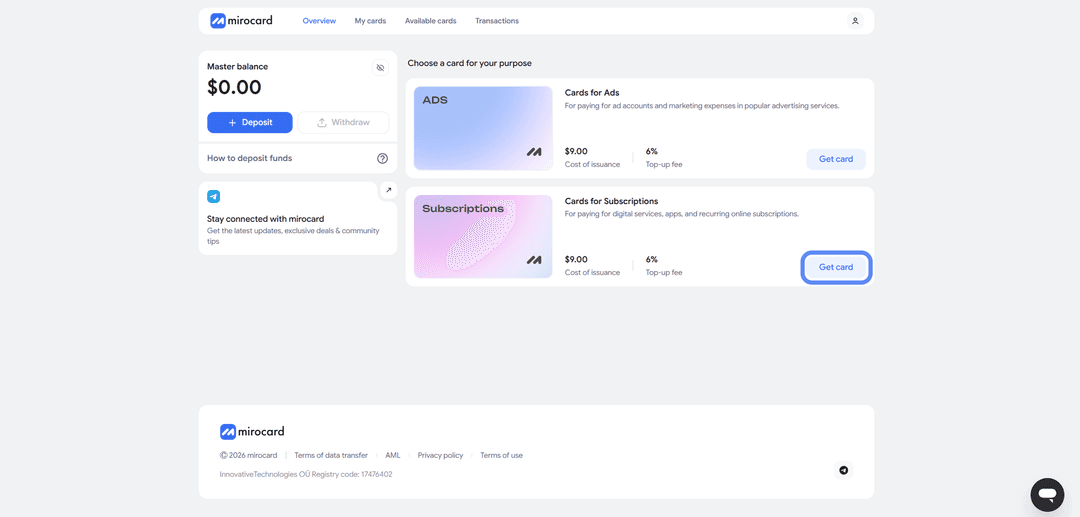
Choose the card type for your task. For paying for Webzilla, the subscription card is the right fit.
Verification
Complete KYC — identity verification. A document and photo are required. This step is mandatory; the card cannot be issued without it. Click «Complete Verification».

Verification is a one-time process.
Card Issuance
Pay the issuance fee from the account balance — click «Deposit and Pay».
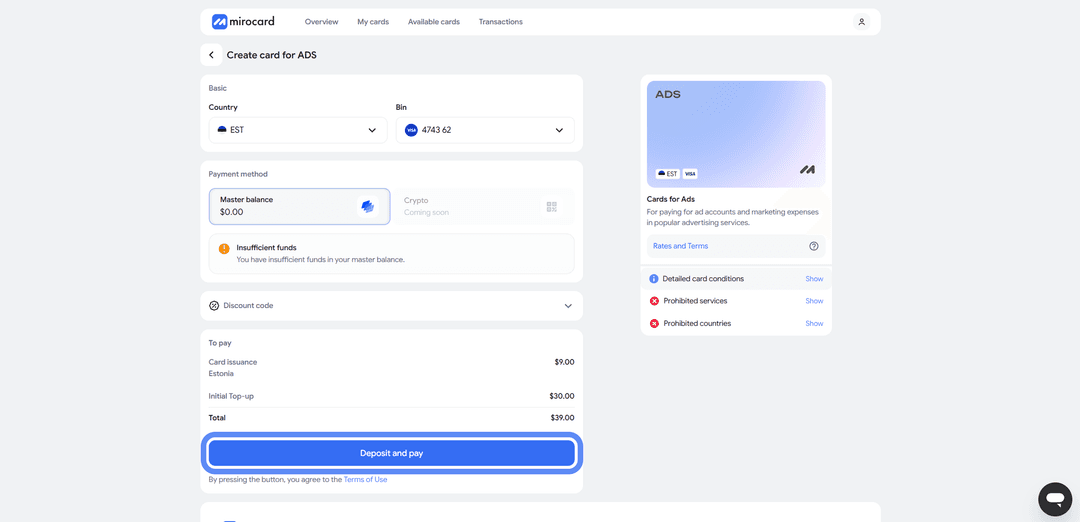
The card is then ready. Its details will appear in the dashboard — card number, expiry date, and security code. These are the details needed when paying for Webzilla.
How to Pay for Webzilla Services
Payment breaks down into three parts — preparation, ordering the service, and the payment itself. Here's each step in detail.
Prepare the Card
Issue a Mirocard and top up its balance. Add a small buffer above the invoice amount. Webzilla prices are in dollars, and currency conversion may apply during payment. The buffer covers exchange rate differences and any fees. Without a buffer, payments sometimes fail even when the balance appears sufficient.
Order the Service
First, decide what's needed — a dedicated server, cloud, or storage. This determines how to place the order.
Webzilla doesn't publish all plans on its website. Cloud configurations are selected from ready-made options. For a dedicated server, terms are discussed individually — you describe the requirements, and the provider prepares an offer and invoice. After agreement, the service appears in your account and payment becomes available.
Proceed to Card Payment
In the dashboard or on the invoice page, select bank card as the payment method. Then enter the Mirocard details — card number, expiry date, security code, and cardholder name.
Before confirming, check the amount and currency. Make sure the payment is in dollars and that there are sufficient funds on the card accounting for the exchange rate. Then confirm the payment.
Complete Verification
Some payments go through additional verification. The service requests a confirmation code. Without it, a payment requiring verification may not go through.
Check the Result and Save the Receipt
After payment, confirm that the service is active and the invoice status has changed to paid. Save the receipt — it's useful for contacting support and for accounting purposes.
Monitor Renewals
Servers and cloud are billed periodically. Check the card balance before each renewal. If funds are insufficient, the service may be suspended. It's convenient to keep a buffer on the card and top it up in advance.
What to Do If a Payment Fails
A few common causes and solutions.
Insufficient funds — top up the card accounting for conversion and fees.
3D Secure verification requested — pay with a card that supports it.
Amount increased due to exchange rate — add a small buffer and retry the payment.
Service declines the card — verify that the details are entered correctly and try again. If that doesn't help, contact Webzilla support.
Conclusion
Payment difficulties with online services affect two groups of users. The first — those who hold funds in cryptocurrency and can't spend them directly. The second — those whose bank card the service simply doesn't accept.
A virtual card funded with cryptocurrency removes this problem. It turns cryptocurrency into a standard payment that goes through international systems. With Mirocard, paying for Webzilla takes just a few steps — no foreign bank account, no intermediaries. The same approach works for other IT services too.