How to Pay for Facetune
Facetune is an app for editing portraits and selfies, where skin retouching, facial feature adjustments, and effects all happen in a couple of taps, with no need for skills in professional editors. The interface packs in tools for fixing lighting, removing small blemishes, and picking flattering filters, and some features run on AI, automatically adjusting the result to fit the specific photo. People use it for personal social media shots as well as for content from bloggers and small brands who want a fast but polished result without hiring a retoucher.
The free version lets you try out the basic tools, while the paid subscription unlocks the full feature set with no restrictions — that's what turns Facetune from a demo into a working tool for regular use.
How the Facetune subscription works
The subscription also removes the watermark from finished photos and lets you save them in high resolution — an important detail if you plan to use the images anywhere beyond your phone, like in print or ad materials. Ads between actions disappear completely, and the developers regularly add new filters and features that become available to subscribers right away at no extra cost.
Why paying for Facetune can be tricky
The issue is that none of Facetune's payment methods are built for crypto directly — the site and both app stores only accept a card, PayPal, or Google Pay. Cryptocurrency in a wallet just stays an asset until it's converted into a regular payment instrument, and the service has no built-in bridge between a wallet and a subscription.
What payment methods you can use for Facetune
A card from a bank in another country
A personal account with a bank in another country, with a card issued against it, closes the payment question completely — the card links to your Apple ID, Google account, or directly to Facetune's site, and works with no restrictions at every subscription renewal. Opening that kind of account solely for one photo editor usually isn't worth the time and cost, but for anyone who already has an account for other purposes, this route costs nothing extra.
A virtual card
Details with international information can be issued online in a few minutes and are accepted at Facetune's checkout the same as a regular international card — no bank visit, no separate account to open. For repeat charges, which are typical of a subscription service like Facetune, it's important to pick a card built specifically for recurring payments rather than a single transaction, or the first month's subscription might get paid, but the renewal might fail on the second.
A gift card for the matching region
A code for the right region for the App Store or Google Play works as a substitute for a bank card — you activate it on your account balance, and the subscription then charges from there, with no card details field at all. The catch is that the code's region is tied strictly to your account's region — a code for one country won't be accepted on an account from another, and if the code's value doesn't exactly match the subscription price, the leftover just sits on the balance until the next payment.
Mirocard as an option for international subscriptions
The only difference between Mirocard and a regular card is how you get it — virtual Visa and Mastercard cards are issued online instead of handed out at a bank branch, but at checkout on any service with international payment, they behave exactly the same, whether that's Facetune, another editing app, or a subscription to anything else. The key thing here is support for repeat charges — the card doesn't just get through the first payment, it keeps working for the second and third month of the subscription too, so the risk of a sudden decline at auto-renewal isn't tied to the card type itself.
The card balance is built straight from cryptocurrency in your wallet — no exchange, no exchanger, and no third party handling the payment for you. Funds become available on the card within a few minutes of the transfer and are ready right away to pay for the subscription.
How to pay for Facetune with Mirocard
Once the card is ready, setting up a Facetune subscription takes just a couple of minutes.
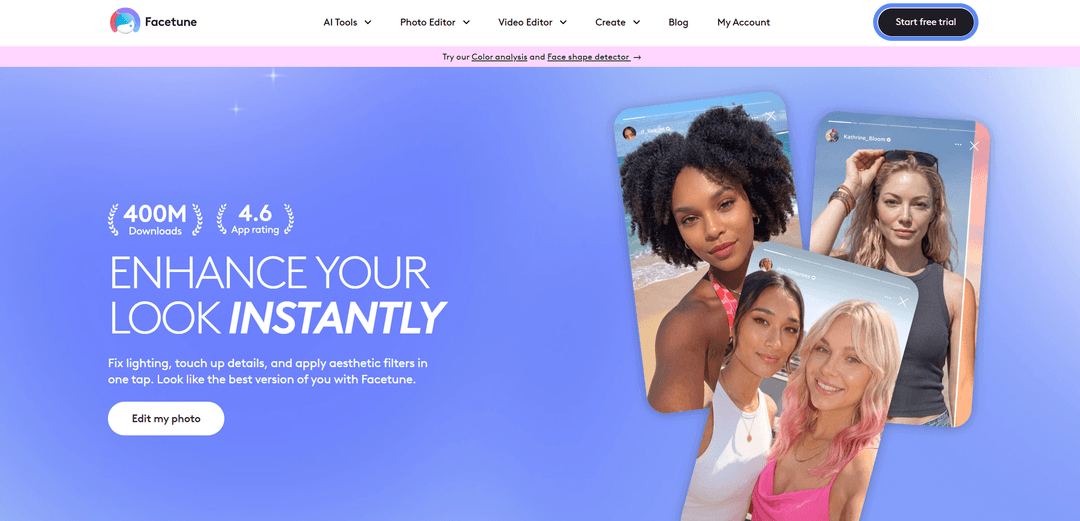
Open the Facetune site and click "Start free trial" in the top-right corner of the page — it takes you straight to setting up the trial period, with no need to hunt for a separate pricing section. The system shows the subscription terms, noting seven days of free access, after which charges begin on the plan you picked — at this point, it's worth reading the amount and frequency of the upcoming charge carefully before entering your payment details.
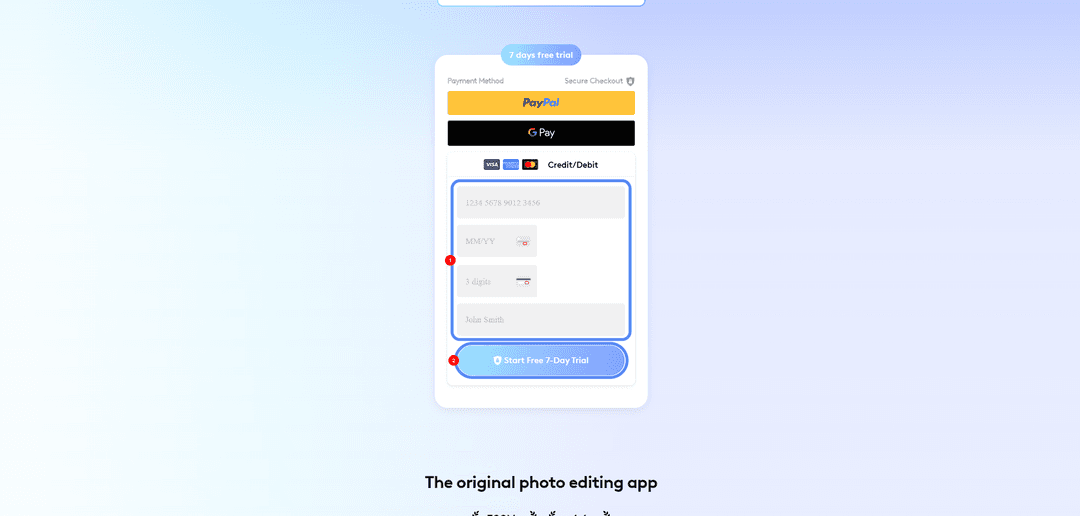
What to do if the payment doesn't go through
First, check the card's balance — it needs more on it than the subscription costs, since currency conversion sometimes adds a few percent on top of the listed price. Next, double-check the details themselves — the card number, expiration date, and security code need to go in without spaces or typos, and the cardholder name needs to match what's on file in your Mirocard account.
If you're paying through the App Store or Google Play rather than directly on the site, the reason for a decline might be your account's region — the payment method needs to match the country your Apple ID or Google account is tied to, or the system will block the purchase before any charge happens. There's also the matter of confirming the transaction through 3-D Secure, an extra code, or biometrics that the bank or payment system requests to verify the payer's identity. If that window appeared and was skipped or closed too early, the payment looks like an ordinary decline even though it just wasn't completed. If none of these steps help, the fastest way to sort it out is to go straight to Mirocard support — describe exactly which step of the Facetune payment shows the error.
Conclusion
Paying for Facetune comes down to which payment instrument the system will accept when confirming the subscription — a crypto holder needs a way to turn their asset into a familiar card. A Mirocard virtual card with support for repeat charges solves that, and once issued, you can use it not just for Facetune, but for any other service with a similar recurring subscription.