How to Buy Robux in Roblox with Cryptocurrency
Roblox is an online platform where users not only play but also create games themselves. Every mode here is made by someone from the community, from simple obbies to complex role-playing worlds and simulators. There are millions of such modes on the platform, and all of them are available from a single account.
Roblox itself is free, and you can pay in it with one currency: Robux. It's bought with money and spent both on a character's appearance and on advantages inside individual games.
We'll explain how Robux works, where it's best to buy it, and how not to lose money when buying.
What Robux is for and what you can buy with it
Robux is the single currency of the whole platform. Whichever game inside Roblox you open, you'll have to pay in it with Robux. That's convenient, since you don't need to top up a separate balance for each mode.
Most Robux goes toward the avatar. The catalog sells clothing, accessories, animations, and character looks. Many items are made by other users, so the selection is practically endless.
The second area of spending is in-game purchases. Mode creators sell game passes with permanent bonuses, such as access to a restricted area or faster leveling, as well as one-time items like a specific mode's in-game currency.
Robux can be not only spent but also earned. Game creators receive it for sales inside their modes, and once they meet the conditions of the Developer Exchange program, they can exchange earned Robux for real money.
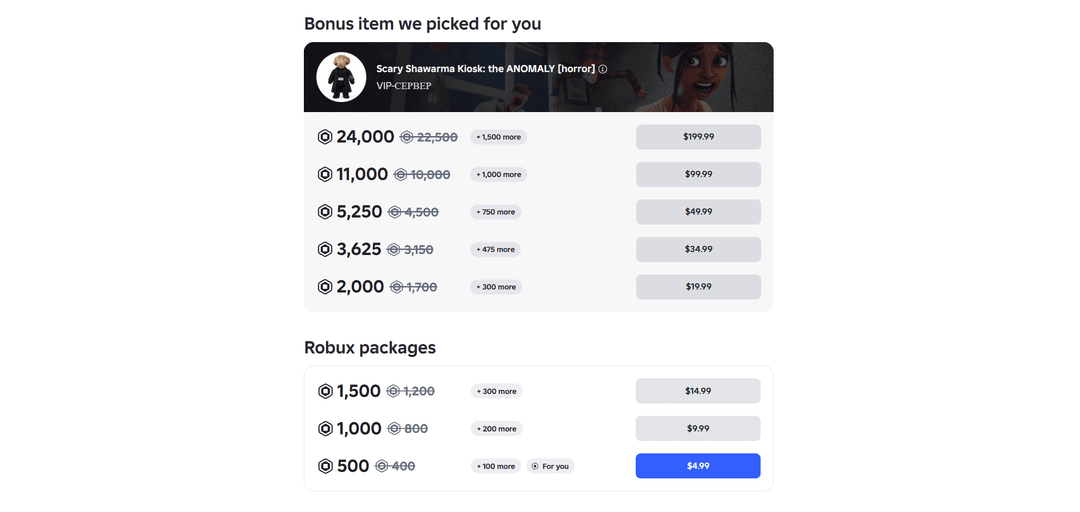
An important feature of Robux is the price difference. On the Roblox website, bonus Robux is added to packs, which you don't get when buying through the mobile app. For example, a $4.99 pack gives 500 Robux on the site instead of 400.
Can you buy Robux with cryptocurrency
Not directly. Roblox doesn't accept cryptocurrency. The payment page offers bank cards, PayPal, Roblox gift cards, and other methods that depend on the country.
Third-party platforms sell Roblox gift cards for cryptocurrency. This works for one-off purchases, but there are risks. If a code turns out to be already redeemed, getting your cryptocurrency back is nearly impossible, since a blockchain transfer is irreversible.
It's more reliable to top up a virtual card with cryptocurrency and pay with it on the Roblox website. That way you get the official price and all the bonus Robux for a web purchase, instead of paying a reseller's markup.
How to buy Robux with a Mirocard virtual card
Mirocard issues virtual Visa and Mastercard cards for paying for games and digital services. On the Roblox website, such a card can be chosen as an ordinary bank card, and you can buy Robux with the web version's bonuses.
We showed how to issue a card in a step-by-step guide. Once the card is ready, go to the Roblox website.
Open the Robux purchase page and sign in to your account. Choose a pack in the "Robux packages" section and click the button with its price. Above the main packs, there's sometimes a "Bonus item we picked for you" block, where an item for one of the games is added to the Robux.
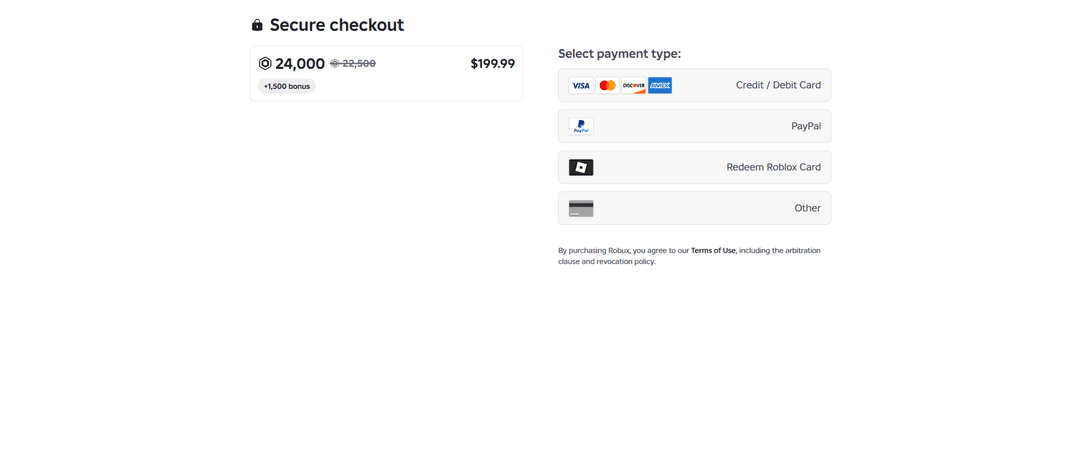
On the "Secure checkout" page, choose "Credit / Debit Card". Enter the number, expiration date, and CVC from your Mirocard account dashboard, check the amount, and confirm the payment. The Robux will appear on your balance right after the payment.
Mirocard is topped up with cryptocurrency. BTC, ETH, USDT, USDC, TON, TRX, and SOL are supported, and once the coins are credited, you can buy Robux with the card right away.
How to buy Robux without losing money
Buy on the website, not in the app. The bonus Robux for a web purchase gives a noticeable advantage. A $4.99 pack brings about 100 Robux per dollar on the site, while the largest one, 24,000 Robux for $199.99, brings about 120.
Don't believe free Robux generators. Roblox says outright that such generators don't exist. Sites that promise free Robux collect logins and passwords or ask you to download malware.
Check the website address before paying. Scammers make copies of Roblox pages with a similar address to get your card and account details. Buy Robux only on roblox.com or in the official app.
Don't buy Robux at a discount from unofficial sellers. Roblox's rules forbid it, and if Robux was obtained dishonestly, the platform may deduct it and restrict the account.
Robux purchases are generally non-refundable. Before paying, double-check the pack and the amount, especially if you're buying a large one.
If a child uses the account, set up parental controls. There you can set a monthly spending limit and forbid purchases without a parent's confirmation.
Take the card top-up fee into account. At 4%, a $9.99 purchase comes to about $10.39, and it's better to build that difference in ahead of time.